Logos representative only and should not be seen as an endorsement / preference / recommendation
Updates from the week ending Sunday, May 30th, 2022
This summary is generally published every Monday, and is a list of SL viewer / client releases (official and TPV) made during the previous week. When reading it, please note:
It is based on my Current Viewer Releases Page, a list of all Second Life viewers and clients that are in popular use (and of which I am aware), and which are recognised as adhering to the TPV Policy. This page includes comprehensive links to download pages, blog notes, release notes, etc., as well as links to any / all reviews of specific viewers / clients made within this blog.
By its nature, this summary presented here will always be in arrears, please refer to the Current Viewer Release Page for more up-to-date information.
Note that for purposes of length, TPV test viewers, preview / beta viewers / nightly builds are generally not recorded in these summaries.
Official LL Viewers
Release viewer: version 6.6.0.571939 – formerly the Performance Improvements viewer, dated May 25th – NEW.
Logos representative only and should not be seen as an endorsement / preference / recommendation
Updates from the week ending Sunday, May 22nd, 2022
This summary is generally published every Monday, and is a list of SL viewer / client releases (official and TPV) made during the previous week. When reading it, please note:
It is based on my Current Viewer Releases Page, a list of all Second Life viewers and clients that are in popular use (and of which I am aware), and which are recognised as adhering to the TPV Policy. This page includes comprehensive links to download pages, blog notes, release notes, etc., as well as links to any / all reviews of specific viewers / clients made within this blog.
By its nature, this summary presented here will always be in arrears, please refer to the Current Viewer Release Page for more up-to-date information.
Note that for purposes of length, TPV test viewers, preview / beta viewers / nightly builds are generally not recorded in these summaries.
Official LL Viewers
Release viewer: version version 6.5.5.571282, – formerly the MFA RC viewer, dated April 26, promoted Wednesday, May 4th – No change.
Release channel cohorts:
Performance Improvements RC viewer updated to version 6.6.0.571939, on May 20th.
Logos representative only and should not be seen as an endorsement / preference / recommendation
Updates from the week ending Sunday, May 15th, 2022
This summary is generally published every Monday, and is a list of SL viewer / client releases (official and TPV) made during the previous week. When reading it, please note:
It is based on my Current Viewer Releases Page, a list of all Second Life viewers and clients that are in popular use (and of which I am aware), and which are recognised as adhering to the TPV Policy. This page includes comprehensive links to download pages, blog notes, release notes, etc., as well as links to any / all reviews of specific viewers / clients made within this blog.
By its nature, this summary presented here will always be in arrears, please refer to the Current Viewer Release Page for more up-to-date information.
Note that for purposes of length, TPV test viewers, preview / beta viewers / nightly builds are generally not recorded in these summaries.
Official LL Viewers
Release viewer: version version 6.5.5.571282, – formerly the MFA RC viewer, dated April 26, promoted Wednesday, May 4th – No change.
Release channel cohorts:
Performance Improvements RC viewer version 6.6.0.571736, May 12.
Makgeolli Maintenance RC viewer (Maintenance M) viewer, version 6.5.6.571575, May 12.
Project viewers:
Performance Floater project viewer, version 6.5.4.571296, May 10.
In keeping with the statements made on the release of Catznip R13 (which is overviewed here), the Catznip team released a Maintenance update to the viewer on Sunday, May 8th, 2022, which is available for Windows (32-bit and 64-bit) and Mac OSX ((10.11 or later).
As work is progressing well on the next full release (R14), this maintenance update – called simply Catznip R13.1 – is not packed with news features and options, but does, in keeping with its function as a Maintenance release, offer some nice additions, some fixes, and one or two new items.
As always, full details of the changes and updates in this Catznip release are available through the official release notes; what follows is a general summary of the more interesting updates.
MFA provides additional security to your Second Life account. It is entirely optional – you do not need to use it if you don’t want to – but it currently provides additional account security when trying to access particularly sensitive information about your Second Life account (e.g. trying to view your billing info or transaction history, trying to cash out (“process credit”) money out of your account, trying to change the e-mail address associated with your account, etc.).
You can find out more on MFA in general by following the links below:
Anyone who has opted to use MFA will, every 30 days, will be required to provide an MFA token in addition to their user name and password when logging-in to SL via any viewer / client supporting MFA.
Anyone who has not opted to use MFA, or decides to disable it after initially opting-in, will not see any change to how they log-in to SL via a viewer /client.
For those who have enabled MFA on their account:
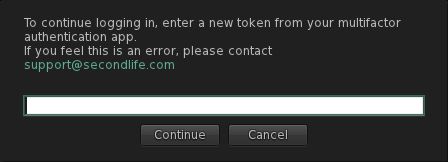
The first time you use Catznip R13.1 you will have to use your preferred authentication method to generate a new token (6-digit code) and enter it into the viewer when prompted (after entering your user name and password).
The MFA prompt for a token, which will be seen in Catznip R13.1 (and other viewer supporting the Lab’s MFA code) once every 30 days.
Some authenticators generate their token as 2 groups of 3 digits (e.g. XXX YYY). Where this is the case, you can enter the code with or without the space.
Note that the token will remain valid for 30 days, as noted above, so you do not have to provide a token every time you log-in to the viewer.
Catznip Improvements
Group Activation and Accessing Notices
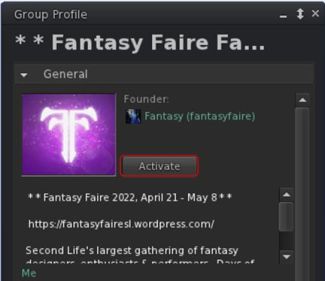
Catznip’s new Group Activation button displayed in profiles of Groups you have joined
This release of Catznip offers two new options for activating a Group tag, and a new option for viewing group notices:
You can activate the tag for any Group of which you are a member directly from the Group’s Profile floater, by clicking the Activate button.
You can also active the Group’s tag (again, you must already be a member) but right-clicking on the Group’s SLurl when displayed in local chat and selecting Activate from the drop-down menu.
You can also use this latter method (right-click on the Group SLurl in chat) to select the Show Group Notices option from the drop-down and view notices.
Teleport History Pruning
Regions come and go in Second Life, and if you spend a fair amount of time hopping around the grid visiting places, it is possible to end up with the Teleport History panel that is full of landmarks that are no longer valid (e.g. because the shop has moved, or the region has changed owners / user, or has gone away completely, etc.). You may also want to ease searching for LMs in history by pruning out those “one off visits” you’ve made.
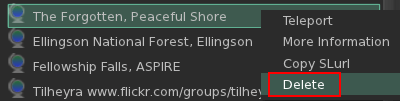
Deleting LMs from your Teleport History tab in Places
Catznip R13.1 now makes this possible:
Open you Teleport History (Me → Places → Teleport History).
Either:
Right click on the landmark in the history list.
Select Delete from the drop down menu.
Or:
Left-click on the landmark in the history list.
Click the dustbin at the bottom of the of the floater.
Conversations Navigation
Catznip R13.1 adds an additional set of keyboard shortcuts to assist in navigating between tags within the Conversations floater:
Action
Horizontal Chat Tabs
Vertical Chat Tabs
Page to the next tab
ALT-Right Arrow
ALT-Down Arrow
Page to the previous tab
ALT-Left Arrow
ALT-Up Arrow
Page to the next tab with unread messages
ALT-SHIFT-Right Arrow
ALT-SHIFT-Down Arrow
Page to the previous tab with unread messages
ALT-SHIFT-Left Arrow
ALT-SHIFT-Up Arrow
Mouselook Improvements
Catznip R13.1 adds the following three options to using Mouselook:
Allow script dialogues.
Do not immediately snap the mouse back to the centre of the screen after a (scripted touch) click.
Show the hand cursor while holding down the CTRL key in Mouselook to indicate touchable faces.
Feedback
A small but tidy group of updates well suited to a maintenance release and which ensures Catznip is MFA compliant (which will be required of all viewers / clients in the near future). I admit to particularly liking the Teleport History pruning capability; would that the other viewers I use adopt it – some of my history lists tend to get jammed full of LMs, and purging the lot from outside of the viewer just to start over has never really been ideal.
Again, for the complete list of updates and bug fixes, please refer to the Catznip R13.1 release notes.
Logos representative only and should not be seen as an endorsement / preference / recommendation
Updates from the week ending Sunday, May 8th, 2022
This summary is generally published every Monday, and is a list of SL viewer / client releases (official and TPV) made during the previous week. When reading it, please note:
It is based on my Current Viewer Releases Page, a list of all Second Life viewers and clients that are in popular use (and of which I am aware), and which are recognised as adhering to the TPV Policy. This page includes comprehensive links to download pages, blog notes, release notes, etc., as well as links to any / all reviews of specific viewers / clients made within this blog.
By its nature, this summary presented here will always be in arrears, please refer to the Current Viewer Release Page for more up-to-date information.
Note that for purposes of length, TPV test viewers, preview / beta viewers / nightly builds are generally not recorded in these summaries.
Official LL Viewers
Release viewer: version version 6.5.5.571282, – formerly the MFA RC viewer, dated April 26, promoted Wednesday, May 4th – NEW.
Release channel cohorts:
Performance Improvements RC viewer updated to version 6.6.0.571507, May 5th (MFA).
Logos representative only and should not be seen as an endorsement / preference / recommendation
Updates from the week ending Sunday, May 1st, 2022
This summary is generally published every Monday, and is a list of SL viewer / client releases (official and TPV) made during the previous week. When reading it, please note:
It is based on my Current Viewer Releases Page, a list of all Second Life viewers and clients that are in popular use (and of which I am aware), and which are recognised as adhering to the TPV Policy. This page includes comprehensive links to download pages, blog notes, release notes, etc., as well as links to any / all reviews of specific viewers / clients made within this blog.
By its nature, this summary presented here will always be in arrears, please refer to the Current Viewer Release Page for more up-to-date information.
Note that for purposes of length, TPV test viewers, preview / beta viewers / nightly builds are generally not recorded in these summaries.
Official LL Viewers
Release viewer version 6.5.4.570575 – formerly the Lao-Lao Maintenance RC viewer, promoted Monday, April 18 – No change.
Release channel cohorts:
Makgeolli Maintenance RC viewer (Maintenance M) viewer, version 6.5.5.570983, April 26.


 Inara Pey: Living in a Modemworld