Updates for the week ending: Sunday June 1st, 2014
This summary is published every Monday and is a list of SL viewer / client releases (official and TPV) made during the previous week. When reading it, please note:
It is based on my Current Viewer Releases Page, a list of all Second Life viewers and clients that are in popular use (and of which I am aware), and which are recognised as adhering to the TPV Policy. This page includes comprehensive links to download pages, blog notes, release notes, etc., as well as links to any / all reviews of specific viewers / clients made within this blog
By its nature, this summary presented here will always be in arrears, please refer to the Current Viewer Release Page for more up-to-date information
Official LL Viewers
Current viewer release: no change from version 3.7.8.289922
SL Memplug RC updated to version 3.7.9.290286 on May 28th and then to version 3.7.9.290405 on May 30th – core updates: fixes to address memory leaks in the viewer (download and release notes)
SL Zipper RC version 3.7.9.290133 removed from the Alternate Viewers page on May 30th
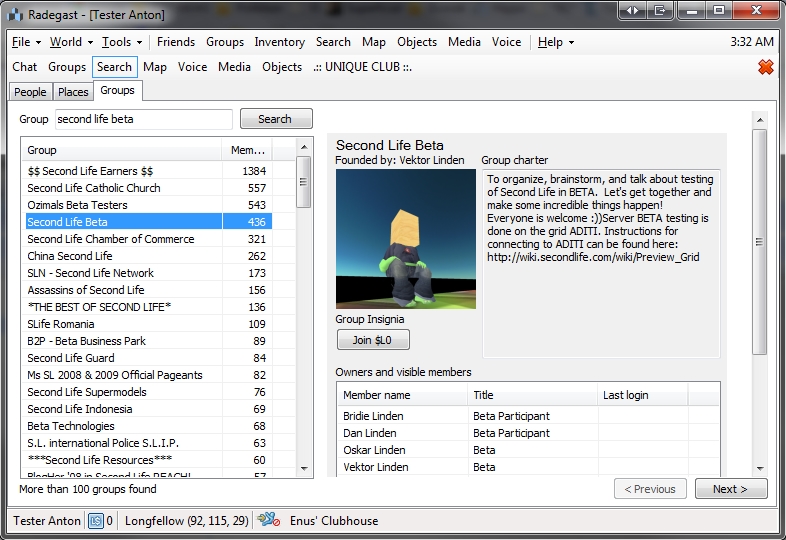
Radegest is a lightweight client for OpenSim and Second Life available for Windows, Linux and Mac. As well as providing text-based capabilities, it was the first lightweight Second Life client to offer a 3D world view (windows and Linux), allowing users on low-end systems to have a visual experience when using a virtual world.
Offering a similar level of capabilities and interaction as a full viewer, and supporting recent updates and improvements to the SL service (mesh rendering, HTTP protocol updates, Marketplace Direct Delivery, Server-side Appearance, etc.), Radegast has become very popular among users with visual impairments and with audio gamers. So much so that Roxie Marten and Celene Highwater of Virtual Ability Inc., have written a comprehensive Accessibility Guide to help people get started with Second life through Radegast. This not only serves as an excellent introduction for the visually and aurally impaired, but forms a thorough introduction for anyone wishing to gain familiarity with using Radegest.
Radegest gives you almost all the capabilities of a full viewer in a lightweight package (image courtesy of Radegast)
Because of Radegast’s popularity among the visually impaired, Celene Highwater will be teaching a special class on Radegast for all those interested in assisting new users understand the client and in helping them become a part of the growing community of blind SL users.
The class will be held at the The Tavern on Wolpertinger, on Thursday May 29th, at 12:00 noon SLT / PDT, and will take place in text, or voice upon request.
Anyone who is interested in learning the ins and outs of Radegast in order to help blind or visually impaired users make effective use of the client, is extended a warm invitation to attend the session.
Lance Corrimal has provided a short update on progress with his Dolphin viewer. As noted in these pages, a combination of unavoidable issues have meant that development of the Dolphin viewer has slipped somewhat over the course of the past year.
In his latest blog post, Lance indicates that things are still progressing, but he’s been hit by the interest list merge (as other TPV developers have been dreading), which is slowing things down due to the volumes of changes which have been included alongside the actual interest list updates.
Since his last update, which I noted here, Lance has completed several more elements of work on the viewer:
Worn tab
Preferences page
Machinima floater.
He also indicates a few further decisions have been made regarding things Dolphin won’t have:
There will be no client-side AO. Lance sees this as a labour-intensive task to port and implement, and he also doesn’t want to use a bridge-like scripted tool (as Firestorm does)
There will be no media filter implementation
He will not be implementing Flickr upload support in the snapshot floater, but instead will look to implement the SL Share capabilities, which offer Flickr upload capabilities anyway.
As always, the time frame for when a new vision of Dolphin will appear, Lance wisely states, “when it’s done”.
Updates for the week ending: Sunday May 25th, 2014
This summary is published every Monday and is a list of SL viewer / client releases (official and TPV) made during the previous week. When reading it, please note:
It is based on my Current Viewer Releases Page, a list of all Second Life viewers and clients that are in popular use (and of which I am aware), and which are recognised as adhering to the TPV Policy. This page includes comprehensive links to download pages, blog notes, release notes, etc., as well as links to any / all reviews of specific viewers / clients made within this blog
By its nature, this summary presented here will always be in arrears, please refer to the Current Viewer Release Page for more up-to-date information
Official LL Viewers
Current viewer release: updated to version 3.7.8.289922 – formerly the Maintenance RC – May 19 (download page, release notes)
SL Share 2 RC viewer updated to version 3.7.9.290144 on May 22nd – ability to upload Tweets and snapshots to Twitter and / or snapshots to Flickr (download and release notes)
Sunshine / AIS v3 RC updated to version 3.7.9.290131 on May 21st – Stability and performance improvements for SSA – (download and release notes)
SL Memplug RC version 3.7.8.289942 released on May 19th – core updates: fixes to address memory leaks in the viewer (download and release notes)
Project viewers:
Oculus Rift project viewer version 3.7.8.289834 released on May 21st – new controls and viewer options for the Oculus Rift (download and release notes)
CtrlAltStudio updated to version 1.2.1.41169 for Windows (Mac version unchanged) on May 24th – fix for issues of the XBox controller not being recognised by the viewer (release notes) – review
Kokua released an experimental interest list update, version 3.7.7.33622 on May 19th (release notes and download)
V1-style
Cool VL viewer updated on May 24th, as follows: Stable: version 1.26.12.2; Legacy: version 1.26.8.60 – core updates: please refer to the release notes (downloads)
On Friday May 16th, Black Dragon 2.3.9.8 was released on the world. The release is marked as “experimental”, and so some caution is advised in using it. It is also billed as a part-way release between the 2.3 and 2.4 versions of the viewer.
The majority of the changes this time around are within the UI, although the version does pick-up on some new shiny from LL, notably the SL Share 2 capabilities for uploading text and photos to Twitter and photos to Flickr.
Again, this isn’t intended as an in-depth review of the viewer, more a look at some of the highlights and give some initial feedback.
UI – Toolbar Buttons
The UI changes are immediately apparent on launching the viewer: the UI has moved more to a black schema, and system messages, etc., are by default in red. The result is quite striking, but at the same time I wonder how those with visual impairments will find the viewer at first glance.
The most noticeable element of this version of the viewer when run for the first time, is new button placement area at the top left of the screen. This displays buttons where one would, in any other v3-based viewer, expect to find the Me, Comm, World, etc., menu options.
The new top bar arrangement in Black Dragon includes the ability to set-up toolbar buttons “in” the top bar, ranged to the left of the Black Dragon drop-down menu which accesses the familiar menu options (“Dragon”)
The buttons are displayed in a new size of “Tiny”, and are immediately followed by the Dragon menu option, which provides access to the expected drop-down of menus (File, Edit View, World, etc). Right-clicking on these buttons displays the expected button options menu, and buttons can still be dragged and placed on the left or right of the screen or at the bottom of the screen, according to your own preference.
It’s an interesting approach, and bearing in mind the current release is experimental, not entirely trouble-free, for me at least. By default, the Navigation & Favourites bar are enabled, but for me, the Navigation Bar didn’t display the region name or any details, and toggling to the Mini-location Bar caused it clash with the toolbar buttons, suggesting more work needs to be done in integrating the two sets of functions. Given the nature of the viewer, I’m not pointing to either item a fault, but rather something to be aware of should you try the viewer yourself and encounter similar oddities.
Additional “spacer” buttons in the Black Dragon Toolbar Buttons floater can be used break-up buttons in a toolbar into logical groups
Another interesting / useful little extra is the addition of five “spacer” buttons to the Toolbar button floater. Like the toolbar buttons, these can be dragged and dropped into any of the toolbar areas and used to break-up the buttons displayed within it into groups. As with the other buttons on the floater, note that each spacer can only be displayed (used) the once.
Snapshot Floater Overhaul
Niran has undertaken a complete overhaul of the snapshot floater. Again, this still appears to be a work-in-progress, given the lack of a preview panel for viewing snaps, but what is there is likely to get some people bouncing in their seats.
The most immediate change visible in the floater is the inclusion of buttons for the share to Facebook, Twitter and Flickr options. Clicking on any of these will launch the respective floater, thus offering a quick and easy way to swap from the snapshot floater should you wish to upload an image elsewhere.
However, and perhaps more particularly for most people, Niran has incorporated the post-processing filters from the SL Share 2 viewer into the snapshot floater. This means that when saving snapshots to disk, e-mail or your Profile feed, you can now apply any of the filters supplied with the SL Share 2 code (1970s colours, autocontrast, sepia, lens flare, etc., and Niran’s own “realblackandwite”).
Black Dragon’s WIP snapshot floater: note the inclusion of the post-process filter options, applicable to images saved to disk and inventory and uploaded to profiles feeds or e-mailed
Clicking on the red bar to the right of the floater will open the preview pane – something which caught me out initially in looking at Black Dragon (and for some reason a trial click didn’t do anything – so my thanks to Maddy Gynoid for poking me on this and getting me to try again and revise this review as a result).
The snapshot preview panel
Motion Blur and Godrays
Black Dragon’s motion blur option is now on by default, and gets its own tuning options in Preferences > Display. Note that motion blur, while itself on by default, will only work when Deferred Rendering (now more commonly called “Advanced Lighting Model” in viewers) is enabled. However, Ambient Occlusion and Shadows do not need to be enabled.
The Motion Blur and Godray options in Preferences > Display
This release of Black Dragon also sees the Godrays option gain a toggle option in Preferences > Display, together with fine tuning sliders.
Niran has produced a video demonstrating motion blur, embedded below, or you can travel to the Black Dragon office in Hippo Hollow and witness it first-hand using the viewer.
Godrays, from Tofu Buzzard, were introduced with the last release of Black Dragon, but enabling them was a slightly convoluted process, as Niran hadn’t got around to adding a toggle function to them. The new option, together with the fine tuning sliders makes using Godrays much easier, and can, with the right windlight settings, produce some stunning effects, although (for me at least) it took some trial-and-error to get something reasonably usable, When used properly, it can add some stunning depth / feel to snapshots, although I did encounter something slightly unexpected when panning my camera around a sky build when I had Godrays enabled.
Casting shadows on the sky with Godrays
Given most people will be looking towards the Sun when using the Godrays effect, this isn’t much of an issue; however, for the artistically minded, it might offer-up ways to produce some interesting images …
Feedback
Niran has always pushed the envelope with the viewer, and this release of Black Dragon is again ample demonstration of that. The fact that much of the UI is still a work-in-progress means that it would be unfair to pick at it at any length, given any issues that might be apparent could well be down to the fact that it is in a state of flux.
That said, the new approach to the top bar areas of the viewer is interesting, and I’d like to see how that develops, vis getting things like the Navigation bar to correctly display. I’m not totally convinced about the toolbar button area sited to the top left screen; which it works fine for the “mini icons” setting, it does so only if your taste in buttons is minimal. Get to many, and they start wrapping. Use any of the other display options, and things can get a little messy up there very quickly.
The mini icon option also works on the side and bottom toolbar positions, and from my perspective works really well in them; the buttons are unobtrusive but easy to click. Now, if only Black Dragon would include an option to left / right range them along the bottom…
However, as mentioned above, it is the snapshot floater where Niran is to be given particular kudos; the inclusion of the SL Share 2 filters is an excellent addition. The overall design of the panel is something I wouldn’t mind seeing in other viewers; so hopefully it’ll be contributed back to LL and accepted.
On Saturday May 17th 2014, the Firestorm team hosted another of their Q and A sessions to discuss Firestorm and Second Life, and to address users’ questions. Unfortunately, no public video for the meeting is available. The following transcript is therefore provided from a personal audio recording made by myself.
For those who wish to listen to the audio, and for ease of reference, it has been broken down into a number of files, each of which precedes the text to which it relates
When reading, please remember:
This is not a word-for-word transcript of the entire meeting. While all quotes given are as they are spoken in the audio, to assist in readability and maintain the flow of conversation, not all asides, jokes, interruptions, etc., have been included in the text presented here
If there are any sizeable gaps in comments from a speaker which resulted from asides, repetition, questions to others etc,, these are indicated by the use of “…”
Questions / comments were made in chat while speakers were talking. This inevitably meant that replies to questions would lag well behind when they were originally asked. To provide context between questions and answers, questions in the transcript are given (in italics) at the point at which each is addressed by a member of the Firestorm team, either in voice or via chat
This transcript is provided for informational purposes only. I am not an official member of the Firestorm team, and technical or support issues relating to Firestorm cannot be addressed through these pages. Such requests for assistance should be made through the in-world Firestorm Support groups or at the Firestorm support region.
Firestormers Assemble: Takoda, Tonya, Jessica and Ed settle-in for another Firestorm Q&A session
Firestorm 4.6.5 and the Release Cycle
00:00 Jessica Lyon (JL): So we released 4.6.5 two months early – surprise! It’s been a more-or-less, pretty much across-the-board, a really good release for folks, with few problems and lots of improvements, although it is primarily just bug fixes which are in it anyways. So that was sort-of to be expected and hoped.
00:25 JL: It was a bit of an experiment, because we’ve had a lot of people complain about how long our releases take, including some of our own developers and even some support people. So it was a bit of an experiment in some ways just to see what happens if we do a release in half the time. And the results are interesting.
00:48 JL: Adoption – the rate at which people upgrade from whatever older version they’re on, has been very slow compared to other releases; although that’s not to say it’s non-existent. We have … 85,000 people on 4.6.5 now, and that’s not quite in a full week [since release]. So that’s no slouchy number; but in a typical release, we’re usually up around 140,000, so almost twice that.
01:28 JL: It’s easier for support, certainly, because fewer people are updating all at the same time, so I guess that stretches out the support load. [It’s] easer for QA, that’s good to know. But that doesn’t mean we’ll be able to do releases in that two-month time frame all the time.
01:56 JL: For example, our next task is going to be project interesting, which I’m sure most of you are aware of, Linden Lab just finally released it, and it’s apparently really, really good. Things rez much faster, and we can’t wait to get … to the point after we’ve merged it … [there’s a description of the interest list work, as per the blog post linked to above].
The interest list updates provide more predictable and faster scene rendering, such as large objects and those closest to you appearing first, rather than at random. More use is also made of the viewer’s cache (so the warning for not clearing cache as a first action in “fixing” issues becomes even more important)





 Inara Pey: Living in a Modemworld