Black Dragon 2.4.2 goes beta; UKanDo 3.7.26 and RLV 2.9.7 get AHH

There have been a number of rapid-fire TPV updates this week, so here’s a quick overview for Black Dragon, UKanDo and RLV.

Black Dragon 2.4.2 Beta

On Monday, March 23rd, Black Dragon updated to version 2.4.2 Beta, with Niran focusing on further updates to rendering, although there are some interesting WIP elements as well.

In particular, Niran notes that he’s done further work on the volumetric lighting capability, notably adding a Falloff slider to both Preferences -> Display and the Machinima Sidebar (F1), so that Godrays will fall off the closer they are to the camera which will be further smoothed in future releases), and working to get volumetric lighting working with FXAA and glow.
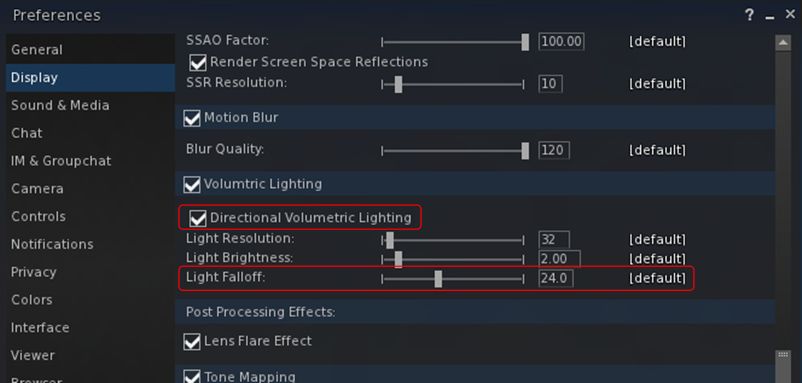
Black Dragon 2.4.2 Beta add options for both directional volumetric lighting and Godrays Falloff

Also within Preferences -> Display, Niran has added a check box for enabling alphas in depth of field calculations. When unchecked, this excludes alpha from both depth of field and volumetric lighting calculations to prevent focus issues (depth of field) and odd lighting effects (volumetric lighting). when checked, both depth of field and volumetric lighting calculations will include alphas in the field of view.
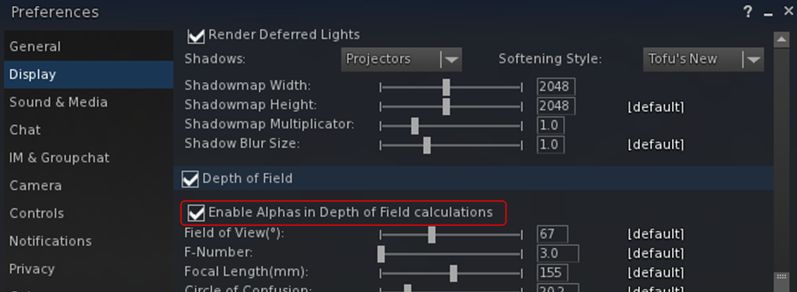
The new option for enabling / disabling the inclusion of alphas is DoF and volumetric lighting calculations. The option is unchecked (alpha inclusion disabled) by default

Other additions with this release comprises:

  • A Custom System Memory option and a separate slider for the “linked” memory version
  • A chat colour for Friends
  • (as a work-in-progress) a new information system for Preferences to tell possible performance breakers and problems that could occour with certain options.

As always, for a full list of changes / updates, please refer to the viewer’s release notes.

Related Links

UKanDo 3.7.26

The UKanDo v3 style viewer updated to release 3.7.26.28080 on Tuesday, March 24th. This update brings the viewer up to parity with the Lab’s 3.7.25 and 3.7.26 code, and almost up to spec with Marine Kelley’s RLV updates (2.9.7 of RLV having appeared just after the UKanDo update).
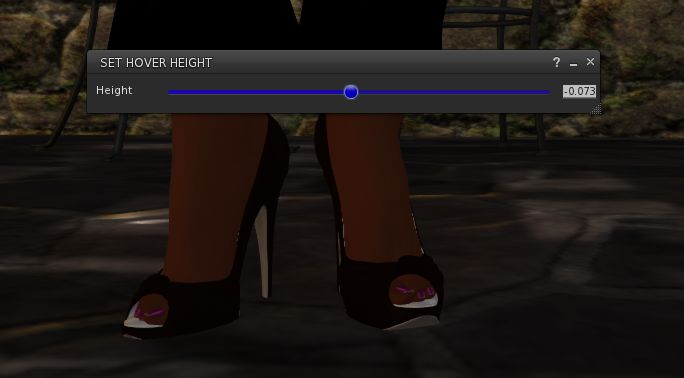
UKanDo 3.7.26 includes the Lab's new Avatar Hover Height capability
UKanDo 3.7.26 includes the Lab’s new Avatar Hover Height capability

In particular, this release sees UKanDo gain the maintenance fixes from the 3.7.25.299021 official view release and the new Avatar Hover Height functionality which has just become a part of the official release viewer.

In addition, this release of UKanDo includes:

  • Disabled the RLV start-up restriction feature by default. Re-enable via the “RLVStartUpRestriction” Debug setting or the RLV tab under General in Prefernces
  • FIRE-15489 by Ansariel Hiller – Add confirmation when unlinking objects, released under LGPL
  • RLV – Quick fix Courtesy of Nicky Perian, and tidy-up.
  • A fix for the “nolink>” parser bug, courtesy of Drake Arconis (Alchemy Viewer).

Related Links

RLV 2.9.7

This release of the Restrained Love Viewer sees assorted fixes for recent RLV release and the inclusion of the Lab’s Avatar Hover Height (AHH) capability, which came about as a result of a detailed formal proposal being put before Lab by members of the Firestorm team during a TPV developer meeting in June 2014.

Currently, and as noted by Marine, AHH is not yet linked to her existing “@adjustheight” capability and slider in the top bar of the viewer.

Related Links


2015 viewer release summaries: week 12

Updates for the week ending: Sunday, March 22nd, 2015

This summary is published every Monday, and is a list of SL viewer / client releases (official and TPV) made during the previous week. When reading it, please note:

  • It is based on my Current Viewer Releases Page, a list of all Second Life viewers and clients that are in popular use (and of which I am aware), and which are recognised as adhering to the TPV Policy. This page includes comprehensive links to download pages, blog notes, release notes, etc., as well as links to any / all reviews of specific viewers / clients made within this blog
  • By its nature, this summary presented here will always be in arrears, please refer to the Current Viewer Release Page for more up-to-date information.

Official LL Viewers

  • Current Release version: 3.7.25.299021 February 24th – no change
  • Release channel cohorts (See my notes on manually installing RC viewer versions if you wish to install any release candidate(s) yourself):
    • Maintenance RC viewer updated to version 3.7.26.299845 on March 18th – multiple fixes and improvements (download and release notes)
  • Project viewers:
    • No updates

LL Viewer Resources

Third-party Viewers

V3-style

  • CtrlAltStudio Alpha for Oculus Rift updated to version 1.2.3.42797 on March 18th – core updates: recommended alpha update for windows & crash fixes (release notes)
  • Kokua updated to version 3.7.26.35224 on March 16th – core updates: parity with LL 3.7.25 code base and RLV 2.9.6.8 (release notes)

V1-style

  • Cool VL Viewer
    • Stable branch updated to version 1.26.12.36 – March 21st
    • Experimental branch to 1.26.13.4 – March 21st
    • Release notes

Mobile / Other Clients

  • Mobile Grid Client updated to version 1.22.1241 on March 20th – core updates: fix for chat/IM tab highlighting in Android 5; improved IM channel highlighting on new messages (release notes).

Additional TPV Resources

Related Links

OnLive: Firestorm now on Android and iPad

SL go logoImportant note: The SL Go service is to be shut down on April 30th, 2015. For more information, please read this report.

On Monday, March 23rd, OnLive, the company providing the SL Go service, announced the release of Firestorm Mobile for SL Go, bringing Second Life’s most-used viewer to Android devices and the iPad.

Commenting on the launch to me, Dennis Harper, OnLive’s Product Manager for SL Go, said “Since the launch of Firestorm on SL Go in December 2014, one of the questions we’ve most frequently been asked has been, ‘when will Firestorm be available for mobile?’ With this release, OnLive is delighted to again fulfil a request from users and provide them with the service they desire.”

However, due to technical constraints, the launch does see a change to the mobile side of the service, where OnLive is only able to provision one viewer to users. Given the huge popularity Firestorm for SL Go has already achieved since its launch on the SL Go service, it will, for a time, be the only viewer available to those using the service on Android devices and the iPad. Hopefully, this will be a short-term situation, and OnLive will again be able to offer a choice of viewers to mobile users in the near future.

This will not affect SL Go users on PCs and Mac computers, to whom OnLive will continue to offer a choice of the Lab’s Second Life viewer or Firestorm when running the SL Go service.

OnnLive have released Firestorm for SL Go running on Android devices and iPads - and for the time being, it is the viewer for such devices
OnnLive have released Firestorm for SL Go running on Android devices and iPads (note the SL Go screen overlay in the image) – and for the time being, it is the viewer for such devices

If you are already using SL Go on either an Android device or an iPad, you do not need to do anything. As soon as you log-in to SL Go, Firestorm will launch automatically.

New users can continue to join the service in one of two ways:

  • Via subscription, complete with a 7-day free trial of the service: simply visit the SL Go web page and sign-up (credit card or PayPal required)
  • By in-world payment (minimum of L$650 for one week) via the SL Go in-world payment service (no name and no credit card are required) – you can also read about this service here.


2015 viewer release summaries: week 11

Updates for the week ending: Sunday, March 15th, 2015

This summary is published every Monday, and is a list of SL viewer / client releases (official and TPV) made during the previous week. When reading it, please note:

  • It is based on my Current Viewer Releases Page, a list of all Second Life viewers and clients that are in popular use (and of which I am aware), and which are recognised as adhering to the TPV Policy. This page includes comprehensive links to download pages, blog notes, release notes, etc., as well as links to any / all reviews of specific viewers / clients made within this blog
  • By its nature, this summary presented here will always be in arrears, please refer to the Current Viewer Release Page for more up-to-date information.

Official LL Viewers

  • Current Release version: 3.7.25.299021 February 24th – no change
  • Release channel cohorts (See my notes on manually installing RC viewer versions if you wish to install any release candidate(s) yourself):
    • Avatar Height Hover RC viewer version 3.7.26.299635 released on March 10 – Avatar Hover Height allows you to adjust the vertical position of your avatar within some preset limits. See the wiki page and my overview (download and release notes)
    • Experience Keys RC viewer updated to version 3.8.0.299338 on March 9 – provides support for viewing and managing Experiences and for contributing content for Experiences (download and release notes)
  • Project viewers:
    • No updates

LL Viewer Resources

Third-party Viewers

V3-style

  • Black Dragon updated to version 2.4.1.9 on March 10th – core updates: rendering improvements to horizon, Godray / volumetric light (change log)
  • CtrlAltStudio Alpha for Oculus Rift updated to version 1.2.3.42796 on March 15th – core update – parity with Firestorm release 4.6.7 (download and release notes)
  • Restrained Love Viewer updated to version 2.9.6.8 on  March 10th – core updates: ability to shift camera focus when blindfolded, allowing avatar to “feel” environment around them (release notes)

V1-style

  • Cool VL Viewer
    • Stable branch updated to version 1.26.12.35 – March 14th
    • Experimental branch to 1.26.13.3 – March 14th
    • Legacy branch to 1.26.8.91 – March 14th
    • Release notes

Mobile / Other Clients

  • No updates.

Additional TPV Resources

Related Links

Black Dragon 2.4.1.9: “volumetric lighting” and more

Blackdragon logoOn Tuesday, March 10th, NiranV Dean released version 2.4.1.9 of his Black Dragon viewer, which includes his recent work on volumetric lighting for Second Life, which I reported on at the start of March.

The update also includes a number of other fixes to some long standing rendering issues that Niran has been attempting to fix. Taken together, they are part of a larger update Niran has been planning, but as he comments in the release notes, he wanted to get these particular changes out to show people, and will save the rest for his upcoming version 2.4.2 release.

Graphics Memory Changes

The first of the changes Niran has made relates to the way in which graphics memory is used with textures. Generally, the viewer has one slider for setting a limit on the amount of texture memory, which encompasses everything you see in the viewer, including all of the UI elements.  The is generally set to 512 Mb by default.

Up until the 2.4.1.9 release, Black Dragon, like most viewers, offered a single slider for setting the amount of video memory which could be dedicated to texture processing by the viewer

With the 2.4.1.9 release of Black Dragon, Niran has split how graphics memory is used between “global” textures – which include all the UI elements, etc., and the graphics memory currently being used to render the current scene – what you are actually seeing in-world at any moment in time.

The idea here is to provide the scene textures with their own “pool” of graphics memory, so they are no longer competing for graphics memory with all the other textures obtained from the region and the viewer’s UI textures, and should thus result in fewer issues of visible textures being “thrashed” (e.g. constantly switching between blurry and clear as they are swapped into and out of memory due to lack of space).

With Black Dragon 2.4.1.9 , Niran has attempted to "split" how video memory is used  by the viewer into two adjustable "pools", one for global textures (which include UI elements), and one just for just the current scene textures
With Black Dragon 2.4.1.9 , Niran has attempted to “split” how video memory is used by the viewer into two adjustable “pools”, one for global textures (which include UI elements), and one just for just the current scene textures

As I’m not a graphics or viewer rendering expert, I can offer no opinion on this approach. However, do note Niran’s recommendation to set texture memory to 512 Mb (the default upper limit for SL viewers, set several years ago to avoid OpenGL issues which might occur when setting large memory allocations) and the scene memory to 256 Mb.

Horizon and Other Rendering Fixes

One of the visual irritants in Second Life when running the view with the Advanced Lighting Model option (which Niran still refers to by its more technical name of “deferred rendering”), those living at altitude in-world (or flying at a few hundred metres above sea level), is the way in which the line of the horizon between “sky” and “sea” forms a concave curve across the screen, rather than a flat line as one might expect.

The familiar concave horizon line between "sky" and "water" seen when running the viewer in "deferred" mode (ALM enabled) ...
The familiar concave horizon line between “sky” and “water” seen when running the viewer in “deferred” mode (ALM enabled) …

With Black Dragon 2.4.1.9, Niran has addressed this, and a few other horizon-related rendering issues so that – and again when running the viewer with Preferences > Display > Deferred Rendering (ALM) enabled, the horizon now appears as a horizontal line, as shown in the two images shown here, taken from Rebeca Bashly’s When Life Gives You Apples … Run.

Images of all the horizon rendering adjustments Niran has made can be found in his blog post on the release, linked to at the top and end of this article.

Niran's revised horizon line between "sky" and "sea", seen in Black Dragon 2.4.1.9 with deferred rendering (ALM) enabled
Niran’s revised horizon line between “sky” and “sea”, seen in Black Dragon 2.4.1.9 with deferred rendering (ALM) enabled

Continue reading “Black Dragon 2.4.1.9: “volumetric lighting” and more”

Firestorm TTT: clean install revisited

firestorm-logoIn the Firestorm Tool Tip Tuesday video for Tuesday March 3rd, 2015, Jessica gave a rapid-fire overview of performing a clean install. In trying to keep the video to around 5 minutes in length, the result, while informative, came across as rushed.

Given people did feel the first video did feel hurried, and that clean installs can be a necessary part of viewer life, the latest Tool Tip Tuesday video from Jessica might be referred to as “Clean installs: the Director’s Cut”.

With a running time a little under 13 minutes, the new video provides greater information and clearer instructions on:

  • Saving your chat and IM logs to a custom location on your PC
  • Using Firestorm’s backup capability to save and restore your viewer’s global and per-account settings
  • Performing a clean install.

The video both complements the original clean install video, and stands as an instructional guide in its own right, providing a lot more explanation and background. So, if you were confused by the speed of delivery in the original video, this revisit may well be for you!