Logos representative only and should not be seen as an endorsement / preference / recommendation
Updates from the week through to Sunday, October 6th, 2024
This summary is generally published every Monday, and is a list of SL viewer / client releases (official and TPV) made during the previous week. When reading it, please note:
It is based on my Current Viewer Releases Page, a list of all Second Life viewers and clients that are in popular use (and of which I am aware), and which are recognised as adhering to the TPV Policy. This page includes comprehensive links to download pages, blog notes, release notes, etc., as well as links to any / all reviews of specific viewers / clients made within this blog.
By its nature, this summary presented here will always be in arrears, please refer to the Current Viewer Release Page for more up-to-date information.
Note that for purposes of length, TPV test viewers, preview / beta viewers / nightly builds are generally not recorded in these summaries.
Official LL Viewers
Release viewer: version 7.1.10.10800445603, formerly the DeltaFPS RC, dated September 11, promoted September 17promoted August 26 – NO CHANGE.
Release Candidate: ExtraFPS RC, version 7.1.11.11074622243, September 30.
Aesthetics improvements: new Antialiasing setting – SMAA; Contrast Adaptive Sharpening; Khronos Neutral Tone Mapping (can be changed to ACES via the RenderTonemapType Debug setting).
On September 27th and 29th, Kokua updated their viewer with the release of version 7.1.10.
As is common with Kokua, the viewer is provided in three variants utilising the same code:
No RLV, version 7.1.10.56206
RLV and “Full time” RLV, version 7.1.10.59780.
The key aspects of this release are parity with Linden Lab’s DeltaFPS viewer code base, and changes made to the Linux system requirements. The following is an overview of some of the key changes between this release and the previous Kokua 7.1.8 release.
Also note that Kokua did not provide a release to match the Lab’s 7.1.9 Altasaurus viewer. However, updates from that viewer are a part of DeltaFPS; as such, the release notes for the Altasaurus viewer are referenced below for those interested.
Installation
Only download Kokua via the Kokua website. Do not utilise and other third-party site purporting to offer the Kokua viewer.
There is no need to perform a clean install with this release if you do not wish to.
Do, however, make sure you back-up all your settings safely so you can restore them after installing 7.1.10.
Linden Lab Updates
DeltaFPS
Viewer version number 7.1.10.10800445603, dated September 17th – release notes in full.
Core updates: performance improvements, building on the improvements in viewer 7.1.9; viewer-side WebRTC support.
Date of promotion to release status: 26th August, 2024.
The release notes for both of the above should be referred to for complete information on updates and resolved issues, only some of which are summarised below.
WebRTC
WebRTC communications protocol (RTC=”real-time communication”) is the new Voice communications protocol for Second Life, replacing Vivox Voice.
Why Make The Change?
Voice in Second Life has been supplied through an arrangement with Vivox. This has required Linden Lab to utilise a viewer plug-in tool – SLvoice.exe – to manage voice services within the viewer., which in turn has made LL both reliant on Vivox for bug fixes for the plug-in, and subject to changes in support for operating systems imposed by Vivox such as the latter ending native support for Linux some years ago).
WebRTC by contrast is the predominant telephony protocol used by web-based applications, such as Google Meet, and is integrated into most common browsers. It has almost all the features common to Vivox in supplying a voice service – spatial in-world voice; peer-to-peer sessions; Group voice (including moderation) and multi-user Voice conferencing – although the are some limitations (see below).
Benefits and Improvements
WebRTC Offers a range of benefits over Vivox, including, but not limited to:
48khz audio bandwidth providing cleaner sound.
User control over:
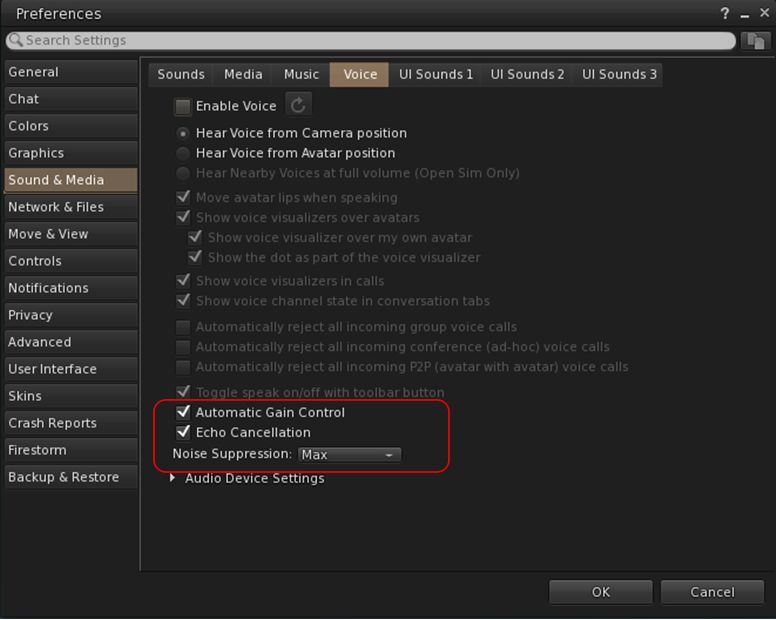
Audio noise reduction – high reduction for noisy environments, no reduction for clean audio sources (performers, etc.)
Automatic gain control – less need to individually tune other user’s audio levels.
Audio/video device selection.
Improved: spatialization, audio echo cancellation and audio sampling rates for improved audio quality.
The WebRTC options added to Kokua’s Voice preferences
Most significantly, WebRTC removes all reliance on a third-party plug-in for the viewer. Instead, it is supplied as a library and wrapper within the viewer. This means:
Linden Lab has greater ability to address Voice related issues directly, without having to await fixes from a supplier.
WebRTC potentially opens the door to adding features and capabilities to SL Voice in the future, including some which have been long-requested.
Limitations
WebRTC does not support the existing Voice Morphing capability in Second Life.
This is because voice morphs are tied to the Vivox service, and cannot be utilised with WebRTC.
Those who do use the current Voice Morphing capability are directed to this SL Wiki article on Voice Morphing, which provides a list of solutions which can be used with WebRTC.
Note that the Voice Morphing options remain available in Kokua 7.1.10 because at the time of release, Vivox Vorph Morphing remains available on Vivox-enabled regions.
Conferences and group voice calls are limited to 50 participants.
Security
The Second Life implementation of WebRTC addresses security issues such as potential eavesdropping, exposing users’ IP addresses, etc., by routing communication through proxy servers managed directly by LL .
Deployment Notes
At the time of writing, simulator support for WebRTC is limited; deployment is due to become more widespread from October 16th, 2024, and hopefully be grid-wide by the end of October 2024. During this transitional period, peer-to-peer, conference calls and group chat sessions might be subject to various disruptions (e.g. they will not work between those on simulators running Vivox and simulators running WebRTC).
Usability Updates
Object Take
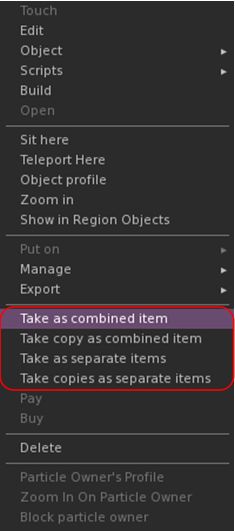
The update multi-object take options
Kokua 7.1.10 includes the Lab’s updates to picking-up objects in-world using the right-click context menu:
When selecting an individual item, the right-click context menu will display the expected Take and Take Copy options.
When selecting multiple items, the right-click context menu will display the following new options:
Take As Combined Item: return all the selected objects to inventory as a single, coalesced object.
Take Copy As Combined Item: return copies all the selected objects to inventory as a single, coalesced object, leaving the originals in-world as individual objects.
Take As Separate Items: return all the selected objects to inventory, but list them as individual items, not as coalesced.
Take Copies As Separate Items: return copies all the selected objects to inventory, but list them as individual items, not as coalesced, leaving the originals in-world.
Note that all of the above Take options will be available in accordance the SL’s permissions system (as with Take / Take Copy).
Avatar Rendering Updates
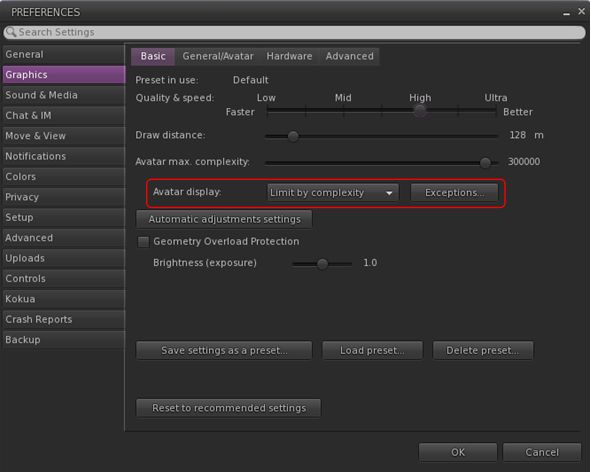
Linden Lab added new options to enable the prioritisation of rendering avatars using the following criteria:
Limit by complexity – any avatar with a complexity greater then your Avatar Maximum Complexity” setting will be rendered as a Jellydoll.
Always show friends – your friends will never be rendered as Jellydolls, no matter what their complexity
Only show friends – all avatars except your friends will be rendered as Jellydolls.
Within Kokua, this options are found under Preferences → Graphics, with the Exceptions drop-down also repositioned in the panel.
New Complexity options from LL within Kokua’s Preferences → Graphics → Basic, including a move of the Exceptions drop-down (also see below)
General Updates / Improvements
Add Images to Inventory Items in Bulk: select up to 50 inventory items → Right click selection → Image.
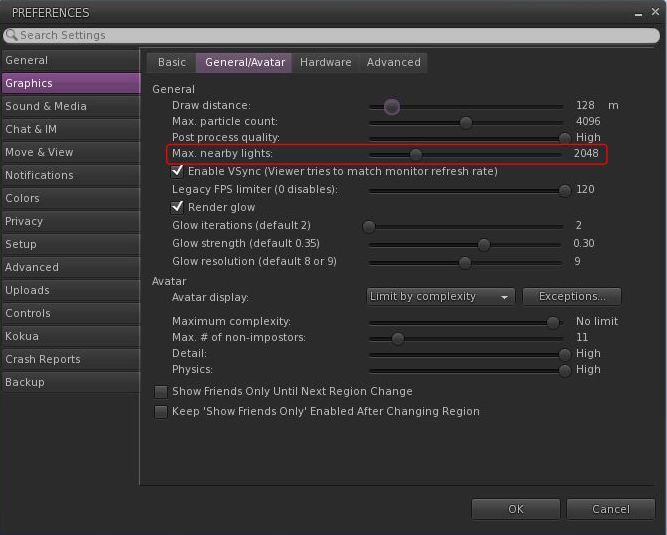
Option to control the amount of lights: Preferences → Graphics → General/Avatar → Max Nearby Lights slider.
Control nearby lighting through the nearby lighting slider
glTF model preview: use a prim to preview the appearance of a glTF scene / model:
Edit the prim. then Top menu bar → Develop → GLTF → Open.
To enable the Develop menu, either go to Advanced → Show Develop Menu or press Ctrl-Alt-Q or go to Preferences → Advanced → check Show Developer Menu
Note that this feature is still in the early stages of development and that glTF models will only appear locally in your own viewer, they will not be rendered for others to see in their viewers.
Better MOAP URL handling in order for users to not only be able to CTRL-C or Cmd-C copy but also to see decoded URL payloads for easy inspection. In the nearby media list, you can also right click a media/data link and Copy URL/Copy Data.
Mirrors disabled by default for all graphics quality levels to improve performance.
You can choose to enable mirrors manually in Preferences → Graphics → Advanced→ Mirrors.
Selected Kokua Updates
Preferences
With the introduction of the new avatar complexity settings by the Lab:
Kokua’s options Show Friend Only Until Region Change and Keep ‘Show Friend Only Enabled Avatar Changing Region have been relocated:
From: Preferences → Graphics → Basic
To: Preferences → Graphics → General/Avatar.
Kokua’s Always Render Friends checkbox is removed from Preferences → Graphics → Basic.
Improve Graphics Speed
The Improve Graphics Speed → Auto-Adjust Settings panel is now correctly sized to fit the displayed information (no overflow).
The Enable VSync options have been inverted so the explanation and note are at the top (Improve Graphics Speed → Auto-Adjust Settings → Enable VSync.
Linux Updates
Kokua 7.1.10 requires a newer Linux system than previous releases; GLIBC 2.35 is required, meaning Ubuntu 22 or better and Debian 12 or better.
This version of Kokua may run on older Linux variants (e.g. Ubuntu 20), however CEF will not run, so web pages within the viewer will not be available.
There are some known bugs in the Linux version which we considered minor enough to proceed with the release.
360 snapshot doesn’t work
Need wine installed for Vivox voice
GLIBC 2.30 systems could still run the viewer, but with a broken internal browser.
This Linux version of Kokua runs much more smoothly due to LL fixing a number of the causes of frame stall which were most noticeable on Linux.
Kokua Team Request
Kokua is provided through time and efforts of a two-person project team. Understandably, the majority of work two people can perform on the viewer is largely focused on tracking and integrating with official viewer releases from Linden Lab. This means that there is limited time for bug fixing and for implementing additional features and requests. The team also has a limited capacity for maintaining the Linux flavour of the viewer.
Because of this, the Kokua team is seeking additional help. In particular they would like to hear from:
People interested in working on bug fixes and enhancements for Kokua, thus reducing the said backlog.
A Linux specialist to help with maintaining the Linux version of Kokua.
Those interested in volunteering their time should drop an e-mail to chorazinallen AT gmail.com. When doing so, please note that:
Experience with C++ is essential.
Familiarity with working with the viewer is a bonus.
Logos representative only and should not be seen as an endorsement / preference / recommendation
Updates from the week through to Sunday, September 29th, 2024
This summary is generally published every Monday, and is a list of SL viewer / client releases (official and TPV) made during the previous week. When reading it, please note:
It is based on my Current Viewer Releases Page, a list of all Second Life viewers and clients that are in popular use (and of which I am aware), and which are recognised as adhering to the TPV Policy. This page includes comprehensive links to download pages, blog notes, release notes, etc., as well as links to any / all reviews of specific viewers / clients made within this blog.
By its nature, this summary presented here will always be in arrears, please refer to the Current Viewer Release Page for more up-to-date information.
Note that for purposes of length, TPV test viewers, preview / beta viewers / nightly builds are generally not recorded in these summaries.
Official LL Viewers
Release viewer: version 7.1.10.10800445603, formerly the DeltaFPS RC, dated September 11, promoted September 17promoted August 26.
Performance boosts. Memory management has been optimized and users will experience a higher FPS across various systems. A comprehensive range of bug fixes are also provided. This includes better PBR material handling and resolving frequent crashes. See the release notes for more.
UI for scheduling region restarts now available via a new button located in the Region/Estate floater. (Note: there is currently an issue with scheduled region restarts working correctly and a fix is due to come in the next server release).
Logos representative only and should not be seen as an endorsement / preference / recommendation
Updates from the week through to Sunday, September 22nd, 2024
This summary is generally published every Monday, and is a list of SL viewer / client releases (official and TPV) made during the previous week. When reading it, please note:
It is based on my Current Viewer Releases Page, a list of all Second Life viewers and clients that are in popular use (and of which I am aware), and which are recognised as adhering to the TPV Policy. This page includes comprehensive links to download pages, blog notes, release notes, etc., as well as links to any / all reviews of specific viewers / clients made within this blog.
By its nature, this summary presented here will always be in arrears, please refer to the Current Viewer Release Page for more up-to-date information.
Note that for purposes of length, TPV test viewers, preview / beta viewers / nightly builds are generally not recorded in these summaries.
Official LL Viewers
Release viewer: version 7.1.10.10800445603, formerly the DeltaFPS RC, dated September 11, promoted September 17promoted August 26.
Performance boosts. Memory management has been optimized and users will experience a higher FPS across various systems. A comprehensive range of bug fixes are also provided. This includes better PBR material handling and resolving frequent crashes. See the release notes for more.
UI for scheduling region restarts now available via a new button located in the Region/Estate floater. (Note: there is currently an issue with scheduled region restarts working correctly and a fix is due to come in the next server release).
On Tuesday, September 17th (SLT), Firestorm released version 7.1.10.75913 of their viewer.
This release is primarily focused on a merge with the Linden Lab Atlasaurus release code base, which combines initial performance bug fixes to help correct some of the issues seen with recent viewer releases with the WebRTC code in preparation for the switch away from using Vivox Voice with Second Life.
In addition to the above, there are some cherry-picked updates from the Lab’s upstream code (DeltaFPS), and also updates from the Firestorm Team.
Note that the following is not a complete review of the 7.1.10 release and all the changes made therein; it focuses on the more visible and user-facing updates. Those requiring a list of all changes and updates to Firestorm 7.1.10 should refer to the Firestorm 7.1.10 release changelog, which also provides all proper credits for the work.
Note: as this review was going to post, Linden Lab promoted the DeltaFPS viewer to de facto release.
General Notes
Installation
Only download Firestorm from the Firestorm website. Do not utilise and other third-party site purporting to offer the Firestorm viewer, and remember Firestorm will never ask for log-in credentials in order to download a release version of their viewer.
There is no need to perform a clean install with this release if you do not wish to.
Do, however, make sure you back-up all your settings safely so you can restore them after installing 7.1.10.
Date of promotion to release status: 26th August, 2024.
WebRTC
WebRTC communications protocol (RTC=”real-time communication”) is the new Voice communications protocol for Second Life, replacing Vivox Voice.
Why Make The Change?
Voice in Second Life has been supplied through an arrangement with Vivox. This has required Linden Lab to utilise a viewer plug-in tool – SLvoice.exe – to manage voice services within the viewer., which in turn has made LL both reliant on Vivox for bug fixes for the plug-in, and subject to changes in support for operating systems imposed by Vivox such as the latter ending native support for Linux some years ago).
WebRTC by contrast is the predominant telephony protocol used by web-based applications, such as Google Meet, and is integrated into most common browsers. It has almost all the features common to Vivox in supplying a voice service – spatial in-world voice; peer-to-peer sessions; Group voice (including moderation) and multi-user Voice conferencing – although the are some limitations (see below).
Benefits and Improvements
WebRTC Offers a range of benefits over Vivox, including, but not limited to:
48khz audio bandwidth providing cleaner sound.
User control over:
Audio noise reduction – high reduction for noisy environments, no reduction for clean audio sources (performers, etc.)
Automatic gain control – less need to individually tune other user’s audio levels.
Audio/video device selection.
Improved: spatialization, audio echo cancellation and audio sampling rates for improved audio quality.
Options for managing WebRTC Voice quality can be found under Preferences → Sound & Media → Voice
Most significantly, WebRTC removes all reliance on a third-party plug-in for the viewer. Instead, it is supplied as a a library and wrapper within the viewer. This means:
Linden Lab has greater ability to address Voice related issues directly, without having to await fixes from a supplier.
Potentially opens the door to adding features and capabilities to SL Voice in the future, including some which have been long-requested.
Limitations
WebRTC does not support the existing Voice Morphing capability in Second Life.
This is because voice morphs are tied to the Vivox service, and cannot be utilised with WebRTC.
Those who do use the current Voice Morphing capability are directed to this SL Wiki article on Voice Morphing, which provides a list of solutions which can be used with WebRTC.
Conferences and group voice calls are limited to 50 participants.
Security
The Second Life implementation of WebRTC addresses security issues such as potential eavesdropping, exposing users’ IP addresses, etc., by routing communication through proxy servers managed directly by LL .
Deployment to RC channel should commence on Wednesday, October 2nd, when the code will be deployed to the BlueSteel RC channel.
During this deployment period both WebRTC Voice and Vivox Voice will be supported.
LL will turn off the Vivox support on the simulators some time after WebRTC has been fully deployed and there is sufficient support for the service across all viewers.
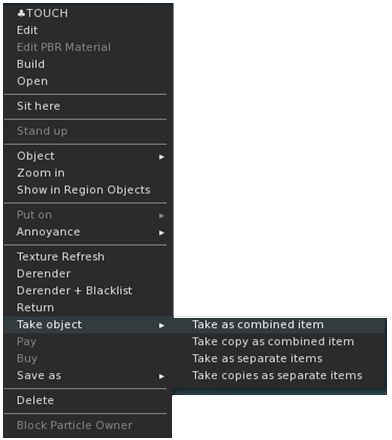
LL’s new object Take options, as displayed through the Firestorm right-click context menu
When picking-up in-world objects you can now chose to:
Take As Combined Item: return all the selected objects to inventory as a single, coalesced object.
Take Copy As Combined Item: return copies all the selected objects to inventory as a single, coalesced object, leaving the originals in-world as individual objects.
Take As Separate Items: return all the selected objects to inventory, but list them as individual items, not as coalesced.
Take Copies As Separate Items: return copies all the selected objects to inventory, but list them as individual items, not as coalesced, leaving the originals in-world.
Note that for Firestorm 7.1.10, these options are ONLY available as a sub-menu set in the right-click context menu; they have not as yet been added to the Pie menu (see: FIRE-34438).
Avatar Rendering Updates
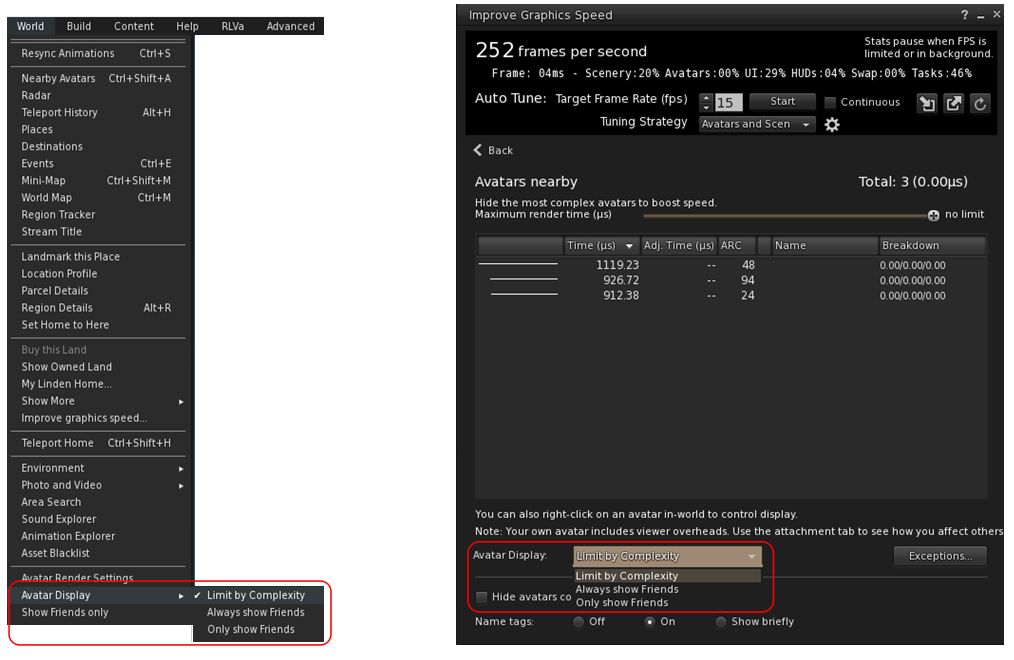
Linden Lab added new options to enable the prioritisation of rendering avatars using the following criteria:
Limit by complexity – any avatar with a complexity greater then your Avatar Maximum Complexity” setting will be rendered as a Jellydoll.
Always show friends – your friends will never be rendered as Jellydolls, no matter what their complexity
Only show friends – all avatars except your friends will be rendered as Jellydolls.
Within Firestorm, these options can be found as follows:
In the top menu → World → Avatar Display.
In the Performance Floater → Avatars Nearby.
Linden Lab’s avatar rendering options, as located within Firestorm 7.1.10
Notes:
In addition to these updates, Firestorm 7.1.10 retains the Firestorm option World → Show Friends Only. When enabled, the viewer will only renders your friends.
The now redundant Always Display Friends In Full Detail checkbox has been removed from the Performance Floater → Avatars Nearby.
Avatar-Related Improvements
Avatar height now correctly displays in edit appearance window (see: FIRE-34192).
Worn clothing layers now all correctly report as such in inventory (see: FIRE-34343).
Fix for integer underflow causing issues with wearables.
Fix for avatar attachments & surroundings not rezzing after teleport when teleport screens are disabled (see: FIRE-33981).
Setting for AvatarRotateThresholdSlow and AvatarRotateThresholdFast added back into Firestorm following their removal as part of a viewer code clean-up by LL (see: FIRE-34196 and LL Bug #1963).
General Updates / Improvements
Add Images to Inventory Items in Bulk: select up to 50 inventory items → Right click selection → Image.
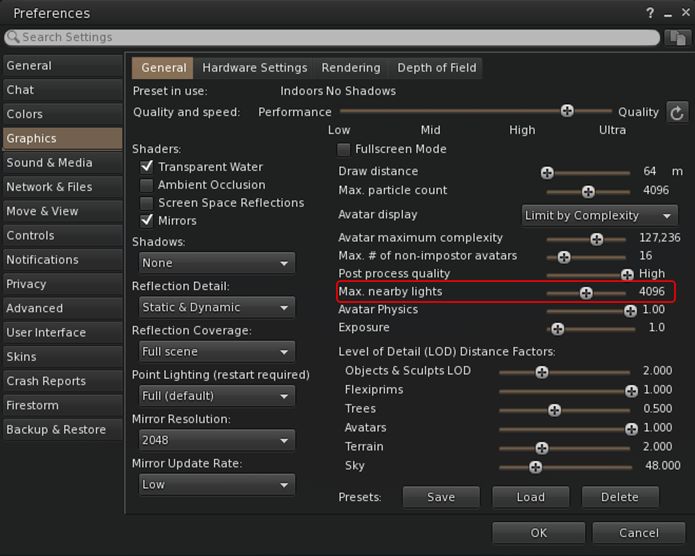
Option to control the amount of lights: Preferences → Graphics → General → Max Nearby Lights slider.
Control nearby lighting through the nearby lighting slider
GLTF model preview: use a prim to preview the appearance of a glTF scene / model:
Edit the prim. then Top menu bar → Developer → GLTF → Open.
To enable the Developer menu, either go to Advanced → Show Developer Menu or press Ctrl-Alt-Q or go to Preferences → Advanced → check Show Developer Menu
Note that this feature is still in the early stages of development and that glTF models will only appear locally in your own viewer, they will not be rendered for others to see in their viewers.
Better MOAP URL handling in order for users to not only be able to CTRL-C or Cmd-C copy but also to see decoded URL payloads for easy inspection. In the nearby media list, you can also right click a media/data link and Copy URL/Copy Data.
Performance Improvements Summary
Mirrors disabled by default for all graphics quality levels to improve performance.
You can choose to enable mirrors manually in Preferences → Graphics → General → Mirrors.
Improved general performance with PBR – Issue 1769.
Fixed performance regression since Graphics Featurettes viewer – Issue 1831.
Fixed viewer failing to detect more than 4Gb of video memory on Windows – Issue 1583.
Improved PBR viewer performance on Apple Silicon – Issue 1527.
Fixed setting a map beacon causing extreme lag on Mac – Issue 999.
Fixed severe stall and stutter in PBR viewers on Mac when editing objects – Issue 1203.
For the full list of fixes and improvements from Atlasaurus, please refer to the Atlasaurus release notes, linked to above.
Upstream Fixes from LL
Added error handling for intel crashes from the GLTF Scene shader – this fixes the login crashes on systems with older Intel HD graphics (see Issue 1856).
Fixed visual corruption caused by divide by zero in lighting functions – this fixes black & white areas in certain locations (see Issue 1852).
Fixed the voice call button being greyed out when you logged in to a voice disabled parcel (see this Canny bug).
Significant Firestorm Updates
Camera Roll
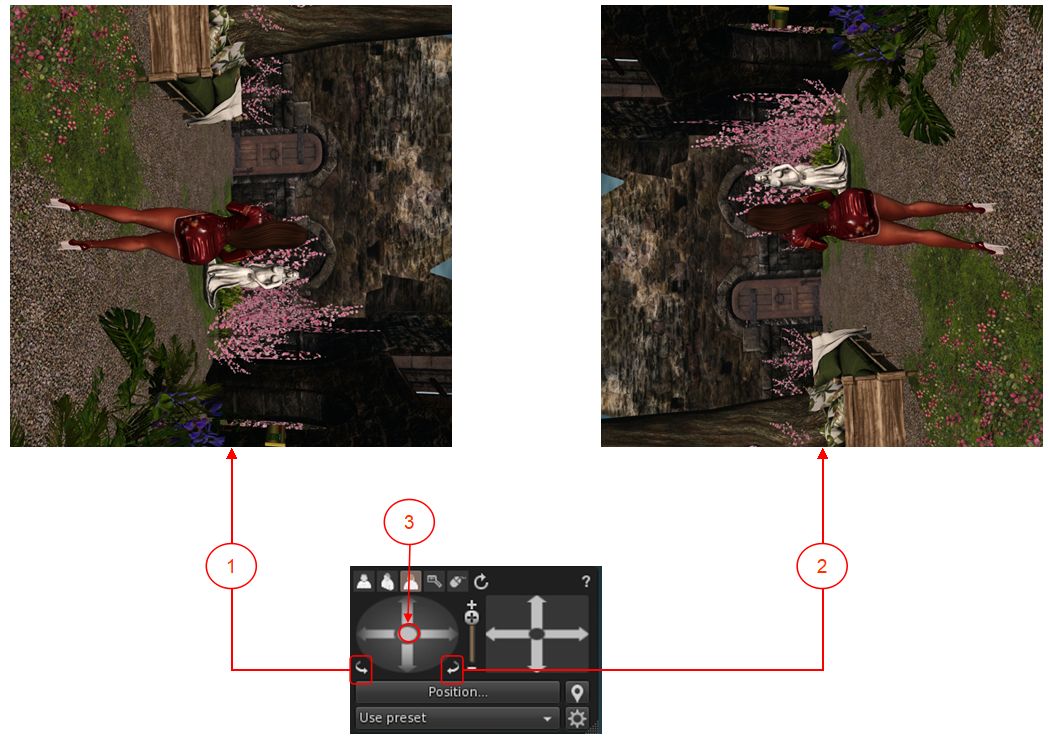
Ever wanted to physically roll the camera with ease when taking pictures? With Firestorm 7.1.10 you can, using an update based on an Alchemy viewer feature. Both the large and the small camera control floaters have new camera roll buttons (see image below):
The new camera roll buttons and the button for re-centring the view
The left button will roll the camera view clockwise on your screen through 360º.
The right button will roll the camera view counter-clockwise on your screen through 360º.
Clicking the button at the centre of the rotation controls will revert the viewer to “normal”.
General Improvements
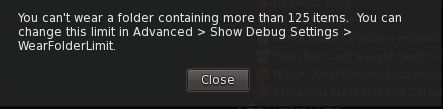
Check folder limit safeguard:
If you select the Wear Items option in the Inventory folder context menu, and the total number of items in the folder(s) exceeds the maximum limit for wearable items / attachments, a warning pop-up is displayed.
This prevents multiple items withing a folder (and sub-folders) being worn / removed / worn in excess of the limit when the Wear Items option is clicked.
A new safeguard warning is displayed when clicking on the Warn Items Inventory menu option for a folder containing items that exceed the maximum number of wearable items / attachments
Raised the 512×512 limitation for uploading snapshots to inventory to 2048×2048.
Multiple bug fixes for memory issues, RAM detection, texture management, UI bugs, stability and improvement fixes, crash fixes and more – please refer to the Firestorm 7.1.10 changelog for specifics.
OpenSim Updates
Fix for inventory fetching issues on OpenSim (seeFIRE-34403).
Fix for occasional crashes on large inventories or slow grid asset servers (see FIRE-34403).
Previously, an assertion failure would occur if mComplete.size() was zero. This has been downgraded to a warning message and early return, improving stability especially for large inventories or slow grid asset servers.
This entire code path is only accessed by OpenSim pending their implementation of AISV3, when it will be removed.
Feedback
As with the PBR release, I have no feedback to offer with this release, as I’ve not had time time to bounce around with it to any great degree.
Note that the performance improvements from the Lab’s Atlasaurus viewer constitute a first round of fixes; more will be coming with the upcoming DeltaFPS viewer (promoted to release status, Tuesday, September 17th) and the ExtraFPS viewer (still to be issued by LL at the time of writing).
Logos representative only and should not be seen as an endorsement / preference / recommendation
Updates from the week through to Sunday, September 15th, 2024
This summary is generally published every Monday, and is a list of SL viewer / client releases (official and TPV) made during the previous week. When reading it, please note:
It is based on my Current Viewer Releases Page, a list of all Second Life viewers and clients that are in popular use (and of which I am aware), and which are recognised as adhering to the TPV Policy. This page includes comprehensive links to download pages, blog notes, release notes, etc., as well as links to any / all reviews of specific viewers / clients made within this blog.
By its nature, this summary presented here will always be in arrears, please refer to the Current Viewer Release Page for more up-to-date information.
Note that for purposes of length, TPV test viewers, preview / beta viewers / nightly builds are generally not recorded in these summaries.
Official LL Viewers
Release viewer: version 7.1.9.10515727195, formerly the Altasaurus RC, promoted August 26.
Performance boosts. Memory management has been optimized and users will experience a higher FPS across various systems. A comprehensive range of bug fixes are also provided. This includes better PBR material handling and resolving frequent crashes. See the release notes for more.
UI for scheduling region restarts now available via a new button located in the Region/Estate floater. (Note: there is currently an issue with scheduled region restarts working correctly and a fix is due to come in the next server release).



 On Tuesday, September 17th (SLT), Firestorm released version 7.1.10.75913 of their viewer.
 Inara Pey: Living in a Modemworld