Firestorm ready to launch Gateway; MadPea join as partners

The Firestorm Gateway: partnering with MadPea Games

I recently covered the soon-to-be-launched Lab trail progamme which will see a new set of community gateways active within Second life and geared towards helping incoming new users get to grips with the platform more positively, and help them to start to engage in activities, thus hopefully improving the chances that they’ll “stick”.

The Firestorm team are one of the groups invited by the Lab to be a part of this new trial programme, and as I reported earlier in October, they will be launching their Gateway on Saturday, October 31st with a special party followed by a month-long Spooky Nights hunt which will take place across the five core regions of the Firestorm Gateway.

What I couldn’t reveal in that article, but am able to now, is that MadPea Games have agreed to partner with Firestorm to help get new users engaged in Second life.

madpea-logo
A number of MadPea games will be available in the Firestorm Gateway regions

In a press release on October 28th, MadPea confirm they are providing Firestorm with a number of their vintage games which income new users will be invited to play free-of-charge, in order to present them with even more opportunities to learn about and engage in Second life.

Commenting on the partnership, Kiana Writer, CEO and Queen Pea of MadPea Games says, “We are all very excited about the opportunity of working with Jessica and her team and waving the flag for what is achievable for user-created content on the grid. There’s a huge learning curve when you enter SL for the first time and we believe Firestorm, along with their partners, are best placed to help guide new users through that arc.”

Jessica Lyon, speaking for the Firestorm team, said: “We are super excited to announce that we’ve formed a mutually beneficial partnership with MadPea Productions! Essentially MadPea will install some of their older games as free play in our environments, and in exchange new residents will learn about MadPea Games to become potential new customers. MadPea will also then be able to send their new users to our installations to learn how to play MadPea games.”

The Firestorm Halloween Party stage area

The Firestorm Halloween Party will kick-off at 13:00 SLT with a series of live performances running through until 16:00, when things will switch over the DJs, and the Spooky Nights Halloween Hunt will launch.

Topping the bill for the party are:

  • 13:00 SLT – Mankind Tracer
  • 14:00 SLT – Nance Brody
  • 15:00 SLT – The Changhigh Trinity Sisters Fireshow
  • 14:00 SLT onwards – DJ Quad

Over 150 well-known Second Life merchants have contributed to the hunt, and you can read a list of participating creators on the Firestorm post on the party, and also catch photos of some of the prizes on offer.

Four landing points will be in operation for the party, as follows:

For further information on the party and the Firestorm Gateway, please refer to the Firestorm blog post, or to find out more on the Gateway and the new Gateway programme, please refer to the articles in this blog.

Related Links

Alchemy 3.8.5: skinning and getting under the hood

Alchemy-logoOn Sunday, October 25th, the Alchemy team announced the release of version 3.8.5.36974 of their viewer. This is an update which primarily focuses on a lot of under-the-hood updates and fixes which may not always be obvious to users, but which are intended to further improve viewer stability and improvements. However, it also includes some interesting tweaks as well, of which more below.

As always with any viewer release, please refer to the release notes for details on updates, improvements and fixes, as provided by the development team.

The first noticeable change with this release lies with the version number, which leaps from 3.8.2 from the last release to 3.8.5 – the result of Alchemy (alongside UKanDo and Kokua) pacing the Lab’s version numbers for viewer updates. The idea with this is to make it easier to quickly identify which of the recent releases from the Lab has been merged into a release from any TPV with a matching version number. So in this case, Alchemy is merged-up to the Lab’s 3.8.5 code and the October Maintenance release viewer.

The other major visual change to the viewer with this release is a new skinning option. This allows users to choose the look of the viewer UI skin, and to create their own skins, which they can use on their own or share with others, marking alchemy as the latest viewer to offer support for custom skins.

The option can be found under Preferences > Skinning, and as the release notes indicate, the viewer currently includes just two options at present, in order to keep the install size down: Alchemy’s own dark skin (default) and the Lab’s classic V3 viewer skin.  However, the release notes appear to suggest that further skins may be added to the viewer – or perhaps made available for download through the alchemy website – in due course. There will also apparently be a guide produced, offering users instructions on making their own skins.

The Skinning option, new with Alchemy 3.8.5 allows the use of custom UI skins with the viewer

Using a skin simply requires selecting it from the list of available options, clicking the Apply button and then confirming your selection by clicking on Yes in the follow-up dialogue box. Restarting the viewer will then apply the selected skin.

Other Updates

The Alchemy 3.8.5 refresh option allows you to refresh textures / meshes worn by yourself or other avatars

As well as the above, the 3.8.5 release of Alchemy includes:

  • libcurl 7.45.0, boost 1.59, the replacement of C++11 with C++14
  • ALCH-312 – a Refresh option has been added to assist with loading avatar mesh and textures
  • ALCH-278 – the Group list (CTRL-SHIFT-G) now includes an “eye” icon to show if the group can be viewed in your Profile (icon shown) or is hidden (icon not shown) – groups are hidden through the Group Profile floater, as usual
  • ALCH-270 – a message logger and builder for packet and message inspection for debugging and fixing OpenSim. This feature will be locked to developer builds
  • ALCH-297 – the Fast Timers legend is now scrollable by the scroll wheel
  • ALCH-290 – the Destination Guide now updates when teleporting between OpenSim grids
  • Numerous bug fixes and many under-the-hood changes.

There is still no RLV support for Alchemy with this release, which may disappoint some. However, what is there makes for a useful update, and ensures Alchemy stays on par with the Lab’s continuing run of updates and additions to the official viewer.

Related Links

2015 viewer release summaries: week 43

Updates for the week ending Sunday, October 25th

This summary is published every Monday, and is a list of SL viewer / client releases (official and TPV) made during the previous week. When reading it, please note:

  • It is based on my Current Viewer Releases Page, a list of all Second Life viewers and clients that are in popular use (and of which I am aware), and which are recognised as adhering to the TPV Policy. This page includes comprehensive links to download pages, blog notes, release notes, etc., as well as links to any / all reviews of specific viewers / clients made within this blog
  • By its nature, this summary presented here will always be in arrears, please refer to the Current Viewer Release Page for more up-to-date information.

Official LL Viewers

  • Current Release version: 3.8.5.305531- no change  download page, release notes
  • Release channel cohorts (See my notes on manually installing RC viewer versions if you wish to install any release candidate(s) yourself):
    • Quick Graphics RC viewer updated to version 3.8.6.305942 on October 19 – provides the new Avatar Complexity options and the new graphics preset capabilities for setting, saving and restoring graphic settings for use in difference environments / circumstances (download and release notes)
  • Project viewers:
    • No updates.

LL Viewer Resources

Third-party Viewers

V3-style

  • Alchemy updated to version 3.8.5.36974 on October 25th – core updates: parity with LL 3.8.5 code base, new skinning capability, libcurl 7.45.0, boost 1.59 – release notes

V1-style

Mobile / Other Clients

  • No Updates.

Additional TPV Resources

Related Links

Firestorm Halloween Hunt to open Gateway

The Firestorm Gateway regions: setting for a special Spooky Hunt, but merchant assistance sought

Firestorm will be opening their new Gateway regions to the public on Saturday, October 31st, with both a special Halloween party and the launch of their Spooky Nights Hunt, which will run through until Monday, November 30th.

The Firestorm Gateway is one of up to 20 new Community Gateways which will soon be opening as a part of a trial of a new Community Gateway programme initiated by the Lab, and  which I previewed back in September.

The idea is to allow communities and groups within Second Life to build their own gateways focused on bringing new users into Second Life and to help get them started. These gateways will include web pages to attract new users to them, which will include a registration API to allow those users to sign-up to SL and create and account without necessarily having to go through the central registration process at secondlife.com.

While the hunt isn't focused on encouraging new users into Second Life, the Firstorm Gateway regions, once officially opened, are itentded to help incoming users gain familiar with SL, gain support, and experience some of the activities to be found in-world, such as socialising, flying, boating and - as shown here - scuba diving
The Firestorm Gateway regions, once officially opened, are intended to help incoming users gain familiar with SL, gain support, and experience some of the activities to be found in-world, such as socialising, flying, boating, playing games, and – as shown here – scuba diving and underwater exploring

The Firestorm party and Spooky Nights hunt do not mark the official opening of the new Gateway programme as a whole – the Lab will hopefully be announcing this is due course. However, they do present the opportunity for Second Life users to explore the Firestorm Gateway regions, five of which will be featured in the hunt, which will also serve as the first event designed to attract new users to Second Life via Firestorm’s website.

A special stage area has been created for the party on October 31st, which will feature Mankind Tracer and Nance Brody, among others. There will be more details on this announced by the Firestorm team in due course.

The Firestorm Gateway regions also include areas suitable for intdoucing people to role-play, etc. - and you can explore them once the Spooky Hunt opens on October 31st
The Firestorm Gateway regions also include areas suitable for introducing people to role-play, etc. – and you can explore them once the Spooky Hunt opens on October 31st

The Spooky Nights Hunt will take place across the five activity regions of the Gateway, and it is hoped it will provide fun and interaction for both established and new users. Right now, and in support of the hunt, the Firestorm team are reaching out to Merchants who are willing to provide goodies as hunt prizes, with Jessica Lyon, the Firestorm project manager noting:

Although it is a Halloween hunt, the hunt remains open after Halloween. You can make a spooky gift or not.

If you are a Merchant interested in supporting the hunt, please hop over the Firestorm website and the Spooky Hunt application page for further information.

As well as participating in the hunt, newcomers and visitors will be able to explore all six of the Firestorm Gateway regions, which include an orientation region for people new to Second Life and a social area where people can meet and interact (and where questions on using Second Life can be answered). In addition, they’ll be able to participate in any of the activities offered across the regions. These are designed to present a broad feel for the things people can enjoy in Second Life, and include fly aircraft, sailing, jet skiing, scuba diving, playing games, etc. In addition, they can explore a simple role-play environment, or use the sandbox area to learn the basics of building.

The Firestorm Gateway opening will focus on a Halloween party of Saturday, October 31st, followed by a month-long Spooky Nights Hunt in the 5 activity regions of the Gateway

The Firestorm Gateway opening will focus on a Halloween party of Saturday, October 31st, followed by a month-long Spooky Nights Hunt in the 5 activity regions of the Gateway

One of the most important aspects of any Community Gateway is providing volunteers who are willing to spend time in-world providing help and support for new users as they arrive. If you would be interested in supporting the Firestorm Gateway by becoming a mentor there, please send a note card with your name and relevant background information (e.g. whether you have been a mentor in the past, experience in helping newcomers and users, etc.), to Jessica Lyon.

To keep up to date with preparations for the party and the hunt, as well as with further news on the Firestorm Gateway, keep an eye on the Firestorm website. I’ll hopefully have more news on the Gateway programme itself as it is announced by the Lab and / or more Gateways come on-line.

If you are participating in the Gateway trial programme, and would like your Gateway to be previewed in this blog, please use the contact form to drop me a line, or contact me in-world.

Black Dragon 2.4.4.3: going Chromium

Blackdragon logoOn Saturday 17th October, Niran V Dean released Black Dragon 2.4.4.3, which sees his viewer merged with the latest release from Linden Lab, gain the Lab’s Chromium Embedded Framework code for media, and which  includes some updates from Niran himself.

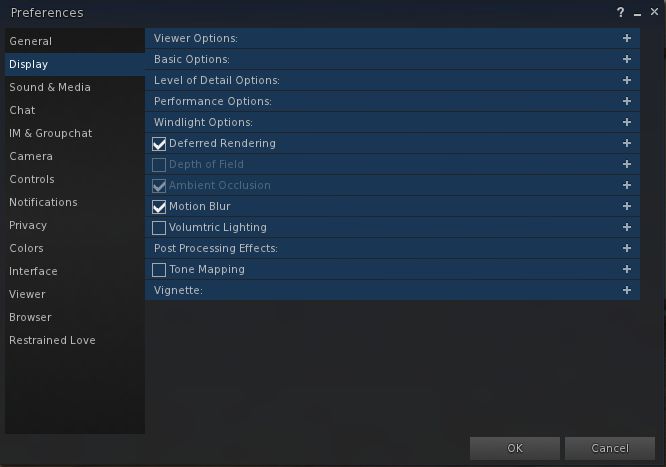
The latter most notably take the form of a re-working of the Display tab in the Preferences floater. Here, Niran has replaced the older scrolling tab layout with a more compact version, with expandable sub-tabs allowing feature sets to be viewed and expanded whilst also offering quick and easy on / off check boxes for functions users may wish to enable / disable, but where they don’t necessarily wish to change the associated settings.

The new Display tab in Preferences offers a series of function defined expandable sub-tabs, some of which had default on / off check boxes.

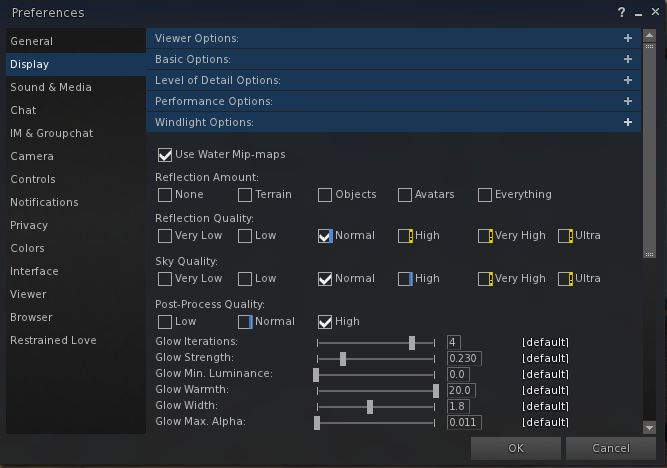
The sub-tabs can be individually opened / closed by checking on the + to the right of each tab’s title bar, and those opened will remain so until either closed, or the viewer session is closed and re-started. Opening multiple sub-tabs will add a scroll bar to the right of the Preferences floater when displaying the contents of the Display tab, allowing for smooth navigation between sub-tabs.

Clicking on the + on any od the Display sub-tabs will expand it to reveal all the associated options and settings. Sub-tabs will remain open until either manually closed or the viewer is shut-down
Clicking on the + on any of the Display sub-tabs will expand it to reveal all the associated options and settings. Sub-tabs will remain open until either manually closed or the viewer is shut-down

The inclusion of the CEF code from the Lab sees Black Dragon move a little ahead of the curve feature-wise, given the code still is only at project status when the Lab prefers TPVs not to adopt it until it has reached RC status.  That said, the code appears to work well within the viewer, allowing media to be easily viewed and well as allowing the expected manipulation of webGL elements either through the viewer’s MOAP capabilities or through the built-in web browser, as the very simple video below demonstrates.

Overall, a tidy update for the viewer, with the new Display tab layout present an interesting approach to encapsulating the myriad from display options available in the viewer in a format that allows for ease of use and viewing. While scrolling and expanding options aren’t to everyone’s liking, it does offer a tidy way of presenting things, with the quick on / off check boxes on some of the sub-tabs providing a good alternative to the growl factor of otherwise having to scroll and / or open / close sub-tabs to in order to disable or enable the functions.

Those on Black Dragon who produce media products in SL, or who wish to test their MOAP applications can, with this release, get to test their items without having to necessarily fall back on the Lab’s project viewer, but with the potential for updates to be pushed out by the Lab slightly ahead of them reaching any TPV, it might still be an idea to watch the Lab’s own viewer channels, just in case things get slightly adrift.

Note the video included in this article is only a very simple demonstration of WebGL manipulation in a CEF viewer. It is not intended as an in-depth demonstration or as a significant commentary on CEF use within the viewer, where it is intended to replace the use of llqtwebkit for media support (including within in-world televisions, etc.). WebGL demos via David Walsh and with thanks to Whirly Fizzle for the link.

Additional Links

2015 viewer release summaries: week 42

Updates for the week ending Sunday, October 18th

This summary is published every Monday, and is a list of SL viewer / client releases (official and TPV) made during the previous week. When reading it, please note:

  • It is based on my Current Viewer Releases Page, a list of all Second Life viewers and clients that are in popular use (and of which I am aware), and which are recognised as adhering to the TPV Policy. This page includes comprehensive links to download pages, blog notes, release notes, etc., as well as links to any / all reviews of specific viewers / clients made within this blog
  • By its nature, this summary presented here will always be in arrears, please refer to the Current Viewer Release Page for more up-to-date information.

Official LL Viewers

  • Current Release version: 3.8.5.305531, October 13 – formerly the Maintenance RC viewer download page, release notes
  • Release channel cohorts (See my notes on manually installing RC viewer versions if you wish to install any release candidate(s) yourself):
    • Notifications RC viewer updated to version 3.8.6.305981 on October 14 – new Notifications floater separates incoming notifications into System, Transactions, Invitations, and Group. It provides a better way to view, interact with, prioritize and manage incoming notices for busy residents (download and release notes)
  • Project viewers:
    • No updates.

LL Viewer Resources

Third-party Viewers

V3-style

  • Black Dragon updated to version 2.4.4.3 on October 17th – core updates: CEF integration, merge with current LL release viewer.
  • UKanDo updated to version  3.8.5.28153 on October 14 – core updates: merge to latest LL viewer release.

V1-style

Mobile / Other Clients

  • No Updates.

Additional TPV Resources

Related Links