2025 Week #30 Project Zero User Group Meeting

via Linden Lab
The following notes were taken from the Thursday, July 24th 2025 Project Zero User Group (PZUG) meeting.

  • They are based on the official video of the meeting (embedded below) + my chat log.
  • They should not be taken as a full transcript of the meeting.
Table of Contents

Meeting Purpose

  • The Project Zero User Group provides a platform  for open discussion about Project Zero, the cloud-streamed version of the Second Life Viewer. Topics can range from sharing the goals for Project Zero, demoing the current experience, and gathering feedback to help shape the future of cloud access for Second Life.
  • These meetings are conducted (as a rule):
    • The second and fourth Thursday of every month at 13:00 noon SLT.
    • In Voice and text.
    • At the Hippotropolis Campsite.
  • Meetings are open to anyone with a concern / interest in the above topics, and form one of a series of regular / semi-regular User Group meetings conducted by Linden Lab.
  • Dates and times of all current meetings can be found on the Second Life Public Calendar, and descriptions of meetings are defined on the SL wiki.

Resources

Recent Updates

[Video: 0:00-7:48; initially no sound on the video, as local chat is being used]

  • LL continue to experiment with sending some new users accessing SL via Project Zero to different start locations.
    • Part of July saw these users directed to the sandbox of the Welcome Hub; currently, they are being directed to Ahern.
    • LL is paying attention to what new users do when they get there and how likely they are to come back.
    • There is an intentional move to avoid traditional tutorial zones with these users, primarily because these tutorial areas are focused on the Desktop viewer, and Project Zero, within its emerging UI is starting to differ from the Desktop viewer.
      • There may in the future be a tutorial area designed specifically for Project Zero.
    • Suggestions for other locations new users could be sent to were sought.
  • Work is being carried out to move Project Zero’s Go menu to a sidebar within the browser window, so it operates in a similar manner to the Avatar Picker.
    • The number of available locations on the Go menu may also be expanded to more than three choices.
  • A focus remains on helping new users how to better understand avatar customisation and making new avatars.
  • A further focus is the development of a new web-based (presumably React / HTML5, as has been previously discussed) UI for Project Zero. This is designed to be a simplified UI specifically aimed at encouraging new users to give SL a try.

General Discussion

  • The general discussion revolved in part around further questions of a similar nature asked of users in the July Web User Group meeting. previous meeting: what was your first purchase; have you ever used a complete avatar; what originally brought you to Second Life; why did people say; were the first things you obtained in SL purchased or free; how did people obtain their first Linden Dollars (purchased, camping, etc), etc.
    • Obviously the responses were mixed, and mostly given in text chat.
    • his being the case, please refer to the video.

Date of Next Meeting

2025 Week #26 Project Zero User Group Meeting

via Linden Lab
The following notes were taken from the Thursday, June 26th 2025 Project Zero User Group (PZUG) meeting.

  • They are based on my audio recording of the meeting + chat log.
  • They should not be taken as a full transcript of the meeting.
Table of Contents

Meeting Purpose

  • The Project Zero User Group provides a platform  for open discussion about Project Zero, the cloud-streamed version of the Second Life Viewer. Topics can range from sharing the goals for Project Zero, demoing the current experience, and gathering feedback to help shape the future of cloud access for Second Life.
  • These meetings are conducted (as a rule):
    • The second and fourth Thursday of every month at 13:00 noon SLT.
    • In Voice and text.
    • At the Hippotropolis Campsite.
  • Meetings are open to anyone with a concern / interest in the above topics, and form one of a series of regular / semi-regular User Group meetings conducted by Linden Lab.
  • Dates and times of all current meetings can be found on the Second Life Public Calendar, and descriptions of meetings are defined on the SL wiki.

Resources

Recent Updates

Firestorm Zero

  • Firestorm Zero has – for the time being – been shut down as a streaming option.
  • Those who still had remaining purchased time for Firestorm Zero should have been refunded and received an e-mail notification that the service was being shut down.
  • The reason for shutting it down is primarily related to:
    • The amount of work required to maintain two different streaming products.
    • The need for the Lab to migrate project Zero to a new platform at the behest of their streaming provider, and not having time to also migrate Firestorm Zero in the same period.
  • This does not mean there will never be a further offering of Firestorm as a part of the Second Life streaming service.

New Joiner Workflow Updates

  • There has been a complete refresh of the Lab’s web-based new joiner workflow at join.secondlife.com, which now leverages the Avatar Picker first seen in Project Zero. For more on this, please see A short look at the refreshed Second Life web-based join flow.
  • As a part of this, the sign-up flow specific to Project Zero has also been updated. In particular, the Project Zero web site web.secondlife.com (formerly zero.secondlife.com) has been refreshed so:
    • It now  shows the same backdrop image as now seen on the web sign-up flow.
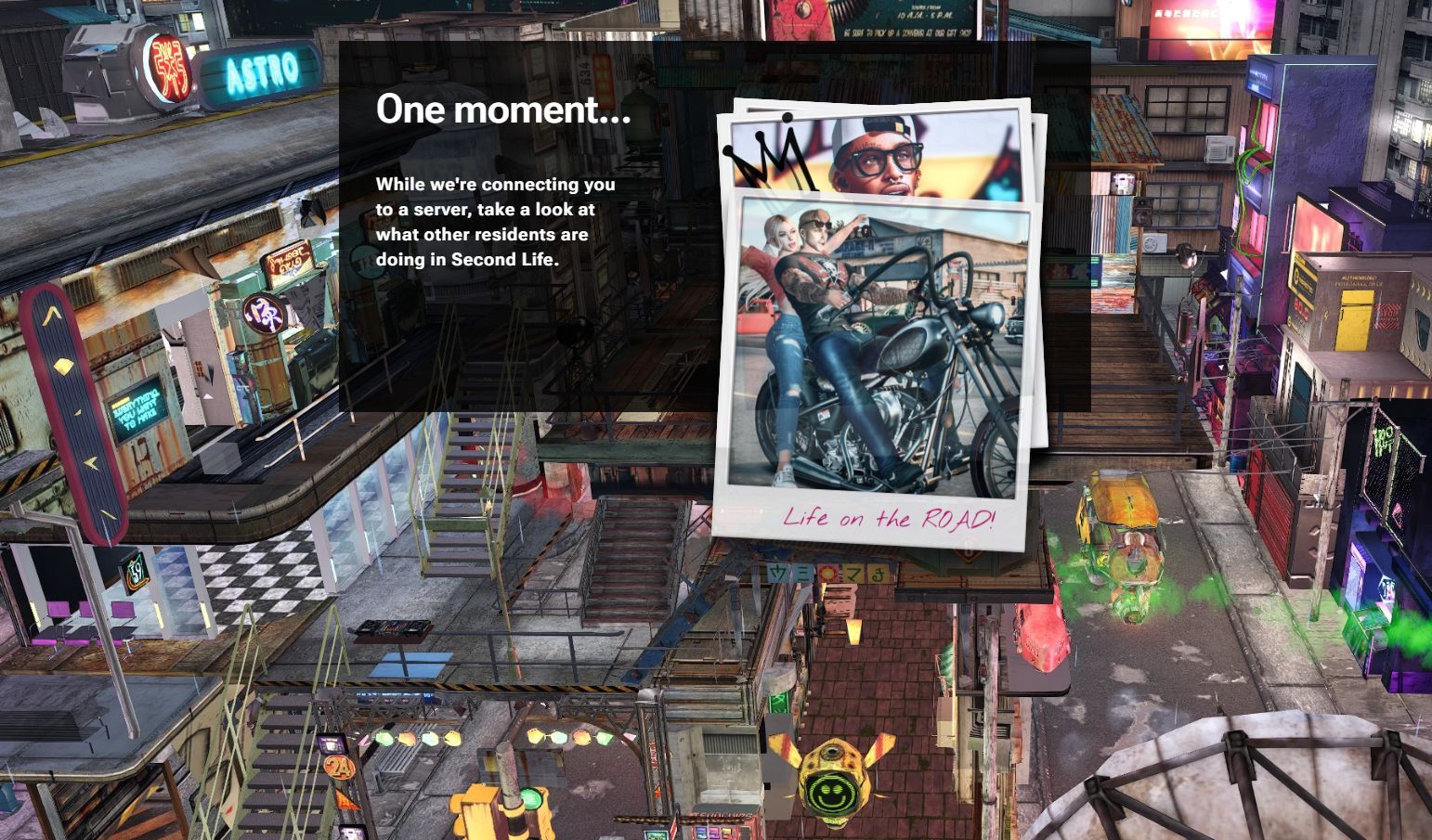
    • It Includes a slide show of Polaroid-like snapshots intended to illustrate to ne users what people can do in SL, whilst waiting for an instance of the viewer to become available and load in their browsero.
      • My own tests of this suggested that the page will keep parsing through the images seemingly ad infinitum if you cannot be connected to a browser instance of the viewer, rather than indicating this is the case.
The revised web page for launching Project Zero (web.secondlife.com) with the backdrop splash image and the “polaroid snapshots” slide show
  • Overall, these changes  – both to web.secondlife.com and (particularly) join.secondlife.com have resulted in more incoming users sticking around in-world.

Current Focus

  • In line with Philip Rosedale’s SL22B Meet the Lindens session on Wednesday, June 25th (see the video, or refer to my summary of that event for specifics), Project Zero is focused on the new user experience.
  • Specifically, how to get a new user from logging in and choosing an avatar through to customising that avatar so it reflects what they want to reflect, as easily as possible, using the Avatar Welcome Pack content, rather than Senra.
  • This is likely to be an iterative process over multiple months, with a cadence of updates intended to test and refine ideas and approaches.
  • The work will also involve gathering quantitative data on how well the approach(es) seem to be working, and also qualitative data through spending time at areas where people coming into SL are, and watching and interacting with them as they customise their avatar, and gain feedback.

General Discussion

  • Project Zero remains primarily focused on use by incoming new users, with a “very small concurrency” of existing users available to access it.
  • The reason for the focus on incoming new users is because it is easier to try new ideas and iterate on them easier using Project Zero, rather than trying to do so through the desktop.
  • It is recognised that there is a hunger among existing users to try the streaming viewer, and one way to do this might be to start to offer it on a paid basis as was the case with Firestorm Zero. However, this is not something that is likely to happen in the short-term.
  • The current action of Project Zero simply booting a user off when their allotted time is up without any warning / gracefully log-out is something to be addressed in “the very near future”.
  • Whilst the UI for Project Zero largely resembles that of the official viewer, there are differences, some visible (such as the lack of a left-side toolbar button field, and some not so visible.
    • The not-so-obvious difference is that elements linked to buttons are subject to redesign, so that if any are updated – such as Chat – the associated Conversations floater can be redesigned so it does not obscure so much of the in-world view when it is open.
    • These aspects of the work potentially allow elements of the viewer to be displayed outside of the world view, but withing the browser tab, as has been done with the Avatar Picker, leaving the in-world view unimpeded.
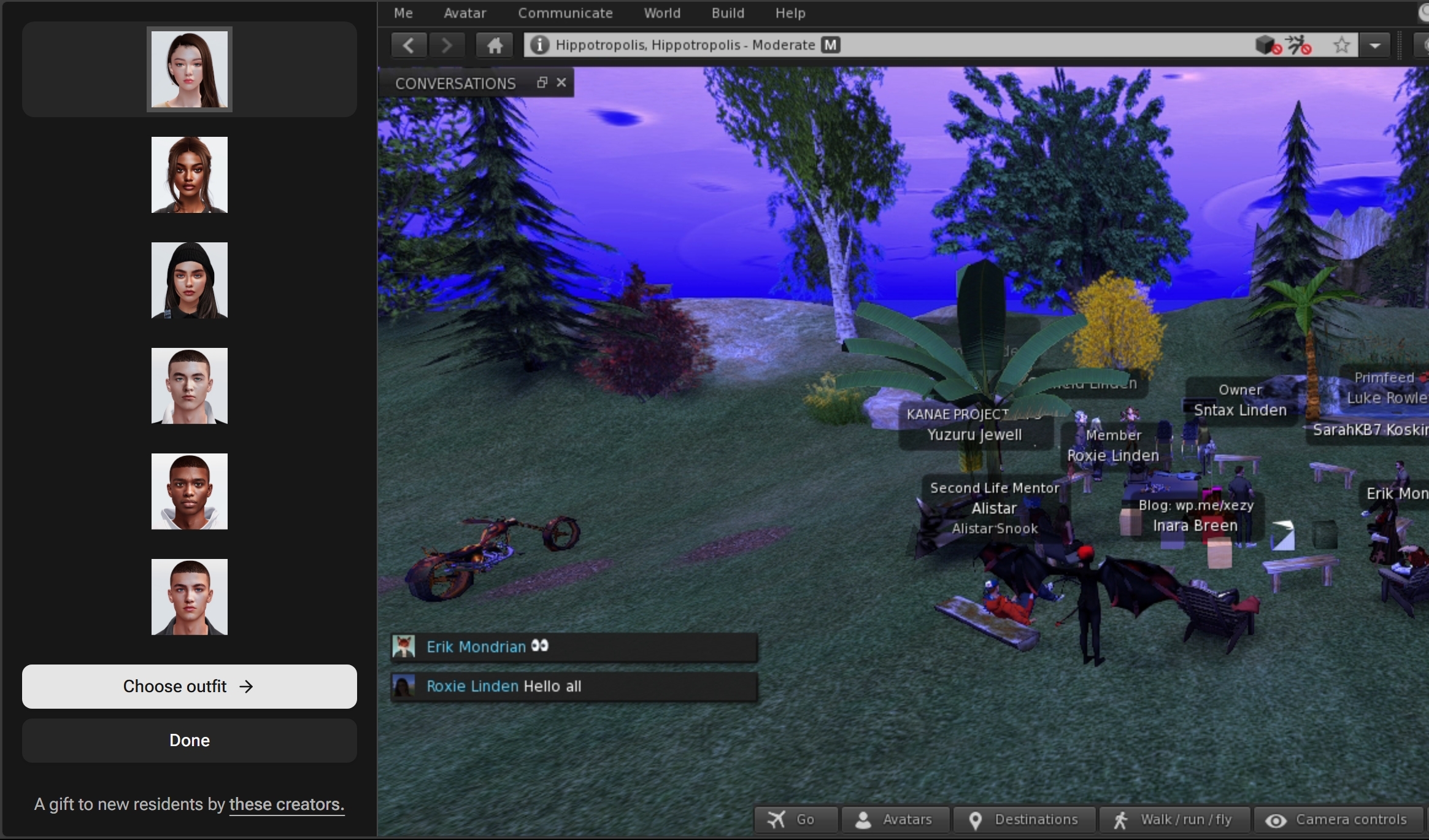
An example of a viewer toolbar button (Avatars) causing the Avatar Picker to be displayed within the browser tab, but outside of the Second Life viewer window, leaving the latter unencumbered.
  • A general discussion on helping new users understand customising their avatars – from providing freebies suitable for the bodies in the Avatar Welcome Pack in placing such as the Welcome Hub and locating these together with the teleports to the changing rooms; providing additional help and information boards, etc., within the changing rooms, offering new users a “home space” where they can go to change (much like Sansar had / has), etc.
  • Offering some form of recognised changing room area where new users could experiment with avatar dressing / customisation was seen as advantageous on several levels:
    • It has a familiarity with the way we go about trying clothing in the physical world, and thus is a comfortable environment.
    • It could be used by a new user and a mentor or friend, so the latter can give support and lessons without interruption.
    • It can save on unintended embarrassment (e.g. having a fatpack for multiple different bodies and accidentally wearing everything).
  • A broader discussion on how to offer new users more of an experience in Second Life – should they be prompted / directed on the basis of interest, or should it be free-form? Should users be provided with lists of Groups which share their interests? How can this be done?, etc.

Date of Next Meeting

2025 Week #21 Project Zero User Group Meeting: updates

via Linden Lab
The following notes were taken from the Thursday, May 22nd 2025 Project Zero User Group (PZUG) meeting.

  • They are based on my audio recording of the meeting + chat log.
  • They should not be taken as a full transcript of the meeting.
Table of Contents

Meeting Purpose

  • The Project Zero User Group provides a platform  for open discussion about Project Zero, the cloud-streamed version of the Second Life Viewer. Topics can range from sharing the goals for Project Zero, demoing the current experience, and gathering feedback to help shape the future of cloud access for Second Life.
  • These meetings are conducted (as a rule):
    • The second and fourth Thursday of every month at 13:00 noon SLT.
    • In Voice and text.
    • At the Hippotropolis Campsite.
  • Meetings are open to anyone with a concern / interest in the above topics, and form one of a series of regular / semi-regular User Group meetings conducted by Linden Lab.
  • Dates and times of all current meetings can be found on the Second Life Public Calendar, and descriptions of meetings are defined on the SL wiki.

Resources

Note: “Zero” or “Project Zero” in these summaries always refers to the SL official viewer running in a browser; “Firestorm Zero”, “FS0” or “FS Zero” always refers to the Firestorm viewer offering in a browser.

Recent Updates

Avatar Picker

The Avatar Picker. Credit: Linden Lab
  • The Picker is actually a browser HTML element separate to the viewer, popping out and to the left of the viewer within a browser tab.
    • This is currently experimental, but is something the Lab would like to move towards.
    • The idea is is move away from floaters in the viewer, where appropriate, moving things to one side in the browser so as to leave the in-world view less cluttered.
  • The picker is associated with the new Avatar Welcome Pack also issued in April, and forms first part of presenting Project Zero with a new UI, built using HTML / React, and first discussed by Philip Rosedale when Project Zero was initially launched.

Go Menu and Toolbar Button

  • Previously referred to as the “Destination Picker”, the Go Menu has now been implemented, the name aligning with the Go button seen on the web account registration  / join pages.
  • Accessed by a new Toolbar button within Project Zero – also called Go – the “menu” is a scrollable  panel of potential destinations for (new) users.
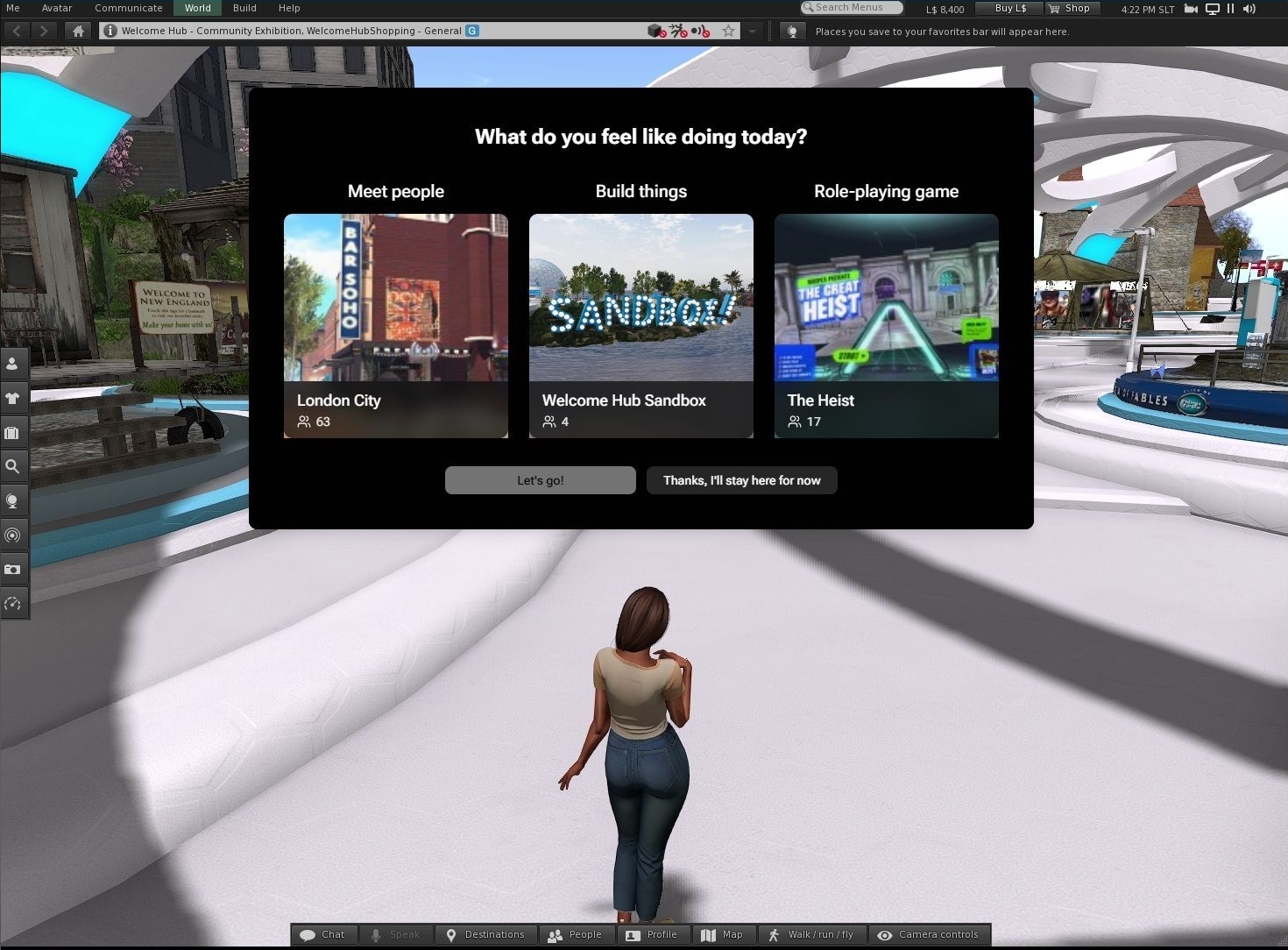
  • Currently, the panel contains three destinations, rather than the 12 indicated in the April meeting. These have been selected on the basis of activity, rather than location; the activities being: meeting people, building, joining a role-playing game.
The Go Menu panel. Credit: Linden Lab
  • The Go Menu is automatically displayed when a new user first launches Project Zero, and is experimental at this point, and:
    • May well be expanded more towards the notional 12 places.
    • Is not intended as a replacement for the Destination Guide.
    • Is being monitored by LL to gather information of how well it is used and the potions people tend to use the most.
  • In addition, a new Toolbar button has been created.
    • This is called “Go” and has an airport-style image of an aircraft departing.
    • It is part of the default set of Toolbar buttons.
    • Allows a user to re-display the Go Menu panel.
  • Even with the limited choice on offer, the Lab has already noted that users coming into SL tend to pick on the option that has other avatars present, rather than being purely driven by activity. However, s noted in the meeting, it is still too early in testing to say this is definitively so (it might just be that as the first location in the panel, London City is just naturally clicked on, for example).

Toolbar Refresh

  • The general display of the toolbar buttons has been refreshed for Project Zero.
  • In particular, buttons are no longer displayed on the left side of the viewer window; everything defaults to the bottom of the window, with the number of buttons reduced to better-suit the initial needs of incoming new users.
The new Project Zero Toolbar layout as seen by incoming new users – click for full size, if required. Credit: Linden Lab
  • By default, this Toolbar comprises:
    • Go button – described above.
    • Avatars – opens the avatar picker, also described above for changing an avatar / altering the style of dress.
    • Six unchanged buttons: Destinations, Walk/Run/Fly, Camera Controls, Profile, Speak, Chat.
  • During the meeting, the following default buttons were additionally suggested:
    • Chat Bar (per most viewers outside of the official viewer).
    • Inventory.
    • People / Friends + access to Groups.

General Discussion

  • It was noted that those attending the meeting had all been unable to access Project Zero to test the new features – it is hoped (no promises) that this might bee addressed.
  • Suggestions for alternative Go Menu destinations were offered:
    • Builders Brewery and Ivory Tower of Prims as places for those wishing to learn to build.
    • A broader selection of game destinations, rather than just MadPea.
    • Places like Dreamer’s Bay, where newcomers can receive assistance, have the opportunity for free housing, etc.
  • There was a general Discussion on how people make friends, and the various means of doing so, possibly in the hope of finding a route to making it easier for newcomers to do so, rather than them getting confused by multiple different ways.
  • The above led to a more esoteric discussion on Calling Cards; the Friends List (and how it’s not really that, it’s more a contacts / acquaintances list for many, which strayed into the realm of Firestorm Contact Sets); feedback on how people might go about making friends. These discussion appeared to be more for gleaning information than aiming towards anything planned for Project Zero.
  • The point was made that Second Life is potentially far less sociable nowadays than previously, and that while the onus seems to be on creators and content – which can help – the sense of wider community and of having places to go and things to do has been somewhat lost. In this, mention was made of fun activities such as skydiving, regions like the Greenies and other builds by Rezzable, etc.

Date of Next Meeting

2025 Week #17 Project Zero User Group Meeting

via Linden Lab
The following notes were taken from the Thursday, April 24th 2025 Project Zero User Group (PZUG) meeting.

  • They are based on my audio recording of the meeting + chat log.
  • They should not be taken as a full transcript of the meeting.
Table of Contents

Meeting Purpose

  • The Project Zero User Group provides a platform  for open discussion about Project Zero, the cloud-streamed version of the Second Life Viewer. Topics can range from sharing the goals for Project Zero, demoing the current experience, and gathering feedback to help shape the future of cloud access for Second Life.
  • These meetings are conducted (as a rule):
    • The second and fourth Thursday of every month at 13:00 noon SLT.
    • In Voice and text.
    • At the Hippotropolis Campsite.
  • Meetings are open to anyone with a concern / interest in the above topics, and form one of a series of regular / semi-regular User Group meetings conducted by Linden Lab.
  • Dates and times of all current meetings can be found on the Second Life Public Calendar, and descriptions of meetings are defined on the SL wiki.

Resources

Note: “Zero” or “Project Zero” in these summaries always refers to the SL official viewer running in a browser; “Firestorm Zero”, “FS0” or “FS Zero” always refers to the Firestorm viewer offering in a browser.

Avatar Picker

  • Released on April 24th, 2025.
  • Actually the first part of presenting Project Zero with a new UI, built using HTML / React, and first discussed by Philip Rosedale when Project Zero was initially launched.
  • Takes the form of a UI element that “pops in and out” of the left side of the browser window for the viewer.
  • Allows a user to select one of the avatars available within the new Avatar Welcome Pack, and the dress it in one of the available outfits.
  • The idea is to help new users get started with the kinds of avatars and avatar accessories more generally found in SL, thus grounding them more in the platform and the avatar ecosystem.

Project Zero and On-Boarding New Users

  • With the resumption of direct advertising of SL, the Lab has noted:
    • Only around 10% of users responding to an ad and who are directed through the sign-up process that requires them to download and install the viewer, actually get as far a logging-in.
    • However, the number responding to an ad and being directed to the sign-up process culminating in them being able to access SL directly through their browser using Project Zero, has a success rate of over 50% actually logging-in.
  • Data gathering on incoming new users responding to ads suggest that the majority are using computers that would not be able to run the viewer to its fullest visual extent; however, 90% of those users coming in via the Project Zero route are able to properly “see people and hear the birds”.
  • The next strategic step is seen as encouraging those new users to more fully engage with the platform, and two steps are being taken in this direction – the Avatar Picker noted above, and an upcoming “Destination Picker”, which is seen as an extension to the avatar onboarding process.

Project Zero “Destination Picker”

  • This is liable to be the next element for the new UI.
  • When available, it will allow (new) users to select one of the 12 destinations, in a similar manner to the Go button seen on the web account registration  / join pages.
  • The desire being to point them towards locations and experiences that bring home the value of Second Life, and which encourage them to continue to log-in to the platform.
  • In this it is recognised that:
    • Simply listing a plethora of destinations which may or may not have active use risks losing incoming new users on the basis if they get sent to places where there is no engagement with others, they simply will not stay.
    • Similarly, just sending people to “crowded” places (clubs, shopping areas, etc.), is not necessarily a good idea, and people within those environments may not be amenable to answering questions / offering assistance. etc.
    • People are much more likely to stay if they find people who are friendly, willing to offer help, point them towards community resources, etc.
  • As such, the destinations placed in the Picker are going to be curated (and possibly rotated), based on how well they assist in helping new users feel “part” of SL.

Additional Notes on Destinations / On-boarding

  • Selections for inclusion are liable to be along lines that reflect the typical reasons people give for signing-up to SL – such as an interest in art, a desire to experience live music, etc.
    • In this regard, incoming new users are already being “round robined” to a number of potential starting points: the Welcome Hub, Gateways such as Firestorm’s gateway, experience-oriented hub like MadPea, etc.
    • However, the Lab wants to move this on to the users themselves being able to make a choice as to where they go on logging-in.
  • A new channel will be provided to those managing the selected destinations, which will provide them with data such as: numbers of new users returning for a further session, number of users going to no upgrade to a subscription tier, and other data that can help illustrate the success of a location in supporting new users, and possible highlight areas for possible optimisation.
  • With regards to the success of destinations used within the on-boarding of new users over the year, Philip Rosedale noted the following:
Over all these years, when we have looked at the statistics for destinations for areas as different as those I’ve mentioned – the Welcome Hub, the Adventure Island, the Firestorm Welcome Island, the MadPea games, for example – fascinatingly enough, we see that the success at retaining new users is virtually identical for all of those destinations; and overall, is of course very poor. 
So its interesting to not that we’re not even close, it would seem, on what the right on-boarding experience is; because all of the ones we have tried are equally unsuccessful. 

– Philip Rosedale

New Users and a Sandbox

  • Sntax floated the idea of offering incoming users the opportunity to go to a specific sandbox environment were they could join other users and new users in collaborative building / learning to build.
  • Active Worlds used to have something similar for its incoming new users.
  • Responses to this at the meeting were mixed.
    • Positives: offers the opportunity for collaborative work using the built-in tools; allows experienced 3D content creators new to SL experiment with importing mesh; could become an informative learning “playground”.
    • Negatives: built-in tools for content creation are both complex and have not seen any real TLC in years; primitives fall well short of more refined meshes; the potential for griefing.
  • This lead to a more general discussion on engaging new users, opportunities for engaging them in activities and how to direct them (e.g. offering those wanting to use Voice to “Voice friendly” locations; offering experiences such as games, sailing, flying, etc.

Notes on Availability

  • Existing users can also use the Avatar Picker, however:
    • It is only available on Project Zero.
    • Project Zero is geared towards incoming new users, so existing users might find it difficult to obtain a slot when trying to log-in via Zero.
  • Part of the reason for this is the Lab feels the capability needs to mature before becoming more widely available to existing users.
  • That said, if people would like to use Zero because it would potential offer a better experience than a viewer running locally on their computer, should IM Sntax Linden stating why they want to use Zero and what, specifically, they would use it for and the perceived benefits. Such use cases might then help speed the development of the capability.
  • Passes for Firestorm Zero are currently not available.

Date of Next Meeting