On Tuesday, November 15th, the Main (SLS) channel received the same server maintenance package as previously deployed to the three RC channels in week #45. This includes:
llGetObjectDetails() will have a new OBJECT_GROUP_TAG function (feature request BUG-20064) – when pointed at avatars it returns the group tag you see floating above them; and also OBJECT_TEMP_ATTACHED – to tell you if something is a temp attachment (feature request BUG-5195).
There is no planned RC deployment for Wednesday, November 16th.
No Change Window
A No Change window is in force in week #47 (week commencing Monday 21st November) in the run-up to Thanksgiving in the United States. This means that all four server channels should now remain on the same release through until November 30th, when a new RC deployment is anticipated.
SL Viewer
As anticipated, the Maintenance RC viewer, version 4.1.2.321518 was promoted to de facto release status on Tuesday, November 15th. The viewer includes multiple crash fixes; fixes for bugs encountered in building; fixes and improvements for the viewer UI; avatar and outfits improvements; inventory fixes; code clean-up, etc. Please refer to the release note for specifics.
The leaves the rest of the viewer release channels as follows:
Obsolete platform viewer, version 3.7.28.300847, dated May 8, 2015 – provided for users on Windows XP and OS X versions below 10.7.
A further Maintenance RC viewer is anticipated, and may appear before the end of the week.
Horizons Experience
On Tuesday November 15th, the Lab introduced the Horizons Experience, a new 6-region quest-style adventure coupled with a new Mainland themed community environment. You can find out more via the official blog post, while I have a in-depth look at the new community environment and a run through the new gaming experience.
The following notes and audio were taken from the weekly Bento User Group meeting, held on Thursday, November 10th at 13:00 SLT at the the Hippotropolis Campfire Circle. and chaired by Vir Linden. For details on the meeting agenda, please refer to the Bento User Group wiki page.
There is a further RC update pending, as the Lab continues to work on reported bugs. Issues in particular which are receiving attention are:
An issue affecting some Mac systems running Nvidia graphics running out of the GL uniform buffer space. This can be fixed by cutting the number of joints per mesh, which may not always be ideal from a creator’s perspective. However, a further fix has been suggested by the alchemy viewer team, which Vir is looking at, which may be an option going forward.
An issue with the Reset Skeleton option not always un-deforming an avatar. This appears to be a permissions issue (you can generally deform your own avatar, but may not be able to properly un-deform someone else due to the permissions set on their animations). Vir is currently having a hard time pinning the issue down, and has requested than anyone able to consistently repro it with a model to drop him a line.
A further fix still to be added to the RC viewer is for collision volume joint positions which were failing to reset correctly when using Reset Skeleton.
There have been more bugs filed as a result of the Firestorm Bento pre-release and alpha version being made available to testers, which is helping to pin down the more significant issues and ensure that, where possible, fixes are put in place.
The most recent RC for the viewer at the time of writing (version 5.0.0.321250) has been showing an improved crash rate, with no significant spikes when compared to the current release viewer.
Legacy Content Deformation Issues
The deformation issue affecting some early Bento avatars and due to bad joint position overrides, as initially reported in BUG-40672 doesn’t appear to be widespread. As such, and subject to final confirmation by the Lab, it looks as though no changes will be made to the viewer to fork rendering behaviour (as discussed in my Bento update #32), which would require Bento content to be re-uploaded.
There are other bugs reported within BUG-40672 which have fixes, such as for the eye problem (again, see my Bento #32 update), the Haste Coy product problem, and the 1st Act Garou Male Avatar, and these either are, or will be in RC updates to the Bento viewer, where code fixes are required.
Firestorm Bento FPS Issue
Some people on the Firestorm Bento alpha release are reporting poor performance / low FPS when around other avatars. However, others are reporting an improved performance with the Bento version over the current 4.7.9 – although that could be a placebo effect. For those experiencing lower than expected FPS on their systems,try running the latest official Bento RC and see if the same performance issues are apparent. If they aren’t, try one of the following:
Try raising your Avatar Complexity to a high value / No Limit, as there is an odd issue on some systems where rendering a lot of “Jelly Dolls” can negatively impact viewer performance
Back-up your settings, and then reset everything to default values (e.g. as defined by the Bento RC) and check performance. If there is a noticeable improvement, gradually work through graphic settings and see if / when the updates start to impact performance. If you see a consistent impact which can be reproduced, file a Firestorm bug report.
llGetObjectDetails() will have a new OBJECT_GROUP_TAG function (feature request BUG-20064) – when pointed at avatars it returns the group tag you see floating above them; and also OBJECT_TEMP_ATTACHED – to tell you if something is a temp attachment (feature request BUG-5195).
SL Viewer Updates
The Maintenance RC viewer updated to version 4.1.2.321518 on Thursday, November 10th. This may well be the next RC to gain promotion to release status, given the Bento viewer is still awaiting a further RC update, as noted above.
The 360 Snapshot project viewer updated to version 4.1.2.321431 on Wednesday November 9th.
Avatar Complexity Issue
As noted in the Bento update, some people are experiencing FPS / performance issues on the Firestorm Bento viewer. However, there are a number of issues related to the level of detail (LOD) on “jellied” avatar attachments, which can have an impact on general viewer performance. The Lab is working on these problems, and hopefully, a fix will be appearing in a Maintenance RC at some point.
Aditi Log-ins
Some people are having issues when trying to log-in to Aditi, These are generally people who having logged-in to the beta grid in a very long time or are trying for the very first time with a particular account. If you are encountering problems, the best solution is to file a support ticket. It should generally be dealt with within 24 hours (weekends allowing), and your Aditi inventory will be synced with Agni (Main grid) as a part of the process of granting you access. You should only need to file a support ticket once.
llGetObjectDetails() will have a new OBJECT_GROUP_TAG function (feature request BUG-20064) – when pointed at avatars it returns the group tag you see floating above them; and also OBJECT_TEMP_ATTACHED – to tell you if something is a temp attachment (feature request BUG-5195).
SL Viewer
There have been no changes to the current batch of viewers in the various pipelines since the end of week #44, leaving things as follows:
Current Release version: 4.1.1.320331 (dated October 4th), promoted October 10th – formerly the VLC media plug-in for Windows RC
Release channel cohorts:
Project Bento RC (avatar skeleton extensions), version 5.0.0.321250, dated November 2nd – bug fixes
Maintenance RC viewer version 4.1.2.321183, dated October 28th – over 70 crash fixes, improvements and other fixes
Project viewers:
360-degree snapshot viewer, version 4.1.2.320965, dated October 26th – ability to take 360-degree panoramic images – hands-on review
Obsolete platform viewer version 3.7.28.300847 dated May 8, 2015 – provided for users on Windows XP and OS X versions below 10.7.
Avatar Attachments Being Unexpectedly Detached
This has been an issue for a while, but has recently seen an uptick in occurrences. IN essence, and for some reason, when undertaking at TP or physical region crossing (both amount to the same thing), a “kill object” (attachment) message can be sent by the simulator.
Essentially, there is an issue in messaging between the simulator and the viewer during region crossings (physical or teleports), which can result in attachments being detached or, harder to detect, attachments being removed server-side, but remaining visible (but effectively ghosted) in your view, and which cannot be individually removed, as the simulator doesn’t recognise them as being there.
Whirly Fizzle has posted on possible fixes for the issue, including details of an experimental fix from the Firestorm team which might be included in the next release, pending Linden Lab addressing the root cause of the problems
One of the most common occurrences for the problem is having multiple items on a single attachment point (rigged meshes can often all default to the right hand, for example). So, should this problem occur, and once you’ve corrected matters (such as be a forced rebake (CTRL-SHIFT-R) or a complete change of outfit, for example), check the items affected by the problem, and if they do share an attachment point with one another or other attachments your avatar is wearing, trying relocating them to unoccupied points (this should be particularly easy to do with rigged mesh, which can be attached pretty much anywhere and render at the correct point on your body.
The majority of the notes in this update are taken from the abbreviated TPV Developer meeting held on Friday, November 4th. The video of that meeting is embedded at the end of this update. My thanks as always to North for recording and providing it.
Server Deployments
As always, please refer to the deployment thread for the latest news and updates.
On Tuesday, November 1st, the Main (SLS) channel received the same server maintenance package as deployed to the three RC channels in week #43. This comprises: a fix for the bug introduced in week #42 – see BUG-40735 “Paying an object with [slgaming] in the object name (most skill game machines) fails on the RC 16.10.14.320687”; two fixes for issues with the new llSit function for Experiences, and additional internal updates.
There was no RC channel deployment on Wednesday, November 2nd. However all three channels were restarted.
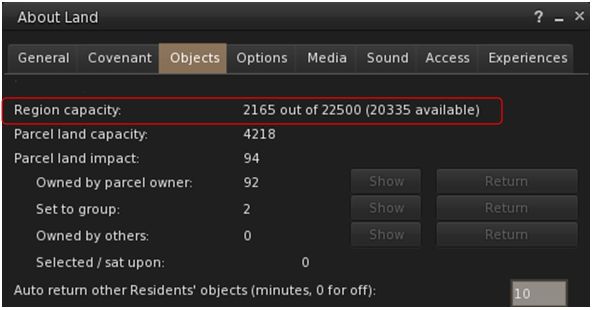
Both the Main channel deployment and the RC channel restarts saw land capacity / prim allowances for Mainland regions increase.A full Mainland region now has a land capacity / prim allowance of 22,500 as standard. Note that private estate regions will follow in due course.
The Project Bento RC viewer updated to version 5.0.0.321250 on Wednesday, November 2nd. offering the following fixes (the reports on the JIRA are non-public, so links aren’t included here to save confusion):
SL-395 – joint scale locks failing to upload in some cases.
MAINT-6853 – viewer crash when checking preview skin weights in mesh upload.
SL-504 – intermittent crash when adding attachment to an avatar (probably during shutdown).
This viewer is expected to go through at least one more iteration to address further bugs.
The Lab hopes that either the Bento RC or the current Maintenance RC (version 4.1.2.321183 at the time of writing) will be promoted to the de facto release viewer prior to US Thanksgiving, with the other being promoted shortly thereafter.
A further Maintenance RC is in development, and is likely to appear once the current RC has been promoted.
64-bit Viewer Progress
The Lab has completed building all of the required libraries for the 64-bit viewer, and are now actually building the first 64-bit project viewers, which it is hoped will see the light of day before the end of the year.
The library updates also mean that the Lab will be able to do large-scale updates to the viewer build environment with significantly greater ease in the future. One of the first of these updates liable to come in the first quarter of 2017, to switch to Xcode 8 (Mac) and Visual Studio 2015 (Windows).
Bento
Medhue Simoni’s Bento elephant is now available – requires a Bento viewer to use / render correctly
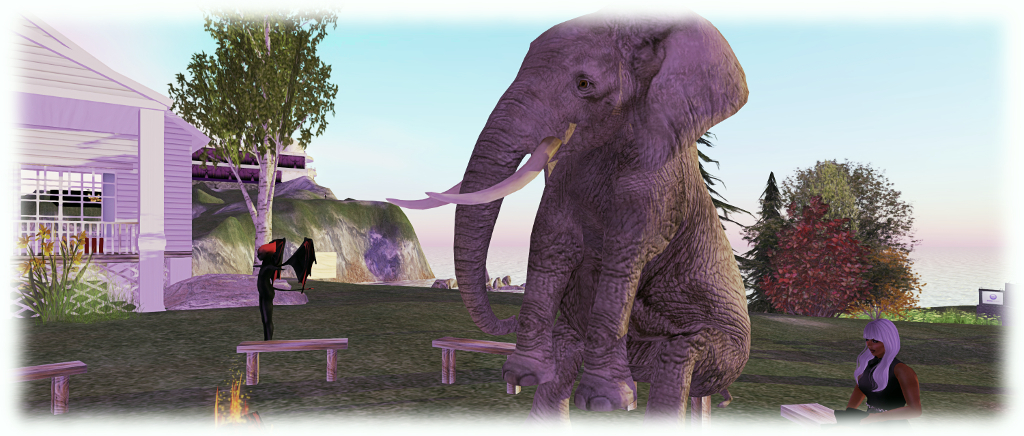
There was no Bento User Group meeting on November 4th, so there is nothing major to report on that front – except those who have been fascinated and charmed by Medhue Simoni’s magnificent Bento elephant can now obtain it via the Marketplace. There’s also an extensive video on it – and it even flies! How cute is that?
Note, obviously, that you will need a Bento capable viewer to use it, and others will require Bento capable viewers to render it correctly.
During the meeting Sansar is discussed, and Oz Linden indicates that the log-in data the Lab receives suggests than a large number of Second Life users are using systems which are unlikely to be able to run Sansar particularly well, further boosting the Lab’s confidence that Second Life has a longer-term future.
This shouldn’t be taken to mean that Sansar will necessarily have a massively high set of system requirements – although obviously, anyone wishing to use the current generation of HMDs will need to have a system meeting the specifications required by such hardware.
Rather, it would again suggest than many Second Life users continue to access Second Life using systems which might be described as past their prime when compared to even the “modest” hardware standards set by modern home computers.
As always, please refer to the deployment thread for the latest news and updates.
On Tuesday, November 1st, the Main (SLS) channel received the same server maintenance package as deployed to the three RC channels in week #43. This comprises: a fix for the bug introduced in week #42 – see BUG-40735 “Paying an object with [slgaming] in the object name (most skill game machines) fails on the RC 16.10.14.320687”; two fixes for issues with the new llSit function for Experiences, and additional internal updates.
On Wednesday, November 2nd, all three RC channels are set to remain on the same server maintenance package as week #43. However, there should be a rolling restart across the RC channels.
SL Viewer
On Friday, October 28th, the Maintenance RC viewer updated to version 4.1.2.321183, and came with an expanded set of release notes offering a better overview of changes and updates. These include, but are not limited to:
You can now see your Temp attachments via Appearance > Wearing > Temporary attachments
Cut items won’t be put in Trash any more to avoid inventory loss. Instead they’ll be visually greyed out but remain in place until the next operation is performed
Rigged Mesh LOD is now size-dependent, not just avatar-dependent. Improves how LODs are swapped
In a related case, wrong bounding box location was affecting LOD calculation causing some mesh avatars to deform
PRIM_TEXT draw distance limit can now be changed up to 300m via debug setting “PrimTextMaxDrawDistance”
Avatar Complexity notices can now be disabled from Preferences > Notifications: “Warn me about my avatar complexity changes” + “Warn me if my avatar complexity may be too high” settings
A warning is displayed when trying to put too much inventory in coalesced objects and will still be blocked
A warning will be displayed when creating or wearing HUDs that can cause critical performance hits
This RC release restores weapons behaviour to same state as in the release viewer
Buying L$ links will once again open in internal browser by default
You can now “Wear-Replace current outfit” even if the new outfit is a subset of the old one
Accidentally scrolling the mouse wheel while renaming an item in inventory will now cancel renaming instead of moving the item. True for any operation where ‘renamer’ moves out of visible area
Multiple crash fixes.
Other viewers in the viewer pipelines remain as per last week:
Current Release version: 4.1.1.320331, dated October 4th, promoted October 10th – formerly the VLC media plug-in for Windows RC
Project Bento RC (avatar skeleton extensions), version 5.0.0.320815, dated on October 20th
Obsolete platform viewer version 3.7.28.300847 dated May 8th, 2015 – provided for users on Windows XP and OS X versions below 10.7.
Mainland LI / Prim Allowance Increase
Update, November 3rd: following the complete announcement on the prim changes and the timeline, full details on the changes for Mainland, and those to be applied to private regions are now available in this post.
As is increasingly being noticed, Mainland regions on the Main (SLS) channel received an increased LI allowance with the deployment on Tuesday, November 1st, with Full regions now having a total capacity of 22,500 LI (or prims, if you prefer).
The change in land impact (/ prim allowance) was noted in Mainland Full regions on the SLS channel as they started coming back on-line following the November 1st deployment restarts
The change isn’t a mistake, and there will be an official announcement on Thursday, November 3rd about what is going on. As noted in my preliminary article linked to above, I’ll also have more at that time 🙂 .
The following notes and audio were taken from the weekly Bento User Group meeting, held on Thursday, October 27th at 13:00 SLT at the the Hippotropolis Campfire Circle. and chaired by Vir Linden. For details on the meeting agenda, please refer to the Bento User Group wiki page.
Note that this update is not intended to offer a full transcript of the meeting, nor does it present the discussion points in chronological order. Rather, it represents the core points of discussion, grouped together by subject matter were relevant / possible, whilst maintaining the overall context of the meeting.
General Project Status
Work continues on Bento bug fixes. As a result of the Bento code being available in a pre-release version of Firestorm, the number of reported issues with legacy content have increased (see BUG-40672). There are two issue in particular the Lab have been looking at:
The previously reported issues of some mesh content having latent “bad” joint positions which were previously overlooked by the viewer, but which are now taken into account under Bento, leading to avatar deformation (see my update #30 for more on this)
An issue related to the eye joints now being scaled by the eye size slider, which can result in existing mesh eyes appearing to bug out of avatar’s heads when viewed in the Bento viewer. The easiest way to fix this is to reset the eye slider to the default 50 value.
Eye sizing issue: as Bento allows mesh eyes to be affected by the eye size slider, they can suddenly appear to resize when seen on the that viewer (r), compared to how they appear on a non-Bento viewer (l)
Outside of these problems – which are still being looked at (see below), there is at least one bug (initially noted with Haste Coy products and also reported on BUG-40672), which should have a fix in the next Bento RC update, and a crash issue which also should be fixed in the next update.
If anyone is encountering issues with existing content when using the Bento viewer, they should report their problems via the JIRA (BUG-40672) so the Lab can look at things.
Benches: because even an elephant needs the occasional sit down. Medhue Simoni’s stunning Bento elephant avatar
Legacy Content Deformation Issue
There has still been no decision on how to handle the “werewolf deformation” issue, which now extends to about three creators, and may extend beyond werewolf models. There have been suggestions on forking rendering behaviour by something like upload date, so that if an item was uploaded prior to date X, then it is handled as “non-Bento”; if uploaded after date X, it is handled with Bento in mind.
A problem here is setting an arbitrary date may not actually solve anything. Bento has been around for over a year, with content creators working on it for the last several months at least, during which time other creators have been creating / updating and uploading non-Bento content. So, determining which is which by date likely won’t work.
That said, if there is a large amount of legacy content impacted by the viewer change, it still might be preferable to set a date and have Bento content creators re-upload their work to be on the “right side” of that date, rather than trying to get legacy content creators to re-upload. This is because some creators may not already be around and / or some may have used mesh creation kits which don’t have the necessary .DAE file for them to modify.
A further complication here is that any impact of the viewer behaviour change may simply be negated by creators of older avatar models updating to Bento models, to which their customers subsequently update.
Other Items
No Modify Shapes
The eye issue mentioned above once again raised concerns around users employing shapes that do not have modify permissions. Such shapes prevent the use of the appearance sliders, so even apparently “easy fix” issues, such as adjusting the eye size slider, may not be applicable.
This particular issue sparked a lengthy conversation about using the (currently non-obvious in the official viewer) XML shape exporter coupled with additional code to more easily export a shape’s XML file, which could then be re-imported with a check box to ensure the default 50 setting for things like the eye size sliders.
One problem here, as Vir pointed out is that users who are unaware of unfamiliar with using the shape sliders likely aren’t going to be enamoured with the idea of exporting an appearance XML file, creating a shape and then importing the appearance XML data against that shape, even though some TPVs have, with the Lab’s approval, sought to make this easier.
There is also the problem that creators may object to users being given the ability to export / import shape data, as it effectively bypasses the permissions system, allowing anyone to take shape data and use it as they please. However, given there is already a TPV methodology available, to assist with shape data import which has been given the nod by the Lab, Vir will take the matter back to the office for further discussion.
The more direct solution might be for creators to indicate that Bento avatar meshes require the use of a modifiable shape (either supplied with the mesh or which the user can create and edit).
The Skeleton
Vir highlighted the fact that while different terms are used, there are technically three types of joints in the avatar skeleton: bones, the “standard joints” for rigging to; collision volumes, as used by things like fitted mesh; and attachment points, which have most of the properties of joints, hence why some creators started rigging and animating to them, even though this was never an intended use.
Next Meeting
The next Bento meeting will likely be Thursday, November 10th, 2016, as November 3rd clashes with the Lab’s monthly internal meeting.


![Dystopia // [flit ink] + aberrant; Inara Pey, November 2016, on Flickr](https://c8.staticflickr.com/6/5819/30187672623_9bf5bf266d_o.jpg)




 Inara Pey: Living in a Modemworld