OK, I admit I wasn’t expect this until next week, but on Wednesday, September 14th, the Lab announced that Project Bento is now officially available as a release candidate viewer – version 5.0.0.319688 – which can be obtained through the Alternate Viewers wiki page.
And just in case anyone has missed all the Project Bento news, the best way is to catch-up through the official video. In short, Bento adds a wealth of new bones to the basic avatar skeleton (30+ to heads / faces and to hands alone!), making a wealth of new avatars (humans and non-human) and mesh wearables possible.
The reason I wasn’t expecting the viewer to get promoted just year is that the Lab also has a proof-of-concept viewer being tested, so I assumed any push to RC would come after a decision had been made on incorporating those changes (if they are to be adopted). So, not for the first time, I’m been wrong 🙂 .
The move to release candidate status doesn’t mean the project is at an end. There is still further work to be done as remaining bugs are fixed, etc (so updates such as the slider locking in the proof-of-concept might yet arrive in the viewer). What it does do is three things:
Makes the viewer available to a wider audience through the Lab’s RC distribution mechanism, thus allowing any unforeseen issues in merging the Bento code into the current release viewer code (and which may be outside of direct Bento testing) to be identified and fixed
Potentially makes the viewer more widely available to content creators who may not have so far tried the viewer
Means that TPVs can now officially start incorporating the Bento code into their viewers (in fact, Cool VL Viewer has had Bento in its Experimental branch from some time, and Firestorm have also been working to merge the Bento code as well – but this shouldn’t be taken to mean there will be a new release of the latter in the near future).
In keeping with the status of the Bento code, the Lab do ask people – particularly avatar content creators – to give the viewer a go, and to file a JIRA against any issues found.
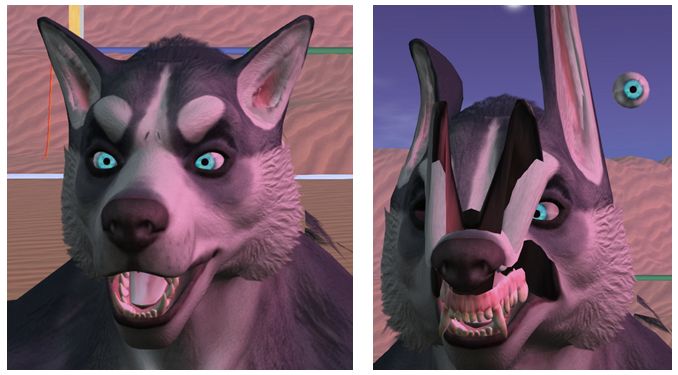
As noted above, Bento offers a range of opportunities for mesh wearable and avatar creators – you can see a couple of video exploring the AK and Catwa preview Bento mesh heads in my SL project update. Also, back in August, Vista Animations produced a video illustrating the potential of finger animations:
Then, of course, there is a huge range of non-human avatars: centaurs, “rideables”, winged creatures – all of which can be achieved a lot more efficiently through Bento than has previously been the case.
On Tuesday, September 13th, the Main (SLS) channel received the same server maintenance package previously deployed on the RC channel in week #36. This comprises “minor internal logging changes” which may help with some of the problems occasionally seen with estate bans; at a minimum the Lab will be able to gather more information on them.
There iss no planned deployment or restart set for the three RC channels during the week. RC deployments will resume in week #38. This may involve further serve-side updates to reduce certain griefing vectors.
SL Viewer
The VLC Media Plugin viewer updated in September 13th to version 4.1.1.319583. This viewer replaces the QuickTime media plugin for the Windows viewer with one based on LibVLC.
In addition, and as indicated in my TPVD meeting notes, this version should include changes for exception handling in the viewer intended to ensure exceptions are better handled and recorded. These may not prevent crashes occurring, but should provide the Lab with better data on the exception throws and catches. Overall, they are describes as “fairly small, widespread changes” to the viewer code.
The remaining viewers in the various pipelines remain as per the end of week #36:
Current Release version: 4.0.7.318301 (dated August 8), promoted August 11 – formerly the Maintenance RC viewer download page, release notes
Visual Outfit Browser viewer, version 4.0.8.319143, dated August 30 – ability to preview images of outfits in the Appearance floater
Project viewers:
Project Bento (avatar skeleton extensions), version 5.0.0.318969, dated August 25 – avatar vertical position update; SLM files are by default not created or used; show bones display uses colours differently; animation of collision volumes fixed
Obsolete platform viewer version 3.7.28.300847 dated May 8, 2015 – provided for users on Windows XP and OS X versions below 10.7.
Project Bento
Following my last Bento update, Matrice and Gaia have been working on Avastar 2, which has now reached Alpha 10, supporting the current version of the project viewer (5.0.0.318969).
Demo Heads
In that update, I also blogged about the AK Bento preview head. On September 13th, Catwa offered some bloggers a preview look at an upcoming Catwa head, as well as a preview video. – Doubtless, more heads will be appearing in the near future.
An important point to note with Bento heads is that while they will offer considerably more options for customising your look that “conventional” mesh head, it won’t simply be a case of buying Bento head, wearing it, and having it conform to your existing facial features – you will obviously need to adjust many of the head / facial sliders to get a close / approximate look, and even then, just how close a look you can achieve will depend a lot upon the base mesh of the head itself. So careful testing of Bento heads to find one which bears some initial resemblance to your desired look is likely to be required, and it may be that multiple heads are still required to achieve all of your desired looks.
Strawberry Singh has produced a video based on the AK Bento preview head, demonstrating how it currently works with the sliders.
As Whirly Fizzle pointed out to me, on the day Catwa issued preview copies of her Bento head work, fashion blogger Daeberethwen Arbenlow also put a video together running through the capabilities on that head as well
A further point of note with Bento mesh heads is that the degree of customisation available will depend on which bones of the face and head a model is rigged to, and the weighting assigned to it. An example of this is the nose division, mentioned in both videos. This can potentially be more prominent, providing the head is rigged to the mFaceNoseBase bone and has a suitable weighting applied.
As Cathy Foil, developer of MayaStar, and one of the core members of the Bento development team points out:
Each mesh head designer will have to decide what sliders they want and will have to experiment with different weighting. It will be very exciting to see how face weights will evolve over the next few months and years.
Which again underline the need for careful comparisons when selected Bento heads as they become more and more available once Bento moves past RC status, and more Bento products start to appear.
SL Wiki
The Wiki remains locked to the majority of users for editing, no news on when it may be unlocked, or what might be done to address the current issues.
The following notes and audio were taken from the weekly Bento User Group meeting, held on Thursday, September 8th at 13:00 SLT at the the Hippotropolis Campfire Circle. For details on the meeting agenda, please refer to the Bento User Group wiki page.
Note that this update is not intended to offer a full transcript of the meeting, nor does it present the discussion points in chronological order. Rather, it represents the core points of discussion, grouped together by subject matter were relevant / possible, whilst maintaining the overall context of the meeting.
RC Viewer Release
It is still hoped the Bento viewer will move to RC status soon. The main reluctance with pushing it further is to give people enough time for final testing with the majority of Avastar issues now hopefully resolved (see below). There are currently no major changes to the viewer being planned by the Lab, with the possible exception of the proof-of-concept idea for locking a mesh against slider changes.
Proof of Concept: Locking a Mesh Against Slider Changes
There have been discussions about possibly adding the ability to override the scale as well as position for joints in uploaded mesh models. A joint with both position and scale overrides would be effectively “slider-proof” – no sliders that affect the joint would have any effect on the model. This may be useful for content creators who want to control their avatar mesh shape exactly, without being affected by the standard customization options.
The Lab has now issued a proof-of-concept version of the Bento viewer for testing. Depending on feedback it may or may not make it into the final version of the viewer. In releasing the proof-of-concept. there are also some notes on the forum from Vir on using this version of the viewer.
Note that this option doesn’t include the ability to enable / disable things on a per joint basis, which is unlikely to happen within the remaining Bento time frame. The idea is to try to provide something that s useful, but doesn’t involve a lot of changes to the UI. The Lab is interested in any feedback on this approach (via the Bento forum thread).
Collision Volumes
Vir presented a forum post on collision volumes and the operations supported for them (contrary to the name, collision volumes are not related to the physics of avatars – all such calculations are carried out on the back-end using a simplified representation of the avatar and do not include the avatar skeleton). Vir indicates that support for animating collision volumes is available on all versions of the viewer, including Bento, but whether or not it is a good idea to do so depends on what is trying to be achieved, noting the following use-cases:
Raycasting: collision volumes are used to detect an avatar under the mouse pointer. You can see this in drag-and-drop – try dragging a folder of clothing onto yourself. The drag will succeed if the spot you drag to is occupied by a collision volume
Animations with constraints: animations can include constraint information that causes the animation to respond to the location of body parts (hands on hips, resting hand on legs when sitting, etc). The collision volumes are used to determine these constraint locations.
Fitted mesh: suitably rigged meshes can use the collision volumes to scale with the avatar shape.
He also offered some guidelines for using collision volumes both in the post and during the meeting, including using them in the creating animations with constraints. Matrice requested anyone doing the latter if they could pass information to him on how they are doing this, as documentation is lacking.
Avastar 2 Updates
Avastar 2 Alpha 7 is available, which should resolve major issues with joint positions. The core updates in this version are:
All the related Appearance sliders, for human characters as well as for non human characters. Avastar now behaves just like any Second Life viewer, giving true “what you see is what you get character editing in Blender
Mesh eyes now behave exactly in the same way as the system eyes, including scaling with the eye size slider.
Medhue Simoni has produced an instructional video on updating from the “old” Bento rig version to the new rig version in Avastar.
Matrice Laville offered some feedback on the video, concerning some upcoming changes to Avastar.
Matrice also noted that there are a couple of issues which either have a fix awaiting release, or being investigated, which are related to jaw issues and scaling (below).
Jaw Issues And Scaling
Teager reports continued problems with her horse avatar, specifically with the teeth showing as a result of the lower lip not aligning correctly with the upper lip. Testing had led her to believe the problem might be related to scale on one of the bones. Matrice confirmed that there is a scaling issue, together with a peculiarity in the way Blender works and applying scale within Avastar and issues of parenting / unparenting meshes which can lead to problems. He therefore recommends the best option at present is to ensuring the scaling on a bone in a mesh is always 1 while the problem is investigated.
In addition, Matrice indicated that he has added an option to Avastar to allow the export of all parent bones of each weighted bone, rather than just relying on the Avastar optimising which exported only weighted bones and ignoring any intervening bones. This option will be appearing in the next release of Avastar 2.
The following notes and audio were taken from the weekly Bento User Group meeting, held on Thursday, August 25th at 13:00 SLT at the the Hippotropolis Campfire Circle. For details on the meeting agenda, please refer to the Bento User Group wiki page.
Note that this update is not intended to offer a full transcript of the meeting, nor does it present the discussion points in chronological order. Rather, it represents the core points of discussion, grouped together by subject matter were relevant / possible, whilst maintaining the overall context of the meeting. My apologies for the background birdsong. I usually turn off local sounds for these recordings – but in this instance I forgot!
Bento Viewer
The Bento project viewer updated on Thursday, August 25th to version 5.0.0.318969. This release includes the following changes / improvements, but please refer to the release notes for the full set of updates.
SLM Files
Following previous discussions (see my Bento week 23 update), MeshImportUseSLM has been set to FALSE in the viewer, so that SLM files are by default not created and not used. Switching MeshImportUseSLM to TRUE via debug settings will re-enable them once more.
Avatar Vertical Position (height above ground) Calculation
See here for further background noted. Essentially, any position or scale changes for joints that are included in the body size calculation (those up through the left leg from the foot, the pelvis, torso, chest, neck, head and skull. can trigger issues with an avatar bobbing up-and-down unexpectedly as a result of the frequency of the calculation being increased to once per frame. To help compensate, this new version of the viewer only updates the body size calculation when starting / stopping an animation, so hopefully the changes will be less visually jarring.
Overall, however, the best fix is still to avoid using animations that change the positions of the joints used to calculate the vertical position of the avatar.
Two other updates worthy of individual note are:
The show bones display has been modified to use colours differently, distinguishing between joints that are skinned to, joints that have position overrides defined, and all other joints.
Animation of collision volumes has been fixed.
Teager’s Bento Raptor
Move To Release Candidate Status
Currently, the Lab believes there are no known active bugs which are sufficient enough to prevent the Bento viewer moving to Release Candidate status, potentially in the next few weeks. With the core AvaStar issues also seemingly resolved (see below), creators are being encouraged to complete any additional testing they wish to make so that any remaining potential blockers are found before the viewer goes to a wider audience. Move the viewer to RC status will expose it to a wider cross-section of users, allowing the Lab to get a better feel for the viewer’s overall stability or whether any non-Bento regressions have slipped into the code, etc.
Mesh Distortions with Altitude
Vir has looked further into the issue of facial distortions with altitude when software skinning is used (some meshes can also be distorted when right-clicking on an avatar). The problem seems to be in the base avatar mesh itself, although one idea he had for the cause of the problem didn’t pan out.
Cathy Foil demonstrates the mesh deformation which becomes more pronounced with altitude (starting at around 1,000m and getting progressively worse through 4,000m)
As this particular problem can be overcome by using hardware skinning, and seems to be a subset of a broader issue affecting worn meshes (floating point calculation error), it may not prevent the Bento viewer going to RC, but Vir is going to continue to look at it.
AvaStar Issues
Matrice Lavalle of the AvaStar team believes he’s resolved most of the issues affecting their software (see here for some background), and his testing indicates that bones should now be correctly positioned and adjusted when using sliders, although there are some minor nips and tucks he still wants to take care of. He also noted an issue affecting the torso bone, which came up shortly before the meeting and which may be limited to a particular way in which the torso is modified, and he is looking into that.
Maya / MayaStar Notes
Cathy Foil provided background information on some of the lessons she’s most recently learned in using Maya for avatar models, relating to joint orientation requirements, performing freeze transformations, etc.
Cathy also provided some advice to Maya users on ensuring that facial bones which have a custom position but which are not rigged to, are included in the skin cluster, otherwise the bone will be excluded from the .DAE file, leading to issues with the model in Second Life.
Matrice noted that as a result of Cathy’s discovery, AvaStar has been updated to ensure custom bones without weights are automatically exported.
When she has time, Cathy plans to produce some video tutorials on the lessons she’s learned through the Bento process to help Maya users avoid issues like these. Currently, she is still working on updating MayaStar to work with all of the new bones, which is currently a manually intensive task.
Bone Position Information and Slider Values
Cathy points to an issue with the neck bone slider, which, rather than having a neutral position of 50 (as with most bones), has a neutral position value of 66.6667, which can lead to neck alignment problems when adjusting the neck bone position. She asked if in the future, the Lab could update the default avatar shape to ensure all slider positions as close to neutral (50) as possible. This initiated a discussion on the feasibility of doing so, and some of the broader issues slider position value calculations.
Matrice also provided an overview of how AvaStar now handles neutral positions and the default avatar, before he and Vir discuss using other tools and the avatar BLEND file.
Following the meeting proper, Cathy and Matrice further discussed the differences between Blender and Maya in handing bone positions / rigging on export through the use of weight maps (Blender) and skin clusters (Maya).
Other Items
Bento Collaboration and Future Projects
Troy reported that overall, the Lab like the outcome of the Bento project, with the level of collaboration and cooperation between content creators and the Lab, particularly vis the user group meetings etc. While not the first time the Lab has worked with SL users on a project, Troy indicated that the approach taken with Bento is something the Lab would like to continue, where appropriate. Vir seconded this view, noting how the collaboration has made Bento a far more usable product.
Bento Content Documentation
An interesting point of discussion with Bento is the need for content creators to consider documentation carefully given the way the bones can be re-purposed – or at least define a common means of annotating how they have used various bones – in order to help avoid potential conflicts which might arise on those occasions where a user might attempt to use two mesh elements, each of which calls upon the same bone, but require it to be positioned differently to one another.
My apologies for the latest of this update. Working on my recent Sansar Summary pushed this update completely out of my mind!
Server Deployments – Recap
There were no deployments to the Main (SLS) channel or the RC channels this week. It is currently “doubtful” there will be an RC deployment next week – although this may change. A contributing reason for the slowdown is that the Lab is currently focused on server-side operating system upgrades.
SL Viewer
The Visual Outfits Browser RC viewer updated on August 17th. Version 4.0.8.318686 sees the viewer merged to the current release viewer code, and the following additional updates:
A fix for Outfit Gallery failing to use local files Select Photo Picker
A fix for Snapshot preview being corrupted
A fix for a crash in the viewer when using the snapshot preview.
The following notes were taken from the weekly Bento User Group meeting, held on Thursday, August 18th at 13:00 SLT at the the Hippotropolis Campfire Circle. For details on the meeting agenda, please refer to the Bento User Group wiki page. No audio is supplied, as the meeting was fairly short and sharp, without a major amount of discussion.
SLM Files
SLM files are produced alongside of the Mesh .DAE files. They can be a problem as by default, the official viewer is set to check for any existing SLM file when uploading a mesh model, and this can lead to confusion when trying to fix issues by overwriting the original .DAE, only to have the viewer reference the existing SLM file, either causing problems on upload or giving the impression the issues in the model haven’t actually been fixed.
Firestorm has always avoided this by having the debug setting MeshImportUseSLM set to FALSE by default, and the suggestion going forward is for the official viewer to do them same.
Mesh Distortions with Altitude
The issue of facial distortions with altitude when software skinning is used continues to prove difficult to resolve. The general recommendation is to use hardware skinning (my Bento Update #19). The root cause of the problem appears to be a floating point error which can affect any mesh. The Lab is still looking at it, but given there is a workaround by using hardware skinning, the problem is not seen as a major blocker.
The issue of facial distortions at altitude when using software skinning in Bento has yet to be fully resolved (images courtesy of Cathy Foil)
Proposals for NOT Having Mesh Influenced by Sliders
There have been requests to not have the avatar bones influenced by the shape sliders (i.e. by a creator optionally locking both the scale and position of a joint). The Lab is looking at this, but if any work is done, it will not be prior to the Bento viewer reaching release candidate status. Whether anything may be done was the RC version of the viewer progresses towards release (the work is not seen as a huge amount of effort), or whether it is a piece of “post-Bento” work is still to be decided.
Avatar Test Files
Cathy foil has now updated the Maya male and female avatar models on the Bento Test wiki page so they match the latest Bento skeleton updates (as of August 17th, 2016). Then both utilise the same (female) skeleton, the male version have a male mesh / morphs applied. Cathy has used the Avatar Bento angel weights and apply them to the models, so the faces and fingers are all fully rigged, although both are sans wings and tails.
Cathy will be making a set of .FBX files of the models, which will also be placed on the Bento Test page when available, for those who are not using tools such as 3D Studio Max for their work.
Elizabeth Jarvinen (polysail) is also working on a tool for 3D Studio. Max which is intended to provide a second means of producing animations / meshes etc that isn’t reliant upon Blender / Avastar. However, this requires a considerable amount of work, not least in providing slider support, and Elizabeth has received offers of assistance from Vir and Cathy, who will also see about having the AvaStar team lend assistance.
Rigs Modifying Collision Volumes
As noted in my Bento update #22, recent reports of people encountering problems with Bento rigs which modify collision volumes (see here for details). As noted in that update, this was not something that the Lab planned on supporting, particularly as it did not come up during the initial Bento development meetings with creators.
However, and as further indicated in my update #22 (with thanks to Whirly Fizzle), an update will be included in the next project viewer release for Bento which should hopefully fix the issues being encountered.
Release Progress
There has been a lot of questioning over the Bento release time frames recently, both within the Bento user group meetings and elsewhere (e.g. at TPVD meetings). Currently the plan is to get a further project viewer released in the near-term (possibly before the end of August), and then progress to release candidate status from there.
However, time frames beyond that become nebulous, because the Bento viewer, as a release candidate, will be vying for release alongside other RC viewers, some of which may have a higher priority, some of which may need to be issued in sequence, or have other pressures, and so predicting a date when Bento will be the de facto release viewer is difficult to predict.
This is further exacerbated by the fact the recent changes and requirements have required extensive updates to AvaStar, much of which is still work-in-progress (see my Bento updates #22 and #21 for more). Once completed, this work will require further testing in order to confirm any problems within AvaStar are resolved, and any remaining issues (if uncovered) are viewer related, rather than external tools related. Then over and above this, there is the list of existing Bento issues which needs to be worked through, depending on the severity of the problems reported.
That said, it would appear the overall hope is to get Bento formally released before the end of 2016.
Updated: animation of collision volumes is being added – section updated section below.
The following notes and audio were taken from the weekly Bento User Group meeting, held on Thursday, August 11th at 13:00 SLT at the the Hippotropolis Campfire Circle. For details on the meeting agenda, please refer to the Bento User Group wiki page.
Note that this update is not intended to offer a full transcript of the meeting, nor does it present the discussion points in chronological order. Rather, it represents the core points of discussion, grouped together by subject matter were relevant / possible, whilst maintaining the overall context of the meeting.
Time Frame for Promotion to Release Candidate Status
Some at the Lab are keen to see Bento move forward and reach a larger audience of content creators (although there is currently no reason why creators cannot get involved now and attend meetings, help with feedback, etc). Inevitably, this means promoting the Bento viewer to release candidate status, and doing so some time in the next two weeks has been mooted.
Given the number of issues currently being investigated, not all of which are viewer-specific (see below), but for which fixes may yet have an impact on the viewer, this would seem to be a somewhat ambitious time frame.
Viewer Issues
Work at the Lab is focusing on a batch of issues for which bug reports have been raised, including:
Several relating to joint positions:
BUG-37546 [BENTO] facial bone joint offset issues – which has been the subject of recent Bento updates in this blog
BUG-37591 [BENTO] New import of a non-human rigged mesh is deformed
BUG-37633 Bento – Custom joint positions and Reset Skeleton not matching
Avatar height calculation issues:
BUG-20013 [Bento] When wearing a Bento avatar, observers see your hover height lower than you see it yourself
BUG-20169 [ BENTO ] Z-Offset not applying correctly & camera tied to Z-offset
Eye scaling problems (referenced via SL-433, an LL internal bug report)
The eye scaling issue, the result of the scaling within the viewer for mesh eyes being different to the expected system eye size, has been corrected, and will be one of the fixes released with the next viewer update, although existing models may need tweaking as a result a test carried out during the meeting using an early build of the next project viewer iteration suggested that there are still issues, and Matrice believes part of the problem might be within AvaStar.
Facial Bones Issues / Distortions
At least some of the facial bones issues appear to lie with AvaStar exports, which Matrice and Gaia are trying to rectify. Gaia offers an explanation for the problem in the Bento forum thread. Matrice further notes that there is a discrepancy between the restpose and the SL default pose; in Blender there is no easy way to define the absolute SL restpose in order to add bind pose information on top of it, leading to the wrong information (or even a lack of information) being exported to the Collada files.
Matrice is working on improving things in AvaStar, but the work is taking time and effort. Gaia has offered a detailed explanation of joint preparation on the Machinimatrix website as a workaround as they continue to redefine and improve their workflow, and offers a brief summary of the approach through the forum thread. The workaround isn’t seen as optimal at the moment, but the hope is that once the work on AvatStar has been completed, the workflow should be more straightforward and transparent.
Machinimatrix have produced a workflow process to handle the correct placement of facial bones. This is not intended to be the finished means of doing so, but is offered to counter issues currently being encountered
Some questions were asked on whether it was an AvaStar issue rather than something inherent in the viewer, prompting Vir to comment that given the viewer handles joint positions in a model and joint positions in an animation pretty similarly, it’s hard to see how the viewer could be at fault, but acknowledged the only way to be sure of this is test once AvaStar have reasonable confidence they have corrected the issues they have identified.
Later in the meeting, Matrice offered a further explanation of the Belender / AvaStar issue, also pointing to the explanatory document on joint preparation, again noting that things are very much a work-in-progress on trying to fix things.
During the meeting, Medhue Simoni tried the recommended approach given in the documentation and found it did resolve all of his facial deformation issues, other than with his eyes, which as noted above, may require further viewer-side tweaks and additional work within AvaStar, as Matrice commented.
Avatar Height Position Issues
The camera issue which can be encountered as a part of the avatar height calculation issue
I’ve covered this at length in past updates (see update #21 and update #19 for more). The Lab hasn’t progressed any further with a fix, but may look to alter the frequency of updates to see if this helps.
The problem is viewed as being rooted in animating one of the bones used in the calculations for determining the avatar’s height relative to the ground (left leg, up through the pelvis and head), so the solution may ultimately be down to alternative means of animating movement without touching something like the pelvis bone – something which may not be possible when trying to replica certain types of natural movement.
Rigs Modifying Collision Volumes
There have been recent reports of people encountering problems with Bento rigs which modify collision volumes. As Vir explains in the meeting, it’s not something that the Lab planned on supporting, nor did it come up during the original Bento development meetings when rigging to attachment points was discussed, so no effort has been put into making sure it works at all. Vir is now looking at the issue, but whether the Lab will support it is questionable at this point in time; however, the focus at the moment is to more fully understand the impact.
Update, August 12th: Whirly Fizzle pointed me to a viewer repository containing an update to support the animation of collision volumes, to avoid breaking existing content.
Other Items
Slider / Bone Spreadsheet
Aki Shichiroji has been putting together a spreadsheet of all the slider settings and how they affect the Bento avatar bones and geometry. It is very much a work in progress, given things are still in a state of flux, and Aki notes she is aware that there is missing information (she has yet to run through the avatar.LAD file and the avatar skeleton file). However. she has made the spreadsheet available through Google Docs, and welcomes constructive feedback from content creators (which should be addressed to her, I’m not sure if Aki reads this blog!).
Maya / MyaStar And Custom Joint Positions
Following the discussion of Blender / AvaStar and custom joints, Cathy Foil provided some additional information to help Maya users with MayaStar.