
Firestorm 7.1.11: DeltaFPS: performance updates and tweaks

On Tuesday, October 22nd (SLT), Firestorm released version 7.1.11.76496 of their viewer. The primary aim of this release is to achieve parity with the Lab’s DeltaFPS viewer release, and bring the performance enhancements and fixes from that viewer to Firestorm.

Note that the following is not a complete review of the 7.1.11 release and all the changes made therein; it focuses on the more visible and user-facing updates.

Those requiring a list of all changes and updates to Firestorm 7.1.11, including all bug fixes and changes since the last release, should refer to the Firestorm 7.1.11 release changelog, which also provides all proper credits for the work.

Table of Contents


General Notes

Installation

  • Only download Firestorm from the Firestorm website. Do not utilise and other third-party site purporting to offer the Firestorm viewer, and remember Firestorm will never ask for log-in credentials in order to download a release version of their viewer.
  • There is no need to perform a clean install with this release if you do not wish to.
  • Do, however, make sure you back-up all your settings safely so you can restore them after installing 7.1.11.

On Version Blocking

The Firestorm Team provide the following on viewer blocking and updating:

  • As per the 7.1.10 release documentation, Firestorm 6.6.17 will not be blocked, but will remain available for those who need it. However, it will not be maintained in terms of updates and bug fixes.
  • Firestorm 6.6.14 will also remain unblocked for the time being. However users running version 6.6.14 are strongly advised to update to version 6.6.17 on the ground of greater stability.
  • Users on the initial Firestorm PBR release, 7.1.9, are strongly encouraged to update to this release – 7.1.11 -in order to benefit from both greater stability and improved performance. Version 7.1.9 may well be blocked in the future, due to the high number of crash reports.

Linden Lab Updates: DeltaFPS

  • Viewer version number 7.1.10.10800445603 (release notes).
  • Date of promotion to release status: 17th September, 2024.

This is the first of two viewer releases from the Lab specifically targeting performance improvements (both PBR and non-PBR related), and which offers some additional quality of life improvements for users and a range of bug fixes. The following is a summary of some of the more notable updates within the DeltaFPS release:

Schedule Region Restarts

  • Region holders / Estate Managers with access to to the Region /Estate floater can now schedule their region restarts to run at a given time.
  • Top menu → World → Region Details → Region → Manage Restart Schedule button.

Disable 2K Textures for Bulk Uploads

  • Even with the pop-up warning when including 2K textures during a Bulk texture upload, some people are still getting caught out. To further help prevent this, it is now possible to limit all Bulk textures to a maximum of 1024×1024 (thus limiting costs to L$10 per texture uploaded).
  • Top menu → Build → Upload → Bulk  → check Scale Textures to a Maximum of 1024px in the upload floater.
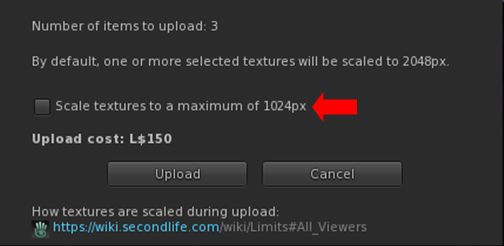
The option to limit the image size in Bulk texture uploads (and reduce costs to a level L$10 per texture)

Disable LookAt Animations

  • Tired of your avatar constantly tracking you mouse pointer movement, and looking like an idiot, constantly look up and down? You can move disable the animation.
  • Top menu → Developer → >Avatar → Character → Tests Disable Look At Animation.
  • Note this does not disable LookAt data being broadcast by the viewer (the cross-hairs / name tag), it only disables any avatar body / head movements associated with LookAt.

Notable Bug Fixes

    • Issue 1870: Improved performance on lower-end systems: lower-specification systems should see improved viewer performance; particularly those with the following:
      • Intel HD 4000, 4400, & Iris Xe video cards.
      • Nvidia GT 1030.
      • Laptops with an AMD video card.
      • Macs with the M1, M2, or M3 Silicon SoC chips.
    • Issue 2225: Fixed opening the Joystick Configuration floater causing a hug FPS drop.
    • PBR-related fixes:
      • Issue 853: Fixed – PBR Material resets to legacy material after teleport
      • Issue 1299: Fixed – PBR texture stretches when “stretch textures” is unchecked.
      • Issue 1847: Fixed – Negative UV scale causes wrong lighting on PBR materials.
      • Issue 1922: Fixed – Make PBR scale and offset crosshair work the same as Texture crosshair.
      • Issue 1857: Fixed – Reset texture transforms for a terrain PBR material when the material is applied.
      • Issue 2027: Fixed – Being unable to apply PBR materials on larger linksets.

General Quality of Life Improvements:

  • Issue 1209: Fixed – Newly-created sculpted prims not rendering until relog.
  • Issue 1253: Fixed – Viewer tries to detach attachments in inventory on shutdown.
  • Issue 1500: New – Better out of disk space handling: The viewer should no longer crash when disk space is low; instead the user will receive the warning: The system is out of disk space. You will need to free up some space on your computer or clear the cache.
  • Issue 1965: Fixed – Selection beam swirls swirl forever when the user interface is hidden
  • Issue: 1905: Fixed – The “Share” and “Pay” buttons are active when selecting multiple avatars in Nearby tab.
  • Issue 1988: Fixed – The ‘Set Empty’ option (Preferences → Controls does not remove previously applied keys for all control modes with the ‘Apply to all’ checkbox.
  • Issue 2144: New – Added tooltip to the region Object Return button to clarify who “someone else” means.
    • Top menu → World → Region Details → Debug → Object Return → Options → On someone else’s land.
    • Tooltip has been changed from “Return only objects which are on land belonging to someone else” to “Return only objects which are on land that isn’t owned by selected user”.
  • Issue: 2395: Fixed – Favourite and Featured locations sending user to (0,0).
  • Issue 2467: Fixed – Sim surrounds do not fully load.
  • Issue 2482: Fixed – Second Life reports incorrect amount of available video memory on some discrete GPUs on Windows.

Notable Viewer Build Updates

  • Updated llphysicsextensions to version 1.0.66e6919
  • Updated Tracy profiler to version 0.10
  • Updated Meshoptimizer package to version 0.21
  • Updated llca to version 202407221423.0
  • Updated Boost to version 1.85
  • Updated Ogg Vorbis to version 1.3.5-1.3.7
  • Updated VLC to version 3.0.21
  • Updated libhunspell to version 1.7.2-r1
  • Updated from jpeglib to libjpeg-turbo 3.0.3

WebRTC – Reminder

Note: as WebRTC is (subject to last-minute stoppers) now due to be deployed across the gird in the very near future, the following is repeated from my 7.1.10 release overview, for the benefit of those who use Voice and who may not have upgraded to Firestorm 7.1.10 / read that overview.

WebRTC communications protocol (RTC=”real-time communication”) is the new Voice communications protocol for Second Life, replacing Vivox Voice.

Why Make The Change?

Voice in Second Life has been supplied through an arrangement with Vivox. This has required Linden Lab to utilise a viewer plug-in tool – SLvoice.exe – to manage voice services within the viewer., which in turn has made LL both reliant on Vivox for bug fixes for the plug-in, and subject to changes in support for operating systems imposed by Vivox such as the latter ending native support for Linux some years ago).

WebRTC by contrast is the predominant telephony protocol used by web-based applications, such as Google Meet, and is integrated into most common browsers. It has almost all the features common to Vivox in supplying a voice service – spatial in-world voice; peer-to-peer sessions; Group voice (including moderation) and multi-user Voice conferencing – although the are some limitations (see below).

Benefits and Improvements

WebRTC Offers a range of benefits over Vivox, including, but not limited to:

  • 48khz audio bandwidth providing cleaner sound.
  • User control over:
    • Audio noise reduction – high reduction for noisy environments, no reduction for clean audio sources (performers, etc.)
    • Automatic gain control – less need to individually tune other user’s audio levels.
  • Audio/video device selection.
  • Improved: spatialization,  audio echo cancellation and audio sampling rates for improved audio quality.
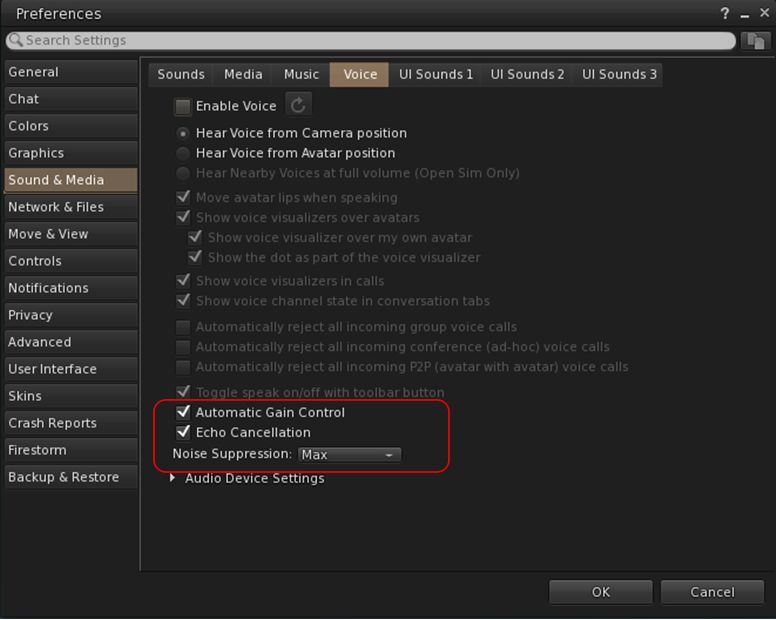
Options for managing WebRTC Voice quality can be found under Preferences → Sound & Media → Voice

Most significantly, WebRTC removes all reliance on a third-party plug-in for the viewer. Instead, it is supplied as a  a library and wrapper within the viewer. This means:

  • Linden Lab has greater ability to address Voice related issues directly, without having to await fixes from a supplier.
  •  Potentially opening the door to adding features and capabilities to SL Voice in the future, including some which have been long-requested.

Limitations

  • WebRTC does not support the existing Voice Morphing capability in Second Life.
    • This is because voice morphs are tied to the Vivox service, and cannot be utilised with WebRTC.
    • Those who do use the current Voice Morphing capability are directed to this SL Wiki article on Voice Morphing, which provides a list of solutions which can be used with WebRTC.
  • Conferences and group voice calls are limited to 50 participants.

Security

The Second Life implementation of WebRTC addresses security issues such as potential eavesdropping, exposing users’ IP addresses, etc., by routing communication through proxy servers managed directly by LL .

Additional Information

Firestorm Updates

Performance: AVX2 Update

AVX2 (also known as Haswell New Instructions) is the more recent of the Advanced Vector Extensions for  Intel and AMD, which should offer improved performance for more modern systems. To quote the official blog post on the AVX2 work:

Installer choices – supporting modern CPUs (AVX2): One of our aims is to help those on lower-end machines, and one change that our early-access users have loved has been enabling a feature of modern computer (called AVX2) which can unleash extra performance even on smaller machines. It works on CPUs built in the last decade, but don’t worry if you are not sure, the Firestorm installer will warn you if your computer is too old for this, and will redirect you to a more traditional version (Linux user can check here).  Some have found it makes a massive difference.

Pie Menu: Object Take Options

  • Linden Lab recently added further options for picking-up multiple objects collectively selected in-world and returning them to inventory as one of the following:
    • Take As Combined Item: return all the selected objects to inventory as a single, coalesced object (old behaviour).
    • Take Copy As Combined Item: return copies all the selected objects to inventory as a single, coalesced object, leaving the originals in-world as individual objects (old behaviour).
    • Take As Separate Items: return all the selected objects to inventory, but list them as individual items, not as coalesced (new behaviour).
    • Take Copies As Separate Items: return copies all the selected objects to inventory, but list them as individual items, not as coalesced, leaving the originals in-world (new behaviour.
  • These options were added to the right-click Context menu in Firestorm 7.1.10 (see: Object Take from my Firestorm 7.1.10 overview).
  • Firestorm 7.1.11 now extends this options into the pie menu as well – not that they will only be displayed within the pie menu when selecting multiple objects to return to Inventory at the same time.

Camera Roll and Key Bindings

Camera Roll Added to the Phototools Camera Floater
  • Camera Roll was added to Firestorm 7.1.0, in the form of two buttons on the Camera floater which allow the camera to be rolled clockwise or counter-clockwise for more dramatic photos see here for more).
  • These buttons have now been added to the Phototools Camera Floater.
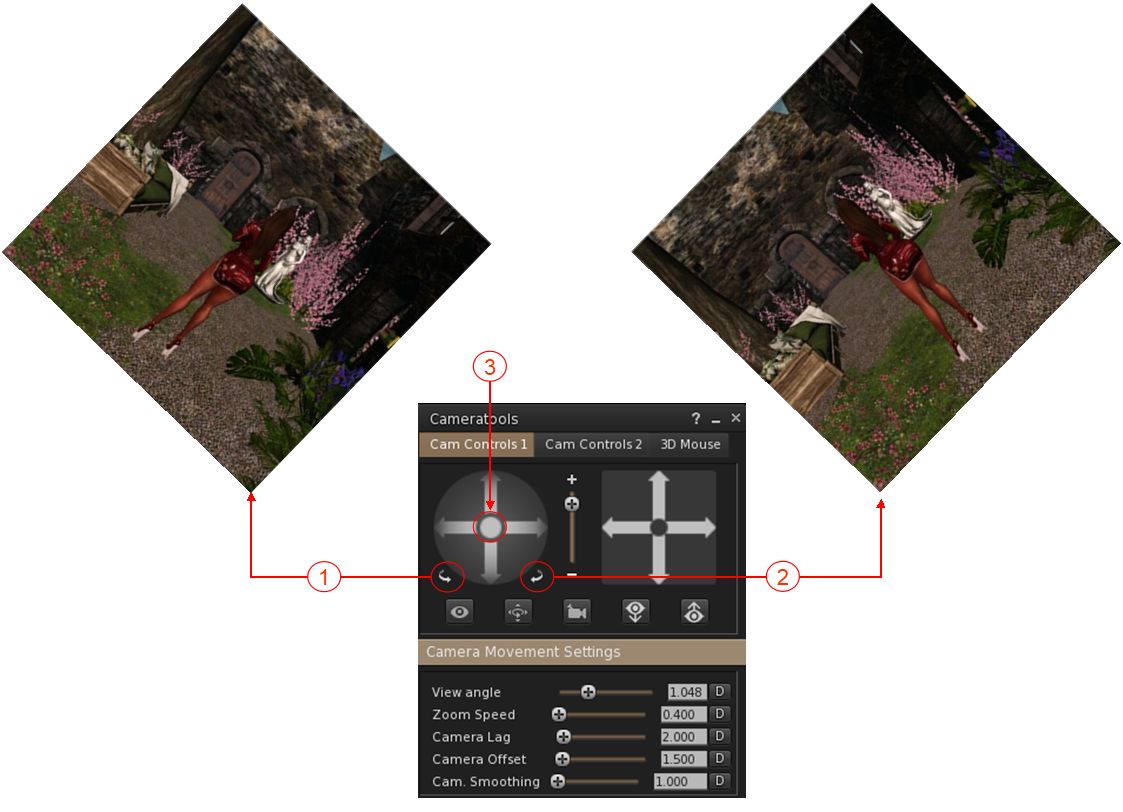
The Camera Roll buttons have now been added to the Phototools Camera floater: 1. The left button will roll the camera view clockwise on your screen through up to 360º; 2. The right button will roll the camera view counter-clockwise on your screen through up to 360º; 3. Clicking the button at the centre of the rotation controls will reset the view to “normal”.
Camera Roll Key Bindings
  • In addition, Firestorm 7.1.11 adds the ability to create key bindings for the camera roll buttons: Preferences → Controls → When in third person or when sitting → Camera section → Roll left / Roll right.
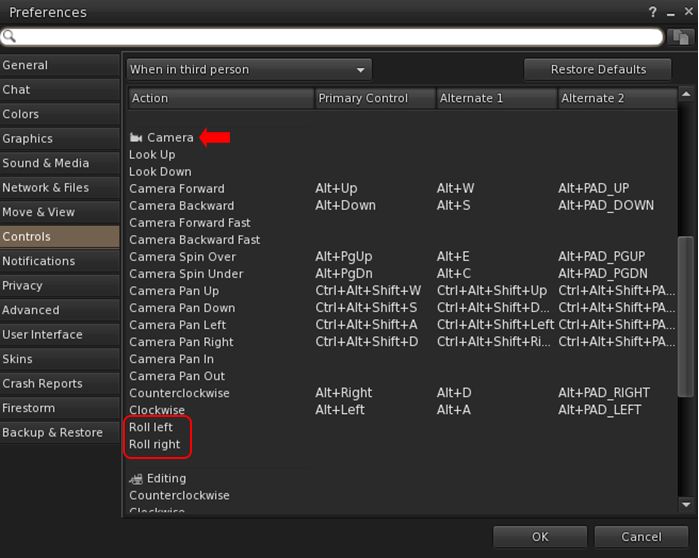
The new Camera Roll Key bindings options allow you to assign key combinations to enable the camera roll capabilities (left / right)

Assorted Quality of Life Updates

  • Addition of a “eye” button on the login splash screens.
    • When clicked, will display the alphanumeric values for a password as it is typed in, rather than black dots.
    • If the password has previously been saved (and so entered automatically on account name selection), clicking the button will display a placeholder, not the password.
    • See: FIRE-34629.
  • Pie menu autohide function has been extended to also work with sub menus and not only slices.
  • Whitelist adviser text corrected, as per FIRE-34524.
  • Snapshot floater updated so that the Current Window option no longer gives any pixel sizing (“512×512”), to reflect the fact that images up to 2K can be captured using this option, potentially incurring additional costs. See FIRE-34562.
  • Preferences → Graphics: in order to reduce potential confusion, the setting GPU Dedicated VRAM (GB): (Preferences → Graphics → Hardware Settings) has been renamed to Override GPU Dedicated VRAM (GB):.

OpenSim Updates

  • Removed the hardcoded classified fee for OpenSim (see FIRE-34618).
  • Fix for a crash when querying glTF materials (see FIRE-34589).
  • Fix for an OpenSim crash in surface patch gen Tangents for empty patch (see FIRE-34672).
  • General fix for OpenSim viewer build.

Feedback

In the limited time I’ve had to use 7.1.11.76496, I’ve found that it (and earlier versions of the Beta release) provide a decent improvement in performances and better stability. I did find with both 7.1.10 and earlier 7.1.11 Beta versions I experienced multiple crashes during / when attempting teleports. This has not been the case with 7.1.11.76496, although I have been running it less than 24 hours at this point. As with the PBR release, I have no feedback to offer with this release, as I’ve not had time time to bounce around with it to any great degree.

2024 SL viewer release summaries week #42

Logos representative only and should not be seen as an endorsement / preference / recommendation

Updates from the week through to Sunday, October 20th, 2024

This summary is generally published every Monday, and is a list of SL viewer / client releases (official and TPV) made during the previous week. When reading it, please note:

  • It is based on my Current Viewer Releases Page, a list of all Second Life viewers and clients that are in popular use (and of which I am aware), and which are recognised as adhering to the TPV Policy. This page includes comprehensive links to download pages, blog notes, release notes, etc., as well as links to any / all reviews of specific viewers / clients made within this blog.
  • By its nature, this summary presented here will always be in arrears, please refer to the Current Viewer Release Page for more up-to-date information.
  • Note that for purposes of length, TPV test viewers, preview / beta viewers / nightly builds are generally not recorded in these summaries.

Official LL Viewers

  • Release viewer: version 7.1.10.10800445603, formerly the DeltaFPS RC, dated September 11, promoted September 17 – NO CHANGE.
  • Release Candidate: ExtraFPS RC, version 7.1.11.11296522354, October 18.

LL Viewer Resources

Third-party Viewers

V6-style

  • No updates.

V1-style

  • Cool VL Viewer Stable: 1.32.2.19, October 19 – release notes.

Mobile / Other Clients

  • SL Mobile (Beta) version 2024.10.532 – October 15.
  • Speedlight – Android, iOS and Browser v36 October 18 – release notes.

Additional TPV Resources

Related Links

2024 week #42: SL CCUG summary

Mad Hatter’s Tea Room, September 2024 – blog post

The following notes were taken from my audio recording and chat log transcript of the Content Creation User Group (CCUG) meeting held on Thursday, October 17th, 2024. There was no livestream or video for this meeting

Meeting Purpose

  • The CCUG meeting is for discussion of work related to content creation in Second Life, including current and upcoming LL projects, and encompasses requests or comments from the community, together with related viewer development work. This meeting is held on alternate Thursdays at Hippotropolis.
  • Meeting dates and times are recorded in the SL Public Calendar, and they re conducted in a mix of Voice and text chat.
  • The notes herein are a summary of topics discussed and are not intended to be a full transcript of the meeting.

Official Viewers Update

  • Release viewer: version 7.1.10.10800445603, formerly the DeltaFPS RC (multiple performance fixes, etc), dated September 11th, promoted September 17th.
  • Release Candidate: ExtraFPS RC, version 7.1.11.11074622243, September 30.
    • Performance improvements: enhanced texture memory tracking, broader hardware compatibility and higher FPS gain.
    • Aesthetics improvements: new Antialiasing setting – SMAA; Contrast Adaptive Sharpening; Khronos Neutral Tone Mapping (can be changed to ACES via the RenderTonemapType Debug setting).

Near-Term Viewer Release Roadmap

  • ExtraFPS work remains focused on bug fixes.
  • The first maintenance RC to follow ExtraFPS will be the Maint B viewer, which will include updates put on hold during the focus on performance issues plus additional updates, some of which may be further “post-PBR” performance / aesthetic improvements.
    • Maint B, as noted previously in these summaries, will have updates to help with Linux support / builds.
  • Maintenance C is also being put together, but updates changes have not yet be specified, outside of a desire to keep the changes separate to Maint B in the interests of keeping updates easier to manage.

Avatar LookAt /  Eye Tracking in the Viewer

  • A conversation relating to avatar eye movement / use of Look At cross hairs (& the resultant drama it can cause (“Stop perving me!”), and whether because of the latter, the capability should be removed completely from the viewer.
    • The core problem is, even though the option for a user to see their own LookAts in the Official viewer is disabled by default, the data (cross hairs and avatar name) is broadcast to surrounding viewers, resulting in unwarranted drama (“Stop perving me!” or “You’re on the wrong viewer!”).
    • Various viewers handle this situation in different ways; some follow the SL viewer, other’s provide means to see the LookAt crosshairs from others whilst supressing their own LookAt data (e.g. so I can see your LookAt crosshairs (if not supressed), but you cannot see mine – possibly leading to more drama).
    • Given this, LL sought the best way to reduce the level of upset: remove the LookAt broadcast altogether, or limit it / make it subject to having be physically turned on through a debug. The consensus of replies appeared to be to limit it / disable it behind a setting.
  • This conversation also crossed-over into avatar head movement tracking the movements of the mouse (e.g. you move the mouse up to the menu bar and your avatars head tracks upwards, then you move to a toolbar to the side or bottom of the window, and your avatar’s head again tracks).
    • This is perhaps more immersion-breaking that Look Ats (drama on the latter notwithstanding) and as  some TPVs allowing such head movement to be disabled, there was a consensus that this should be disabled / removed from the viewer.

Graphics Team Work

PBR Terrain Transforms and PBR Terrain Painting

  • PBR terrain transforms: As per my week #38 update, PBR terrain Texture transforms for applying scale, offset and rotation to any one of the four PBR terrain materials, have been developed for use in the viewer.
    • The capability is a subset of the KHR texture transform.
    • Currently the viewer-side options are setting behind debug flags.
    • The simulator support for this work is currently targeting the Barbeque simulator update, which is due to start deployment after the  WebRTC simulator deployments.
  • PBR Terrain Painting: the work on PBR terrain painting (see my week #31 update for a summary and previous status) has been “shelved” for the foreseeable future.
    • While no specific reason for this was given at the meeting, it seemed implied that this work has been superseded by the need to focus on other work for the time being.

General glTF / Graphics Comments

  • In response to a question about additional  glTF work, Runitai Linden confirmed that user-made shaders will not be supported, but blend shapes and (possibly) animation of texture coordinate transforms from Blender.
  • Displacement maps won’t be supported for the time being as their is no available glTF specification for them.
  • Given the percentage of people not using PBR enabled viewers, LL is considering adding a simulator-side update that can detect a non-PBR viewer, and then take the base colour and Normal layer from the PBR material and move them to the Blinn-Phong parameter, so users on those viewers will at least see some surface detail on PBR objects rather than only seeing then a flat grey surfaces or untextured prims.

In Brief

  • A fair portion of the meeting was taken up with issues pertaining to the New User Experience / Marketplace issues – both of which those Lindens (Engineers) at the meeting were unable to directly address as these areas are outside of their remit.

Next Meeting

† The header images included in these summaries are not intended to represent anything discussed at the meetings; they are simply here to avoid a repeated image of a gathering of people every week. They are taken from my list of region visits, with a link to the post for those interested.

2024 SL SUG meetings week #42 summary

La Côte Sauvage, September 2024 – blog post

The following notes were taken from the Tuesday, October 15th, 2024 Simulator User Group (SUG) meeting. They form a summary of the items discussed, and are not intended to be a full transcript, and were taken from my chat log and Pantera’s video of the meeting, which is embedded at the end – my thanks to her for providing it.

Meeting Overview

  • The Simulator User Group (also referred to by its older name of Server User Group) exists to provide an opportunity for discussion about simulator technology, bugs, and feature ideas.
  • These meetings are conducted (as a rule):
  • Meetings are open to anyone with a concern / interest in the above topics, and form one of a series of regular / semi-regular User Group meetings conducted by Linden Lab.
  • Dates and times of all current meetings can be found on the Second Life Public Calendar, and descriptions of meetings are defined on the SL wiki.

Simulator Deployments

Quoting Rider Linden:

Two weeks ago we had a bit of a rough roll, so some of the main grid was left on Summer Fun. Last week the entire engineering team was at an offsite and we decided it was probably not a good idea to do anything while we were all distracted. We believe that we have a fix for the issue and are going to be making a final decision later today about doing an off schedule roll on the SLS regions that are still causing problems. Once we have that out of the way we’ll be able to get back to the regular schedule. I believe that that the next in line is WebRTC, but we need to make sure that enough people have upgraded to an RTC capable client.

SL Viewer Updates

No changes at the start of the week:

  • Release viewer: version 7.1.10.10800445603, (formerly the DeltaFPS RC), dated September 11th, was promoted to de facto release status on September 19th. This includes:
    • Performance boosts. Memory management has been optimized and users will experience a higher FPS across various systems. A comprehensive range of bug fixes are also provided. This includes better PBR material handling and resolving frequent crashes. See the release notes for more.
    • UI for scheduling region restarts now available via a new button located in the Region/Estate floater. (Note: there is currently an issue with scheduled region restarts working correctly and a fix is due to come in the next server release).
  • Release Candidate: ExtraFPS RC, version 7.1.11.11074622243, issued September 30th.
    • Performance improvements: enhanced texture memory tracking, broader hardware compatibility and higher FPS gain.
    • Aesthetics improvements: new Antialiasing setting – SMAA; Contrast Adaptive Sharpening; Khronos Neutral Tone Mapping (can be changed to ACES via the RenderTonemapType Debug setting).

In Brief

Please refer to the video below for the following:

  • Leviathan Linden requested a “top five” (or so) features / options people would like to see added to the official viewer. Responses at the meeting included:
    • RLV  – currently, RLV/a code is being submitted to LL by its author, Kitty Barnett, for inclusion in the Official viewer and (I believe) RLV author Marine Kelley may have also provided information on RLV functionality to LL.
    • Client- side animation override (AO) capability.
    • Object derender.
    • Contact Sets (Firestorm).
    • Autrespond outside of Do Not Disturb mode.
    • Automatically rezzing under land Group.
    • ADD instead of WEAR as the default behaviour for attachments.
    • Adjustable toolbar button sizes.
  • Leviathan also dropped the following question into the meeting:
Suppose SL added a VR mode that allowed for seeing SL content in stereo vision a-la VR goggles. NOT the ability to be in the avatar body and move the limbs with trackers but just the ability to view SL content as a fly-cam in VR mode… would that be useful to anyone? Would anyone here use it? What would you use it for?
    • Responses were broadly positive, if the capability could be tired to the likes of using a vehicle in world.
    • Concerns were raised over the viewer’s ability to maintain a smooth, high enough frame rate consistently through a VR session.
    • The above does nor mean LL is about to implement and kind of VR / partial VR element within the viewer; Leviathan made it clear he was just looking at feed back in relation to the general idea of a partial VR experience with SL.
  • A further discussion on the issue of attachments failing (being dropped / lost / ghosted issues (see: Attachment loss on RC channel 2024-08-29.10619830788) which can be experienced during region crossing (TP or physical) & the fact the LL are working on a fix.  is being
  • A discussion on making Media on Prim (MOAP) safer, and which threaded throughout much of the meeting.
  • The above drifted into discussions general media handling and also on rendering, colour maps, support for look-up tables for rendering / colour grading in the viewer (e.g. to give post-processed effects).
  • A further discussion on editing tools, scripting options, etc.


† The header images included in these summaries are not intended to represent anything discussed at the meetings; they are simply here to avoid a repeated image of a rooftop of people every week. They are taken from my list of region visits, with a link to the post for those interested.

2024 SL viewer release summaries week #41

Logos representative only and should not be seen as an endorsement / preference / recommendation

Updates from the week through to Sunday, October 13th, 2024

This summary is generally published every Monday, and is a list of SL viewer / client releases (official and TPV) made during the previous week. When reading it, please note:

  • It is based on my Current Viewer Releases Page, a list of all Second Life viewers and clients that are in popular use (and of which I am aware), and which are recognised as adhering to the TPV Policy. This page includes comprehensive links to download pages, blog notes, release notes, etc., as well as links to any / all reviews of specific viewers / clients made within this blog.
  • By its nature, this summary presented here will always be in arrears, please refer to the Current Viewer Release Page for more up-to-date information.
  • Note that for purposes of length, TPV test viewers, preview / beta viewers / nightly builds are generally not recorded in these summaries.

Official LL Viewers

  • Release viewer: version 7.1.10.10800445603, formerly the DeltaFPS RC, dated September 11, promoted September 17 – NO CHANGE.
  • Release Candidate: No update.

LL Viewer Resources

Third-party Viewers

V6-style

  • No updates.

V1-style

  • Cool VL Viewer Stable: 1.32.2.18, October 12 – release notes.

Mobile / Other Clients

  • No updates.

Additional TPV Resources

Related Links

2024 SL viewer release summaries week #40

Logos representative only and should not be seen as an endorsement / preference / recommendation

Updates from the week through to Sunday, October 6th, 2024

This summary is generally published every Monday, and is a list of SL viewer / client releases (official and TPV) made during the previous week. When reading it, please note:

  • It is based on my Current Viewer Releases Page, a list of all Second Life viewers and clients that are in popular use (and of which I am aware), and which are recognised as adhering to the TPV Policy. This page includes comprehensive links to download pages, blog notes, release notes, etc., as well as links to any / all reviews of specific viewers / clients made within this blog.
  • By its nature, this summary presented here will always be in arrears, please refer to the Current Viewer Release Page for more up-to-date information.
  • Note that for purposes of length, TPV test viewers, preview / beta viewers / nightly builds are generally not recorded in these summaries.

Official LL Viewers

  • Release viewer: version 7.1.10.10800445603, formerly the DeltaFPS RC, dated September 11, promoted September 17promoted August 26 – NO CHANGE.
  • Release Candidate: ExtraFPS RC, version 7.1.11.11074622243, September 30.
    • Performance improvements: enhanced texture memory tracking, broader hardware compatibility and higher FPS gain.
    • Aesthetics improvements: new Antialiasing setting – SMAA; Contrast Adaptive Sharpening; Khronos Neutral Tone Mapping (can be changed to ACES via the RenderTonemapType Debug setting).

LL Viewer Resources

Third-party Viewers

V6-style

  • Kokua: 7.1.10.56206 (no RLV) and 7.1.10.59780 (RLV variants)  (DeltaFPS), Sept 30 – release notes.

V1-style

Mobile / Other Clients

  • Mobile Grid Client version 1.33.1308, September 30 – changelog.
  • SL Mobile (Beta) version 2024.7.530 – October 1  – update notes.
  • Speedlight v35, October 3 – release notes.

Additional TPV Resources

Related Links