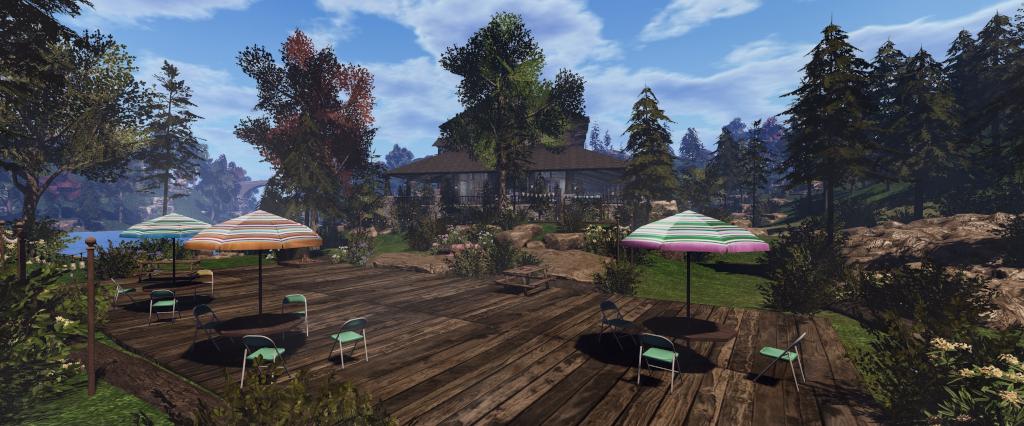
Dreamer’s Landing: a community supporting new users in Second Life

Dreamer’s Landing, February 2025

Update, March 27th: Dreamer’s Landing is being overhauled and is currently closed. 

Co-founded by Ⱥvalon Bouvier and Fire (Fire3850), I first dropped into Dreamer’s Landing in mid-December 2024, drawn by the concept of a setting which brings together both those new to Second Life and those engaged with the platform in order to foment a sense of community, learning, encouragement and support, in which new users gain a better foothold in-world, from being able to find a free home through to having the opportunities for direct mentorship and to engage in social events – users can even apply for jobs within the setting.

At the time of my first visit, there was still work going on setting-up parts of the region, so I had intended to hop back again at the start of the New Year and take a detailed look at Dreamer’s Landing; unfortunately, things being what they were, I didn’t manage to do so until later January – so my apologies to Fire, Avalon and their team for the delay in getting this article put together.

Our mission at Dreamer’s Landing is to provide housing, mentorship and community to new and experienced SL members, where everyone contributes and respects the people within the community. We do this by attracting seasoned residents who want to create community and mentoring.

– Dreamer’s Landing Mission Statement

Dreamer’s Landing, restaurant – February 2025

Occupying a Full private region utilising the Land Capacity bonus offered by Linden Lab, Dreamer’s Landing is not currently a part of the Lab’s Community Gateway programme, as re-launched in 2017. This is primarily because it is more a “next step” community for new users rather than a place for leaping in from sign-up and getting started; however, it does have links with several community gateways, including the Lab’s own welcome hub, where such on-boarding does occur. By keeping a little apart from the usual mix of on-boarding, focused learning (mixing self-learning with mentor support) found within “traditional” Community Gateways, Dreamer’s Landing is able to focus more on personalised support built around the overall sense of community.

In addition, Members of the team may have their own homes within the community and are very much a part of social activities; thus, the sense of friendship and community is further fostered, and this helps lower any embarrassment newer users might otherwise feel when it comes to asking questions / seeking assistance. Within this, Dreamer’s Landing wraps within itself the concept of paying forward; new users obtaining a home within the region are asked to give a little back to the community in support of others, as Avalon noted to me.

We have about 12 mentors at the moment who are volunteering to spend time with our new residents, and we have onboarded 14 new residents so far, hopefully giving them all a lift up to their new life in SL. Part of the project is that we encourage new users to give back by becoming greeters at the Landing Point or by contributing directly to the rest of the community here. We also try to encourage them to discover things they’d like to do in-world. 

– Avalon Bouvier, co-founder, Dreamer’s Landing

Dreamer’s Landing, February 2025

The Landing Point is located on the ground level of the region, which has been attractively laid out in a style of 18th and 19th century French metropolitan architecture, with some Greco-Romano touches. A region surround offers a sense of greater space, whilst the region as a whole mixes community spaces, a small business district, gardens, and residential rentals, all brought together by cobbled avenues and boulevards. As well as the gardens and parks, copses of trees and the waterway cutting through the region help to avoid any sense of the setting being overcrowded.

The residential properties here are kept to the outer edges of the region to offer those renting them with a sense of personal space. If I understand things correctly, these units – taking the form of large classical French townhouses as might be found in Paris – are available to volunteer mentors and new users who wish to remain a part of the community.

The Landing Point sits within the small business district with boutique-style shops focused on fashion, couture and avatar customisation, together with gallery spaces to introduce newcomers to SL’s art scene, and similar.  It is rounded-off by the local café,  which joins with the dancing / music / games square towards the centre of the setting, the restaurant to east with its outdoor terrace / dance area build over the waters of a small cove, and the pool, spa and beach to the south-west as the major event and activity spaces.

Dreamer’s Landing – new user homes, February 2025

Getting around the ground level is easy enough on foot, but the various areas are also linked by the Dreamer’s Landing teleport system which also provides access to the region’s sky platforms. These include:

  • The Education Centre – where classroom lessons can be obtained for those who prefer them, together with self-help guides (touch the bookcases), and residents can apply for volunteer and paid jobs within the community (ads for these can also be found on the ground level). This level also includes the Dreamer’s Landing passport centre and a gifts centre to help new users to get started.
  • The Sandbox – where community members can unpack boxed items they have obtained, practice building, etc., and where community paintball games might be held.
  • The Walk-in Closet – offering space for users to sort their inventory, try outfits, learn about (and purchase) web-based inventory management systems, change their appearance / adjust the positioning of non-rigged attachments  and try them out with various poses, etc., with with the assistance of others or in private changing facilities if they prefer.
Dreamer’s Landing – Education Centre, February 2025

And of course there is the new user free housing. This takes the form a chalet-style housing spread over a sky platform with light landscaping, with personal touches added by the Dreamer’s Landing team, such as a sign welcoming incoming users to their new home and small outdoor community spaces as well.

We currently have 24 free homes for new residents, with about half occupied. Each house is supplied with furnishings and décor, and have an additional 50 LI for personal use. However, if someone wants to have the supplied furniture removed, they can, and that will give them up to 100 LI for personal use. Houses are generally supplied for a two-month period to help people get started, although this might on occasion be extended according to circumstance.

– Fire3850, co-founder, Dreamer’s Landing

Dreamer’s Landing – new user homes, February 2025

From my multiple visits to Dreamer’s Landing, I can personally attest to the friendliness and helpfulness of the folk at Dreamer’s Landing – both established and those who are more recent to Second Life and have volunteered to help within the community. If you know of any recent arrivals to Second Life who are looking for somewhere they might initially treat as home and be among a helpful community – be sure to direct them towards Dreamer’s Landing. Further information on the community – including the schedule of events and entertainment – can be found at the Dreamer’s Landing website.

SLurl and Links

2025 SL viewer release summaries week #5

Logos representative only and should not be seen as an endorsement / preference / recommendation

Updates from the week through to Sunday, February 2nd, 2025

This summary is generally published every Monday, and is a list of SL viewer / client releases (official and TPV) made during the previous week. When reading it, please note:

  • It is based on my Current Viewer Releases Page, a list of all Second Life viewers and clients that are in popular use (and of which I am aware), and which are recognised as adhering to the TPV Policy. This page includes comprehensive links to download pages, blog notes, release notes, etc., as well as links to any / all reviews of specific viewers / clients made within this blog.
  • By its nature, this summary presented here will always be in arrears, please refer to the Current Viewer Release Page for more up-to-date information.
  • Note that for purposes of length, TPV test viewers, preview / beta viewers / nightly builds are generally not recorded in these summaries.

Official LL Viewers

  • Release viewer: version 7.1.11.12363455226. formerly the ExtraFPS RC, dated December 17, promoted December 19 – No change.
  • Release Candidate: Forever FPS, version 7.1.12.12999043440, February 4, 2025.
    • Numerous crash and performance fixes.

LL Viewer Resources

Third-party Viewers

V7-style

  • No updates.

V1-style

  • Cool VL Viewer Stable: 1.32.2.34, February 1, 2025 – release notes.

Mobile / Other Clients

  • SL Mobile updated to version 2025.1.542 (Android) / 0.5.533 (iOS) – February 4.

Additional TPV Resources

Related Links

Between the Clouds in Second Life

Between the Clouds, February 2025 – click any image for full size

Over the years I’ve covered many of region settings designed by Bella (BellaSwan Blackheart), and have always enjoyed my time exploring them and taking photos. So when I saw via Bella’s Second Life profile that she now has a place called Between the Clouds, I was curious to see what it might be all about.

Sitting within a Full region split into 16 4096 sq metre parcels – something which, as a by-the-by, I haven’t dropped into in a very long time – Between the Clouds is much smaller than Bella’s other settings. As a result, and upon arrival, the setting might be mistaken as a sky build mostly comprising building shells and – other than upper portion of a tower block apparently thumbing its nose at gravity – little else. But first impressions often deceive, and such is the case here: there is a lot going on and waiting to be discovered.

Between the Clouds, February 2025
Welcome to this little hideaway high upon the sky and discover the hidden spots this place has to offer. Feel free to enter the buildings that are accessible and hang out wherever you want. No nudity or any sexual activities please! 

– Between the Clouds About Land description

Take, for example that floating tower block roof area; it forms the setting’s Landing Point, and the rooftop on which people arrive is speckled by colourful paper cranes whilst the roof over the elevator winch room has been imaginatively turned into a little swimming pool.

Between the Clouds, February 2025

The stairs alongside the winch room lead down to the rest of the remnants of the tower – including the upper doors of an elevator shaft. However, given the rest of the building is not longer there, trying to call for the elevator might be a little difficult. Instead, the stairways offers the most immediate route down – but do beware of the last step, it’s a big one (although a paddling pool has thoughtfully been provided to enable incoming bodies to splash down 😀 ).

Further progress to the setting’s street level requires a further leap of faith. Or at least a leap; one which will drop you down into a grassy courtyard with little businesses tucked into it – although most of these appear to have been shuttered and to have seen better days.

Between the Clouds, February 2025

Two routes out of this courtyard are offered; a narrow alley link through to a much larger square, again overgrown with grass and around which various businesses are arrayed on the ground floors of stubby apartment blocks, one of which appears to have never been completed. The second route away from the courtyard is via stairs leading between more squat buildings. However, this doesn’t go too far – but it down offer a route to a couple more of the little spaces set aside throughout the setting for people to sit an pass the time.

What then of all the little details I mentioned? Well, these take many forms – find the right door, and you can take the stairs up to a trio of small apartments being put to various uses, for example. Another door offers a similar upwards climb ending in the rather unsettling sight of a couple of hazmat-suited figures in heavy gas masks apparently observing the square from behind the gaping maws of frameless windows, one of which has an equally not-too-reassuring sign reading FALLOUT SHELTER beneath it. This little tableau, together with the office space in the same building where a monitor screen warns NO SIGNAL PLEASE STAND BY, possibly offer the makings of a narrative for the setting – but I’ll leave you to work out what form any story might take.

Between the Clouds, February 2025

Also in the large square is a sturdy builder’s scaffold; but while there are building blocks on and under it, it now appears to be in support of a stone statue and fountain, adding another mystery to the setting – a mystery furthered by the apparent hints of habitation which suggest whoever lived here may have rapidly departed: bicycles sit in a rack or propped against walls along with a deserted moped; underwear hangs on a washing line; slippers await feet by an armchair and, most intriguingly of all, a pair of glasses holding paper papers with scribbled sketches and partner by an old cell phone and a stagnant cup of tea, as if suddenly abandoned.

Not that the place is entirely devoid of life; beside the two strange figures up in the apartment building, this is a place rich in bird song and the cooing of pigeons; there’s even a big dog apparently awaiting the return of its owner, who appears to have left some handwritten cards and little bear (perhaps a toy for the dog?) on the bench  – and  I’ll leave you to find the other dog 🙂 . Then there are the setting’s cats; around a dozen of them are scattered around, some keeping an eye on things, other catching up on their sleep – and one taking on the role of an unusual star of a television!

Between the Clouds, February 2025

Deceptively engaging, Between the Clouds is one of those locations which demonstrates you don’t have to have a complete region in which to allow your imagine loose; small can be equally as a captivating and photogenic.

SLurl Details

Insomnia: art and being in Second Life

Artsville, February 2025: Filipa Emor – Insomnia

Insomnia, or sleeplessness, is a terms which might all have some familiarity with, although its definition covers a broad range of conditions and circumstances in which a person has trouble sleeping. In fact, the conditions under which insomnia can occur are so broad, analysis of the problem through study either by randomised controlled trials or via systematic review can lead to very different outcomes and even biased in findings.

Very broadly speaking, insomnia might be split into insomnia disorder (ID), which might de defined as protracted difficulties in sleeping and obtaining rest which might be tied to specific health / lifestyle / psychological issues, and insomnia symptoms, which refers more to shorter (but equally intense) periods where our sleep is disrupted due to briefer onsets of one or more of the symptoms of insomnia. The latter may run from simply eating a large meal too late in to evening and being unable to sleep while the digestive system continues to chug away through to the more recognised symptoms of insomnia such as a rise in anxiety or fear, and similar emotional condition or when we “can’t turn our brains off” as a result of something that occurred during the waking hours.

Whatever form it takes, between 10% and 30% of all adults can be suffering from insomnia at any given time, and around half of all adults will experience insomnia symptoms of one form or another during the course of a year – with up to 6% of them dipping into ID lasting more than a month.

Artsville, February 2025: Filipa Emor – Insomnia

It is these latter aspects of insomnia which are examined within the individual pieces making up Insomnia, an immersive installation by Bee (Filipa Emor) within a sky Gallery at Artsville. In doing to, the pieces come together to offer a broader perspective on Insomnia Disorder as a whole; one that is perhaps very personal to the artist – but through its individual parts, will doubtless hold meaning for each of us who visit.

Insomnia reminds us that the night is not just for dreams, but also for confronting our deepest thoughts … Each image is a fragment of my sleepless nights, shared to resonate with those who have also stared at the ceiling, chasing sleep.

– Bee (Filipa Emor)

Insomnia is also a genuine tour-de-force of artistic exploration and exposition; the arts and the space within which it is displayed – and designed by the inimitable Konrad (Kaiju Kohime) – combine to present an installation seeped in meaning and metaphor, inviting exploration and provoking contemplation. When visiting, you must have local sounds enabled to fully experience the installation and make sure you are using the Shared Environment; both are essential to this visual and physical journey.

Artsville, February 2025: Filipa Emor – Insomnia

Both the art and the environment are presented in monochrome tones of white and black – appropriate, given the subject – which combine to give sense of chiaroscuro which spreads from the individual pieces of art to encompass the entire installation, increasing the sense of being caught within that strange space and state where we hover listlessly between sleep and wakefulness; a space prowled by thoughts and inner demons intent on preventing us from passing peacefully from the former to the latter as the night hours pass.

Each piece here portrays a different facet of sleeplessness: the longing, the struggle, and the strange beauty of being awake while the world dreams. Insomnia reminds us that the night is not just for dreams, but also for confronting our deepest thoughts.

– Bee (Filipa Emor)

I don’t want to offer my interpretations of the images Bee presents; I have little doubt they will resonate in a personal, intimate way for anyone seeing them. What I will say about them is that they are designed to be touched, fading and brightening in a portrayal of the struggle to find sleep and thought roil within. They also have an order to them, as indicated by the clock display under each one, marking the passage of the night as they progress from the far side of the information board at the landing point, and progress counter-clockwise around the installation’s lower level.

Artsville, February 2025: Filipa Emor – Insomnia

Accompanying the images are quotes on the nature of sleep, restlessness, insomnia and the soul. Some of these also brighten and dim on being touched, in reflection of the flux of being they each represent. Located higher up within the installation, they are reached by stairways and walkways  – as does a bed in one corner. Together these two climbs present metaphors: one for our rising desire to find the sanctuary of sleep as the heartbeat ticking of passing time torment us, and the other the physical act of climbing the stairs to find our bed – possibly accompanied by thoughts of whether it will be to sleep – or to lie trapped in thought.

Beautifully expressive and presented, Insomnia should not be missed.

SLurl Details

January 2025 SL Mobile UG meeting summary

Campwich Forest grounds: location for the Monthly Mobile User Group (MMUG)
The following notes were taken from the Thursday, January 30th 2025 Monthly Mobile User Group (MMUG) meeting.

These notes should not be taken as a full transcript of the meeting, which was largely held in Voice, but rather a summary of the key topics discussed. For this initial meeting, video recording was not permitted, we hope that changes with future meetings.

Table of Contents

Meeting Purpose

  • The Monthly Mobile User Group provides a platform to share insights on recent mobile updates and upcoming features, and to receive feedback directly from users.
  • These meetings are conducted (as a rule):
    • The last Thursday of every month at 12:00 noon SLT.
    • In Voice and text.
    • At Campwich Forest.
  • Meetings are open to anyone with a concern / interest in the above topics, and form one of a series of regular / semi-regular User Group meetings conducted by Linden Lab.
  • Dates and times of all current meetings can be found on the Second Life Public Calendar, and descriptions of meetings are defined on the SL wiki.

Re-Cap on Recent Releases

  • Version: 2025.01.538 (Android) / 0.1.530 (iOS)
  • Push notifications for group notices.
  • Mobile chat history.
  • Avatar Improvements.
  • Streaks rewards testing (see here for more).

Upcoming Updates and Roadmap

A look at upcoming features for SL Mobile based on information supplied to bloggers – including myself – at the end of 2024, and referencing my blog post on that meeting – see: Second Life Blogger Town Hall, December 2024: Mobile, marketing and more:

  • Ability to create accounts via Mobile, including creating an initial avatar and logging in using the existing new joiner workflow.
SL Mobile – the ability to create a Second Life account from within the app
  • Addition of an Address Bar to the app,  making it possible to:
    •  Search landmarks /create landmarks.
    • Share SLurls with people on other apps (Discord, Reddit, WhatsApp, etc.) via the native share cards found in Android and iOS.
    • Allow maps.secondlife.com work on the Mobile App.
Coming soon – the SL Mobile: Address Bar
  • The new Lobby feature, intended to enable communications, allow users to see who is on-line and provide general information whilst the app continues to load things like the 3D world view in the background.
    • This is also seen as a means for those on lower / mid-tier mobile devices to make use of the App as a communications tool.
Coming soon: the SL Mobile: Lobby
  • Other work in progress includes:
    • Providing quicker access to chat when using the app.
    • Providing the means to indicate which Group notifications  you wish to see pushed to your mobile device.
    • Improving in-world interactions within the app – making it easier to identify objects with which an avatar can interact, and know that something is happening when long-pressing an interactive object.
      • The identification will initially likely be the display of a timer under the finger when placed on an interactive object – when the timer expires (approx. 1 second), the interaction (e.g. a dialogue box) will be initiated.
      • Once available, this will be iterated over time to include selections form things like list views, where appropriate, limiting selection by distance, etc.

Roadmap Approach

  • Grumpity Linden reiterated the approach to Mobile development is focused on batching together requests and feedback on what users would like to see (allowing for us all having different expectation / needs / wants), to build end-to-end experiences covering a specific aspect (“journey”) in using the app.
  • To help with this, Grumpity also indicated that feedback (preferably through the Mobile app using the Feedback option in the menu) is greatly appreciated and does go into thinking about the roadmap and feature set for SL Mobile.

Avatar Rendering

  • As there are numerous differences between avatar rendering / operation in Second Life and Unity (e.g. in SL the Z axis references vertical movement; in Unity it references horizontal back / forth movement; each system handles rigged meshes differently, etc.), the entire rendering system for SL Mobile has had to be built for the ground-up over a period of over a year.
  • While much progress has been made, the team acknowledge avatar rendering within Mobile is not as yet on a par with avatar rendering in the viewer, therefore more work is to be done in this area.
  • However, because the SL avatar system is so open, there are still numerous specific issues where avatars may not render correctly in SL Mobile for assorted reasons (such the the way an attachment has been made, how it attaches to the the avatar, etc).
    • These issues require fixing on a case-by-case basis (and the team already have a library of 50 such “avatar classes”), and each one must undergone extensive regression testing to make sure any custom fix does not break avatar rendering elsewhere.
    • This is a current focus of work, and users noting persistent rendering issues as a result of clothing / attachments are asked to report it via the Mobile app’s feedback option, including information on the attachment / item which seems to cause the problem they are seeing, and where a copy of it might be obtained.
  • Once the focus can turn from the above work, there are plans to further improve avatar rendering performance, making it more efficient – and thereby improve app performance as a whole.
  • There are some tonal differences in how avatars appear SL Mobile (e.g. skin tone). This is because SL and Unity use different approaches to rendering ambient light. Again, the hope is that in time, lighting in the Mobile app can be made more “viewer-like” to help reduce such issues, but, this work will take time to develop and deploy.

Avatar Transparency Issues

  • During the run-up to the initial release of the Mobile app there was concern as to whether or not the app would get through the vetting process and onto the major app stores, particularly in terms of the risk of avatars appearing nude during rendering.
  • The transparent avatar approach was specifically to solve this risk; keeping the avatar transparent until such time as it has fully loaded and be preventing it from rendering properly should an attachment fail to apply as expected.
  • Unfortunately, the system is not fool proof, and false positives can be received which result in an avatar becoming “stuck” in the transparent mode.
  • There is thought being given to help overcome this (e.g. by forcing the avatar transparency mode to time-out after a set period to allow the avatar to complete loading), but this has yet to be finalised.
  • Those who do have repeated issues with being stuck in transparent mode, even after an outfit change (e.g. via the Desktop viewer) should file a feedback report, and if possible indicate the item they think might be causing the problem.

Memory Use (and PBR Rendering)

  • Another key difference between Mobile and the viewer is (obviously) available system and video memory.
  • Computers running the desktop viewer generally have at least 4Gb of memory to play with, with those with dedicated GPU cards also have dedicated VRAM.
  • Mobile has around 500MB-1Gb to play with. This necessarily limits Mobile in some ways (e.g. dropping texture resolutions as limits are more easily hit, etc.). However, there is work being put into this in the hope of again making Mobile more efficient in its use of memory.
  • In the meantime, the fact that memory is limited is one of the primary reasons why, as yet, there has been no attempt to implement PBR rendering into the Mobile app, and it significantly ups memory use.
  • The memory limit is also the reason why the number of avatars SL Mobile can render is set so low: avatars have a high rendering / memory cost, and can push the app to its limits, stopping other things from rendering – including leaving avatars transparent.

In Brief

  • A run-down of the top requests for Mobile (and the official viewer in some cases).
    • HUDs: something the Lab would like to implement for Mobile, but the volume and complexity of HUDs in use, the screen space they require, etc., does make coming up with a suitable means of handling them difficult.
      • The likely approach to this will again be iterative: initially offering support for very basic HUDs, and then working up from there.
      • However, team resources are such that focusing on this as a multi-month project when there are other areas of Mobile to be enhanced and features possibly more easily implemented, means it is somewhat lower on the list.
    • Inventory:
      • Another intensive task.
      • A preview of the work currently being done is in the Mobile app – the Select Outfit option, which is seen as a first step towards inventory support in Mobile.
      • Exactly what will follow this as it is implemented, is still subject to a final decision.
  • Mobile is generating a lot of new user traffic into SL, although precise metrics were not available at the meeting.

Date of Next Meeting

Looking at Streaks reward testing on the SL Mobile app

Streak rewards are available to some users of the SL Mobile app as an experiment

The most recent update to SL Mobile – version 2025.01.538 Android) / 0.1.530 (iOS), dated January 14th, 2025 – introduced an experimental rewards scheme for some of those those using the app to log-in to Second Life, in order to encourage daily engagement through the app.

Encouragement of this kind is referred to as “streaks”, and can be used as a form of incentive to encourage or maintain specific routines or achieve daily goals through game mechanics, or some form of reward in return for engagement. Snapchat for example offers “collectible” emojis to users who exchange Snaps through the app with one another on a daily basis; meanwhile Roblox includes the ability for users to build their own streaks rewards systems into their games. With SL Mobile, the rewards take the form of modest (and incremental) offerings of Linden dollars.

The idea behind the experiment with SL Mobile is to see how rewards might influence people’s use of the Mobile app – particularly those referred to as “lapsed” Second Life users; those who have walked away from the platform and who have, according to Brad Oberwager, cited a lack of Mobile access as being one of the contributing factors for them doing so. This aim was also reiterated by Bridie Linden, the Project Manager for SL Mobile during the inaugural Monthly Mobile User Group meeting.

Some of you may have noticed we are doing an experiment that is trying to encourage follows to come back to Second Life and increase their engagement. So [it is] a log-in rewards offering. Not everyone will see the same thing, because we’re trying different variations in incentives.

Bridie Linden, SL Mobile Project Manager, January 30th, 2025

As it is currently an experiment and subject to A/B testing related to the general use of SL Mobile, not all users downloading the app or currently using it will be able to engage with the streaks rewards, as Grumpity Linden also explained during the same meeting:

Currently, log-in rewards are only available to subscribers, but not all who are subscribers will have the same experience; so I’m not going to say you should subscribe if you want to get log-in rewards in Linden dollars, because that’s not always going to be the case. But if you’re already a subscriber, you should check-out Mobile, and come back every day and see whether, maybe [you have the option]– because we’re going to continue tweaking this programme. Obviously, we want people to be happy, and we want this to be successful.

– Grumpity Linden, January 30th, 2025

To find out if you are eligible to join (and have not already done so – I am intentionally late in reporting on this scheme as I’ve been poking at it for the last 8 days), proceed as follows:

  • Start SL Mobile on your device and log-in.
  • Click the Menu button (top left, three horizontal bars) to open the menu.
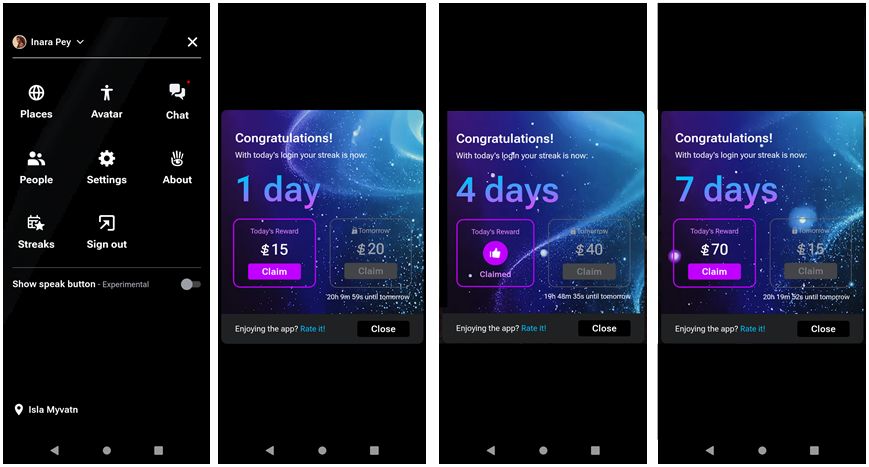
  • If you are eligible to join the experiment, you will have a Streaks button displayed in your menu Highlighted below, left).
  • Tap the Streaks button to opt-in to the scheme and start the clock counting down to when you can claim your first rewards (which appears to be set to L$15 for everyone).
Those who are included in the initial testing can opt-in to the Streaks rewards by going to SL Mobile’s menu and tapping the Streaks icon (if available), to opt-in to the the rewards
  • Note the two sliders t the bottom of the Streaks screen allowing you toggle daily streak messages as soon as you log-in to the app off/ on, and to opt out / in to Streaks, both of which are enabled (“on” and opted-in) by default.

Once you have joined Streaks, rewards can be claimed daily, starting with the initial L$15. In addition, please note:

  • The amount of the reward offered each day increments (e.g. L$15 on “day 1”; L$20 on “day 2”).
  • The amount by which the daily rewards increments also increases the longer a streak continues (e.g. rising from a L$5  increment per day to (first) L$10 increments per day).
  • Streaks appear to last for 7 consecutive days before the reward amount automatically resets to L$15 (or you miss a daily log-in), and you start over again.

To claim a daily reward:

  • Log-in to the SL Mobile app. Your Streaks status should be automatically displayed unless you have turned off the daily login message, in which case, open the app’s menu and tap the Streaks button.
  • The display should tell you the amount available to claim, and the incremented amount that will be available for you to claim in 24-hours’ time (below left).
  • Tap the Claim button to claim the available amount and have it added to your SL amount L$ balance, and update your Streaks status (below centre).
Claiming daily Streaks is required to transfer them to your account L$ balance (left and centre). Streaks appear to rest to the baseline L$15 after around 7 days
  • Per the notes above,  Streaks rewards appear to increment of a 7-day period, and then reset to the initial L$15 (see the image above right) and build up again. However, whether this is an infinite cycle or also limited; I have no idea.

As a means of encouraging users (current and “lapsed” to use SL Mobile, this is an interesting approach; I’d been particularly interested in how much traction it gets amount its intended primary audience  – “lapsed” users – over time, and in how well it might act as incentive as new users are able to sign-up to Second Life through the app. However, we’ll hear more on both in due course.