Looking at the New Linden Homes Store

via Linden Lab

On Monday, October  9th, Linden Lab sort-of formally launched the new Linden Homes Store for Second Life, showcasing all the Linden Home types and themes available to those users holding a qualifying subscription account (at the time of writing, Premium  / Premium Plus), and which had been previously semi-previewed in a September 27th official blog post.

The new Linden Home Store is part of a project to completely overhaul what Linden Lab calls the “Land Journey” in order to provide a resource hub for all matters pertaining to land holdings in Second Life: how to lease one or more regions from Linden Lab, types of regions available, how to obtain Mainland, even how to go about locating and renting land from private estates / land providers.

The first part of this work actually launched in February 2023 in the form of the Land Portal, the core of the new hub. At that time, the Portal was little more than a “front page” showing what was to come, so rather than devote a full post to it, I covered it in one of my Web User Group meetings, as it was at one of those meetings where the launch of the portal was announced. While it does gather together information related to buying / renting land from existing sources, the Linden Homes Store is really the first major piece of meat on the bones in terms of a new suite of pages for the Portal – so what’s been done and how does it look?

The upper part of the new Linden Homes Store main page, as seen by someone in possession of a Linden Home.

General Overview

Store Home Page

In terms of looks, the first thing that hits the eye is that the store has – unsurprisingly – been produced using the new general page style and colours which have started to roll out across the Second Life web properties, as was the case with things like the Destination Guide. The Linden Home Store also borrows from DG in some elements of its look and feel, thus helping to further instil a sense of platform identity in to the pages whilst encouraging a degree of familiarity to help promote confidence of use.

But to get down to specifics. The Store’s home page offers two slightly different layouts, depending on whether a user is either logged in our out of their secondlife.com account and / or has a qualifying subscription account with a Linden Home already associated with it or not, per the images above and below.

upper part of the new Linden Homes Store main page, as seen by someone who does not have a qualifying account type / is not logged into the the Second Life web properties.

The What Next? section of pages displayed for qualifying accounts has some curiosities within it which raised my eyebrows:

  • The “Your home’s content pack” links to third -party purchasable add-ons for “2019+” Linden Homes. Whilst these are a handy resource, they actually have bugger all to do with the Content Packs actually supplied with the various themes – so why name the link thus? It’s unnecessarily confusing for those interested in seeing the different selections of items supplied with the various Linden Home themes.
  • Why on Earth utilise a video from 2010 which has nothing to say about the far more recent Linden Homes themes, which are liable to be of the most interest to recently upgraded account holders? Could not a more up-to-date video have been produced prior to the launch? If nothing else, a video that properly encompasses  all of the Linden Homes products also lends itself to acting as a promotional tool aimed at anyone accessing the Store, regardless of their account type.
  • Why on Earth is “Choose a different home” so called? It’s a link to the SL wiki page serving to introduce and describe “2019+” Linden Homes – so why not call it “Introducing Linden Homes” or something? As it is, the title suggests that by clicking it, the user will be magically whisked to where they can swap their existing home without the need to scroll further.
A closer look at the What Next? section of the Linden homes Store, as displayed to qualifying account holders with the niggling links (your home’s contents pack, Video tutorial and Choose a different home).

Beneath the What Next? / Amenities section of the page, is the main store listing. This comprises information panels for all Linden Homes, 2019+ and 2010., with panels listing slightly different information:

  • 2010 Linden Homes only provide a photograph of the house type, the name of its theme (e.g. “Tahoe” or “Meadowbrook”), and the parcel size.
  • “2019+” Linden Homes are listed by theme name (e.g. Ranch, Log House, Silt House, etc.), provide a photograph of one of the styles from the theme, number of layouts (styles) within the theme, location and parcel size.

This listing is periodically updated to reflect the current status of all Linden Homes: available themes / types are listed firt in the order Premium Plus Homes then Premium 2019+ Homes then Premium 2010 / 51w sq m parcel homes. And themes or types currently unavailable are then listed in the same order and labelled NOT AVAILABLE.

For those on non-eligible (for Linden Homes) accounts / who are not logged-in to the SL web properties, the Store will go on to display additional useful information on Linden Homes below the index list.

House Panels / Information

Clicking on a specific house / theme in the Store’s index list will refresh the page and display expanded information on the selected house / theme that the top, with the more recent Linden Home themes having more information available than the 2010 Homes, per the images below. The listing of homes will then continue below this expanded panel.

An information panel within the Linden Home Store for one of “2010” styles of Linden Home. Note the information on the left.

That the “2019+” homes have more information associated with them is not surprising, simply because they have more to offer. however, it did again give rise to some niggles:

  • The text “Includes X layout versions to choose from” (where X is a number) is followed by a link called Learn More. This gives the impression that clicking the link will display further information directly related to the theme (such as what the layouts are). Instead, it takes the user out of the Land Store and to the 2019 Linden Homes wiki page.
    • While this does contain some information related to the various themes, it’s hardly more informative that the information displayed within the Store and totally disrupts what has thus far been a relatively contained, seamless experience.
    • Given the effort put into the Store, it’s a shame time wasn’t taken towards building more detailed pages (with images) for the themes ahead of any launch.
  • Similarly, the text “Customise the colours of this home’s surfaces” is perhaps mis-labelled, and would be better called “About the Linden Homes Controller”, given it links to the section of the SL wiki page devoted to all of the Controller’s options, not just decorating.
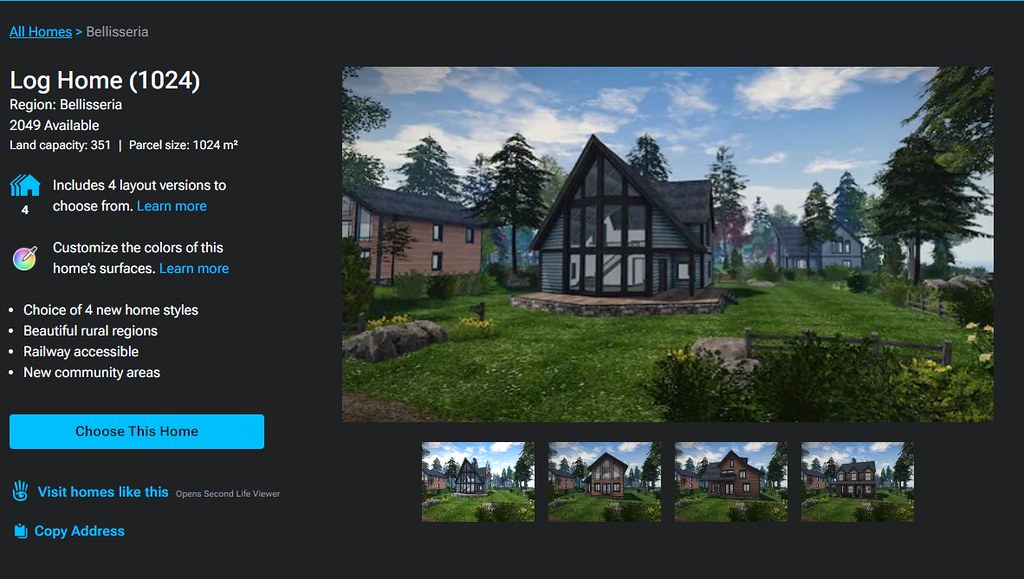
An information panel within the Linden Home Store for one of “2019+” themes of Linden Home. Note the expanded information on the left, and the critquies of it noted in the above bullet points.

Some have also commented that listing the “2019+” Linden Homes within the Store in terms of their collective theme (e.g. Houseboat) rather than style (e.g. Windlass, Barnacle, Jolly Roger, etc.), and doing the reverse for the “2010” Homes, listing them by style (e.g. Aspen, Birch Cedar) rather than collective theme (e.g. Tahoe) is further confusing.

However, while I can understand thinking this way, I’d actually point out that it does in fact make sense: all “2019+” Lindon Home styles within a given are available through a rezzing system on the parcel, allowing the user to swap between them whenever they wish. However, this is not the case with the “2010” homes; regardless of the over-arching theme (Tahoe, Meadowbrook, etc.)., the only way to swap from one theme to another is to physically swap homes through the Store  – ergo, listing them by style rather than trying to group them by theme does in fact make sense.

General Observations

I will confess, other than kicking the tyres of the new Linden Home Store as described above, I’ve not taken it for a drive in terms of using it to obtain a Linden Home; frankly, I’m perfectly happy with the location of my current Linden Houseboat, and I have no desire to pack-up and be randomly moved for the sake of a test. Sorry.

That said, it should be noted that whilst you can see the various types and themes of Linden Home currently available when browsing the Store, while the actual house type / theme you pick might be in-world is still down to a random selection from the available stock; you cannot puck a specific parcel in a specific region. Nor should this be expected: building a system to list all the locations of a given house type / theme when these could run into the hundreds just isn’t reasonable; thus Support ticket remains the means but which to request a specific location.

I do find several other points in the design niggling / confusing. Why, for example, are “2019+” Linden homes on 512 and 1024 sq m parcels listed as “Free with Premium Membership” when they are in fact available to both Premium and Premium Plus? Why do Basic and Plus members who might not realise have to get half-way through the Choose This Home before being told they are not eligible? Would it not be better to divert them to the account updates page on clicking the Choose button, rather than displaying angry red text when they try to Confirm Their Choice? Why wasn’t the store hooked into the Linden Homes widget in the top right of the secondlife.com dashboard for Premium / Premium Plus members from the outset (and which currently still links to the “old” Linden Homes store)?

The updates page for choosing a Linden home. It is only at this point that Basic and Plus users are informed they are ineligible for a Linden Home and need to upgrade – diverting them to the account upgrade page on chick the earlier Choose This Home button might be friendlier.

These are all small points, and to be fair, LL does have a long history of releasing not-quite-baked features and updates into the wild and then tweaking them after the fact. As such, there is the potential for all of these personal annoyances to be be address as a natural part and parcel of that work. However, the fact that there are all these little niggles and potential points of confusion does negatively impact first impressions. Which is a shame, because overall, it has to be said this new Linden Home Store is a significant and welcome improvement to to previous version.

2023 SL viewer release summaries week #40

Logos representative only and should not be seen as an endorsement / preference / recommendation

Updates from the week through to Sunday, October 8th, 2023

This summary is generally published every Monday, and is a list of SL viewer / client releases (official and TPV) made during the previous week. When reading it, please note:

  • It is based on my Current Viewer Releases Page, a list of all Second Life viewers and clients that are in popular use (and of which I am aware), and which are recognised as adhering to the TPV Policy. This page includes comprehensive links to download pages, blog notes, release notes, etc., as well as links to any / all reviews of specific viewers / clients made within this blog.
  • By its nature, this summary presented here will always be in arrears, please refer to the Current Viewer Release Page for more up-to-date information.
  • Note that for purposes of length, TPV test viewers, preview / beta viewers / nightly builds are generally not recorded in these summaries.

Official LL Viewers

  • Release viewer, version 6.6.15.581961 (formerly the Inventory Extensions Viewer), promoted October 2 – NEW.
  • Release channel cohorts:
    • Maintenance V(ersatility) RC viewer, version 6.6.16.582093, October 6.
    • Maintenance W RC viewer, version 6.6.16.582075, October 5.
  • Project viewers:
    • No updates.

LL Viewer Resources

Third-party Viewers

V6-style

  • No updates

V1-style

  • Cool VL Viewer Stable branch updated to version 1.30.2.31 and Experimental branch updated to version 1.31.0.9 on October 2 – release notes.
  • Genesis Viewer updated to version 1.8.957 on October 8 – release notes.

Mobile / Other Clients

  • No updates.

Additional TPV Resources

Related Links

A journey through Shadowfell in Second Life

Calas Galadhon Shadowfell II, October 2023 – click any image for full size

Every year, Tymus Tenk, Truck Meredith and the Calas team bring us worlds of wonder to explore in the form of their Halloween and Christmas wonderland builds as an adjunct to Calas Galadahon Park, and each year we are gifted with regions of mystical / seasonal delight. Mixing an atmospheric setting rich in places to explore, scenes to uncover, rides to enjoy and events to attend, all knitted together by the weave of environment settings, soundscape and supporting music, these builds are always and genuinely a highlight of Second Life.

For October / Halloween 2023, the Calas team once again present Shadowfell II, a journey to a realms which although probably not modelled specifically after any element of Tolkien’s mythology, carries with it something of a sense of Middle Earth during the Second and Third Ages, mixed with hints of other franchises to offer an engaging potpourri of elements deserving of careful exploration. First presented in 2022 as The Gardens of Shadowfell, things have this year been expanded into a third region for visitors explore.

Calas Galadhon Shadowfell II, October 2023

As with all of the Calas themed builds, this is one in which it is very important visitors note at least some of the guidelines regarding a visit, all of which can be found at the landing point – with the most important perhaps being:

  • Make sure you Used Shared Environment (via World → Environment).
  • Make sure Advanced Lighting Model is active via Preferences → Graphics).
  • Enable local sounds.
  • Make sure you have particles visible.
Calas Galadhon Shadowfell II, October 2023

It also is suggested that those who can, should also enable Shadows via Preferences → Graphics. This is worthwhile if you can – and with the roll-out of the performance improvements within the viewer, this should be easier than it might have once been for a fair number of Second Life users – and I’d at least recommend it for photography.

Those familiar with the Calas Halloween builds will know that there are two primary means of exploration – on foot, following the paths winding through the regions; and via tour boat (available a short walk from the landing point). I strongly recommend you take the time to use both; the paths and trails offer the most comprehensive way through Shadowfell – including to the teleport portals which are a vital part of the complete experience, but which are beyond the reach of the boats (for obvious reasons); just be sure to allow around 50 minutes for the boat ride.

Calas Galadhon Shadowfell II, October 2023

I would also suggest, perhaps, that when exploring on foot, the accompanying music track is turned off during a first visit so that the ambient sounds can be fully appreciated. Instead, turn the music on for the boat tour (and for subsequent visits). Finally, and as per the guidelines at the landing point, keep an eye out for the eye-in-hand tapestries along the routes – they offer teleport opportunities to additional sit points and locations that you might otherwise miss.

Shadowfell really isn’t so much a single place, but more a realm of multiples environments, all interlinked by the paths and trails as they wend their way through it. There is the forest, with its twists of Tolkien’s Mirkwood, and the caverns dark and old (and on the ground and in the air); places where spiders wait to trap the unwary and even more unearthly creatures have come to call “home” (and where I again found myself wishing that music streams could be defined by altitude as Jerry Goldsmith’s theme for a 1979 Ridley Scott film remains highly suitable for the caverns in the sky!

Calas Galadhon Shadowfell II, October 2023

Then there are the ruins where the cold eyes of battle-ready orcs keep watch, or which mark the place where a kingdom of men (or elves) has fallen. There’s also the caves cut by the aeons-long passages of water, lit by the glimmerings of crystals and otherworldly plants as the water leads inexorably to swamps as beautiful as they are mysterious.

Throughout it all creatures of many places and world watch or roam. Some are clearly hostile; others perhaps content more with the watching. Some might even look friendly and welcoming (although with one, I’m always reminded of a comment by the legendary Robin Williams: “Mickey Mouse to a three-year-old is a six foot RAT!” – so perhaps some of the funnier-looking characters here aren’t as innocent as they might appear!).

Calas Galadhon Shadowfell II, October 2023

Given this is an expansion of 2022’s Shadowfell, there is much which is likely to look and feel too familiar to those who visited in 202. However, looks really can be deceptive, and there are many new and subtle touches which bring a fresh sense of discovery and exploration. This is obviously very much true of the additional region, a place which extends the swamplands into something darker and more chilling and in which ruins mindful of both adventures in the depths of the forests of the Far East and also of places like Moria, hewn from living rock and long deserted by those who created it.

Here fires burn from high stone ledges, perhaps awaiting visitors such as yourself – or perhaps indicating those who lit them heard your approach and even now lie in wait should you stray from the path. Then there are the statues and figures: a hint of Sauron (or perhaps the Witch-King of Angmar) here, a hint of Herne the Hunter there; whilst all across the regions are hints of and suggestions of all walks of fantasy and horror.

The Shadowfell II calendar of events

As always with Shadowfell and Calas special events, entertainment is also provided throughout the time the realm is available to visit; check out the schedule below for dates and times of performances at The Pavilion.  But above all else – do visit and enjoy; Calas events like this are not to be missed.

SLurl Details

Seanchai Library: The Bradbury Project in Second Life

Seanchai Library 2023

Ray Bradbury (August 22, 1920 – June 5, 2012) is perhaps best known as a science-fiction and futurist/speculative fiction author responsible for titles such as  Fahrenheit 451 (a book perhaps of special relevance currently), and his short-story collections The Martian Chronicles, and The Illustrated Man. However, he cast his writing net far wider, dipping into coming-of-age stories, screenplays, television scripts, poetry and both fantasy and dark fantasy. In the latter categories we have (the semi-autobiographical) Something Wicked This Way Comes, and The Halloween Tree.

It is this last story in particular, together with Bradbury’s creation of Green Town which form the latest chapter in immersive, event-driven projects developed and staged by Seanchai Library entitled, appropriately enough, The Bradbury Project.

The Halloween Tree

Running through until November 16th, with activities commencing on Monday, October 10th and running through until October 30th, The Bradbury Project will feature readings of The Halloween Tree by Seanchai staff and their friends together with entertainment provided by eClipse Club & Resort, and additional self-guided activities available for anyone who visits through until the project closes on November 16th, 2023.

Th Halloween Tree is the story of eight boys as they attempt to rescue their friend on Halloween night. Under the guidance of the mysterious Carapace Clavicle Moundshroud, they travel through time and space, learning about different cultures, and the role that the fear of death, ghosts, and hauntings has played in shaping civilisations down the ages, and which has contributed to much that is encompassed in modern-day Halloween activities.

The Project take place across two levels within the Seanchai Library home parcel, and for the best enjoyment, visitors to the Project should make sure their viewer is set to Use Shared Environment (World menu → Environment). Also, anyone visiting who isn’t already a member of either the Caledonian Studios or the Quantum Products SL experiences should join them when a dialogue to do so is displayed, as they will allow for a more seamless experience whilst exploring the Project’s locations.

The two levels for the event present interpretations of Bradbury’s Green Town and elements from The Halloween Tree, with both levels the focus of the Project’s events and activities.

The first of these – reached via the teleport portal close to the Library’s main landing point – is a corner of the outskirts of Green Town. Based on his birthplace of Waukegan, Illinois, Green Town was a fictional construct Bradbury used to juxtapose the comforting familiarity of Small Town America with the mysterious (and sometimes dark) events within several of his novels – including The Halloween Tree.

Two further portals with the Green Town setting provide access to the Project’s second level. This contains settings such as the home of Carapace Clavicle Moundshroud, esq., a good portion of the ravine just outside of Green Town, and the Halloween Tree itself. Of the two teleport portals connecting to this level, I recommend making your way to the the one within the first part of the Ravine on the edge of Green Town and using that when exploring.

Bradbury Project Activities and Events

Activities

  • “Where’s Mr. Lurky?” – Explore The Bradbury Project – everywhere from the main landing in Town, to the Kite Barn and The Halloween Tree. Look for the funny little black guy with the grinning purple face as you explore, and keep count! Full details for this hunt are available within The Bradbury Project locations.
  • Nosferatu on TV in the Halloween Open House – Town Level.
  • The Play Park in Green Town.
  • The Interactive Bradbury Library at Moundshroud’s House.
The Bradbury Project: Green Town

Readings and Entertainment

  • Readings of The Halloween Tree as follows:
    • 19:00 SLT every Tuesday of the event (October 10th, 17th and 24th), featuring Shandon Loring, Faerie Maven-Pralou, and Kayden O’Connell.
    • 13:30 SLT every Sunday of the event (October 15th, 22nd and 29th), featuring David Abbot, Gloriana Maertens, and Caledonia Skytower.
  • Music entertainment (via folk from eClipse Club & Resort) will be offered on the following dates (all times SLT):
    • 19:00-21:00 Friday, October 20th: DJ Momma Hoi.
    • 19:00-21:00 Saturday, October 21st: DJ Iniry Vaher.
    • 19:00-21:00 Sunday, October 22nd: DJ Caledonia Skytower.
    • 21:00-23:00 Thursday, October 26th: DJ Tiger Pawz.
    • 21:00-23:00 Monday, October 30th: DJ JAdmiral Maelstrom.

In addition, other Seanchai Library events may take place at the Project, including additional readings of Bradbury’s work, so keep an eye on the Seanchai Library website.

The Bradbury Project: The Halloween Tree

The Bradbury Project has been built by Dagmar Kohime, Gloriana Maertens, Stevie Basevi-Morane and Caledonia Skytower. All tips received by the Project will be donated to Reading is Fundamental.

SLurl and URL Details

2023 week #40: SL CCUG meeting summary: PBR and combat / gaming

Sonder, August 2023 – blog post

The following notes were taken from my audio recording and chat log transcript of the Content Creators User Group (CCUG) meeting held on Thursday, October 6th, 2023.

  • The CCUG meeting is for discussion of work related to content creation in Second Life, including current and upcoming LL projects, and encompasses requests or comments from the community, together with viewer development work.
  • As a rule, these meetings are:
    • Held in-world and chaired by Vir Linden.
    • Conducted in a mix of voice and text.
    • Held at 13:00 SLT on their respective days.
    • Are subject to the schedule set within the SL Public Calendar, which includes the location for the meetings.
    • Open to all with an interest in content creation.
  • The notes herein are drawn from a mix of my own chat log and audio recording of the meeting, and are not intended to be a full transcript.

Viewer Updates

The Maintenance W RC viewer updated to version 6.6.16.582075 on October 5th. The rest of the current official viewers in the pipelines remain as:

  • Release viewer, version 6.6.15.581961, promoted October 2 (formerly the Inventory Extensions Viewer).
  • Release channel cohorts:
    • glTF / PBR Materials viewer, version 7.0.0.581684, September 8.
    • Emoji RC viewer, version 6.6.15.581551, August 31.
    • Maintenance V(ersatility) RC viewer, version 6.6.15.581557, August 30.
  • Project viewers:

glTF Materials and Reflection Probes

Project Summary

  • To provide support for PBR materials using the core glTF 2.0 specification Section 3.9 and using mikkTSpace tangents, including the ability to have PBR Materials assets which can be applied to surfaces and also traded / sold.
  • The overall goal for glTF as a whole is to provide as much support for the glTF 2.0 specification as possible.
  • Up to four texture maps are supported for PBR Materials: the base colour (which includes the alpha); normal; metallic / roughness; and emissive, each with independent scaling.
  • In the near-term, glTF materials assets are materials scenes that don’t have any nodes / geometry, they only have the materials array, and there is only one material in that array.
  • As a part of this work, PBR Materials will see the introduction of reflection probes which can be used to generate reflections (via cubemaps) on in-world surfaces. These will be a mix of automatically-place and manually place probes (with the ability to move either).
  • The viewer is available via the Alternate Viewers page.

Further Resources

General Status

  • There has been a reported issue with animated textures on glTF materials which is under investigation.
  • Work is focused on clearing the backlog of niggling issues. Part of this is a glTF update which clarifies glare on transparent surfaces (e.g. things like glass and the degree of glare / sheen on it) which is helping for properly define this property (index of refraction), rather than leaving it up to artistic licence.

Mirrors

  • Mirrors are a part of the glTF / PBR materials project, but something of a separate tranche of work.
  • The idea is provide the means to have via high resolution reflections (i.e. mirrors) within a scene.
  • Initially only one active mirror surface per scene will be active for any viewer.
  • The process will use the PBR reflection probes mechanism, combined with a automated “Hero Probe” mechanism which with generate high resolution (512×512) “reflections” for the mirror.
  • The system will operate on the basis of avatar / camera proximity to a mirror surface triggering the closest reflection probe to become a “Hero Probe” for that avatar / camera. This means that if there are multiple mirrors placed within an environment, only the one closest to a given avatar / camera will be active and display the “reflections” generated by the reflection probe.
  • Depending on testing and performance, the number of mirrors might be expanded to two – one for mirror surfaces and one for Linden Water to generate high resolution water reflections where appropriate.

Status

  • Geenz Linden is working on performance improvements within the viewer. There is a target than an active real-time mirror should not exceed cutting a viewer’s frame rate by more than 50% at the highest impact.
  • Culling has been updated so that objects that are physically behind a mirror are no longer reflected by the mirror.
  • Shader work is in progress to get mirror reflections generally looking better visually.

Combat and Gameplay

  • Rider Linden confirmed he is adding a new function and event to llRezObject per the discussion in this forum thread about features for combat gameplay.
  • He also referenced his idea for moving Second Life damage from being a function of a script o being a function of the object, per his comments at the Simulator User Group meeting, and if possible this will include “negative damage” (or health recovery, if you prefer!).
  • A request was made to have a means to cap or better manage damage in some way, in order to prevent scenarios where it is possible to have a single bullet strike a object on which (say) five avatars are seated and have them all be killed (100% damage each), wherein in reality the bullet would only kill one and (maybe) wound another (so instead of all of them getting 100% damage, it is capped to each of them only getting X%). This request grew out of feature request BUG-231985, “Incoming LL Damage Cap”.

In Brief

  • BUG-234493 “Add an “until shortcut key released” option to gestures so we can do properly user-mappable keys” has been raised as a means of potentially making gestures more versatile, particularly in gameplay / combat, but also other areas, such as vehicle control options (e.g. creating a gesture to raise / lower the forks on a forklift truck and have the creator free to bind that to whatever keys / controller button(s) they like), etc.
  • A wide-raging discussion on the ability to create large-scale games in Second Life to attract a new audience, running from the technicalities involved and the need for more integrated toolsets (e.g. viewer-side scripting for HUD creation; and updated physics engine) through the ideas for a type of Second Life Endowment for the Arts (SLEA) but focused on content creation specifically targeted at encouraging people in to SL, to various ideas for new specialist simulator / region types, such as on demand regions and “game / event / entertainment” region types that can be instanced on the basis of demand.
    • The majority of this discussion was among users, the Lindens at the meeting not being in a position to comment on policy or revenue matters.

Next Meeting

† The header images included in these summaries are not intended to represent anything discussed at the meetings; they are simply here to avoid a repeated image of a gathering of people every week. They are taken from my list of region visits, with a link to the post for those interested.

Louvre’s Power of Water in Second Life

NovaOwl Sky Gallery, October 2023: Louvre – Agua

Open through October at the NovaOwl Sky Gallery is an exhibition of art by Louvre (Iamlouvre), a physical world artist who is now making her mark in Second Life, having joined (I believe) in 2021. This is the first time I have witnessed at exhibition of her work, and found it to be richly expressive.

Entitled Agua (the Spanish for “water”), this is an exhibition which fully embraces the space in which it displayed, Louvre demonstrating that as well as being a skilled artist, she has an innate sense of space and design, offering an environment that neatly folds itself around the exhibition’s theme, with the art split between the two levels of the gallery.

Water symbolises much more than an infinite space where we lose ourselves
when we look to sea. Water symbolises transformation, Life. All of us are water.  

– Louvre (Iamlouvre)

NovaOwl Sky Gallery, October 2023: Louvre – Agua

On the upper level, prints of her work are mounted on easels and walls, some of the latter backed by curtains of water tumbling to the floor below. On the lower level, this water spreads across a floor decorated with squares, some just below the surface other rising above it. All offer a sense of being stepping stones, encouraging visitors to make their way across them. These squares and mirrored by cubes and blocks climbing up the walls, the shimmering curtains of water visible in the gaps between them.

Close to the gallery entrance, sixteen cubes present sixteen paintings by Louvre, each painting repeated on all six faces of the cubes. Further back sit two larger cubes, each with an image of one of her paintings projected within it whilst further pieces are mounted on easels in an intentionally understated display, the entire level dominated by a single piece entitled Submarine.

Almost all of the paintings might be seen as portraits of a most unique kind. Few present a complete individual; rather they present images wherein the subjects are blurred or obscured, as if seen through a sheen of water, or with their subjects incomplete of cracked and fractured. In amongst them are paintings of a more abstract nature, but even these contain a sense of water-like fluidity and motion.

NovaOwl Sky Gallery, October 2023: Louvre – Agua

All of this is heavily suggestive of the opening lines of Louvre’s description for Agua, of water giving, being and transforming life. But there is more here as well, as Louvre goes on to note:

Water is also the tears produced by pain and sorrow. It is the force of the DANA flood that just hit my city. Washing away the homes of many neighbours and friends, taking within it their daily objects and their homes. Never in all my life have I been able to contemplate a greater disaster so closely. 
Water is the effort of my hands helping them, to the point of exhaustion, with water and more water.

– Louvre (Iamlouvre)

Storm Dana lashed Spain with torrential rain in early September, causing widespread flooding, particularly in the region of Castilla La-Mancha, home to the cities of Madrid and Toledo, with water levels rising such that streets, major transport arteries  – and most particularly, homes were overwhelmed. Such was the force of the water in places that cars were overturned or smashed together and evacuations were ordered. At least two deaths occurred, and several more people were reported missing.

NovaOwl Sky Gallery, October 2023: Louvre – Agua

It is this devastation, this sense of loss Louvre conveys through her paintings through their blurred / missing / incomplete elements. This reflection of Dana’s destruction is – as Louvre notes – very personal. She has witnessed the loss and hurt it has caused, and sought to help alleviate it through practical support for those around her hit by the storm’s ferocity. That this has also triggered her creativity through her art additionally completes the circle represented by Agua: that as a force of nature, water has the power to both positively and negatively bring about transformative experiences in life.

SLurl Details