At 10:00 SLT on Wednesday, February 4th, 2015 the Lab launched a new photo competition with a total prize pool of L$19,000.
The Photo Booth Fun Contest challenges SL users to submit their own photo booth theme pictures – the sillier the better – for a chance to win one of the following Linden dollar prizes:
Grand Prize – 10,000 Linden Dollars (estimated value at US$40.00).
First Prize – 5,000 Linden Dollars (estimated value at US$20.00).
Second Prize – 3,000 Linden Dollars (estimated value at $12.00).
Third Prize– 1,000 Linden Dollars (estimated value at $4.00).
To help inspire people with ideas for entries, Xiola Linden has scoured the web far and wide and set-up a Pinterest page full of images showing possible ideas and the use of props to make truly memorable / silly photos. But remember – the images are for inspiration only! The judges are looking for entrants to be as creative as as silly as they can get.
To enter, simply create your snapshot and then upload it to the contest page linked-to above and at the end of this article, using the Entries tab on that page (you must be signed-in to the forums for the button to work).
For full details on the rules of entry, general conditions, eligibility for entry, prize information and so on, please refer to the contest’s official rules and conditions.
In a new move for the Lab, winner will not be decided on the basis of a popularity vote. Instead, a specially selected jury, comprising a mixed panel of Linden Lab representatives from the Lab’s marketing and community relations team and a number of Second Life residents will judge the competition.
As noted at the top of this article, the contest is now open, and entries can be submitted between now and 10:00 SLT on Wednesday, March 4th, 2015.
Just over a year after departing Linden Lab, former CEO Rod Humble has announced the release of his new game, Cults and Daggers, which will take place under the Chaphat label on February 12th, 2015.
The game, priced at US $29.99, will be made available through the Steam platform. Described as “a sprawling and complex turn-based strategy game set in the Hellenistic era between the death of Buddha and the birth of Christ”, the game will be available for PC and Mac.
In it, players are charged with creating their own religious cult / faith and engage in a secret war for the soul of the world, lest the ancient Gods, unable to rule the world, seek to destroy it. Once they have created their faith, player must travel across the Mediterranean regions, spreading the word of their faith, converting the masses and gaining the support for the nobility. They must compete not only with the ancient Gods, but also the forces of other cults, spies, occult forces and other hindrances and opposition forces. As such, you can also engage in espionage, arm the members of your cult / faith
Cults and Daggers play screen (image courtesy of Chaphat LLC)
Commenting on the game in the official press release, Humbles says of the game:
With Cults & Daggers, I sought to explore beyond the traditional strategy game model of ‘build and fight’, and offer up a more cerebral experience. At the same time, I wanted players to challenge themselves by navigating the chaotic web created by corruption, religious avarice and betrayal as rival factions vie for power.
The game spans a 400-year period of history, between the death of Buddha and the birth of Christ, and can be played as a single player against the game’s AI, with a multi-player mode for up to four players (hot seat and play-by-e-mail supported). As well as building their own faiths, players can seek to subvert their opponents’ followers, train disciples to become fighters or assassins, gain additional rewards by directly thwarting the plans of the ancient Gods, and more.
Adam Smith, writing in Rock, Paper, Shotgun, says of the game, “I’m absolutely hooked by the theme and the world is an active place, with plagues and wars interrupting my plots”, another he notes a couple of things aren’t immediately clear when playing – although he also notes these isn’t sufficient to put him off, and he’s very keen to try the multi-player options.
A trailer video for the game has also been released on You Tube, so take a look for yourself. And for those of you who like Dance / Electronic music, you might want to have a listen to Mr. Humble’s debut album Outsurge, released last Apirl.
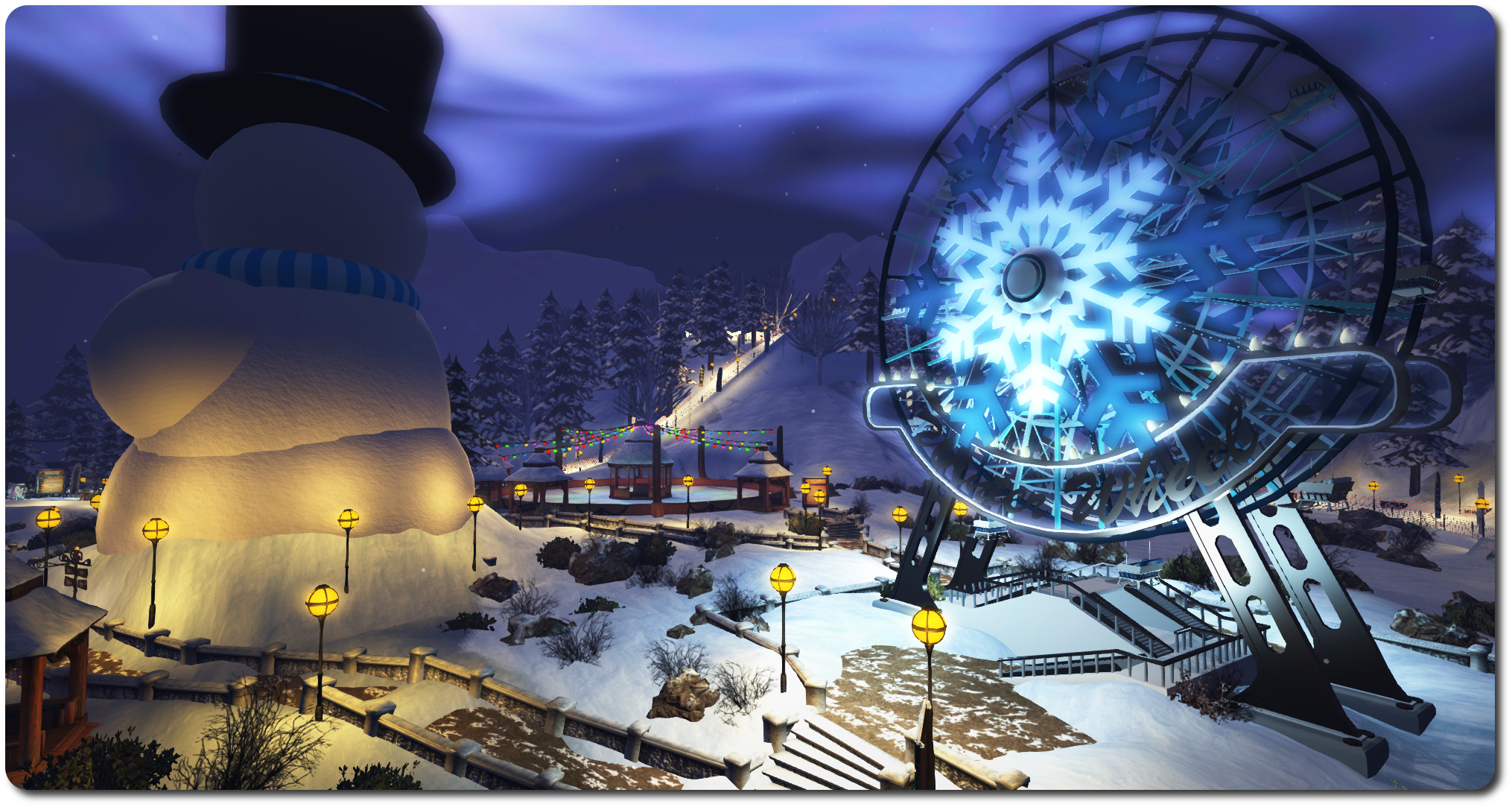
On Thursday, January 29th, Linden Lab announced the opening of the Second Life Winter Wonderland theme park. Encompassing four regions, the park offers a range of activities for regular and premium members to enjoy – and having popped over, I have to say, it’s a lot of fun.
Those with a keen eye may well have noticed that something called “Winter Wonderland” was coming – there has been a gateway under construction at the Portal Parks since before Christmas. These gateways are now open as well, and form an alternative to reaching the Winter Wonderland to the main SLurl provided in the official blog post.
The four regions of the park offer a range of attractions, comprising (taken from the blog post):
Village of lights: “Pay a visit to this fantasy styled icy village and enjoy company, calm, and the wonderful winter feel! In the heart of the village you will find a variety of celebratory gifts await you. Be sure to stick around for the fireworks that light up the sky at the top of every hour!”
Ebbe, Get Your Gun! – my first encounter at the park was a snowball gun toting Ebbe Linden!
Snowball Warzone: “Atop the hill outside the village awaits a great cold wasteland where you and others will buckle down in the trenches of warfare: SNOWBALL FIGHTS! Claim the top of the towers for great vantage, or rule the castle walls with friends. Choose from two weapons, or if you are a Premium member, equip your Premium token for access to the ultimate snowball fight arsenal! You may even catch a Linden or two participating in the snowball shenanigans.”
Icy Race Course: “Strap on your helmet, hold tight, and rev those engines! On the outskirts of the Village of Lights are free vendors where you can pick up a snowboard or a mighty snowmobile. Premium members can access upgraded vehicles by equipping their token. Hop aboard and race around the four-region wide race track full of bumps, hills, jumps, and more! Grab a friend and see who can best the turns and cross the lines first. Be sure to turn on Advanced Lighting to see the track nicely lit up as you cruise the snow!”
Skatetown Area: “In the heart of this region are two skate arenas for the enjoyment of everyone. Grab a pair of skates from the free vendor, strap them on, and give them a spin! Execute athletic jumps and twirls, and glide your way around the ring. In the front vendors here, Premium members will find an extra prize full of customization options to fit your style and avatar.”
Winter Ferris Wheel: “What better way to see the region than to sit, relax, and rotate your way to the top of the view. The Ferris wheel will give you one of the best – and most romantic – views in the region.”
Both the SLurl provided in the blog post and the Portal Park gateways deliver you to the Village of Lights. Here you’ll find gifts to collect in the village square (check the official blog post for details). Two main paths lead from the village to the major attractions.
Of course, me being me, I took a short cut and found my way to the snowball fight arena somewhat unarmed. As a result, I promptly got shot by the decidedly well-armed Ebbe Linden and Marianne McCann! Of course, as Ebbe pointed out, arriving in the arena unarmed really is “not the way to show up for a fight!” Snowball fight guns can be obtained from the giver at the foot of the stairs leading up to the arena from the village, and as everything in the Wonderland is Experience Keys based, the gun will auto-detach on leaving the arena area.
Head westward from the Village, and you’ll come to the race course. Here you can pick-up a snowmobile or snowboard and zip around the course on your own or race others – but be warned, both are pretty zippy (the snowboard has a turbofan engine mounted on the back, and the animations include the ability to jump and perform a trick. Trying either of them in Mouselook is quite a challenge! Within the loops of the racing circuit, which crosses the regions of the park, sit the ice skating rinks and the Ferris wheel.
Materials have been used to good effect within the builds, and allowing for the fact i got there relatively early, and possibly before many have read the official blog post, lag was barely noticeable, although the Ferris wheel is a little juddery and possibly a tad slow for most people’s tastes.
If you’re a Premium member, you can hop over the any of the Premium Gift kiosks and grab your tie-in gift, which opens up “upgrades” to the Winter Wonderland activities and gifts. Just wear your ribbon with pride prior to returning to the Wonderland regions!
All told, Winter Wonderland is very well put together, and offers some good fun to be enjoyed with friends – so why not drop in and see for yourself? My thanks to Alexa, Ebbe and Vitae Linden for the added fun 🙂 .
Note that the opening of the Winter Wonderland coincides with the Lab’s latest Premium Membership special offer (50% off the first quarter’s payment if you sign-up to the Quarterly payment plan for Premium membership. This run through until 08:00 SLT on Monday, February 16th, 2015.
Oculus VR came, in a manner of speaking, a full circle with this Year’s Sundance Film Festival, which is currently taking place in Park City, Utah, and ends on February 1st, 2015.
In 2012, journalist Nonny de la Peña showed (what was then) her latest journey in what she calls “immersive journalism”, Hunger in Los Angeles. The film utilised a head-mounted display unit developed by a 19-year-old student. So convinced was that student of the potential for VR, he started putting together ideas for a commercial, low-cost headset. A kickstarter campaign followed and … yes, you’ve guessed it, I’m talking about Palmer Luckey.
This year, Oculus VR are back at Sundance, in the form of their new in-house film studio, Story Studio, which is showcasing the first of five animated short films the company plans to make under the Story Studio banner over the course of the next year.
Located in San Francisco, Story Studio numbers around dozen film industry veterans from the likes of Pixar and Industrial Light & Magic under the leadership of Saschka Unseld, formally of Pixar. The company started to come together around a year ago, although as Josh Constine notes over at Techcrunch, the idea for the studio was already on the Oculus VR roadmap from the earliest days. Indeed, the very potential for VR in films as indicated by Oculus VR in their plans, many have been one of the added attractions for Zuckerberg in acquiring the company.
Certainly, Oculus VR’s CEO, Brendan Iribe is in no doubt that Facebook has been crucial in accelerating the film plans, noting to Constine, “this is another example where as a smaller, independent start-up it would have been hard to spin up an effort like this.”
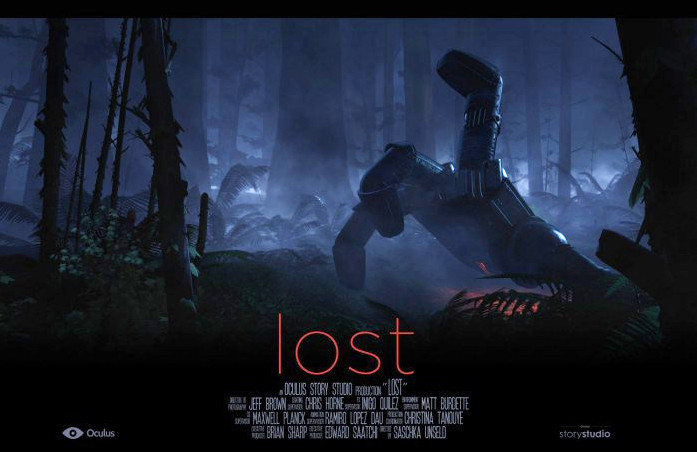
Lost, showcased at the 2015 Sundance Film Festival, is the first in a series of films from Oculus VR’s new in-house film studio: Story Studio (image: Oculus VR / Story Studio)
Lost, the title of Story Studio’s short, runs at between 4 and 10 minutes, the length being determined by the level of engagement in the film and what the decide to explore within it. As such, it is said to be a powerful demonstration of the added depth that VR can bring to a film. It is being shown in the Festival’s New Frontier programme, which this years see no fewer than 11 of the 14 submissions attempt to utilise VR.
Not all of them succeed, as Casey Newton and Bryan Bishop, writing inThe Verge note. Some mange to do exactly the reverse, and demonstrate the inherent weaknesses in VR if not used correctly, and the need to learn entirely new approach to filming, interaction and editing in order to properly create and maintain the desired level of immersion needed to make the use VR worthwhile.
It is because VR as a medium is so difficult a concept to grasp and successfully integrate into film-making that drove Oculus VR to create and develop Story Studio, as Iribe notes in a conversation with The Road to VR’s Ben Lang.
“When we started to show people [the Oculus Rift] in Hollywood, their question was ‘how do we get started?’… We said ‘you pick up these gaming tools like Unity or Unreal and you start making something’ but that’s not natural for [cinema creatives],” Iribe said. “Right now the focus is to support and inspire the community—share with them everything we’re doing, opening it all up. Over the next two months, we’re hoping to educate the community on how we did this and how we got started. We still have a ways to go before people are making longer film experiences.”
Unseld picks-up on this line while talking to Techcrunch’s Constine alongside of Iribe.
“Everyone who starts a project in VR encounters the same things in the beginning,” he states. “They try to figure out ‘How do I make these things I know from film work in VR? How do I do a cut in VR?’ The resounding answer is that porting film concepts straight to VR just doesn’t work.”
Thus, Story Studio will be a studio in both senses of the word. Not only will it be a engine for producing a series of short animated stories over the courses of the next year, it will also be something of a “open-source” VR cinematography “school” presenting and sharing insights into the use of VR in films, offering examples of how the technology works or doesn’t work within the framework of a film, and so on.
This is actually a clever move, as it allows Story Studio to both offer a roadmap on how other studios might involve themselves in VR and present them with the kind of finished product which can be seen to work, both technically and with audiences, thus giving them something they can understand, replicate and even enhance as the technology matures.
Of course, all this will also be helped by actually having the technology – the headset itself – actually available to use by more than a few thousand people world-wide. And even here Story Studio may offer a small clue as to when the consumer version of the Oculus Rift might appear.
According to Reuters, via Fortune On-line, Lost is the first of five animated shorts Story Studio plan to produce over the next year. Furthermore, The Guardiansuggests that all five will be released “in the run-up” to the release of the commercial version of the headset – which Iribe refers to as “Oculus Rift CV1”, while Iribe himself, when talking to Ben Lang, says all five films will be available for the CV1 product.So perhaps one way of counting down the time to the release of the commercial headset is to count off the Story Studio films as they appear…
Angel Manor: the subject of a beautiful new video by its creator, Kaya Angel
Kaya Angel is one of Second Life’s most respected builders, and his Angel Manor estate is rightly admired across the grid both as a build in its own right and as a venue for art, fund raising events and a more. I
As a designer / builder, Kaya naturally turned to emerging capabilities to further enhance his commercial and commissioned work, and to enhance Angel Manor itself – so much so, that I keep reminding myself I’m overdue for a visit in order to write an update to my March 2013 piece on the manor, as so much has changed since then.
In celebration of the manor, and to demonstrate just how immersive Second Life can look and feel, Kaya has produced a new 6-minute video entitled Second Life: A different perception, which has been drawing widespread praise from all who have seen it and is without a doubt, simply superb.
Marvellously edited, matched to an excellent soundtrack, this is a film which can hardly fail to evoke a feeling of wonder, joy and pride in the heart of anyone who has invested time and energy into Second Life. If ever there was a banner by which we can proclaim to the world just what is possible within SL for the creative mind, then this film is it.
January always bring with it the International Consumer Electronics Show (CES). At the time the show was running, I looked at the “public début” (as Brendan Iribe, the Oculus VR CEO called it) of the company’s latest prototype headset, Crescent Bay, and some of the recent news coming out of Oculus VR.
However, while Oculus were getting a lot of air-time at CES, perhaps the most interesting announcement regarding VR came not from Oculus VR, but from gaming equipment manufacturer Razer and high-end VR specialist firm Sensics. who together announced a new development ecosystem for VR: the Open Source Virtual Reality (OSVR).
OSVR aims to create an infrastructure for common VR development work (image: osvr.com)
While many companies are developing VR capabilities – head tracking systems, camera systems, gesture-based and other controllers, games and entertainment packages around the Oculus Rift, the fact is that the consumer market is liable to see a lot of HMDs and peripherals with a VR focus emerging over the next few years, to say nothing of applications and suchlike.
In terms of HMDs Zeiss have already launchedHMDs for various purposes, notably and most recently their sub- US$100 Zeiss VR One for smartphones at the same time Samsung launched their “Oculus inside” Gear VR, both of which I wrote about in December. Sony is working on the Morpheus, Sensics is working on its own consumer-focused headset for the Playstation, while Vrvana and GameFace are working on HMDs while ANTVR used CS to announce their forthcoming headset will be compatible with the PlayStation 4 in addition to PCs, the Xbox 360 and other devices.
With so many different systems on the horizon, the creation of content and peripherals is becoming something of a minefield for developers in terms of ensuring their games, experiences and hardware has the largest possible reach within the new marketplace.
The intention behind OSVR, therefore, is to provide an environment for cross-platform / hardware development for VR, with different development engine plug-ins anyone can use covering different headset, controller, tracking systems and so on. All of which is aimed at helping developers ensure their game or experience or controller or whatever works with the widest possible choice of VR options.
In this, it’s important to recognise that OSVR is not some kind of rival to Oculus Rift, although the acronym is emblazoned across the front of Razer’s own forthcoming VR headset, previewed as a part of the OSVR announcement, and may have given some the impression that it is; something Razer’s Min-Liang Tan has been keen to clarify.
Razer CEO Min-Liang Tan: leading the OSVR charge (image: ubergizmo.com)
“It’s not a competitor to guys like Oculus,” Tan said in an interview with the International Business Times. “This works with Oculus. The software is completely open-sourced. This is a set of standards. A couple of knee-jerk reactions is that people think this is competing with Oculus. Absolutely not. It’s an open platform.”
In the original OSVR announcement, Sensics CEO Yuval Boger also referenced OSVR being he development environment, saying, “OSVR’s open-platform approach accelerates innovation and provides consumers the freedom of choosing the best combination of hardware and software components. We are excited to partner with Razer and other industry leaders to build OSVR together.”
The list of companies on-board with OSVR is small but growing. In terms of HMD makers, the aforementioned Sensics, Vrnana and GameFace. It is also gaining a lot of support from input device manufacturers including Sixense STEM, Virtuix Omni, PrioVR and Leap Motion.
And what of Oculus VR? When asked about the move by journalist Matthew Terndrup, Oculus VR founder Palmer Luckey referred to it as a “good thing“, pointing to the fact that the Oculus Rift DK1 was also open-source. That’s as maybe, but Oculus VR were the first company to walk away from earlier discussions on VR standards shortly before it was announced they’d be acquired by Facebook. Not that they perhaps need to be directly involved in something like OSVR – as the tech media note, most companies are developing with Oculus in mind already, so it might be argued standards for development are more about allowing everyone else a better slice of the pie.
The OSVR website places great emphasis on games being its primary focus, and Tan himself points to games developer Gearbox Software being one of the founder partners in OSVR. However, the wider potential for VR across vertical markets is perhaps reflected in the fact that “OSVR supporters” are being sought from both from both industry and academia, with no apparent preference towards games development. Successful applicants being offered a prototype Razer Hacker Kit.
The Razer Hacker Development Kit – US$199.00 from June 2015 (image: razer.com)
It is this Hacker Development Kit (HDK) that perhaps gave rise to initial confusion about OSVR being a “competitor” to Oculus Rift in some quarters, having been announced at the same time as OSVR.
However, the HDK is actually intended as a low-cost development test rig for VR developers (although it is probable that Razer will eventually market their own HMD), designed to meet current VR standards and to be somewhat modular, offering hardware developers the ability to more readily use it in the development of their own hardware (e.g.tracking systems, cameras, etc.). It will be available from June 2015 at a price of US$199.00.
Developers can already register their interest in the headset (see the HDK link above), and in keeping with the open source nature of the project, the full specifications for the headset, together with a set of schematics for the major components suitable for 3D printing, can also be downloaded from the site for those wishing to DIY their own HMD.
Basic specifications for the HDK (source: razer.com)
In discussing the HDK and OSVR with International business Times, Tan suggested people think of the two like this,”Think about it like Android for VR. It’s not the kit. It’s a platform, completely open-sourced. All the software is on Android, it’s on Apache 2.0. All the hardware, we’ve uploaded it on the Internet, anyone can print it out at home.”
All told, and in terms of it being intended as a development ecosystem, OSVR + the HDK almost sound like consumer focused VR’s very own Swiss Army knife. It’ll be interesting to see how it fares.
 At 10:00 SLT on Wednesday, February 4th, 2015 the Lab launched a new photo competition with a total prize pool of L$19,000.






 Inara Pey: Living in a Modemworld