Poodle vulnerability: Lab issue RC viewer with browser fix

On Wednesday October 15th I blogged about the Lab having issued a Grid Status update warning, those who use the viewer’s built-in browser may not be able to access certain websites. The notice was issued by the Lab as a result of the Padding Oracle On Downgraded Legacy Encryption (Poodle) vulnerability reported by Google.

As noted in my original article, the Poodle vulnerability exploits a flaw in the design of the SSL 3.0 protocol, which despite being 18 years old, is used as a fallback security protocol within most browsers. By using a series of connection failures between a browser and website, an attacker can trigger what is called a “downgrade dance” where the browser eventually falls back to using the SSL 3.0 protocol to maintain communications. When this happens, the attacker can use the exploit within SSL 3.0 to grab sensitive data.
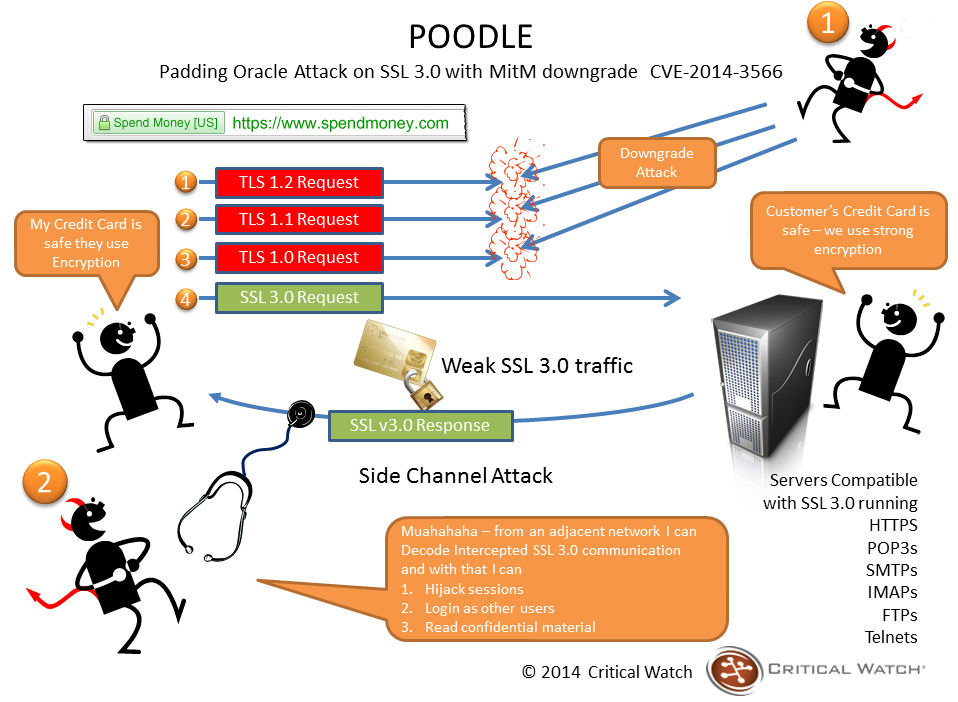
How a Poodle attack works (image courtesy of Critical Watch)

There are a couple of caveats to the vulnerability; for the attack to work, the attacker must be on the same wireless network as you or in the path of your communications (as shown above), and your client must be running JavaScript. However, it caused Google to issue an advisory that SSL 3.0 support is disabled or that tools that support TLS_FALLBACK_SCSV (Transport Layer Security Signalling Cipher Suite Value) are used be websites, which prevent the “downgrade dance” attacks. This prompted some websites to remove / disable SSL 3.0 support, which in turn resulted in some websites becoming inaccessible when using the viewer’s internal browser or browser-related services.

At the time the Grid Status update was issued, the Lab indicated they are working to fix the problem within the viewer’s browser capability. This has now been done, and release candidate version 3.7.18.295539 of the viewer, referred to as the “Browser Fix” viewer, removes SSL 3.0 usage from the viewer’s internal browser, allowing it to connect to sites which have disabled SSL 3.0 support.

If you do use the official viewer and prefer accessing websites using the internal browser, you may want to download this RC. For those not using the official viewer and who have experienced issues accessing websites through the viewer’s internal web browser, try switching to using an external browser to open web links (set via Preferences), as per the advice on the original Grid Status update from the Lab.

Related Links

“I believe I can fly”: the empowering freedom of virtual worlds

The single image Jay Jay
The single image Jay Jay Jegathesan used in his 3-minute presentation on his PhD research on community and collaboration through virtual worlds

I’ve frequently blogged about the work of the University of Western Australia in Second Life; with an active presence in SL since 2009, the University has gained a first-class reputation for sponsoring and promoting art in virtual worlds through initiatives such as the MachinimUWA competitions, and activities such as their current Transcending Borders challenge, the Freedom Project, and Project Homeless, as well as supporting the LEA’s Full Sim Art series, all of which I’ve had the privilege of covering in this pages.

The Freedom Project, one of many community-focused activities undertaken by the UWA within Second Life

The UWA’s involvement in Second Life came about as a result of PhD student Jay Jay Jegathesan (), who founded the University’s virtual campus in Second Life, which has grown to include academic teaching activities across Business, Law (including the use of SL machinima in a post-graduate degree course), the Arts, Anatomy, Physiology & Human Biology, and Education (including providing resources essential it helping educators and new users get started with SL).

In particular, as a result of Jay Jay’s work the University has become recognised as a world leader in global community development through virtual worlds technology. This in turn has encouraged Jay Jay to make the topic of global community development and collaboration through virtual worlds, particularly in reference to people with disabilities, the focus of his PhD thesis.

Currently, Jay Jay is participating in the UWA’s 2014 3-Minute Thesis competition, in which students were asked to speak for 3 minutes on their PhD research using no technology or props aside from a single image. His presentation, directly referencing the power of virtual worlds to help those with disabilities – indeed, all of us -, is both beautiful and direct; so why not take a moment to listen to his impassioned explanation of the empowering freedom virtual worlds offer?

I’d also like to take this opportunity of thanking Jay Jay for his generosity and kindness in sending me a copy of the Freedom Project book, which is a fabulous publication, lavishly illustrated with pictures of the works submitted to the project, biographies of the artists, and much more besides. It is very much a must-have for anyone with and appreciation of virtual world art. Copies can be obtained for L$5000 (around $20.00 US), shipped anywhere in the world. Those wishing to purchase a copy should contact Jayjay Zifanwe in-world for ordering information.

The ghost of the Premium Membership offer returns …

preimiumThe Lab has announced the latest round of the Premium Membership promotions – this one with a decidedly Halloween feel.

As usual, the offer is 50% off of membership for those upgrading, but only if they opt for the Quarterly billing plan, and the discount is applied only to the first quarter billing period. The offer begins on Wednesday the 15th of October at 08:00 am Pacific Daylight Time (PDT) and expires on Monday the 3rd of November 2014 at 08:00 am Pacific Standard Time (PST).

Alongside of the membership discount, comes the Premium gift offer, which this time has a Halloween theme, which includes “jack o’lanterns, witches’ brooms and more – including a bone-shaking skeleton avatar”. The gift pack can be obtained through the Premium Gift kiosks.

I admit I’ve not picked-up my gift, as it doesn’t really appeal. This being the case, I’ll also avoid my usual grumblings about the way Premium membership is pitched, and instead say that whether or not you feel upgrading to Premium is worthwhile is purely a matter of individual choice. However, I would say that if you’re considering on the basis of “exclusive gifts” or “more privacy”, then you’re probably better off sitting down and thinking again.

Part of the Halloween 2014 Premium Gift (image va Linden Lab)

Launched alongside the Premium Membership offer, and included in the same blog post as the Premium offer stuff, is news about the Haunted Halloween Tour, the latest offering from the Lab to feature Experience Keys. This can be accessed via the Lab’s Portal Park, and I’ve covered it in a companion article to this one.

Poodle vulnerability: Lab issue viewer browser notice

On Wednesday October 15th, and as a result of the Padding Oracle On Downgraded Legacy Encryption (Poodle) vulnerability reported by Google, the Lab issued a Grid Status update, warning those who use the viewer’s built-in browser may not be able to access certain websites.

The update from the Lab reads in part:

[Posted 12:15 PM PDT, 15 October 2014] Residents may be unable to open certain websites using the viewers internal browser. This is due to a security related change made by many web sites in response to a vulnerability announced today by Google.  This issue will affect Media-on-a-Prim for those sites, and will block initial setup of some SLShare accounts.

You may be able to access those sites by setting your viewer to use an external browser: go to Me/Preferences/Setup and check “Use my browser (Chrome, Firefox, IE) for all links.

We are aware of the issue and working on a fix.

Unlike recent security vulnerabilities, like Heartbleed, Poodle targets the client-end of things. It does this by exploiting a flaw in the design of SSL 3.0 protocol, which despite being 18 years old, is used as a fallback security protocol within most browsers, including Chrome, Firefox and Internet Explorer. However, there are a couple of caveats to its effectiveness: for the attack to work, the attacker must be on the same wireless network as you (or in the path of your communications), and your client must be running JavaScript.

Essentially what happens is that the attacker initiates a series of connection failures between the browser and website, which in turn trigger what is called a “downgrade dance” where the browser eventually falls back to using the SSL 3.0 protocol to maintain communications. The attacker then uses the vulnerability within SSL 3.0 to grab sensitive data.

Because of its nature, and the fact that certain requirements must be met (as noted above) in order for it to work, Poodle is regarded as less far-reaching than something like Heartbleed. However, it has prompted Google to issue an advisory that websites disable SSL 3.0 support or that tools that support TLS_FALLBACK_SCSV (Transport Layer Security Signalling Cipher Suite Value) are used which prevent the “downgrade dance” attacks on services that can trigger the vulnerability. Google have also stated they plan to scrub SSL 3.0 support from its Chrome browser, and Mozilla are going to do the same with Firefox.

Related Links

UKanDo 3.7.17: new login screen

logoOn Thursday October 8th, the UKanDo viewer updated to version 3.7.17.28056 for both Windows and Linux.

The new version leap-frogs over a 3.7.16 release (the September release being 3.7.15), and instead combines the Lab’s 3.7.16 and 3.7.17 code base updates into a single release.

UKanDo version 3.7.17.28056 incorporates the Lab’s updated log-in splash screen, which sees one of two different screen displayed, depending upon whether the user is logging-in to SL for the first time (or has performed a completely clean install), or is returning to SL having previously logged-in (the screen shown below).

With the 3.7.17 release, UKanDo adopts the new-look Lab log-in splash screen layouts

As well as the log-in screen update, the release also includes the last set of maintenance updates from the Lab to become the release viewer, and which comprised fixes and updates for: inventory & outfit management; appearance editing; group & group ban management; multi-grid support for favourites; camera controls; notifications management and stability improvements, as well as various UI bug and viewer crash fixes.

The new Status bar option to show / hide your L$ balance

There are also a number of updates requested by UKanDo users included in the release:

  • An option in the Status Bar menu to show / hide your L$ account balance (shown by default) – useful for those taking snapshots or screen captures which include the UI, as they can hide their account balance if they wish. when unchecked, the account balance display slides out of sight
  • An option to show the UI in Mouselook has been added to Preferences (Preferences > General > Camera). This is disabled by default, requiring the use of the ALT key to move the cursor
  • The “Save to Disk” button in the Snapshot floater has been re-labelled “Save to Computer”.

Further updates in this release comprise:

  • FModEx updated to 4.44.41
  • lqtwebkit updated to 4.8.1 (contributed by Drakeo), which should fix Flash video not working for GNU/Linux users
  •  FS pose stand updated with additional validation checks (via Ansariel Hiller).

Related Links

Lab announces Oculus Rift DK2 project viewer available

On Wednesday May 21st, Linden Lab publicly released the Oculus Rift project viewer, offering initial support for the Oculus Rift DK1.

Things have moved on since, most notably with the release of the Oculus DK2, versions of which the Lab received in July 2014, and have been using to update the project viewer to provide DK2 support.

Oculus Rift: Lab launches project viewer with DK2 support

On Monday October 13th, the Lab announced that the updated version of the viewer is now available.

The blog post announcing the update reads:

A few months ago, we released a Project Viewer that made it possible to use the first generation Oculus Rift development kit (DK1) anywhere in Second Life.

Since then, Oculus Rift has released a second generation development kit, DK2. The new hardware offers an even more immersive experience when used with Second Life – there’s less likelihood of feeling motion sick thanks to the motion-tracking features, and less of the “screen-door effect” on the visuals, thanks to higher resolution and brighter display.

We’ve integrated the DK2 with Second Life, and today are releasing a new Project Viewer so that virtual reality enthusiasts with the DK2 can use it anywhere in Second Life, just as DK1 users can.

Unfortunately, though, there are still some bugs impacting the experience, which we won’t be able to fix until we receive the next SDK from Oculus Rift. Because Second Life uses OpenGL in its browser, we cannot support direct mode in the Rift until Oculus releases a version of the SDK that supports that.

In addition, juddering is an issue (as it is with most DK2 demos).This can be significantly improved on Windows by turning off Aero, which allows the Rift to use its full refresh rate rather than being limited to the refresh rate of the primary monitor. This refresh rate is a major factor in the judder and turning off Aero can significantly improve your experience.

We’ll continue to fix bugs and improve the experience as quickly as we can once we get the next SDK, but in the meantime, we wanted to get this Project Viewer out into testers’ hands. If you have an Oculus Rift development kit, you can download the new Project Viewer here.

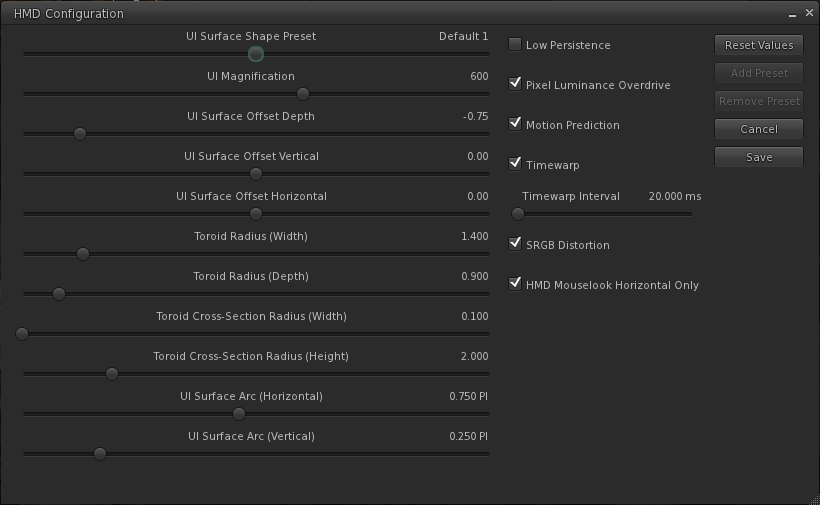
The update includes an expanded HMD configuration panel, which can be accessed via Preferences > Move and View > click on the Head Mounted Displays button.

The expnaded HMD configuration panel
The expanded HMD configuration panel

As with the original project viewer, this configuration panel can also be accessed via a dedicated toolbar button.

The release notes for the viewer include some additional hints and tips:

  1. In Windows 7 turn OFF Aero (go to Windows Basic setting in the “Personalize” right-click menu on the desktop).
  2. In the Windows display settings, adjust the refresh rate on the DK2 to 60hz rather than 75hz.
  3. Make sure your Oculus config runtime and firmware are up to date.
  4. Make sure the power cable is plugged in to the Rift.
  5. If using an NVIDIA card, update to the latest drivers, which have some Oculus/VR specific optimizations.
  6. Turning on Triple buffering in the NVIDIA control panel may help in some cases. Results may vary.
  7. To increase framerate try reducing the Second Life Viewer draw distance and/or disable Shadows and the Ambient Occlusion.
  8. On the HMD setting panel in preferences try experimenting with turning low persistence mode on and off. We’ve found that is some cases it can exacerbate ghosting and jitter.
  9. If you’re in Mac OS X, it is recommended that you exit HMD when uploading files, such as images or models. There is currently an issue that can get your viewer stuck in a bad state if you attempt to upload files while HMD Mode is enabled.

Key Controls

  • Enter HMD mode – CTRL + SHIFT + D
  • Align to look – Q
  • Center Mouse Pointer – Z
  • Action key – X
  • Camera Mode – M (Press multiple times to cycle through 3rd Person, HMD Mouse look, and 1st Person modes)

The blog post from the Lab also includes the video released at the time the original Oculus Rift project viewer was launched.

Related Links