castAR gets a Mountain View as the developer kits appear

The new Deve Kit version of castAR
The new Dev Kit version of castAR (image via Engadget)

I’ve been following the work of Technical Illusions, the creators of the castAR projected augmented reality headset with a VR capability, for some time now, although things have been quiet on the news front for a while. However, that’s starting to change.

The first item of news is that the company in the process of moving its operations from Seattle, Washington, to Mountain View, California.

Henkel-Wallace
David Henkel-Wallace – castAR’s recently appointed CEO (image: Technical Illusions)

The move is being overseen by the company’s new CEO, David Henkel-Wallace, who joined the company in June 2014. The move is in part to try to drive-up the company’s ability to hire hardware talent – they’ve found it hard to get hardware specialists in Seattle, where software rules the roost. It also puts them in the middle of “Nerdvana” – as Co-founder Jeri Ellsworth puts it, which could do much to raise their visibility in terms of inward investment opportunities.

As it is, the company numbers around a dozen full-time employees, including Henkel-Wallace, founders Ellsworth and Rick Johnson and CFO Paul Denton. Both Denton and Henkel-Wallace have considerable experience in building-up start-ups. There’s also Toby the cat, also listed as co-founder, and fulfilling the role of Senior Cat, with responsibilities for eating, sleeping, purring and lap-sitting.

The other major news for the company is that a year after their Kickstarter campaign, their initial developer kits are now ready, and will soon be shipping to those people who pre-ordered kit through the campaign. The new headsets have also been on show to the likes of Engadget and Venture Beat’s Gamesbeat, where Ellsworth talked to Dean Takahashi.

Ellsworth is the first to admit the new headsets are still some way short of a production-ready version, but they’ve still come a long way from even the 2nd prototype versions seen just seven  months ago.

castAR - from pre-prototype (top) in early 2014 to the developer version of the headset (bottom), October 2014
castAR – from pre-prototype (top) in early 2014 to the developer version of the headset (bottom), October 2014 (images via Engadget)

The revised developer headset weighs-in at some 140 grams, and the company is aiming to get this down to around 80 grams in the production version. Included in that are two 120 Hz cameras with 135 degrees tracking, and 1,000 Hz gyro. The optics, now supplied by a Japanese company, deliver a resolution of 2,560-by-720, with every pixel addressable and capable of being resolved at a distances of between half a metre and 2 metres when using the retro-reflective system.

The headset is admittedly still nerdy-looking, resembling a pair of heavily framed sunglasses with a bulky silver mounting for the LEDs and cameras on top. However, Technical Illusions state that they opted to make the headset somewhat on the big / clunky side, as they weren’t sure how well all the tech would fit into it. They’re now confident that the package can be shrunk down to something which not only meets their target weight, but which is also more pleasing to the eye and closer to their conceptual look for production versions.

As well as the headset, the other major components of the system  – the interactive wand, the retro-reflective surface and the VR clip-on – have all been refined and improved. Work is still ongoing with the wand, which allows a user to manipulate virtual items projected by the headset onto the retro-reflective surface with “sub-millimetre accuracy”. Kits, when shipped, will also include Technical Illusions’s own game, mARbles, designed to demonstrate the gameplay capability of the system to developers.

mARbles has been designed by the castAR team to demonstrate the potential of project AR games to developers
mARbles is a “Marble Madness”-style game which can be played individually or by two r more players. It is shipping with the castAR dev kits (image: Technical Illusions)

So what is the market for the castAR? Ellsworth believes that games “will be king for a while”, and admits to looking forward to seeing flight simulators that use the castAR projection system, although she also notes other potential uses when talking to GamesBeat’s Takahashi.

A lot of people are going to get excited about tabletop collaborative experiences, where multiple people sit around a table and work in the same physical space. All the game characters are in the same space. We have a lot of companies approaching us that want to use it for visualization – architecture, things like that, where you can sit around and table and work in the same space.

Nor do users necessarily need to be in the same physical space, in order to engage with one another, as the company has demonstrated in a number of its videos.

In terms of practical applications, Technical Illusions have been working with medical experts to see how the castAR system might be used alongside MRI scans, the castAR system being use to build 3D holograms of scanned patients which can be examined by doctors and / or surgeons, helping them to build a more complete understanding of the patient’s condition.

The conceptualised castAR production headset and VR clip-on system (image: Technical Illusions)

How successful castAR is likely to be is hard to judge; the world is awash with excitement over VR that all things AR have been largely sidelined. Even the involvement of Google (and others) in Magic Wand hasn’t really done much to change that.

castAR is also somewhat different to other AR systems seen so far, potentially making it an oddball in the eyes of some media, although its potential to enter into the VR sphere through the VR clip-on may serve to generate wider interest. How big a footprint castAR might actually make in the VR world is hard to judge; a key here might be in whether it can be made compatible with games being specifically developed for Rift-type hardware.

So far, the company has managed to achieve a lot while remaining relatively low-profile. Their emphasis for the foreseeable future is on building relationship with developers and getting content integrated into the system as the hardware itself continues to mature towards the desired consumer format.

Even so, if the company is to make its mark, it is liable to need the support of investors – and the move to Mountain View is, as noted by Technical Illusions themselves, perhaps as much about that as putting them more readily at the hub of available expertise. As such, it’ll be interesting to see where the move leads.

Related Links

Magic Leap: the elephant (or dragon, or…) in your room (or street, or…)

You'll believe a whale can fly - or that's perhaps Magic Leap's hope (among more practical things)
You’ll believe a whale can fly – or that’s Magic Leap’s hope (among more practical things)

Augmented Reality took a shot in the arm this week with the new that Google is at the forefront of some US$542 million investment in technology company Magic Leap. What’s more, not only is the coming putting the money forward directly, rather than through their investment arm, Google Ventures (which has previously put money into things like Philip Rosedale’s High Fidelity, alongside of investment house True Ventures), but two senior executives from Google will be joining the Magic Leap board. These are Sundar Pichai, Android and Chrome leader, and Don Harrison, Google’s corporate development vice-president.

The funding round comes on top of an initial round of investment in February 2014, which drew some US$50 million to the company.

But who or what is Magic Leap? According to the company’s website, it is essentially an augmented reality system which uses a “Dynamic Digitized Lightfield Signal”, although they note we can call it “Digital Lightfield™”, capable of merging realistic computer graphics with everything the user sees in the real world. This appears to be something of a merging of both VR and AR (with the emphasis on the latter), to create an immersive whole. The system doesn’t use the Oculus Rift, but apparently uses a headset system possibly akin to, say, the castAR system or perhaps Google Glass; the latter of which might explain Google’s interest – or it might not.

However, no-one knows precisely what Magic Leap is or how it works, because there haven’t been any public demonstrations of the system, nor have any images of the hardware been released. And while trendy terms like “Digital Lightfield™” are used on the equally trendy website, there is little to tell what is going on.

So far all that has been released are a series of pretty stunning images and videos – witness the video above, or the images top and centre in this article. However, that’s not so say the company don’t have something to get investors excited.

“It was incredibly natural and almost jarring — you’re in the room, and there’s a dragon flying around, it’s jaw-dropping and I couldn’t get the smile off of my face,” Thomas Tull, CEO of Legendary Entertainment (aka Legendary Pictures) told the Wall Street Journal. Images, projected into the wearer’s eyes, can even be made to appear to pass in front of or behind real-world objects. Tull was so impressed by what he saw, he not only had Legendary Pictures to invest in Magic Leap, he also made a personal investment as well.

Nor are Legendary Pictures and Google alone. Other investors in the funding round include Qualcomm, Kleiner Perkins, Andreessen Horowitz, Vulcan Capital, Obvious Ventures and Caufield & Byers. Qualcomm’s executive chairman, Paul Jacobs, is also joining Magic Leap’s board, and will sit alongside Google’s Don Harrison and an observer.

One of the Magic Leap promotional images: a yellow submarine apparently floats down a street the Magic Leap wearer is walking along
Another Magic Leap promotional image: a yellow submarine apparently floats down a street the Magic Leap wearer is walking along

Such a broad spread of investment potential speaks to the vision held by Magic Leap’s CEO, Rony Abovitz, who wants the company to become “a creative hub for gamers, game designers, writers, coders, musicians, filmmakers, and artists.”

The potential for something like Magic Leap in films is clear; imagine sitting down in a movie theatre, donning a pair of glasses perhaps not too dissimilar to the current 3D glasses provided at theatres, and then seeing a film where events can become a shared experience as they extend into the audience…

That may well be why co-founder of Weta Workshop, the SFx company behind the visual effects for Peter Jackson’s Lord of the Rings and The Hobbit trilogies (among others), Richard Taylor, was also drawn to the project. He participated in the first round of funding for Magic Leap, and now sits on the company’s board of directors.

Weta Workshop co-founder Richard Taylor: Magic Leap investor and board member (image via Stuff)

“What Rony and the Magic Leap team have created is nothing short of remarkable and will forever change the way we interact with images and information,” Taylor said at the time of his investment.

“The wearable technology they have developed is revolutionary in its ability to create amazingly immersive and fantastical experiences. This goal alone would be a Herculean endeavor for any development group, but the fact that the Magic Leap team is driven by the mantra of also delivering devices that complement human physiology is extraordinary,”

Bing Gordon, a partner at Kleiner Perkins Caufield & Byers, and a former executive at EA Games sees a huge the potential for Magic Leap. Commenting on how the system is better coordinated with how the human eye and brain process images, making the computer graphics feel, and move, more naturally, he told the New York Times that Magic Leap could help drive augmented reality to outstrip mobile devices in terms of popularity in its possible range of uses.

It would seem that Google is looking more broadly at the potential of the technology as well, rather than button-holing it for any particular use or in combination with any particular product (Glass itself has been somewhat low-key this year, and was all but absent at the corporation’s Google i/o in July). Many commentators believe that Google’s investment, coming as it does from the company, rather than its investment arm, is a strategic move, with Google willing to see how the Magic Leap technology matures. Abovitz has gone a little further on matters, stating that Glass and Magic Leap use different approaches and will not be merged.

Rony Abovitz (in the space suit) and friends appearing at TEDx Sarasota event in December 2012 - still generating a "Wut?" response in many people today
Rony Abovitz (in the space suit) and friends appearing at TEDx Sarasota in December 2012 – still generating a “Wut?” response in many people today

Abovitz himself cuts something of an unusual figure – as anyone who witnesses his appearance at the TEDx Sarasota’s inaugural conference is liable to agree. The Magic Leap website is equally somewhat offbeat, indicating that the Magic Leap team comprises (among others) “rocket scientists”, “software ninjas”, “computing hobbits”, and “psychedelic physicists”.  however, it might not be wise to underestimate him. Abovitz also founded MAKO Surgical, producing surgical robotic arm assistance platforms, a company he took from start-up in 2004 to being named, in 2011, the fastest growing technology company on Deloitte’s Technology Fast 500.. In 2013, he orchestrated the sale of MAKO to Stryker Medical in a US$1.65 billion deal.

“Magic Leap is going beyond the current perception of mobile computing, augmented reality and virtual reality,” Abovitz said in a company statement following the funding round. “We are transcending all three, and will revolutionize the way people communicate, purchase, learn, share and play.”

Related Links

Lab announces Oculus Rift DK2 project viewer available

On Wednesday May 21st, Linden Lab publicly released the Oculus Rift project viewer, offering initial support for the Oculus Rift DK1.

Things have moved on since, most notably with the release of the Oculus DK2, versions of which the Lab received in July 2014, and have been using to update the project viewer to provide DK2 support.

Oculus Rift: Lab launches project viewer with DK2 support

On Monday October 13th, the Lab announced that the updated version of the viewer is now available.

The blog post announcing the update reads:

A few months ago, we released a Project Viewer that made it possible to use the first generation Oculus Rift development kit (DK1) anywhere in Second Life.

Since then, Oculus Rift has released a second generation development kit, DK2. The new hardware offers an even more immersive experience when used with Second Life – there’s less likelihood of feeling motion sick thanks to the motion-tracking features, and less of the “screen-door effect” on the visuals, thanks to higher resolution and brighter display.

We’ve integrated the DK2 with Second Life, and today are releasing a new Project Viewer so that virtual reality enthusiasts with the DK2 can use it anywhere in Second Life, just as DK1 users can.

Unfortunately, though, there are still some bugs impacting the experience, which we won’t be able to fix until we receive the next SDK from Oculus Rift. Because Second Life uses OpenGL in its browser, we cannot support direct mode in the Rift until Oculus releases a version of the SDK that supports that.

In addition, juddering is an issue (as it is with most DK2 demos).This can be significantly improved on Windows by turning off Aero, which allows the Rift to use its full refresh rate rather than being limited to the refresh rate of the primary monitor. This refresh rate is a major factor in the judder and turning off Aero can significantly improve your experience.

We’ll continue to fix bugs and improve the experience as quickly as we can once we get the next SDK, but in the meantime, we wanted to get this Project Viewer out into testers’ hands. If you have an Oculus Rift development kit, you can download the new Project Viewer here.

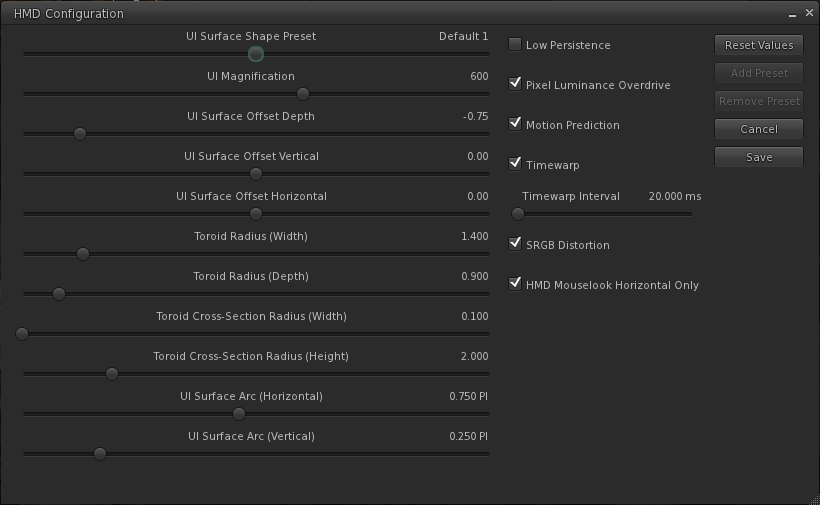
The update includes an expanded HMD configuration panel, which can be accessed via Preferences > Move and View > click on the Head Mounted Displays button.

The expnaded HMD configuration panel
The expanded HMD configuration panel

As with the original project viewer, this configuration panel can also be accessed via a dedicated toolbar button.

The release notes for the viewer include some additional hints and tips:

  1. In Windows 7 turn OFF Aero (go to Windows Basic setting in the “Personalize” right-click menu on the desktop).
  2. In the Windows display settings, adjust the refresh rate on the DK2 to 60hz rather than 75hz.
  3. Make sure your Oculus config runtime and firmware are up to date.
  4. Make sure the power cable is plugged in to the Rift.
  5. If using an NVIDIA card, update to the latest drivers, which have some Oculus/VR specific optimizations.
  6. Turning on Triple buffering in the NVIDIA control panel may help in some cases. Results may vary.
  7. To increase framerate try reducing the Second Life Viewer draw distance and/or disable Shadows and the Ambient Occlusion.
  8. On the HMD setting panel in preferences try experimenting with turning low persistence mode on and off. We’ve found that is some cases it can exacerbate ghosting and jitter.
  9. If you’re in Mac OS X, it is recommended that you exit HMD when uploading files, such as images or models. There is currently an issue that can get your viewer stuck in a bad state if you attempt to upload files while HMD Mode is enabled.

Key Controls

  • Enter HMD mode – CTRL + SHIFT + D
  • Align to look – Q
  • Center Mouse Pointer – Z
  • Action key – X
  • Camera Mode – M (Press multiple times to cycle through 3rd Person, HMD Mouse look, and 1st Person modes)

The blog post from the Lab also includes the video released at the time the original Oculus Rift project viewer was launched.

Related Links

Oculus VR Principal Scientist to address OpenSimulator Conference

2014 banner

On Tuesday July 22nd, Chris Collins, writing on behalf of the 2nd OpenSimulator Community Conference, announced that one of the keynote speakers at the event will be Dr. Steve LaValle.

Dr. LaValle, a professor of Computer Science at the University of Illinois, is the principal scientist for Oculus VR, and he will be addressing attempts to bring the Oculus Rift headset to the mass consumer market.

Dr. Steven LaValle (image: )
Dr. Steven LaValle (image: University of Illinois)

Since Palmer Luckey’s 2012 prototype demonstrated that smartphone-based advances in display and sensing technology can enable a lightweight, high field-of-view VR experience that is affordable by the masses, widespread interest has grown across many industries, research labs, and potential end users of the VR technology. Dr. LaValle’s talk will highlight ongoing technical challenges, including game development, user interfaces, perceptual psychology, and accurate head tracking.

He is certainly well-placed to be able to do so, having been working with Oculus VR since a few days after its successful Kickstarter campaign and has led its R&D efforts up to its $2 billion acquisition by Facebook in March 2014.

Commenting on Dr. LaValle’s appearance at the conference, Cris Collins, who is serving at the conference chair, said, “With all the excitement surrounding the Oculus Rift and other virtual reality technologies, we want the virtual reality community to know that OpenSimulator is a great platform for building the open metaverse.

“OpenSimulator has hundreds of thousands of registered users and a land mass twice the size of Second Life. It’s the only open source platform with an Oculus Rift ready viewer that already has hundreds of interconnected worlds operating in an emerging metaverse and thousands of worlds run privately by corporations, schools, government agencies, nonprofits, and individuals.”

About the OpenSimulator Conference

The OpenSimulator Community Conference is an annual conference that focuses on the developer and user community creating the OpenSimulator software.  Organized as a joint production by the Overte Foundation and AvaCon, Inc., the conference features two days of presentations, workshops, keynote sessions, and social events across diverse sectors of the OpenSimulator user base.

The 2014 OpenSimulator Conference will take place on the OpenSimulator Conference Centre grid on November 8th and 9th, 2014, with registrations opening on September 15th, 2014, and interested parties can sign up to receive an email reminder to register.

The conference will include four themed tracks and a Learning Lab for hands on hackerspaces, speedbuilds, and more:

About the Organisers

The Overte Foundation is a non-profit organization that manages contribution agreements for the OpenSimulator project.  In the future, it will also act to promote and support both OpenSimulator and the wider open-source 3D virtual environment ecosystem.

AvaCon, Inc. is a 501(c)(3) non-profit organization dedicated to promoting the growth, enhancement, and development of the metaverse, virtual worlds, augmented reality, and 3D immersive and virtual spaces. We hold conventions and meetings to promote educational and scientific inquiry into these spaces, and to support organized fan activities, including performances, lectures, art, music, machinima, and much more. Our primary goal is to connect and support the diverse communities and practitioners involved in co-creating and using virtual worlds, and to educate the public and our constituents about the emerging ecosystem of technologies broadly known as the metaverse.

 Related links


Google: all you need for your own VR experience is … cardboard

Google have released their first foray in to the world of immersive VR. They’re calling it Cardboard, because the do-it-yourself headset is made of … well, cardboard.

“Construct a VR viewer from everyday items you can find in your garage, online or at your local hardware store,” is the headline on the Google Cardboard website, complete with a picture of the necessary components.

Build your own VR heaset from cardboard, magnifying lens and a few other bits, and use it with your Android smartphone
Google Cardboard: build your own VR headset from cardboard, magnifying lens and a few other bits, and use it with your Android smartphone

And before you laugh yourself silly thinking this is another little joke from those pranksers who brought us GMail Blue in April 2013, it’s not. The heart of the system is a VR App designed to run on smartphones which can be mounted into the home-made headset.

Cardboard was unveiled at the Google I/O Developers Conference in San Francisco. the app takes advantage of a smartphone’s built-in accelerometers and gyroscopes to provide head tracking, and demonstration environments include a Hall of Mirrors and the opportunity to travel through Chicago. Users can also watch YouTube videos as if sitting in a movie theatre and explore 360-degree panoramic photos or run a series of VR experiments using Google Chrome on their ‘phones.  There’s also a software development kit which allows users to code their own immersive experiences.

“David Coz and Damien Henry at the Google Cultural Institute in Paris built a cardboard smartphone housing to prototype VR experiences as part of a 20% project. The results elicited so many oohs and ahs that they inspired a larger group to work on an experimental SDK,” the website explains, providing the “why” of the effort.

The finsihed headset with 'phone mounted
The finished headset with ‘phone ready to be fitted

Nor is the headset entirely low-tech. Although a phone is almost completely encased in the headset, the instructions provide a guide to making a trigger with a metal ring and a magnet and which uses the ‘phone’s magnetometer. Flicking the ring downward as items come into view allows you to select them.

VR headsets for smartphones aren’t exactly a new idea. We’ve had Kickstarter campaigns for the likes of Altergaze, and there are items like Durovis Dive. But Google Cardboard offers fun approach to things – the company noting that it can be worn with glasses, but that “you may want to cut flaps into both sides of the viewer. There’s a fold line pre-cut into both sides of the viewer to make this easier.”

For those who don’t want to be bothered with gathering all the bits and cutting cardboard to create their own headset, and just want to put the thing together and start enjoying VR on their smartphone, a pre-cut kit with all the necessary parts can be purchased from Dodocase!

Now all we need is SL Go with the Oculus Rift viewer code 😉 .

Loki: using the Xbox Controller with the Oculus Rift

Earlier in May I reported on Dave Rowe’s work integrating the Xbox 360 controller with his CtrlAltStudio viewer, allowing it to be used with the Oculus Rift or Stereoscopic 3D viewing options in that viewer, as well as with the normal display mode.

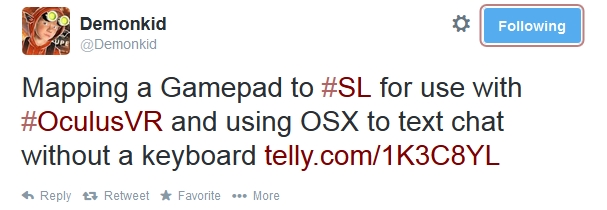
On Saturday May 24th, Loki Eliot tweeted that he’d been working on a similar approach, using the Xbox 360 controller and a dictation feature of OSX Mavericks to provide greater control over his avatar when using the Oculus Rift.

loki-tweet

Since tweeting, Loki has produced a blog post on his work, including links to the software he’s used and tutorials to help get things sorted out. his original video was posted to Telly, which WordPress.com doesn’t like, embedding-wise. However, Draxtor has, with Loki’s permission, reposted it to You tube, and so it’s that version I’ve embedded here.

Loki is the first to admit this approach doesn’t solve all of the Oculus related issues when using Second Life – he has a few wry observations as to where things will “suck” (his expression – not mine!). He also gives some musings on how technology might further assist things in the future.

Loki's work on integrating the Xbox 360 controller for use with SL and the Oculus Rift (image via Loki Eliot)
Loki’s work on integrating the Xbox 360 controller for use with SL and the Oculus Rift (image via Loki Eliot)

The use of HMDs brings with it a lot of challenges – some of which, the Lab freely admits in releasing its Oculus Rift project viewer, it has yet to really tackle. Seeing experiments like this is therefore interesting, as they demonstrate potential alternative (and not necessarily hyper-expensive) means of providing control over basic aspects of using SL with a headset which are not reliant on the keyboard and mouse and, in this case at least, also not dependent upon in-world voice (which many people don’t like to use for a wide variety of reasons). I wonder if approaches like this and Dave Rowe’s work with CtrlAltStudio might raise an eyebrow or two of interest at the Lab …?

Related Links