This year marked (I believe) the 3rd annual Bloggies Awards, the presentations of which took place on Saturday, October 26th.
For those not in the know, the Bloggies are awards organised by the Blogger and Vlogger Network (BVN), a group and website built specifically for networking and education purposes. BVN strives to provide bloggers and vloggers (video bloggers) with the most pertinent, up-to-date, and interactive information available, and hosts live discussion panels, interactive forums and tutorials on a wide range of blogging and vlogging subjects.
The Bloggies are intended to recognise those producing written and video blogs on Second Life across a range of categories, the majority of which are decided via a public / popular voting system. Each year the organisers present special awards: the Founders Award and the BVN Member of the Year Award.
Unfortunately, I was unable to attend due to commitments in the physical world, so I was surprised and delighted to learn today that I had been awarded the Bloggies Founders Award for 2019. This is given to (and I quote):
The founders award can be any blogger or vlogger in SL and we look for those that have made a huge contribution to the SL community through Blogging or Vlogging.
Needless to say, I’m both genuinely honoured and thrilled to receive the award and the recognition of my peers in blogging Second Life, and for the glowing terms used to describe this blog at the ceremony, which I’m also going to reproduce here:
This year’s recipient has been on the grid since 2006 and began blogging in 2007. Her blog covers a range of topics from news, reviews, commentary, exploration and opinion, and her dedication to chronicling the social, cultural and technical aspects of Second Life is unsurpassed. She is the premier source for all Second Life information, a major proponent of the arts and one of the grid’s most prolific bloggers.
I include this word in a small part because I do feel a degree of pride in reading them (I’d be lying if I said otherwise) – but primarily because I don’t try to seek out recognition in any significant way outside of the occasional interview; I simply try to write about what I appreciate, enjoy and find fascinating in Second Life in the hope others find it enjoyable / of interest / useful, and whilst trying to maintain an element of objectivity in my factual reporting. So having this blog recognised in public in terms like those above genuinely encourages me to keep writing and to also do better in the topics I strive to cover.
As I’ve noted several times in these pages, I’m a little partial to Ape Piaggio’s vehicle designs, and often get to help out with her designs in a small way. These treats occasionally lead me to offer a “sneak peek” at an upcoming design, although occasionally it can take longer than anticipated for the final product to appear – as has happened with the Airfish that I previewed over a year ago, and which subsequently hit a couple of hurdles that stalled final development.
The last 24 hours have given me the opportunity to try out and give feedback on Ape’s latest in-development craft: the WaveHopper. This is a craft that should, all things being equal, be commercially available in the next few weeks, but with Ape’s permission, I thought I’d whet a few appetites for it here.
Ape Piaggio’s WaveHopper
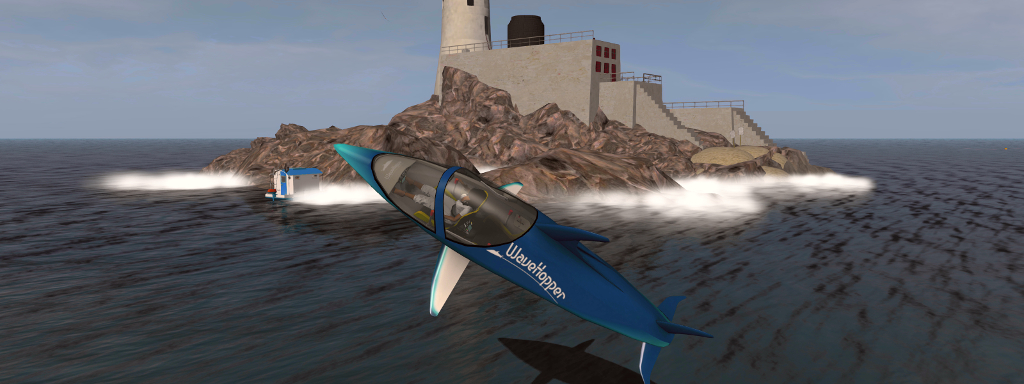
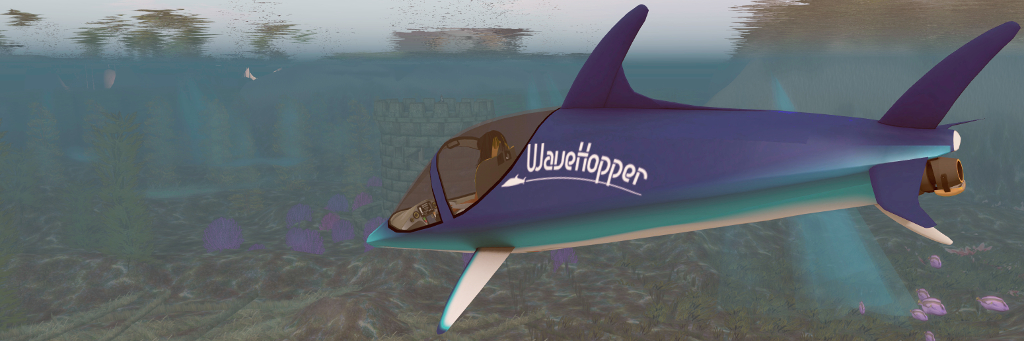
Looking like a dolphin, the WaveHopper is a two-person craft that sits as a cross between a jet-ski (it is powered by a impeller mechanism in a similar manner to a jet-ski), a mini sub (it can operate submerged for up to a minute at a time), and an acrobatic craft. Its porpoise (see what I did there?) is to simply get out on the water and have fun – as I hope the accompanying photos demonstrate.
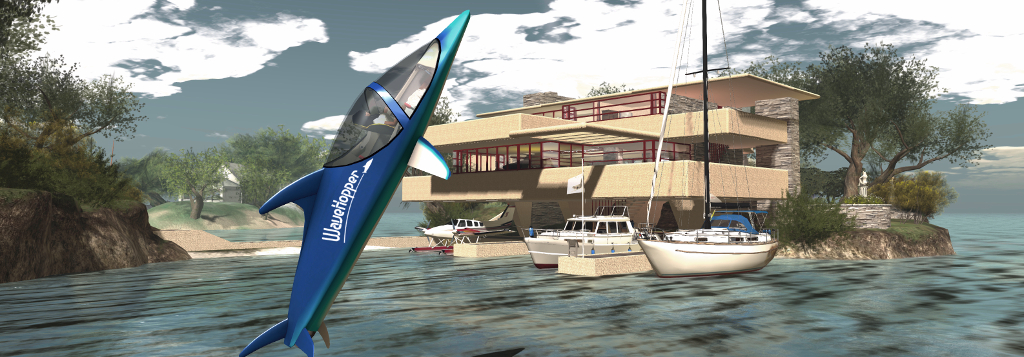
Once underway, the WaveHopper can travel on the surface of the water at a fair rate of knots (although handling at the upper end of the throttle can get some getting used to). Aircraft-like in its controls, tip the nose down and you’ll dive – but the idea is not to stay under water. Instead, pull back up on the controls, and the WaveHopper will accelerate upwards and breach the surface like a dolphin making a jump. What’s more, with a little practice, you can pull stunts with it, rolling as you jump or leaving the water inverted or even pulling a loop, part in / part out of the water can be managed.
Ape Piaggio’s WaveHopper
It’s really designed for fun in a single region rather than long travels across multiple regions. It has a rocking motion when moving on the surface, and the finished version will have more buoyancy, and there will be a timer to turn off the engine to prevent overheating if submerged too long.
– Ape Piaggio describing the WaveHopper
And just in case you think the idea is a bit kooky – WaveHopper is actually based on a real vehicle (which has also been reproduced by a couple of other creators, although Ape’s design was my first exposure to it). You can catch a video of the “real thing” below and get a feel for it.
Pricing for the WaveHopper has yet to be finalised, but I can say it’ll be packed with additional features, including working cockpit nav system for first-person operation, media system, boarding animations and a range of poses. Ape also noted she might offer some little extras to go with it so that owners can have even more fun. As such, I’ll be giving the WaveHopper a full review once it is available.
Ape Piaggio’s WaveHopper
And the Airfish? That’s apparently next on the list for completion!
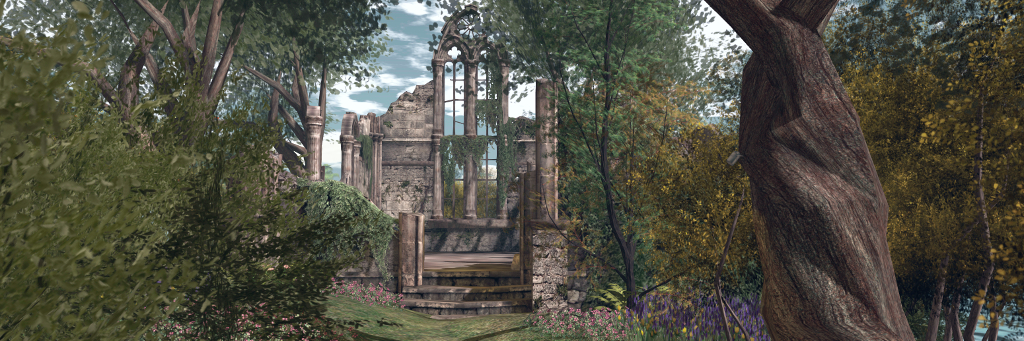
The Chapel Ruins by Marcus Inkpen of The Looking Glass, seated within our “southern island”
It’s been ten months since I bored you with writing about Isla Pey, and at that time I said there probably wouldn’t be any more major changes – and that’s largely been the case. However, over the last couple of months we’ve been re-adding one or two elements of old ruins to the place (a familiar theme with me) – although outside of a couple of walls slipped into the gardens behind the house, nothing really seemed to fit, despite the “south island” screaming to have something placed in it. The towers and walls of previous layouts just didn’t work.
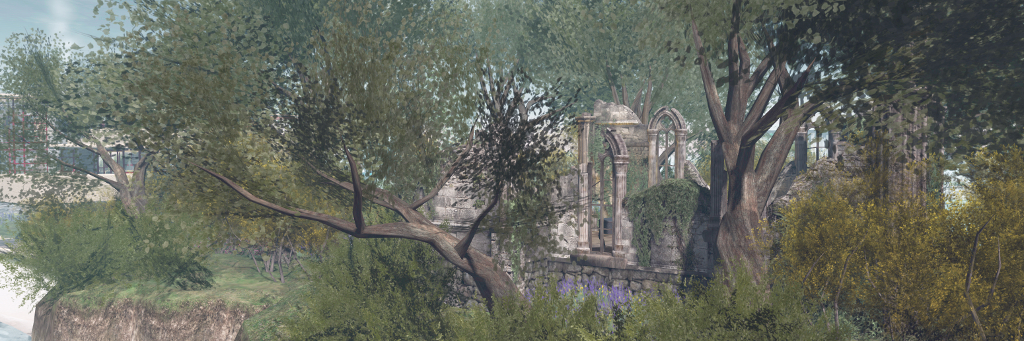
However, a design I’ve admired since it was first released, and which has increasingly been finding its way as a “regular” prop for region designs, is The Looking Glass Chapel Ruins by Marcus Inkpen. Available through The Looking Glass in-world store, this is a truly magnificent piece – and thanks to a combination of size, depth of foundations and luck, it happened to be the *perfect* fit for the land with very little need for anything to be moved or altered – all that was really required was establishing a path to it and around one side of it.
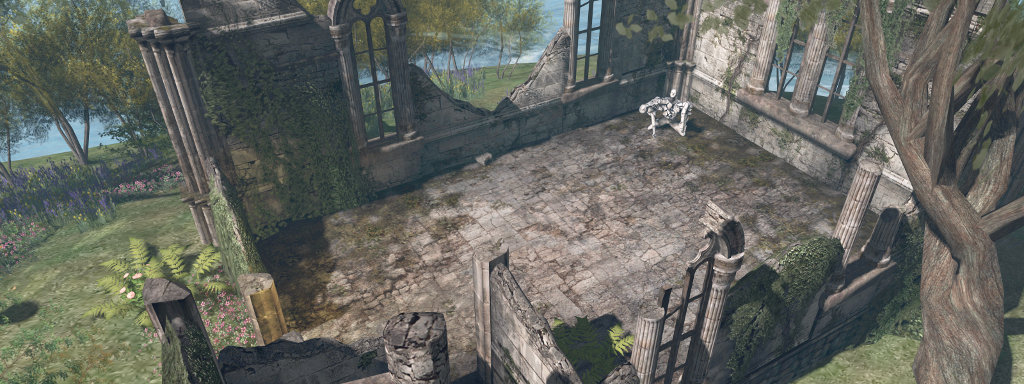
An overhead view of the chapel, with some of my modifications, and a sculpture from Mistero Hifeng
At 66 LI by default, the Chapel Ruins are finely detailed, offering the floor, and broken walls of a single room chapel with the broken square of a tower rising to one side of it, the walls and stairway of which abruptly end just above head height. The windows are without glass, the doors have long gone, and ivy is laying claims to the walls, with fallen stones scattered inside and out. It is, in a word, utterly eye-catching and a worthy centrepiece to any region requiring quality ruins.
Of course, me being who I am, I couldn’t leave it entirely untouched, so a couple of the walls saw some minor alterations (well, one fairly major in that an entire wall section was swapped for another). I also took the opportunity to install some decidedly non-period lighting, together with some additional foliage (pushing the LI to 70) – and then hit a problem.
A view from off-shore
What to do with interior space? Having the ruins really – if I say so myself – set the southern island perfectly; but the rectangle of empty stone floor did look odd – and for over a week nothing came to mind, other than dropping an old piano into it. Which, to be honest, I wanted to shy away from, given such items have also seemed to become de rigueur in a lot of region designs (and I should know- they’ve tended to be de rigueur in my region snapshots of late!).
Fortunately, the answer came in another visit to The Looking Glass. Across the store hall from the vendor for the Chapel Ruins sits a collection called the Our Place To Dream collection, and elements of this collection – notably the wall and the blanket – looked like they might fit with the chapel. And they did.
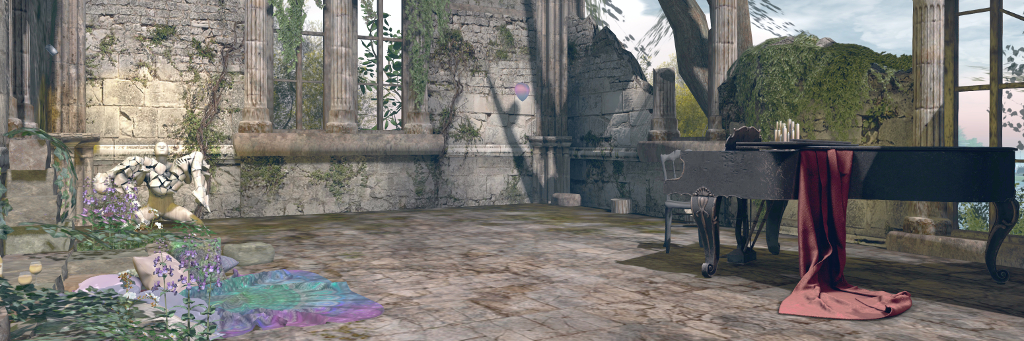
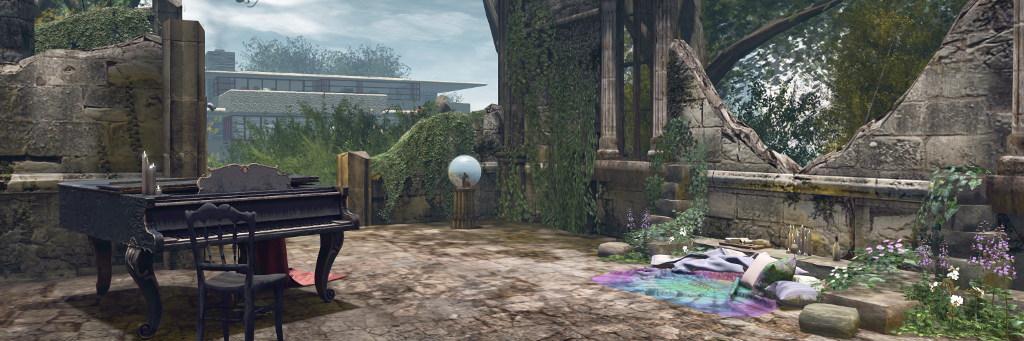
The “finished” space in the Chapel, with the Our Place to Dream Ruined Wall and Blanket (L) and the Nutmeg Distressed Grand Piano.
With a little modification, the wall offered a fitting suggesting of stonework from the broken wall of the chapel gathered together to form a cosy little space for the blanket, particularly when a DIGS cheeseboard together with some candles and wines glasses and bottle from various sources were added to make things even cosier. Which just left the rest of the floor space to deal with. A couple of statues by Mistero Hifeng and Silas Merlin helped; but in the end – well I had to give in to instinct and pick up the Nutmeg Distressed Grand Piano.
So, we now have our own ruined chapel, together with a little cosy spot for dancing, sitting and – with the aid of a picnic set, an outdoor corner to share with friends.
The chapel and the house in the background
The last couple of months have also seen some changes to the house itself – not too much, just some trimming and realignment here and there to give it more of its own look whilst also retaining most of the classic Fallingwater lines. Most of all, it’s given us space for a proper dining area – something I’ve never really seen the point of in SL until I moved into my Linden houseboat 🙂 .
I’m not going to wibble on about the house – but I will say that if you’re looking for a nice-looking, functional (as in animated) kitchen with plenty of options, you might want to take a look at the Olivia Kitchenby: Czikitka.
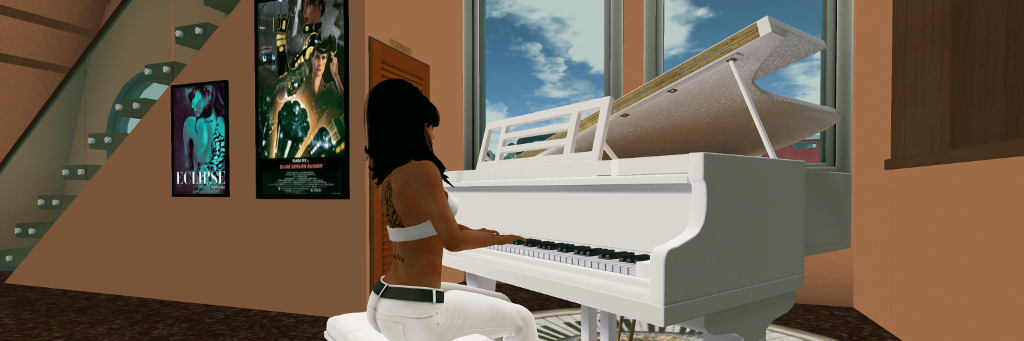
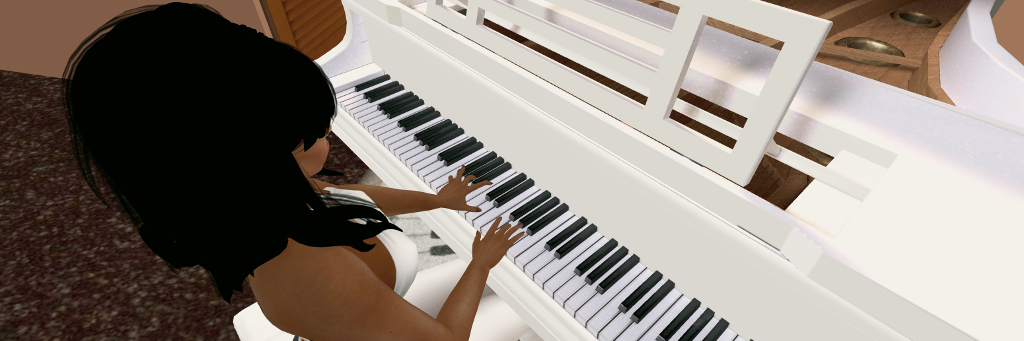
The PrimPossible Bento Mo-Cap 1LI Piano, shown in the built-in white finish option
Ample Clarity, the owner of the PrimPossible brand, made his mark producing 1-prim household items, initially using sculpties (not good for rendering, etc., but nevertheless impressive for their time for those pushed for LI) and more recently for doing much of the same with mesh. He’s well aware of my fondness for the piano, and so recently sent me a beta version of his new 1 LI mesh Bento baby grand piano featuring a selection of motion captured animations, and I decided I’d take it for a quick spin.
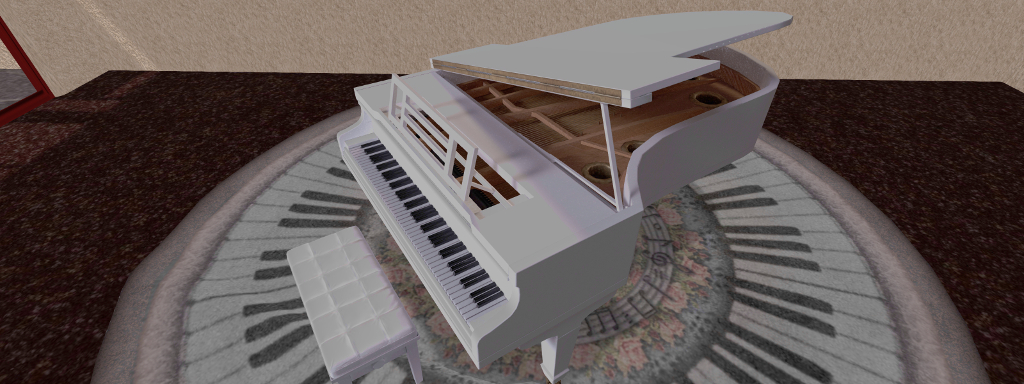
I cannot speak to the packaging of the piano, as it was delivered to me unboxed. However, in terms of shape and styling, it follows the expected form for a grand, and rezzes with the lid open and music stand raised. The former will tend to close when an avatar sits on the stool, but typing “open lid” (no quotes required when typing) in open chat will set it open once more.
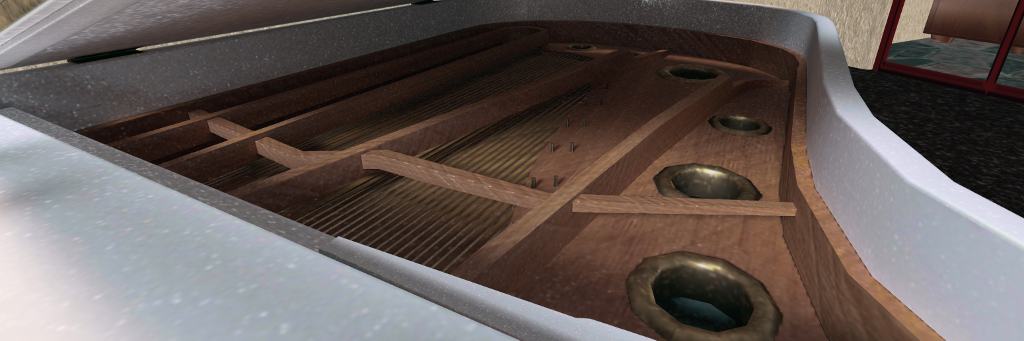
Given this is pretty much a single mesh, there are some elements that can catch the eye a little: the curves of the housing rim perhaps aren’t as smooth as seen on other piano models; the detailing of the soundboard / plate / strings is a little basic compared to other piano models I’ve tried (but also better than others). Certainly, the keys and nicely raised and the texturing of the ivory gives them something of a look of having been used, rather than appearing utterly pristine – a touch I appreciate in my SL pianos.
The PrimPossible Bento Mo-Cap 1LI Piano, shown in the built-in white finish
Sitting at the piano will open the main menu, the top level of which provides access to the piano’s impressively broad range of animations. Depending on which animations are available, depends on whether you have the Adult or PG variant. For the PG variant, which I have, the animations are broken down into the following categories / sub-menus:
Bento: general single (male or female avatar) and couples sitting animations than make use of Bento animations. This can place avatars on or around the piano in a variety of animated poses.
Non-Bento: similar to the above in terms of general sits / cuddle, but also with non-Bento piano playing animations (female, male and duets), and a selection of “friends” animations that again place avatars in poses for chatting, etc., around or on the piano.
Bento piano: a set of four playing styles created for Bento hands and finger movements.
Bento Mo-Cap: as set of single and duet playing styles for Bento hands and created using motion capture software.
The Bento piano animations offer sufficient range for playing most of the pieces of music included in the piano, with Piano Boss adding a little athletic fun to the start of any playing for those so inclined! The Mo-Cap options (two single pianist options for “standard” and “tall” avatars, plus three duet pairs) are, like the Bento animations, fluid, and offer perhaps a more natural placement of hands whilst playing (as they have been motion captured).
Bento hand animations
A total of 24 pieces of music are supplied, the majority of them classical and public domain (Ernest Gold’s theme from Exodus would have entered public domain in 2017, had it not been for the 1978 change to US copyright laws….). Accessible through the Extras > Music Menu option, these are a familiar and popular selection – Bach, Beethoven, Brahms, Grieg, Mendelssohn, Satie, etc., – with a touch of Gershwin.
The music menu includes a Start / Stop option (so you can play the piano sans music, if you have music playing over the stream, etc.), plus options for selecting / playing / looping pieces, and for adjusting the piano’s internal playback volume. I confess that some of the pieces seemed to suffer in places from recording levels perhaps being set too high, with a – to my ears at least – a noticeable distortion.
When playing music, it is also possible to alter the playing animation to better match the piece selected, if desired, and the duets options offer a nice sense of shared moments, although having a couple of additional pieces obviously suited to duet play might be nice. For those who enjoy their piano to play by itself, this is possible: simply use the music menu to select the music and play mode and then click Play (if the piano isn’t already playing). You can do this either whilst seated at the piano or with a touch to bring up the menu when standing.
Also included in the menu are options to set permissions on who can use it (owner, group or anyone), plus texturing options and to adjust the level of shine, the ability to set it to phantom (and avoid bouncing into the air when standing up!), and to adjust your sitting position. The latter brings out one of the little niggles I have with all pianos that have both the instrument and the stool as a single item: as the stool is “fixed” relative to the piano, I never can quite get my avatar to what I feel is the optimal position for playing.
A final thing to note about this piano is the LI. The single LI count of the piano applies to when it is not in use; as soon as an avatar sits at the piano, the LI count will increase to 3. This is necessary due to the nature of SL and sit targets: the PrimPossible piano requires an additional (and invisible) “shell” to be rezzed with it in order for avatars to be correctly sit targeted. This shell is automatically deleted when the piano is not in use, returning it to the advertised 1 LI. So, if you opt for this piano, do keep this in mind should you note the LI count changing – it’s not an issue / error.
Under the lid, the detailing is perhaps a little limited compared to some other piano makes, but at least as good as others – and remember, this is a single LI mesh object
The PrimPossible Bento piano is available in four versions and price points:
No Copy, Mod or Transfer PG at L$800 or Adult at L$950.
Copy, No Mod / Transfer PG at L$2,000 or Adult at L$2,400.
These prices are also listed as being “introductory beta”, and I understand that further animations and Mo-Caps will be added over the coming months. Even so, when comparing the L$2,000 price tag for the Copy version to something like the Culprit Sonata Bento Baby Grand (supplied Copy, No Mod / Transfer, and which I reviewed in March 2019), that’s a hefty difference should you be in need of a Copy version of a piano. Were I to give a very quick, high-level contrast between the PrimPossible and the Culprit it would be:
PrimPossible lower rendering and server costs (4576 and 1.0 respectively), lower LI (1 or 3), but fewer music options (24) and playing styles (for the present). Includes non-playing animations.
Culprit: higher LI (11) with a higher level of detail (particularly the soundboard / plate / strings / hammers / dampeners), more music options (56) and playing styles. Higher rendering / server costs (8561 and 10.7 respectively).
The PrimPossible Bento Mo-Cap 1LI Piano
As it is, the Culprit wins out for me for general home display / use. I find the playing styles more varied (and some more reflective of piano playing techniques) – although it’ll be interesting to see what else is added to the PrimPossible model as the beta progresses. As someone who loves the grand piano, I also appreciate the amount of work put into the Culprit’s “innards”, and I’m not sure I like seeing one clambered all over / sat on, so the additional sitting animations in the PrimPossible model, while potentially fun, hold no real appeal here.
For those who might be pushed for LI, and given more is to come with the PrimPossible piano, it is certainly worth a look and consideration, given the range of prices and the additional animations. As it is, the PrimPossible has been added to my Linden Home houseboat (where it will admittedly be more decorative than functional), where it looks quite at home.
Culprit owners Eku Zhong and Yure4u Sosa have released a couple more fun items I thought would be worth a write-up: the Culprit Sphynxie and the Culprit Flying Machine. Both are decidedly quirky (hence my interest!) and both are liable to be attractive purchases for some.
Sphynxie is a full animated Animesh companion that attaches to your avatar (just ADD it), and which uses an avatar skeleton that can be animated far more fluidly than other forms of pet. It takes the form of a sphynx cat – the famous coatless (but not without fur; its hairs are just exceptionally short and fine) cat produced as a result of selective breeding, and builds on the work done with the Culprit Mousie (see: Culprit Mousie: a little silliness in Second Life).
Mousie was a prototype – our Animesh début revamped for an older creation I did ages ago. He started out with less features (but he’s been updated). Sphynxie is entirely news, and come with more animations.
-Eku Zhong describing the Culprit Sphynxie
Either someone on the left of this photo has been on the catnip, or just got startled…!
At L$599, Sphynxie is also slightly more expensive than Mousie, with the price difference explained by Sphynxie being more capable.
Supplied in a package containing the cat, a HUD and an instructions note card, Sphynxie is offered in a number of individual hair finishes and as No Modify / No Transfer. Using it is a simple matter of attaching the control HUD and – providing you have no other Animesh items already attached (or no more than one if you are Premium!); you can then ADD the cat to your avatar.
Left to itself, Sphynxie will stand beside you on his hind legs (like Mousie, Sphynxie is anthropomorphic in nature) and entertain himself, moving from pose to pose, looking around, breathing deeply and tail moving quite naturally. A right-click Edit allows you to reposition him – move him a little further away if your AO stands causes you to step on him for example, or to move him to your preferred side, etc. When you walk, he’ll trot along beside you. And, of course, being an attachment, he’ll teleport with you.
However, it’s when you click the HUD that Sphynxie comes into his own. This contains three options: New Name (opens a dialogue box in which you can give your Sphynxie a personal name); Channel (to change the channel over which your HUD communicates with your Sphynxie to avoid clashing with others) and Gestures.
This last one provides access to an extensive range of animations that will play on Sphynxie when selected – so you can have him greet people, respond to a conversation (sometimes a little snarkily – something ideally suited to his somewhat upper class English tone of voice!) sing, dance, perform a few ninja fighting moves – and a whole lot more, a small selection of which are shown in the video below.
Complexity-wise, Sphynxie has a slightly higher cost than Mousie – around 7K on top of your avatar complexity – but this is by no means excessive. If rezzed in-world he is slightly more resource efficient than Mousie – his LI is 27 and he has a physics impact of 0.5 and server cost of 0.8; however, he will only play his default animations if rezzed like this, and will not be responsive to the HUD. Plus, if you are a Premium member and have Mousie, you can opt to wear them both (as Premium members can have up to 2 Animesh items attached to their avatar) and they will not interfere with each other.
For those who enjoy attachable pets, the Culprit Sphynxie is – like Mousie before him – a fun addition to have, and his animations are likely to keep people smiling.
Culprit Flying Machine – out over the water
Currently on a short-term offer of L$100 as part of the Culprit Fly Buy Friday promotions (just join the store group) is the new Culprit Flying Machine. Designed entirely for fun, it is perhaps one of the most unusual vehicles I’ve used in Second Life – one that in some respects defies description; is it a boat? Is it a plane? Is it – well, I’ll leave it to the pictures to speak for it!
Like many of Culprit’s vehicles, the Flying Machine is supplied with two versions in the box: a “solo” unit you can fly yourself, and a rezzer unit. The latter takes the form of a black base unit that auto-rezzes an initial flying machine (no Mod, as it is a rezzer version) over it, and that will rez a further machine as the previous one is used, with the owner able to set the total number of boats that can be rezzed at any one time (up to a maximum of 12). These machines will also de-rez when the driver stands up, so they leave no clutter.
The Culprit Flying Machine
Seating a maximum of two people, the machine will turn on its engine when the owner (or first person in the case of the rezzer version) sits in it, and the rear “pusher” propeller will start turning. Movement is then achieved using the standard Arrow / WASD keys (depending on your preference and viewer set-up) – Up / W for forward, Down / S for slowing / reverse; Left / A and Right / D for turning.
Any forward / reverse motion will start the “oars” flapping, making them more like wings, – and like a bee, you’ll improbably hover above the ground and progress in your chosen direction as if being rowed along and pushed by the propeller. Should you reach Linden water, the machine will handle that as well, dipping the rudder slung beneath it as if to help steer. Stop forward / reverse motion, and the “oars” will come to a stop and the machine will glide to a halt.
And there’s more. Touch the machine and you’ll get the “standard” Culprit vehicle menu. In this you’ll find the Flight option. Click this to check it, and you can actually fly the machine at more than just the default hover height – use Page Up / E to put the nose up and climb, and Page Down / C to put the nose down and descend. Be warned however; if you wish to maintain altitude you must stay in motion. If you stop, the “oars” will stop and – naturally, as you’re deprived of their lift – you’ll start to sink towards the ground until you reach the machine’s default hover height – and if you’re over Linden Water, you will sink!
Culprit Flying Machine – flying over Isla Pey
The menu also allows you to turn the engine off, sound the horn, adjust your seating position (which is not saved in the rezzer version), but I’m not entirely sure if the throttle / gear options work (shift up / shift down).
For the purists, the handling may not feel entirely aircraft-like, but remember this is a fun vehicle. What’s more, with its looks and animations, it would also be at home in steampunk environments as well as being used simply for fun. In all, six colour variants are available and can be purchased – as with Sphynxie from the Culprit main store.
Now, a shovel guitar may sound a completely made-up thing, but actually, it is very much a real DIY thing available in the physical world (just do a check on eBay to see for yourself, or check the video at the ed of this review).
The idea comes from a video I saw on Internet, and since I liked the idea, I made it in SL, I hope you will enjoy it as much as I do! The sales of this guitar will help me to get the real life version of the instrument, so thank you for supporting me 🙂
– Ape Piaggio on her shovel guitar
Delivered in a plain cardboard style box, the guitar has one of Ape’s signature unpacking animations – touch the box and it will open and the guitar will float up out of it to stand upright in front of you, before displaying asking you accept the guitar. Confirming this will place the guitar, its instructions and a gesture (which can be used to toggle the guitar’s menu via the gesture command “/sgmenu” or by tapping SHIFT-F1). And that’s just the start.
The Piaggio shovel guitar detailing: the blade (left and right) and grip with tuning mechanisms (centre) – click for full size
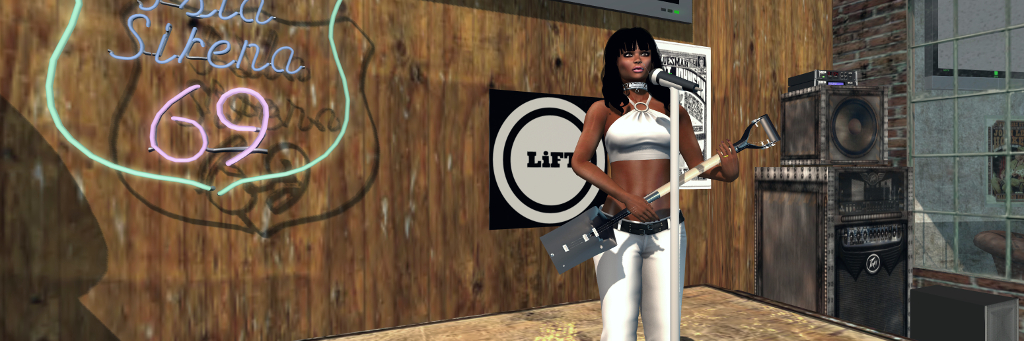
The guitar itself is beautifully detailed: the blade and collar are finished in that “brand new” spade matte black finish that use materials to give them that “brand spanking new” look. The blade itself forms the body for the guitar, complete with bridge and (being an electric guitar), pick-ups, control knobs and output jack socket. The handle and grip form – obviously enough – the neck and headstock for the guitar, the latter with tuning mechanisms for the three strings. When you wear / add the guitar the first time, it will be slung over your shoulder.
Playing can be triggered in three ways: by clicking on the shovel, or if you have the supplied gesture active, by either typing “/sgmenu” (no quotes around it) in local chat, or pressing SHIFT-F1. All three of these will open the guitar’s comprehensive menu – just click Draw / Sheath to move the guitar “play” position (or back to its “carry” position), and you’ll start playing.
A single song is supplied (individual parts of which can be looped, if required), but users can add their own. A guide to how to do this can be found in the supplied instructions note car. While one song might sound limiting, what is supplied is a wealth of animations – playing styles from a range of basic strumming options all the way through to some very fanciful options (flying anyone?) going by way of foot-stomping to spinning to head-banging and and even a hint of The Shadows! These reside with a number of static and sitting animations that offer users a lot of choices – and they can add their own if they wish; again instructions for doing so can be found in the supplied note card.
The playing animations are available from the menu > Animations > Stands, and have a couple of different options when using them.
If the guitar is UNmuted (via the main menu), selecting any of the guitar playing animations will automatically start that animation and leave you in the Stands menu.
If the guitar is MUTED (via the main menu), selecting any of the guitar playing animations will cause a further pop-up menu to display – select Play Now to start the animation.
The latter option allows live performers who use a guitar as their accompaniment to make use of the shovel guitar during their gigs if they wish, to add a little novelty to things. They can play the guitar muted in-world and, if they want, swap the playing animations to better suit the style of song they are singing, rather than always playing the same animation throughout a set, simply by toggling back and forth between the Stands menu and and the playing sub-menu.
Another handy option is Force Anim. This allows you to use the guitar while seated – say on a chair or stool, or when riding in a vehicle or even while riding your wearable Bento horse (a good reason for the guitar *not* being Bento, given non-Premium users can only wear one Bento attachment at a time), so you can mosey across the range, pausing when you like to sing to yer hoss! Admittedly, depending on the animations on the object you’re sitting on, Force Anim may work first time or may take a little bit of fiddling with to kick-in correctly – but it does generally work; I tried it on a number of chairs, stools and other bits around our home, as well as my Teegle and Water Horse horses.
The Force Anim option can be used to allow you to play the guitar when seated on objects (such as the stool on the left), or when riding in a vehicle – or even when astride your Bento horse (right)!
Two options I also found interesting are the sync and the sets options. The former offers a means to sync your guitar animations with those of a friend with the guitar so you’re playing together. Sets enable you to create a set of songs to be played sequentially – and you can create up to nine sets to the guitar.
All of this makes for a very versatile, as well as exceptionally novel, SL musical instrument – and I’ve not covered all of the menu options, with include options to help adjust the guitar’s position, reset it to its default state, etc. At L$450, the price isn’t excessive, and for those who fancy it, it is available on Ape’s SL Marketplace store and at her in-world store.
And, for those who still have doubts about how good a shovel guitar can sound with just three strings, check the video below!
With Thanks to Jodi for letting me use LiFT for the banner image to this article and recording the video clips.
 This year marked (I believe) the 3rd annual Bloggies Awards, the presentations of which took place on Saturday, October 26th.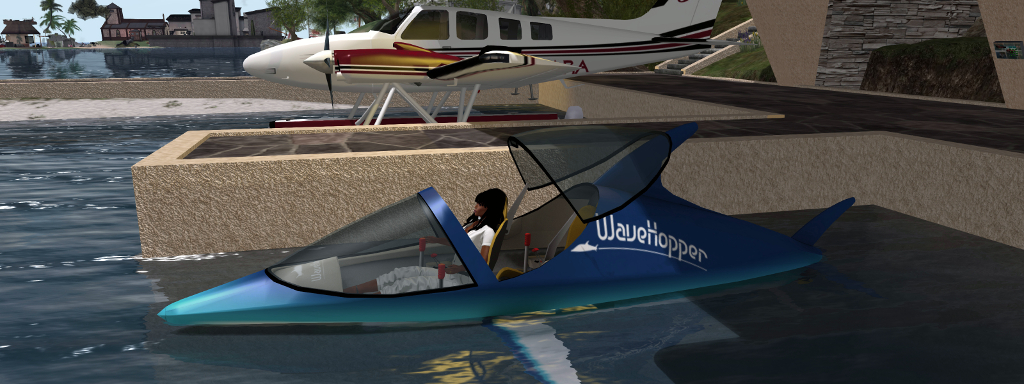





 Inara Pey: Living in a Modemworld