October 2025 SL Mobile UG meeting summary

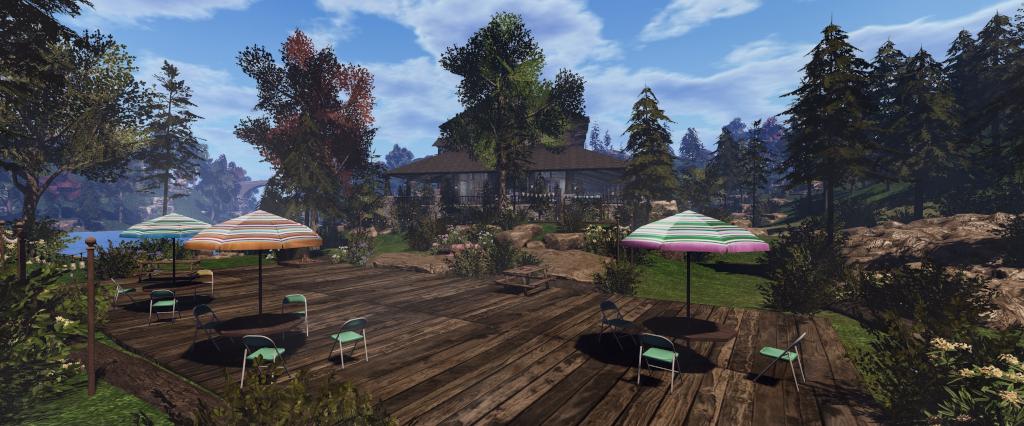
Campwich Forest grounds: location for the Monthly Mobile User Group (MMUG)
The following notes were taken from the Thursday, September 25th 2025 Monthly Mobile User Group (MMUG) meeting. These notes should not be taken as a full transcript of the meeting, which was largely held in Voice, but rather a summary of the key topics discussed.

The meeting was recorded by Pantera, and her video is embedded at the end of this summary – my thanks, as always to her in providing it.

Table of Contents

Meeting Purpose

  • The Mobile User Group provides a platform to share insights on recent mobile updates and upcoming features, and to receive feedback directly from users.
  • These meetings are conducted (as a rule):
    • The last Thursday of every month at 12:00 noon SLT.
    • In Voice and text.
    • At Campwich Forest.
  • Meetings are open to anyone with a concern / interest in the above topics, and form one of a series of regular / semi-regular User Group meetings conducted by Linden Lab.
  • Dates and times of all current meetings can be found on the Second Life Public Calendar, and descriptions of meetings are defined on the SL wiki.

Resources

Current Releases

SL Mobile (Beta) version 2025.1065 (A) / 0.1.1065 (iOS) – October 20.

Updates:

  • Fixed a bug with object loading
  • Added a new 25m draw distance option (Menu > Settings > General > Max Draw Distance) – default is 40m.
    • There have been some reports of this resetting to the default if 25m is set, and then another application is opened on a device. This is under investigation.
  • Improved framerate on lower-end devices
  • Rendering resolution now adjusted on the fly to keep things running smoothly. The app looks at your framerate over the last 10 seconds and automatically lower or raise resolution to maintain at least 20fps (or 80% of your framerate cap, whichever is higher). You might notice a short dip when loading new areas, but it quickly recovers.
  • Added a new “unloader framework” that decides which items should be temporarily removed if the system runs low on memory. Instead of deleting them, it safely suspends them so they can return once memory becomes available again.
  • A performance index now estimates your device’s power using real-world benchmarks. Default settings—like draw distance (how far you can see) and max avatars (how many avatars are shown) —automatically scale to fit your device’s capabilities.

Performance Updates

[Video: 2:06-5:58]

  • The initial October update (560) caused a performance regression on some Android devices, prompting further releases during the month with a focus on re-upping the performance on “lower-end Android devices” (although this in itself covers a wide spectrum of hardware and devices due to the way various devices might be configured by the manufacturer to prioritise things like battery life).
    • The biggest change in this regard is that the the rendering resolution is based on frame rate when initially loading a scene, the idea again being to speed-up the load time.
    • In addition, and again particularly with Android, changes were made to the number of rendering passes being made, together with some simplification within the shaders to again help boost performance.
    • Android testing indicated that these changes should hopefully see around a 20-25% performance boost for most of the affected hardware, which should help alleviate some of the pain users may have been feeling earlier in the month.
    • Those who did experience performance issues on the earlier October releases for Android are encouraged to try the October 20th release, and see if their issues have been resolved (and if not, to please provide feedback).
  • Additionally, changes have been made to how out-of-memory situations are handled.
    • Previously, if the app showed signs of running out of memory, it would attempt to start deleting content held in memory (but not necessarily seen on-screen) to try to stay ahead of the curve and prevent the entire app from crashing due to running out of memory.
    • However, any such content deleted from cache in this way was essentially “gone”; it could not be reloaded, even if the app had available memory to do so.
    • Changes at the start of October altered this behaviour to enable content to be automatically re-loaded, and this has all been synced-up withing the memory management code to make sure that content is reloaded as soon as there is memory available.

Upcoming Work: Texture Memory Use

[Video: 6:12-9:00]

  • For convenience “and a number of other factors” SL Mobile has been “pretty much” loading textures at one fixed resolution (with the exception of avatar textures). This means that the app does not take into consideration things like the size of an in-world object in order to determine a suitable texture resolution.
  • Work is now in-hand to switch-over to a new texture resolution mechanism which allows textures to be loaded at resolutions based on the surface area of an object (what LL is calling “variable textures”).
  • This also means larger objects will get more texture memory allocated to them, whilst very small objects (e.g. a ring, a button, etc.) will get loaded at the absolute lowest resolution.
  • The overall goal is to allocate available texture memory more efficiently than currently is the case, and allow for adjustments to texture memory to be made on the fly as an avatar / camera moves around a scene, with texture memory use changing as any particularly object gets re-sized larger or smaller within the scene.
  • Work on this has been in progress for the last couple of months, and is now a focus for the next beta release, and will be coming the Alpha version of the Mobile app for wider testing prior to release.
  • It is hoped that by carrying out this work, more memory will be made available for future use – such as
  • supporting PBR materials.

SL Mobile New Starter Experiences

[Video: 12:15-19:48]

  • Already available to those in the SL Mobile alpha programme are four new starter experiences, and soon to be released within the beta versions. Specifically developed in collaboration with various SL creators, these are intended to offer new users coming into SL via the Mobile app with high-quality experiences, intended to be “fast, social, photogenic, and touch-friendly” (that is, interactive).
  • The four experiences are:
    • Scaredycat’s Funhouse (by MadPea) – a gamified experience involving catching little kitties.
    • Midnight Pulse (by Bad Unicorn) – a nightclub-style experience.
    • Chronicles from the Backwaters (by Arcback / Altscape) – a “dark, gritty, interactive novel”.
    • The Mobile Learning Centre (by Second Life Studios) – designed to teach people how to move within and use the Mobile app.
  • These have been built as a result of insight gained during the continued development of SL Mobile (e.g.  because new users are looking for “snackable” experiences within the app to engage them), and have been informed by the manner in which people are using SL Mobile, together within its ouch-based UI, and things like the form factors of various mobile devices, and how people tend to use their mobile devices and apps in general (e.g. taking photos / selfies, creating shareable moments, etc.), and trying to lean into that kind of device usage.
  • New users coming into SL for the first time using SL Mobile will be able to select the experience that most interests them as a part of the join process.
  • Existing users will find the experiences can be accessed via the Lobby.
  • As these experiences become more widely available, the plan is to iterate upon them whilst also monitoring them for how they are used and the kind of metrics they produce in terms of engagement, re-use, popularity, etc.
  • The initial focus of this monitoring will be new user retention over the first 24 hours / first week, then expanding to look at month over month stickiness; if / when people make the move from Mobile to Desktop.
  • Alongside of this will be on-going monitoring of general performance within the different experiences and what improvements can be made to them / to SL Mobile as a whole.

Q&A Session

[Video 21:32-End]

  • Bring the Map to SL Mobile: while the web-based SL maps (maps.secondlife.com) have been made mobile device responsive, they have not been directly added to the SL Mobile app as yet as there is not a lot of utility in doing this at this point in time due to limited functionality within the web-based maps toolset.
  • Memory fragmentation:
    • Some users with multiple accounts (notably subscription accounts) have noticed decreasing SL Mobile loading performance when successively logging-on different accounts (e.g. working through the accounts each day to claim Streaks rewards).
    • This is caused in part by the way current versions of Unity work, which leaves small fragments of memory remaining marked as allocated unless an app is completed cleared from memory (swipe up) after use. These fragments then “break up” the larger pool of memory to eventually leave insufficient amounts of contiguous free memory available for other accounts to use when logging-in, thus increasing their load times.
    • It is believed that Unity 7 will offer a better garbage collector for clearing memory, thus preventing this kind of fragmentation from occurring, and this will become available when the SL Mobile is moved to this version of Unity at some point in the future.
    • For the time being, the easiest way to avoid the issue by those encountering it is to swipe up on logging-out of the app, thus removing it completely from memory, and then re-launching it to log-in on the next account (or, if using other apps at the same time, closing them and swiping up to remove them from memory, so as to prevent them causing fragmentation / using memory SL Mobile might otherwise access).
  • Localisation for SL Mobile in support of non-English speaking users is on the roadmap, but has yet to be scheduled as a tranche of work.

Date of Next Meeting

  • Check the SL Public calendar for details. At the time of writing, no meetings had been schedule for November or December.

September 2025 SL Mobile UG meeting summary

Campwich Forest grounds: location for the Monthly Mobile User Group (MMUG)
The following notes were taken from the Thursday, September 25th 2025 Monthly Mobile User Group (MMUG) meeting. These notes should not be taken as a full transcript of the meeting, which was largely held in Voice, but rather a summary of the key topics discussed.

The meeting was recorded by Pantera, and her video is embedded at the end of this summary – my thanks, as always to her in providing it.

Table of Contents

Meeting Purpose

  • The Mobile User Group provides a platform to share insights on recent mobile updates and upcoming features, and to receive feedback directly from users.
  • These meetings are conducted (as a rule):
    • The last Thursday of every month at 12:00 noon SLT.
    • In Voice and text.
    • At Campwich Forest.
  • Meetings are open to anyone with a concern / interest in the above topics, and form one of a series of regular / semi-regular User Group meetings conducted by Linden Lab.
  • Dates and times of all current meetings can be found on the Second Life Public Calendar, and descriptions of meetings are defined on the SL wiki.

Resources

Current Releases

Version: 2025.7.560 (Android) – July 23 / 0.1.557 (iOS) – July 22.

Forthcoming Updates

[Video: 2:50-17:55]

  • A new Alpha build is currently available for Android, and is just waiting to be cleared by Apple (if not already available by the time the post is published).
  • This alpha is viewed as being “close” to being ready for a beta release “Soon™”, and includes all current work on the Mobile product, several aspects of which are outlined below.

Avatar and Character improvements

  • Load times: a “significant” reduction in the amount of memory required to load an avatar, allowing Mobile to both load more avatars in a scene, and do so more reliably.
    • Performance in environments with large numbers of avatars should also now be improved.
    • There are still some shape changes to be completed to allow all avatars to render correctly, but this work is progressing.
  • Network connection stability:
    • As reported in the August update, because of its dynamic nature, SL Mobile requires a constants data stream, and so is far more susceptible to signal interruptions / conflicts with other apps for bandwidth use, etc.
    • Work has therefore been put into making the app more robust in how it maintains network connectivity and continues to function through such interruptions, doing all that is required of it.
    • These improvements also feed into the avatar system as well, further helping with the speed and reliability of avatar loading.
  • Under-the-hood work: general optimisations such as re-targeting download orders (e.g. increasing the download priority of avatar clothing downloads to again improve avatar downloading and rendering).
    • This under-the-hood work also includes refining code related to the loading and unloading of in-scene objects, so when moving around the world, content should load / unload more effectively, with more content in general loading.

EEP Rendering

  • A first pass at implementing EEP environment settings.
  • This is a direct port of the sky shaders used in the viewer, so that scenes should render a lot closer to how they appear on the Desktop viewer.
  • The work includes all of the lighting data, fog / haze data, etc., as well as the sky shaders.
  • Further work is required on lighting due to differences in how the Unity engine and the SL engine respectively handle lighting.

Transparency Rendering

  • Due to the need for order-independent transparency, coupled with limitations within the GPUs used on most mobile devices, SL Mobile has been unable to render “true” transparency, and has had to rely on dithering to approximate transparency.
  • One means to get around this is to use temporal anti-aliasing, which LL has been waiting on through an update to the version on Unity they use with Mobile.
  • The work on this upgrade was recently completed, allowing said temporal anti-aliasing to be utilising within the app, providing better transparency rendering without any loss of performance.
  • Until this work is fully dialled-in, there might be some light ghosting visible when panning around transparent surfaces.

Lighting / Point Lighting

  • There is a “slight incongruity” between how Unity handles point lighting (lighting placed around a scene) compared to how Second Life handles the same (the Unity rendering path prefers quadratic lights – bright up close, dim at a distance; SL is more medium-bright when close, medium-dark when further away). This resulting in point lighting in Mobile to look different to the same lighting seen in the viewer.
    • To try to address this, the lighting calculations used for such point lights has been tweaked within SL Mobile so that such lights will be rendered more closely to how they are within the viewer.
  • As a general note, updates to directional lighting may allow shadows to be re-enabled in the Mobile app, although shadow rendering is expensive, and further work in this area is required.

General Improvements

  • Multi-threading for object and content loading has been improved, which see see more effective use of the CPU cores within a mobile device.
  • Streaming audio has been completely rebuilt to avoid using a now-deprecated library within the current beta streaming audio build.
  • Improvements made to loading the world following a rapid log-out / log back in.
  • General improvements and minor adjustments to the UI. Perhaps the most noticeable of these is the temporary return of the sign-out option as a button in the menu (pending further updates down the road which will likely see it return to a drop-down option once again).
  • Improvements to how spinning objects and target_omega are handled.

Q&A Session

[Video 18:14-End]

  • Switching to another app when using the SL Mobile app and then switching back to SL Mobile can seem to take time.
    • This is partially out of LL’s hands: apps not in current use can be “moved” from active memory to free-space for other apps. Changing focus can also result in the web page used to assist in rendering the UI being suspended.
    • Both of these factors can result in a delay in resuming a session as the focus is returned to SL Mobile.
    • Consideration may be given to adding a pop-up message about possible delays when switching away from SL Mobile to another app, with a possible more in-depth examination as to what might be done to be carried out at some point in the future.
  • Inventory access: outfit sub-folder support, etc: Inventory is something being worked on, but the work is such that no major announcements as to what is being done / what to expect could be made at this meeting.
  • Message caching (e.g. people can receive messages whilst on SL Mobile, but also still see them when logged in via the Desktop viewer): there has been some movement on this, and work is continuing, although complex. Further updates in due course.
  •  Could the current SL networking calls be used with SL Mobile to save tampering with the SL infrastructure?
    • No,  because SL mobile uses different protocols in order to handle:
      • Swapping between the device’s wifi and cellular connections on the fly.
      • Disruptive connections which could otherwise result in high packet loss – something UDP would have difficulty in managing.
    • The protocols used by SL Mobile also reduce the bandwidth the app uses when compared to Desktop (e.g. transmitting the scene state to SL Mobile uses 97% less bandwidth than the viewer).
  • Does SL Mobile run better in landscape mode or portrait? There shouldn’t be any difference.

Date of Next Meeting

August 2025 SL Mobile UG meeting summary

Campwich Forest grounds: location for the Monthly Mobile User Group (MMUG)
The following notes were taken from the Thursday, August 28th 2025 Monthly Mobile User Group (MMUG) meeting. These notes should not be taken as a full transcript of the meeting, which was largely held in Voice, but rather a summary of the key topics discussed.

The meeting was recorded by Pantera, and her video is embedded at the end of this summary – my thanks, as always to her in providing it.

Table of Contents

Meeting Purpose

  • The Mobile User Group provides a platform to share insights on recent mobile updates and upcoming features, and to receive feedback directly from users.
  • These meetings are conducted (as a rule):
    • The last Thursday of every month at 12:00 noon SLT.
    • In Voice and text.
    • At Campwich Forest.
  • Meetings are open to anyone with a concern / interest in the above topics, and form one of a series of regular / semi-regular User Group meetings conducted by Linden Lab.
  • Dates and times of all current meetings can be found on the Second Life Public Calendar, and descriptions of meetings are defined on the SL wiki.

Resources

Release Updates

[Video: 0:00-8:33]

Current Releases

Version: 2025.7.560 (Android) – July 23 / 0.1.557 (iOS) – July 22.

Updates

  • Work has been focused on the next release of Mobile, including pushing updates to the Alpha group of users (those who were part of testing from the start). Two Alpha group updates for the release have gone out so far, and a third is expected “shortly”.
  • A key aspect of the next release is improving overall stability, both in itself and how it deals with “shaky” Internet connections, etc.
    • Feedback from the Alpha testers is that this work is yielding performance improvements (e.g. faster frame rates, lower battery use) on Android, and it is hoped the same holds true for iOS.
  • Network connection stability has been a particular area of work for the last 2 months.
    • Unlike apps which can download data in advance, cache it and then call upon it, Second Life Mobile requires far more of a constant stream of data due to its dynamic nature, and so is far more susceptible to signal interruptions / conflicts with other apps for bandwidth use, etc.
    • Thus, the work has been to try to make the Mobile app far more robust in how it maintains network connectivity and continues to function through such interruptions, doing all that is required of it.
    • The work has taken time and effort to get through, but it is hoped that the majority of it is now complete, and the rest can b wrapped-up within the next month.
  • Work has also been put in to trying to resolve a number of known issues (e.g. streaming audio quality on iOS devices).
  • As such, while there will be new features in the next release, the overall focus of work for the present is on performance, stability and bug fixing.
  • Additionally, a couple of further issues have been identified with avatar rendering, and so effort will be put into addressing these.

Upcoming New Features

[Video: 8:33-14:57]

  • Achievements: giving “visual rewards” to users for moving around in the Mobile app and trying-out actions, etc.
    • Details vague, as the team did not wish to give “too much away and spoil the surprise”.
    • Achievements are currently and specifically aimed towards new users.
    • They triggered automatically in some manner on completing a basic task within the app, after which a new View option is unlocked in the menu, allowing users to see available achievements and the particular level they are “at” for an achievement.
  • Camera improvements (as noted in the July meeting):
    • Reset Camera button, which will be displayed when the two-finger swipe to detach the camera from the avatar is used.
    • Rotate around current camera position when the camera is detached from the avatar.
    • Zoom in and out from the current camera position when detached from the avatar.
    • First-person (Mouselook) view.

General Feedback / In Brief

[Video 14:57-End]

Please refer to the video for details on the following and other questions which may have had a simple “yes” or “in progress” reply.

  • Conflicts between pinch actions for zooming and the joystick control for movement:
    • The joystick event capture area covered a good portion of the lower left side of the screen. Because of this, pinch or swipes commencing / overlapping this area can trigger the joystick  and avatar movement.
    • As the joystick fades to transparency between uses, this can cause confusion for users, as they start a pinch / swipe action within the lower left corner of their device screen which appears “empty”, and accidentally trigger the joystick capture event, causing their avatar to move.
    • Because of this, the joystick function is to be changed so that it is always visible, in the hope that users will not commence gestures within its event capture area.
    • It is hoped that keeping the joystick visible at all times will also alleviate new users becoming confused as to how to move their avatar when the joystick is transparent.
    • This led to a discussion across the last 15 minutes of the meeting on ways to completely disable avatar movement when not required.
  • Alpha transparencies not rendering correctly:
    • Potentially due to a number of issues (the transparent texture not being fully JPG2000 conformant; the renderer not correctly recognising the alpha channel, etc.).
    • This is known about and is being looked at to try to resolve. In the interim further reports on the problem and where encountered are requested.
  • A request was made for feedback on any quality of life issues users experience (e.g. problems with changing outfits, UI issues, etc.), as these are likely to become more of a focus as the current work on performance / stability / network improvements comes to an end.
  • Feedback requested from Alpha testers with the upcoming update (anticipated for Friday, August 29th) include: network stability (particularly when the connection switches from wifi to cellular or vice-versa) – which results in noticeable issues (such as an inability of TP); general reports of unexpected with general use – quality of life, avatar loading, avatar movement issues, etc.

Date of Next Meeting

July 2025 SL Mobile UG meeting summary: latest releases

Campwich Forest grounds: location for the Monthly Mobile User Group (MMUG)
The following notes were taken from the Thursday, July 31st 2025 Monthly Mobile User Group (MMUG) meeting.

These notes should not be taken as a full transcript of the meeting, which was largely held in Voice, but rather a summary of the key topics discussed. The meeting was recorded by Pantera, and her video is embedded at the end of this summary – my thanks, as always to her in providing it.

Table of Contents

Meeting Purpose

  • The Mobile User Group provides a platform to share insights on recent mobile updates and upcoming features, and to receive feedback directly from users.
  • These meetings are conducted (as a rule):
    • The last Thursday of every month at 12:00 noon SLT.
    • In Voice and text.
    • At Campwich Forest.
  • Meetings are open to anyone with a concern / interest in the above topics, and form one of a series of regular / semi-regular User Group meetings conducted by Linden Lab.
  • Dates and times of all current meetings can be found on the Second Life Public Calendar, and descriptions of meetings are defined on the SL wiki.

Resources

Release Updates

[Video: 4:46-10:20]

Latest Releases

Version: 2025.7.560 (Android) – July 23 / 0.1.557 (iOS) – July 22.

Updates

  • Work has been devoted to overcoming some significant infrastructure issues:
    • A bug within one of the core networking libraries resulted in app update cause significant problems for users in the Alpha programme, who received the update first.
    • As a result, the library in question was been updated, but was then found to be incompatible with the version of Unity SL Mobile uses, necessitating a Unity update.
    • Most of this work has gone ahead and is working, although the network-related upgrades still need further testing (e.g. maintaining a connection to the servers when switching from a wifi connection to cellular, or vice-versa).
  • The network upgrade should result in generally better performance.
  • The Unity upgrade brings with it a new renderer, which should offer improved performance across the majority of devices, and the ability for LL to maintain compatibility with newer mobile ‘phones and OS versions.
    • [Video: 25:19-25:52] this upgrade will not directly address issues of rotations being off, textures changing after loading, etc. However, the Lab would like more bug reports sent directly from the app on these types of issue to help identify potential causes.
  • As soon as there is confidence in these updates, a new release of the app will be made.

Upcoming Camera Improvements

[Video: 10:57-14:09]

  • Reset Camera button, which will be displayed when the two-finger swipe to detach the camera from the avatar is used.
  • Rotate around current camera position when the camera is detached from the avatar.
  • Zoom in and out from the current camera position when detached from the avatar.
  • First-person (Mouselook) view.

Feedback on App Notifications

[Video: 14:38-19:53]

  • LL recently started “playing around with some app notifications” (e.g. tips and tricks, links to events, etc.).
  • A request was made to have the ability to opt-in to specific types of event notifications (e.g. only those related to SL sports events or those related to role-play events, etc).
  • Concerned was voiced (by the LL folk at the meeting about the risk of spamming people by sending out too many notifications, but this did not appear to be an issue for those attending the meeting.

In Brief

Please refer to the video for details on the following and other questions which may have had a simple “yes” or “in progress” reply.

  • [Video: 20:01-21:34] Multi-factor Authentication – Make the mobile app a factor in MFA via notification like “Are you trying to log in…?” – seen as a good idea, and something even those at the Lab would like (as all LL accounts use MFA), but it is not currently on the immediate SL Mobile roadmap, due to the complexities in building it out.
  • [Video: 22:01-23:31] Continuity of messages and notification between Mobile and Desktop (e.g. so users get a full history of messages, etc., when moving between Mobile and Desktop):
    • This is a significant project, and requires a fair amount of back-end work involving the server teams as well as the Mobile team.
    • However, it also encompasses the ability for users not to be logged-out of their Desktop session should they log-in on SL Mobile as well.
    • It is hoped that this work, which had been awaiting resources, will be picked-up in early August, with the potential for a more definitive timeline for the release of these capabilities being available at the next Mobile User Group meeting.
  • [Video: 24:21-24:52] Displaying text messages from in-world objects (e.g. via llSay; llInstantMessage, etc.): this is apparently awaiting some UI/UX work, but Pluto Linden was not available at the meeting to address the state of the work.
  • [Video: 29:09-30:55] Inventory access, new users, and future work:
    • First step is to add support for the Avatar Welcome Pack available to the Desktop and Project Zero (viewer in a browser).
    • This is seen as a placeholder to help incoming new users to be able to dress their avatars.
    • Work on inventory access in general on Mobile is described as being a long road. Planning for the next tranche of work on Mobile will be a mix of things for new users to get their bearings and “fall in love with Second Life”, and features to help existing users further augment their Second Life using Mobile.

Date of Next Meeting

June 2025 SL Mobile UG meeting summary: latest releases

Campwich Forest grounds: location for the Monthly Mobile User Group (MMUG)
The following notes were taken from the Thursday, June 5th 2025 Monthly Mobile User Group (MMUG) meeting. These notes should not be taken as a full transcript of the meeting, which was largely held in Voice, but rather a summary of the key topics discussed. The meeting was recorded by Pantera, and her video is embedded at the end of this summary – my thanks, as always to her in providing it.
Table of Contents

Meeting Purpose

  • The Mobile User Group provides a platform to share insights on recent mobile updates and upcoming features, and to receive feedback directly from users.
  • These meetings are conducted (as a rule):
    • The last Thursday of every month at 12:00 noon SLT.
    • In Voice and text.
    • At Campwich Forest.
  • Meetings are open to anyone with a concern / interest in the above topics, and form one of a series of regular / semi-regular User Group meetings conducted by Linden Lab.
  • Dates and times of all current meetings can be found on the Second Life Public Calendar, and descriptions of meetings are defined on the SL wiki.

Resources

Release Updates

[Video: 3:34-7:59]

Latest Releases

Version: 2025.5.550 (Android) – June 4; 0.1.548 (iOS) – June 5, 2025.

  • Avatar rendering:
    • A further fix to rotational movement on attachment bones. This will fix some avatars and attachments on avatars.
    • “Pivot” offsets as well as “pos” offsets are now handled when considering when to ignore a deformer. This should fix a few more cases of avatars rendering incorrectly.
  • Improvements to the v-stick controller – size, position and visibility.
  • Addition of a new water shader along with a new setting “Use New Water” that defaults to enabled.
  • A new setting so you can choose to enable or disable automatic log-in.
The new Settings options for automatic log-in (Settings → General) and to use the improved water rendering (Settings → Developer Tools)
  • iOS Specific:
    • SL Mobile now requires iOS 13 or newer
    • A fix for an intermittent crash when opening Second Life Maps links (release 0.1.548).

Comments on the Updates

  • The avatar appearance fixes were the result of issues around deformers identified too late to make the previous update release. These were related to:
    • Meshes having embedded deformers which weren’t being handled correctly.
    • Some of the default deformers which should ignore bone positions being “incorrectly” handled, mainly as a result of “some confusion” within the desktop viewer over which value to read when ignoring deformers, and this had to be replicated in the Mobile app to get it to handle those deformers as expected when compared to the desktop viewer.
  • With the exception one one possible bug fix, there will now be a pause in avatar fixes and updates while the focus of work switches back towards rendering and merging-in / testing a number of changes and improvements, including how long avatars remain in silhouette (transparent), amount of content displayed, etc.
  • Water improvements: the water shader has been updated to more closely match the desktop viewer, notably in low-lighting conditions.

Purchasing Linden Dollars

[Video: 8:16-10:11]

  • A release to iOS in May 2025 added the ability to make Linden Dollar purchases through the App. This includes support for all payment methods supported by Apple.
  • iOS has received this capability first, as Apple required LL to add it within a certain time frame.
  • In-app purchases of Linden Dollars is on the roadmap for Android, but LL would rather focus on feature development, particularly given the limited ways in which L$ can be spent through the app at present.

Chat History and Synching with the Desktop

[Video: 10:42-15:05]

  • LL acknowledge that in order to be a useful companion app, SL Mobile needs to be able to access all of a user’s conversations (chat), IMs, group messages etc., regardless of receipt when using the app, offline or using the desktop viewer.
  • As all of the above are currently locally stored by the viewer on the client computer. In order to be available across both desktop and Mobile, some form of cloud storage needs to be considered, which requires he building of an API and the provisioning of security to ensure only the designated user can access their chat and IM logs, etc.
    • Some cloud storage has been created to handle the same for Mobile, but it is limited.
  • A further complication is the desire to have users be able to log-in to the Lobby on Mobile without and in-world presence, thus potentially allowing for simultaneous access via the desktop viewer, which would require sharing of chat and histories, etc., between the two in order for them to remain in synch.
  • As such, the capability is not easy to implement and requires careful consideration, utilising multiple resources at LL (Mobile team, Server team, the teams that own the chat and IM, etc., services). Given this, while it will be coming in the future, there is currently no time-line as to when.

Tip and Tricks

[Video: 29:36-31:35]

  • The Go To Lobby button is now available from the Mobile menu when users are in-world, allowing for a quick return to the Lobby.
  • Wearing Group tags:
    • Group tags are off by default.
    • To enable: Menu → Settings → General →  set Show Group Titles slider to On (√).
    • To change a Group tag: Menu →  People →  select Groups from the drop down →  select the required Group to display its information tap Wear Group Tag.
Left: The Go to Lobby Button, available from the menu when in-world on Mobile. Centre and right: enabling Group tags and setting a tag.
  • Share Security Data: can be enabled / disabled via Menu Settings Privacy toggle the slider.

In Brief

Please refer to the video for details on the following and other questions which may have had a simple “yes” or “in progress” reply.

  • [Video: 15:10-20:42] Map support:
    • There have been numerous requests for SL Mobile to support maps – both the World map and the Mini-Map.
    • As both the Mini-Map and the World map serve different functions, both were seen by those at the meeting as being useful to have.
    • It was also noted that the major reasons given: finding locations and teleporting (World) and seeing who is nearby (Mini), are use cases that do not necessarily require a map in order to be solved, if alternate mechanisms could be provided (e.g. a “nearby people” list).
    • For provisioning a World map style of solution, one option might be to use the web map system (although, as noted at recent Web User Group meetings, this does need some TLC in its own right), which would avoid the need for in-app map rendering.
      • Web maps already work with Mobile: use them via the browser on your device and TP links will open in Mobile.
  • [Video: 21:51-26:25] Continuous log-in – the ability to have a avatar logged-in Mobile all the time, without necessarily appearing as on-line, and able to receive and respond to messages etc.
    • Seen as positive by those at the meeting, with the caveat that there is the ability to maintain a full chat history, etc., between both Mobile and desktop.
    • This also included the suggestion of allowing users to save their chat logs, etc., to their own cloud storage and access it from both desktop and Mobile.
  • [Video: 26:30-28:23] Switching accounts: there have apparently been requests to make switching between accounts on Mobile “easier”.
    • General consensus was that switching accounts on Mobile is no worse than on the desktop viewer.
    • A suggestion of having multiple account be able to use Mobile and access the Lobby for messaging purposes would be useful.
  • [Video: 28:34-29:25] Clarification was given that the Mobile Team are looking at chat/message histories, continuous log-in and switching accounts as a set of deliverables that could be made together in some form, and were looking for indicators that they would be well-received by users.
  • [Video 33:50-34:55] The Mobile app can (at least for some, myself included) hang when loading the Lobby. The screen will simply freeze for multiple seconds (sometimes into double-digits). There is no clear cause for this, but might be related to network connectivity issues, which are due to be looked at, with those experiencing the problem asked to submit feedback through the app.
  • [Video: 35:44-37:04] PBR support – this is pending the rendering work, which should help optimise memory use to allow PBR support + one other piece of work. When done should be close to the desktop implementation.
  • Via chat: Scripted Rotation Broken on Mobile – to be looked at.

Date of Next Meeting

April 2025 SL Mobile UG meeting summary: avatar updates

Campwich Forest grounds: location for the Monthly Mobile User Group (MMUG)
The following notes were taken from the Thursday, April 24th 2025 Monthly Mobile User Group (MMUG) meeting. These notes should not be taken as a full transcript of the meeting, which was largely held in Voice, but rather a summary of the key topics discussed. The meeting was recorded by Pantera, and her video is embedded at the end of this summary – my thanks, as always to her in providing it.
Table of Contents

Meeting Purpose

  • The Mobile User Group provides a platform to share insights on recent mobile updates and upcoming features, and to receive feedback directly from users.
  • These meetings are conducted (as a rule):
    • The last Thursday of every month at 12:00 noon SLT.
    • In Voice and text.
    • At Campwich Forest.
  • Meetings are open to anyone with a concern / interest in the above topics, and form one of a series of regular / semi-regular User Group meetings conducted by Linden Lab.
  • Dates and times of all current meetings can be found on the Second Life Public Calendar, and descriptions of meetings are defined on the SL wiki.

Resources

Release Updates and “Coming Soon”

[Video: 2:57-8:46]

Version: 2025.3.548 (Android); 0.5.534 (iOS)

  • Issue: Not receiving items! – inventory offers received when using Mobile failing to appear in Inventory once logged-in on the Desktop viewer. This has now been fixed.
  •  Dash for Cash has proven popular, and has seen a small update in that it now references avatars by name.

“Coming Soon”

  • If you teleport whilst in the Lobby, a teleport pop-up will be displayed in addition to the teleport progress bar at the top of the Lobby screen.
  • Settings clean-up:
    • The Max Avatars drop-down is due to move from the Developer tools list (Menu → Settings → </> Developer Tools) up to the main Settings menu.
    • Group notifications are to become more granular, allowing notifications for specific groups to be turned on / off.
An upcoming change will see the Max Avatars setting move from the Developer Tools to the main Settings screen (note: the above is for illustration only; final update may appear differently).
  • Initial groundwork so that people can access the Lobby feature without their avatars having to be physically in-world:
    • This will see the the Sign Out button move from the Menu up to the Profile bar, and a new button introduced to the Menu: Return to Lobby.
    • When implemented, avatars will still be rendered in-world and seen as on-line, as this is only the groundwork.  However, it is hoped that things will progress over the next few months to reach a point where using the Lobby, as noted, does not require the avatar to be present in-world.
  • Additional quality of life updates are also targeting the May update, but the meeting was considered “a little too early” to discuss them.

Avatar Update

[Video: 9:27-43:00]

  • The core of the meeting was a presentation from Adam Sinewave on some of the challenges involved in rendering avatars on SL Mobile, the approach taken, status to date and work that should be appearing in upcoming releases.
  • This presentation took the form of a slide show with comments from Adam, and I’ve embedded a video of it below, with a concatenated summary of Adam’s comments. to see the latter in full, please watch the video directly in You Tube and click the transcript button in the video’s description area.

  • SL Mobile is a fully ground-up rebuild of Second Life for Mobile devices (utilising the Unity engine), utilising a very different architecture compared to the Desktop Viewer and with no common code, in order to work within the constraints of most Mobile devices.
  • This is particularly evident in the case of avatar rendering, where the different approaches to avatar skeletons as substantial:
    • The SL system is largely “monolithic” (for want of a better term): a single skeleton per avatar containing multiple bone sets, all capable of being positioned be shape, deformer animation, with no deterministic (or even an entirely random) approach to the ordering / priority of such changes.
    • The Unity system is more flexible and robust, but as a result can bring rendering quirks and issues hidden by the SL system into sharp relief.
  • Testing such avatar for issues and the effectiveness of fixes applied (regression testing) has until recently been manually-intensive requiring eye-on testing for each an every issue / fix. However, time has been spent building an in-house testing / regression system to automate a lot of this work, greatly speeding the process of issue identification, fixing and testing.
  • Outside of the above, there are still areas of work associated with avatars (some of which impact in-world objects as well) still to be address, and doing so will take time. These include at the time of the video:
    • “Not Working”: Animesh; avatar lighting; transparency on avatars (alpha layers); PBR materials rendering. All of these will be addressed, but the time frame is liable to be longer-term and the priority of work subject to change.
    • Partially working: Flexi wearables (partially supported, but in need of improvement); system eyes (positioned based on a “average” placement within the skull and which requires further improvement).
  • Silhouetting (avatars appearing transparent in the Mobile app): this is viewed as overly-aggressive, but has been necessary to ensure avatars only render when “complete”, so as to avoid any nudity that might collide with Apple’s rules on such. Unfortunately, this exposes a number of areas where avatar loading can fail and the avatar becoming such as a silhouette. Work is progressing on addressing these issues, but it will require a cycle of multiple updates.
  • A look at (at the time of the meeting) some of of the  upcoming avatar fixes improvements – including expanding the avatar test suite and, for users: improvements to resource loading and texture handling, allowing more to be seen and enabling avatars to be loaded / unloaded as they enter / leave view.
  • It was noted that much of this work has yet to reach the Mobile app (Alpha or Beta), be will be doing so in upcoming releases.

In Brief

Please refer to the video for details on the following and other questions which may have had a simple “yes” or “in progress” reply.

  • [Video: 45:56-47:10] A question on whether mesh creators simply using the default right-hand attachment point of avatar items can cause issues with losing items or how alpha blends work when compared to Desktop.
    • In terms of alpha blends, Mobile uses a different approach to layering (order-independent transparency using Z-depth rather than attachment order), such issues of layer ordering doesn’t apply.
    • It’s acknowledged that this might not quite match what creators are expecting, but it allow for a more efficient use of resources.
  • [Video: 47:38-48:48] SL and Unity handle rotation differently.
    • SL’s coordinates are based on right-handed rotation with the Z axis as up; Unity uses left-handed rotation with the Y axis as Up.  Thus, a translation system between the two is required, which can lead to issues.
    • Further complications can be introduced as a result of animations using rotation.
    • Fixes have been developed to address the more noticeable issues, which will be appearing in the next “update or two”.
  • [Video: 49:37-50:44] Inventory access through Mobile is on the roadmap. However, it is a very large, resource-intensive project with a lot of impact.
    • As such, as, when and how it is tackled is a matter of strategic consideration alongside other priorities.
    • Currently, it is not something that has seen any “substantial” work carried out.
  • [Video: 50:52-50:54 (text]  Mobile app hanging with “Not Responding” and the options to Close App or Wait:
    • The workaround for this at present is to go to the Developer Tools (Menu → Settings → </> Developer Tools), locate the Max Memory Limit drop-down and reduce the amount of memory (e.g. to 30% or 25%).
    • Further work has been made to general performance, which should be going into upcoming releases. As such, reports on the issue would be appreciated if it continues to manifest after these are available.
  • [Video: 51:01-52:53] Has anything been learnt from Mobile (thus far) that can be used to improve the Desktop experience?
    • Suggestions have been passed to the Desktop viewer team from Mobile.
    • There is a desire to unify experiences between the viewer and Mobile where possible (e.g. such as unifying chat history) and which may require changes to the viewer as well as updates to Mobile. However when such work will be carried out was unclear at the time of the meeting.
    • Outside of user-facing work, the avatar testing tool is something potentially of interest to the Desktop team as well.
  • There is an issue with certain fonts in name tags not displaying correctly on Mobile. This is known and will be investigated.

Date of Next Meeting