2025 Raglan Shire Artwalk in Second Life: call to artists

Raglan Shire Artwalk 2024

The Raglan Shire Artwalk is one of the staples of the SL art calendar, and for 2025 the 20th Artwalk will take place between Sunday, May 18th and Sunday, June 15th, inclusive.

Running across four weeks, the Artwalk is popular event among artists and residents, often attracting over 150 artists, who display their 2D and 3D art across the regions of Raglan Shire. All the displays are open-air, with 2D art is displayed on hedgerows in and around the regions, while sculptures and 3D art is displayed in a number of designated areas, all of which allows visitors to both appreciate the art and explore the Shire regions.

Qualifying Art

For the purposes of this show, qualifying art is defined as original representations of RL photography, painting, drawing, printmaking, collage, and digital fine art that can be displayed on a prim; and SL photography, manipulated SL photography and SL sculpture. AI-generated art and pictures of RL crafts, such as beadwork, leatherwork, etc., are not part of this show definition.

Call to Artists

A Call For Artists for the 2025 event has been issued for those wishing to participate, and key points about the exhibition in addition to the above, are as follows:

  • It is a non-juried show.
  • Artists can display more than one piece if they wish.
    • 2D artists (“flat” art – photos, paintings, etc.) will be awarded a maximum of 15 LI. Individual pictures should be 1 prim, including the frame, and pieces should not exceed the height of the hedgerows against which they are displayed. No hovertext allowed.
    • 3D artists (sculptures, etc.), will be awarded a maximum of 500 LI for up to three pieces of work. Artists are requested to state the LI per piece in their application, together with its overall dimensions (length, width & height). Note that any piece exceed 10m in any of these will require special permission from the organisers.
  • In addition:
    • Sales of art are allowed, but tip jars and floating text are not allowed.
    • All art must be rated PG / G – so no nudity, please!
    • Group membership will be required in order to display work.
    • Touch-based landmark / biography givers may be included, but will count against an artist’s total LI allowance.

Registration

Those wishing to display their art should complete and submit the 2025 Artwalk Registration Form by no later than 21:00 SLT on Tuesday, May 12th, 2025.

Raglan Shire Artwalk 2024

Event Dates

  • Tuesday, May 12th: applications close at 21:00 SLT.
  • Friday, May 16th (after 09:00 SLT) and Saturday May 17th: Artist set-up days
    • Hedgerow space for 2D artists is on a “first come, first serve” basis.
    • Areas within Raglan Commons, Heron Shire,  Athen Shire, and Morning Shire will be designated for sculpture set up – available locations will be designated with with a marker.
  • Sunday, May 18th: Artwalk Opens.
  • Sunday, June 15th: Artwalk closes.
  • Sunday, June 15th (after 21:00 SLT) through Tuesday, June 17th: takedown of works.

Event Contacts

In-world contact preferred.

  • Artwalk Director: Linn Darkwatch.
  • Artwalk Assistant: Panacea Pangaea.
  • Artwalk Assistant: Kayak Kuu.
  • Artwalk Assistant: Karmagirl Avro.
  • Questions may also be asked through the Friends of Raglan Shire in-world Group.

Related Links

2025 Week #17 Project Zero User Group Meeting

via Linden Lab
The following notes were taken from the Thursday, April 24th 2025 Project Zero User Group (PZUG) meeting.

  • They are based on my audio recording of the meeting + chat log.
  • They should not be taken as a full transcript of the meeting.
Table of Contents

Meeting Purpose

  • The Project Zero User Group provides a platform  for open discussion about Project Zero, the cloud-streamed version of the Second Life Viewer. Topics can range from sharing the goals for Project Zero, demoing the current experience, and gathering feedback to help shape the future of cloud access for Second Life.
  • These meetings are conducted (as a rule):
    • The second and fourth Thursday of every month at 13:00 noon SLT.
    • In Voice and text.
    • At the Hippotropolis Campsite.
  • Meetings are open to anyone with a concern / interest in the above topics, and form one of a series of regular / semi-regular User Group meetings conducted by Linden Lab.
  • Dates and times of all current meetings can be found on the Second Life Public Calendar, and descriptions of meetings are defined on the SL wiki.

Resources

Note: “Zero” or “Project Zero” in these summaries always refers to the SL official viewer running in a browser; “Firestorm Zero”, “FS0” or “FS Zero” always refers to the Firestorm viewer offering in a browser.

Avatar Picker

  • Released on April 24th, 2025.
  • Actually the first part of presenting Project Zero with a new UI, built using HTML / React, and first discussed by Philip Rosedale when Project Zero was initially launched.
  • Takes the form of a UI element that “pops in and out” of the left side of the browser window for the viewer.
  • Allows a user to select one of the avatars available within the new Avatar Welcome Pack, and the dress it in one of the available outfits.
  • The idea is to help new users get started with the kinds of avatars and avatar accessories more generally found in SL, thus grounding them more in the platform and the avatar ecosystem.

Project Zero and On-Boarding New Users

  • With the resumption of direct advertising of SL, the Lab has noted:
    • Only around 10% of users responding to an ad and who are directed through the sign-up process that requires them to download and install the viewer, actually get as far a logging-in.
    • However, the number responding to an ad and being directed to the sign-up process culminating in them being able to access SL directly through their browser using Project Zero, has a success rate of over 50% actually logging-in.
  • Data gathering on incoming new users responding to ads suggest that the majority are using computers that would not be able to run the viewer to its fullest visual extent; however, 90% of those users coming in via the Project Zero route are able to properly “see people and hear the birds”.
  • The next strategic step is seen as encouraging those new users to more fully engage with the platform, and two steps are being taken in this direction – the Avatar Picker noted above, and an upcoming “Destination Picker”, which is seen as an extension to the avatar onboarding process.

Project Zero “Destination Picker”

  • This is liable to be the next element for the new UI.
  • When available, it will allow (new) users to select one of the 12 destinations, in a similar manner to the Go button seen on the web account registration  / join pages.
  • The desire being to point them towards locations and experiences that bring home the value of Second Life, and which encourage them to continue to log-in to the platform.
  • In this it is recognised that:
    • Simply listing a plethora of destinations which may or may not have active use risks losing incoming new users on the basis if they get sent to places where there is no engagement with others, they simply will not stay.
    • Similarly, just sending people to “crowded” places (clubs, shopping areas, etc.), is not necessarily a good idea, and people within those environments may not be amenable to answering questions / offering assistance. etc.
    • People are much more likely to stay if they find people who are friendly, willing to offer help, point them towards community resources, etc.
  • As such, the destinations placed in the Picker are going to be curated (and possibly rotated), based on how well they assist in helping new users feel “part” of SL.

Additional Notes on Destinations / On-boarding

  • Selections for inclusion are liable to be along lines that reflect the typical reasons people give for signing-up to SL – such as an interest in art, a desire to experience live music, etc.
    • In this regard, incoming new users are already being “round robined” to a number of potential starting points: the Welcome Hub, Gateways such as Firestorm’s gateway, experience-oriented hub like MadPea, etc.
    • However, the Lab wants to move this on to the users themselves being able to make a choice as to where they go on logging-in.
  • A new channel will be provided to those managing the selected destinations, which will provide them with data such as: numbers of new users returning for a further session, number of users going to no upgrade to a subscription tier, and other data that can help illustrate the success of a location in supporting new users, and possible highlight areas for possible optimisation.
  • With regards to the success of destinations used within the on-boarding of new users over the year, Philip Rosedale noted the following:
Over all these years, when we have looked at the statistics for destinations for areas as different as those I’ve mentioned – the Welcome Hub, the Adventure Island, the Firestorm Welcome Island, the MadPea games, for example – fascinatingly enough, we see that the success at retaining new users is virtually identical for all of those destinations; and overall, is of course very poor. 
So its interesting to not that we’re not even close, it would seem, on what the right on-boarding experience is; because all of the ones we have tried are equally unsuccessful. 

– Philip Rosedale

New Users and a Sandbox

  • Sntax floated the idea of offering incoming users the opportunity to go to a specific sandbox environment were they could join other users and new users in collaborative building / learning to build.
  • Active Worlds used to have something similar for its incoming new users.
  • Responses to this at the meeting were mixed.
    • Positives: offers the opportunity for collaborative work using the built-in tools; allows experienced 3D content creators new to SL experiment with importing mesh; could become an informative learning “playground”.
    • Negatives: built-in tools for content creation are both complex and have not seen any real TLC in years; primitives fall well short of more refined meshes; the potential for griefing.
  • This lead to a more general discussion on engaging new users, opportunities for engaging them in activities and how to direct them (e.g. offering those wanting to use Voice to “Voice friendly” locations; offering experiences such as games, sailing, flying, etc.

Notes on Availability

  • Existing users can also use the Avatar Picker, however:
    • It is only available on Project Zero.
    • Project Zero is geared towards incoming new users, so existing users might find it difficult to obtain a slot when trying to log-in via Zero.
  • Part of the reason for this is the Lab feels the capability needs to mature before becoming more widely available to existing users.
  • That said, if people would like to use Zero because it would potential offer a better experience than a viewer running locally on their computer, should IM Sntax Linden stating why they want to use Zero and what, specifically, they would use it for and the perceived benefits. Such use cases might then help speed the development of the capability.
  • Passes for Firestorm Zero are currently not available.

Date of Next Meeting

April 2025 SL Mobile UG meeting summary: avatar updates

Campwich Forest grounds: location for the Monthly Mobile User Group (MMUG)
The following notes were taken from the Thursday, April 24th 2025 Monthly Mobile User Group (MMUG) meeting. These notes should not be taken as a full transcript of the meeting, which was largely held in Voice, but rather a summary of the key topics discussed. The meeting was recorded by Pantera, and her video is embedded at the end of this summary – my thanks, as always to her in providing it.
Table of Contents

Meeting Purpose

  • The Mobile User Group provides a platform to share insights on recent mobile updates and upcoming features, and to receive feedback directly from users.
  • These meetings are conducted (as a rule):
    • The last Thursday of every month at 12:00 noon SLT.
    • In Voice and text.
    • At Campwich Forest.
  • Meetings are open to anyone with a concern / interest in the above topics, and form one of a series of regular / semi-regular User Group meetings conducted by Linden Lab.
  • Dates and times of all current meetings can be found on the Second Life Public Calendar, and descriptions of meetings are defined on the SL wiki.

Resources

Release Updates and “Coming Soon”

[Video: 2:57-8:46]

Version: 2025.3.548 (Android); 0.5.534 (iOS)

  • Issue: Not receiving items! – inventory offers received when using Mobile failing to appear in Inventory once logged-in on the Desktop viewer. This has now been fixed.
  •  Dash for Cash has proven popular, and has seen a small update in that it now references avatars by name.

“Coming Soon”

  • If you teleport whilst in the Lobby, a teleport pop-up will be displayed in addition to the teleport progress bar at the top of the Lobby screen.
  • Settings clean-up:
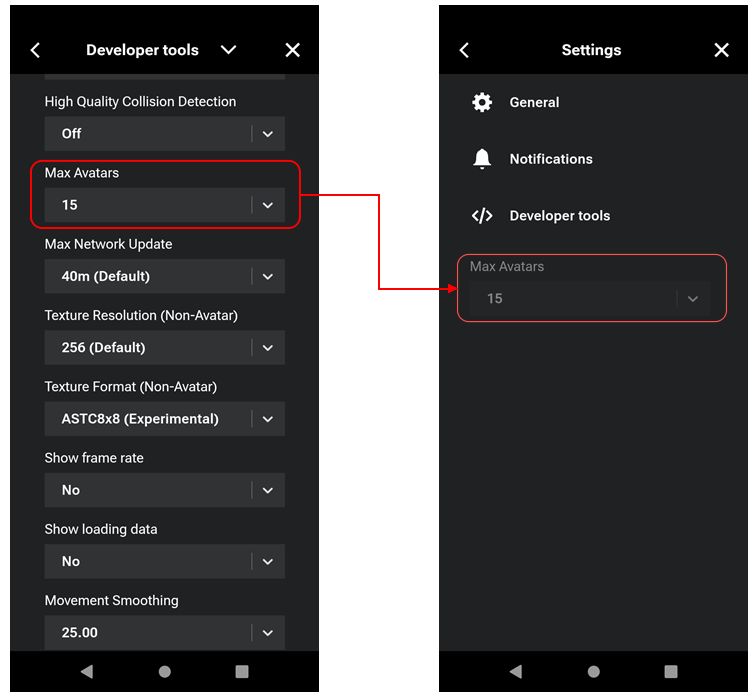
    • The Max Avatars drop-down is due to move from the Developer tools list (Menu → Settings → </> Developer Tools) up to the main Settings menu.
    • Group notifications are to become more granular, allowing notifications for specific groups to be turned on / off.
An upcoming change will see the Max Avatars setting move from the Developer Tools to the main Settings screen (note: the above is for illustration only; final update may appear differently).
  • Initial groundwork so that people can access the Lobby feature without their avatars having to be physically in-world:
    • This will see the the Sign Out button move from the Menu up to the Profile bar, and a new button introduced to the Menu: Return to Lobby.
    • When implemented, avatars will still be rendered in-world and seen as on-line, as this is only the groundwork.  However, it is hoped that things will progress over the next few months to reach a point where using the Lobby, as noted, does not require the avatar to be present in-world.
  • Additional quality of life updates are also targeting the May update, but the meeting was considered “a little too early” to discuss them.

Avatar Update

[Video: 9:27-43:00]

  • The core of the meeting was a presentation from Adam Sinewave on some of the challenges involved in rendering avatars on SL Mobile, the approach taken, status to date and work that should be appearing in upcoming releases.
  • This presentation took the form of a slide show with comments from Adam, and I’ve embedded a video of it below, with a concatenated summary of Adam’s comments. to see the latter in full, please watch the video directly in You Tube and click the transcript button in the video’s description area.

  • SL Mobile is a fully ground-up rebuild of Second Life for Mobile devices (utilising the Unity engine), utilising a very different architecture compared to the Desktop Viewer and with no common code, in order to work within the constraints of most Mobile devices.
  • This is particularly evident in the case of avatar rendering, where the different approaches to avatar skeletons as substantial:
    • The SL system is largely “monolithic” (for want of a better term): a single skeleton per avatar containing multiple bone sets, all capable of being positioned be shape, deformer animation, with no deterministic (or even an entirely random) approach to the ordering / priority of such changes.
    • The Unity system is more flexible and robust, but as a result can bring rendering quirks and issues hidden by the SL system into sharp relief.
  • Testing such avatar for issues and the effectiveness of fixes applied (regression testing) has until recently been manually-intensive requiring eye-on testing for each an every issue / fix. However, time has been spent building an in-house testing / regression system to automate a lot of this work, greatly speeding the process of issue identification, fixing and testing.
  • Outside of the above, there are still areas of work associated with avatars (some of which impact in-world objects as well) still to be address, and doing so will take time. These include at the time of the video:
    • “Not Working”: Animesh; avatar lighting; transparency on avatars (alpha layers); PBR materials rendering. All of these will be addressed, but the time frame is liable to be longer-term and the priority of work subject to change.
    • Partially working: Flexi wearables (partially supported, but in need of improvement); system eyes (positioned based on a “average” placement within the skull and which requires further improvement).
  • Silhouetting (avatars appearing transparent in the Mobile app): this is viewed as overly-aggressive, but has been necessary to ensure avatars only render when “complete”, so as to avoid any nudity that might collide with Apple’s rules on such. Unfortunately, this exposes a number of areas where avatar loading can fail and the avatar becoming such as a silhouette. Work is progressing on addressing these issues, but it will require a cycle of multiple updates.
  • A look at (at the time of the meeting) some of of the  upcoming avatar fixes improvements – including expanding the avatar test suite and, for users: improvements to resource loading and texture handling, allowing more to be seen and enabling avatars to be loaded / unloaded as they enter / leave view.
  • It was noted that much of this work has yet to reach the Mobile app (Alpha or Beta), be will be doing so in upcoming releases.

In Brief

Please refer to the video for details on the following and other questions which may have had a simple “yes” or “in progress” reply.

  • [Video: 45:56-47:10] A question on whether mesh creators simply using the default right-hand attachment point of avatar items can cause issues with losing items or how alpha blends work when compared to Desktop.
    • In terms of alpha blends, Mobile uses a different approach to layering (order-independent transparency using Z-depth rather than attachment order), such issues of layer ordering doesn’t apply.
    • It’s acknowledged that this might not quite match what creators are expecting, but it allow for a more efficient use of resources.
  • [Video: 47:38-48:48] SL and Unity handle rotation differently.
    • SL’s coordinates are based on right-handed rotation with the Z axis as up; Unity uses left-handed rotation with the Y axis as Up.  Thus, a translation system between the two is required, which can lead to issues.
    • Further complications can be introduced as a result of animations using rotation.
    • Fixes have been developed to address the more noticeable issues, which will be appearing in the next “update or two”.
  • [Video: 49:37-50:44] Inventory access through Mobile is on the roadmap. However, it is a very large, resource-intensive project with a lot of impact.
    • As such, as, when and how it is tackled is a matter of strategic consideration alongside other priorities.
    • Currently, it is not something that has seen any “substantial” work carried out.
  • [Video: 50:52-50:54 (text]  Mobile app hanging with “Not Responding” and the options to Close App or Wait:
    • The workaround for this at present is to go to the Developer Tools (Menu → Settings → </> Developer Tools), locate the Max Memory Limit drop-down and reduce the amount of memory (e.g. to 30% or 25%).
    • Further work has been made to general performance, which should be going into upcoming releases. As such, reports on the issue would be appreciated if it continues to manifest after these are available.
  • [Video: 51:01-52:53] Has anything been learnt from Mobile (thus far) that can be used to improve the Desktop experience?
    • Suggestions have been passed to the Desktop viewer team from Mobile.
    • There is a desire to unify experiences between the viewer and Mobile where possible (e.g. such as unifying chat history) and which may require changes to the viewer as well as updates to Mobile. However when such work will be carried out was unclear at the time of the meeting.
    • Outside of user-facing work, the avatar testing tool is something potentially of interest to the Desktop team as well.
  • There is an issue with certain fonts in name tags not displaying correctly on Mobile. This is known and will be investigated.

Date of Next Meeting

La Vie en Rose in Second Life

La vie Vn Rose, April 2025 – click any image for full size

There seems to be something of an unintentional French theme  within my more recent region visits, what with my reports on Les Secrets d’Albane, Sous les Oliviers and Jardin des Lys. It’s not that I’m actively seeking locations with French-inspired names and / or themes; it just seems to be the way that serendipity is pointing me.

Well, to a degree. Because while I’m here again I’m covering a location with a decidedly French name – La Vie en Rose (“life in pink”) and itself a most famous name, being the title of the signature song Édith Piaf (who wrote the lyrics) – it’s not entirely a matter of happenstance. It is the fact is it designed by Beautiful Requiem (BeautifulDisaster Requiem) on behalf (and with the assistance) of Rose Ulrik (Rose Siabonne), the names behind the beautiful (if now closed) Clef des Champs, which I’ve covered on numerous occasions in this blog.

La Vie en Rose, April 2025
Covering slightly less that a quarter of the area of the Full region upon (and over) which it sits, La Vie en Rose offers a choice of environments to visit – with some caution required in part.

The main Landing Point is within a sky platform. Open-sided to the sky, this carries with it memories of the pastoral, countryside feel of Chef des Champs whilst painting a picture all its own. It’s a place filled with details and little points of interest – some of which might be easily missed if one is not careful. It is located to the west of the setting and alongside a natural arch passing through a curtain wall of rock. Within this arch is a teleport disc providing access to the ground-level part of the setting with three destinations – Beach, Location 1 and Location 3.

La Vie en Rose, April 2025

The latter takes the form of a tropical setting with view out over open waters to the south and east.  Four rental properties line the eastern beach (Location 3 on the teleport disc’s menu) – hence the note of caution when exploring. However, the southern sands appear open to the public (Location 1 on the teleport disc’s menu), as does the inland lagoon, served by falls dropped from the parcel-edge cliffs and complete with its own beach. It’s an attractive setting, lending itself to a range of EEP settings, but I’m going to be focused on the sky platform in this article.

To the west of the latter, and under the rocky arch mentioned above, the path passes by way of a pool of water fed by waterfalls to run alongside a stream bubbling and splashing its way southwards, in a hurry to join with a larger body of water watched over by cypress trees and carpeted in lilies. The woods along this path offer various places to sit – with some reached via a log bridge slung across the stream. Wooden boards have been laid over rocks placed in the water of the pool so that it doesn’t end explorations, allowing people to reach the grasslands beyond, where the trail resumes.

La Vie en Rose, April 2025

However, before being too quick to follow the path past and over the water, when stepping under the rock arch from the Landing Point, take the time to look to your right. You’ll notice another archway, this one in carved stone hung with vines a short distance away. A Buddha sits in its shadows here, waiting to greet travellers and offer them the chance to discover the cavern lying within the arch and the secrets it holds.

For those who prefer the open grasslands in front of the Landing Point, these are also cut through with a track that loops around a rocky uprising to become one with the path leading outward from the large pool and its cypresses as it passes by a greenhouse like pavilion on its left, and a Tuscan-style pavilion to its right.

La Vie en Rose, April 2025

When travelling outward from the path from the Landing Point, it is possible to take a shortcut to the greenhouse pavilion by means of stone steps and passing through a broken gateway guarded by a wisteria tree. This leads to a path skirting another little body of water tucked neatly behind the greenhouse. Shaded by blossoming Sakura and fed by a waterfall of its own, this pool has an otherworldly feel to it, thanks to the carved stone of the broken gateway and the elven statue at the water’s edge.

Most of the westward end of the setting forms an open meadow bordered to one end by shallow waters. Here horses graze, birds fly and sing, and the grass and wild flowers grow pleasingly tall. The waters can be reached via a grassy path, or those who prefer can wander through the long grass, imagining their hands playing over the tops of the grass and flowers, perhaps pretending they are a field of wheat as Hans Zimmer’s Progeny from Gladiator plays through their head (at least it did with me!).

La Vie en Rose, April 2025

Part of the land here rising to form the hump of a little hill. Straddling it is a cosy little cottage open to the public. It is one of two houses in the setting, the second (also open to the public) sitting atop a plateau of rock. Neatly screened by trees, it is reached via a climbing up the side of the plateau, the path upwards commencing at the point of anther entrance into / out of the cavern I referenced earlier might be found. This second house sits within an extensive gardens also packed with detail.

Throughout all of the entire setting is a wealth of detail – can you spot the poker-play frogs, the houseboat riding the waters of a pond or the osprey with its latest meal? Outside of the little hilltop house, a loose deck offers comfortable armchairs, one of which has a book placed down beside it as if temporarily deserted while the reader pops inside the house – only for the breeze to come along and riffle through the book’s pages, flicking them with its invisible touch. Multiple places to sit and pass the time are waiting to be found, and wildlife large and small awaits snapshots from those so inclined.

La Vie en Rose, April 2025

Smaller than Clef des Champs, La Vie en Rose is no less as visually impressive, photogenic, and relaxing within its sky platform setting. It is more than worth a visit – and should you do so, don’t forget the ground-level beaches!

SLurl Details

Lab launches Creator Partnership Programme

via Linden Lab

On Wednesday, April 23rd, 2025, Linden Lab announced the launch of the Second Life Creator Partnership Programme, an imitative intended to allow creators in Second Life “play a central role in shaping the future of Second Life”, through a collaboration with the Lab to co-create content and experiences aimed at both new and existing users of the Second Life platform.

The Creator Partnership follows on a number of recent collaborations between the Lab and various creators / groups in Second Life (e.g. MadPea, Seraphim) and perhaps most notably, on the heels of the new Avatar Welcome Packs.

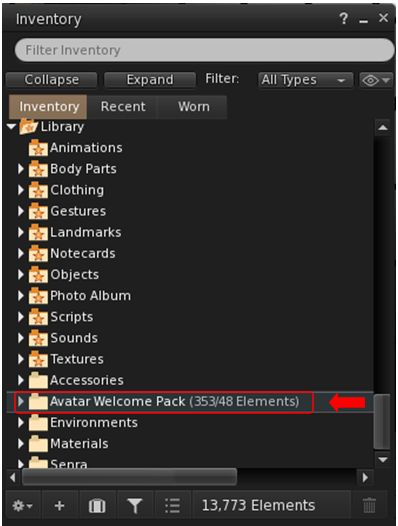
The Avatar Welcome Packs are contained within the System Library, accessed via Inventory

The latter were rolled out quietly recently (although LL are promising to provide more details in the near future), and feature assorted “lite” and “basic” female and heads and bodies, together with a range of accessories and clothing, again from recognised creators (e.g. Lelutka, Addams, MeshBody, Velour).

I’ll actually have more on them in an upcoming post, but for now, the curious who may not be aware of them can find them in the System Library within their inventory.

Through the newly-announced Creator Partnership programme, Linden Lab is looking to work with creators on – initially – three core areas:

Welcome Packs: building on the approach taken with the aforementioned Avatar Welcome Packs, these are aimed specifically at incoming new users in order to help get them started on their Second Life. Such packs could comprises non-human Avtar Packs; Clothing and Accessory Packs; Home furnishing Packs, and similar.

The Lab notes these packs could be distributed through newcomer-friendly areas inworld (possibly for limited time frames), as well as on the Marketplace or Viewer.  But all Welcome Pack content should be optimised for new community members not yet familiar with all the intricacies of Second Life.

Community Perks: the Lab is also hoping to improve the community perks for more established residents. These might include: enhanced paid membership perks; free seasonal and special giveaways; expansion of the Mobile Daily Rewards initiative to include virtual gift; and future programs and promotions that include virtual perks and prizes.

Community Gateways: the Lab is hoping to partner with talented creators of high-quality in-world experiences which can feature as newcomer-friendly destinations available from Community Gateways and the like.

In return for their involvement, participating creators have the opportunity to introduce their brand and content to a wider and loyal audience, with the potential for inclusion in major on-boarding and promotion campaigns, together with the potential to have strategic impact on improving Second Life by working hand-in-hand with Linden Lab.

We’re looking to expand our community collaborations even further – and we invite creators of all types to help us build and improve the next generation of Second Life new user experiences and beyond. Whether you’re a fashion designer, avatar builder, home goods creator, experience developer, or just someone with a standout idea—we want to hear from you.

– Linden Lab blog post

How to Get involved

Further information via the official blog post.

Koexistenz in Second Life

KOEXISTENZ – April 2025

KOEXISTENZ is an immersive new art space created by Eta (etamae) & Jos (mojosb5c) I recently had the opportunity to visit, courtesy of an invitation from Eta. An experience-driven installation, it presents a unique blend of real-world images, digital art, 3D elements, movement and contrasts.

The installation stands as two elements: the Landing Point platform and the main sky platform. The former offers information on how to best view the event. I’d summarise this by saying:

  • The installation is best seen using a PBR viewer.
  • If you can, raise your graphics quality to at least High (Ultra is recommended, but TBH, unless you have a really high-end system / monitor, High works just as well).
  • You accept the local experience via the large “tablet”, to allow you to use the local teleport system.
KOEXISTENZ – April 2025

There is a recommendation to used the local Shared Environment – but to be honest, given the options present within the installation, whether you do or not is a matter of choice.

That said, I would recommend flicking to it, if it is not already selected on arrival, as it tend to show the Landing Point to its best – and its worth looking around (and under!) the platform before right-clicking the teleport disc to be transferred to the main installation.

KOEXISTENZ – April 2025

KOEXISTENZ has no set theme; rather it brings together multiple aspects of artistic expression – as described above – allowing visitors to simply immerse themselves in the installation and allow it to speak to them. In this there are two things to note on starting explorations.

The first is that the installation comprises three spaces, with two further large tablets between them. Touching either tablet will open a dialogue, allowing you to select one of eight different ambient environments. It’s worth taking time to experience the installation through each of them – that order you do so isn’t important – as they can change perspectives and views in the most subtle of ways.

KOEXISTENZ – April 2025

The second is that it is worth taking time to cam out and around the entire structure of the installation as a whole, if you can. There is a mix and flow of geometry to the structure that adds a further subtle complexity to the installation. It has its own unique beauty which should be witnessed in full.

Throughout the three chambers of the structure is a visually engaging mix of 2D and 3D elements – with some of the latter floating below the transparent floor, with some of the 2D pieces also animated. Reflection probes are used to huge effect, rendering beautiful results across the surfaces of floating tears, floating spheres glass-like statues and within the marble of the egg-like mounts of many of the pictures. Spheres revolve, cubes spin, bouncing ambient light over their flat faces. Changes to the ambient lighting via the tablets brings in to full relief the murals on some of the faces of the tent-like ceilings overhead. Everywhere you look there is something to see and admire.

KOEXISTENZ – April 2025

The division of work by the artists – the entire installation reflects their joint deep dive into the intricacies of Blender – is such that Jos created the physical space, Eta the lighting, art and images infusing some of the surfaces. Thus they offer a co-existence of styles and expression, ambience and art.

There is a rich layering of chaos and order throughout; pieces animate and move of their own accord,  images ripple and flow, blobs vie with more regular frames to hold pictures, geometric forms and shapes impose order whilst reflections chase one another randomly as the lighting changes.

KOEXISTENZ – April 2025

Simply marvellous and not to be missed!

SLurl Details