 On September 27th and 29th, Kokua updated their viewer with the release of version 7.1.10. On September 27th and 29th, Kokua updated their viewer with the release of version 7.1.10.
As is common with Kokua, the viewer is provided in three variants utilising the same code:
The key aspects of this release are parity with Linden Lab’s DeltaFPS viewer code base, and changes made to the Linux system requirements. The following is an overview of some of the key changes between this release and the previous Kokua 7.1.8 release. |
Table of Contents |
Also note that Kokua did not provide a release to match the Lab’s 7.1.9 Altasaurus viewer. However, updates from that viewer are a part of DeltaFPS; as such, the release notes for the Altasaurus viewer are referenced below for those interested.
Installation
- Only download Kokua via the Kokua website. Do not utilise and other third-party site purporting to offer the Kokua viewer.
- There is no need to perform a clean install with this release if you do not wish to.
- Do, however, make sure you back-up all your settings safely so you can restore them after installing 7.1.10.
Linden Lab Updates
DeltaFPS
- Viewer version number 7.1.10.10800445603, dated September 17th – release notes in full.
- Core updates: performance improvements, building on the improvements in viewer 7.1.9; viewer-side WebRTC support.
Altasaurus
- Viewer version number 7.1.9.10515727195 – release notes in full.
- Date of promotion to release status: 26th August, 2024.
The release notes for both of the above should be referred to for complete information on updates and resolved issues, only some of which are summarised below.
WebRTC
WebRTC communications protocol (RTC=”real-time communication”) is the new Voice communications protocol for Second Life, replacing Vivox Voice.
Why Make The Change?
Voice in Second Life has been supplied through an arrangement with Vivox. This has required Linden Lab to utilise a viewer plug-in tool – SLvoice.exe – to manage voice services within the viewer., which in turn has made LL both reliant on Vivox for bug fixes for the plug-in, and subject to changes in support for operating systems imposed by Vivox such as the latter ending native support for Linux some years ago).
WebRTC by contrast is the predominant telephony protocol used by web-based applications, such as Google Meet, and is integrated into most common browsers. It has almost all the features common to Vivox in supplying a voice service – spatial in-world voice; peer-to-peer sessions; Group voice (including moderation) and multi-user Voice conferencing – although the are some limitations (see below).
Benefits and Improvements
WebRTC Offers a range of benefits over Vivox, including, but not limited to:
-
48khz audio bandwidth providing cleaner sound.
-
User control over:
-
Audio noise reduction – high reduction for noisy environments, no reduction for clean audio sources (performers, etc.)
-
Automatic gain control – less need to individually tune other user’s audio levels.
-
-
Audio/video device selection.
- Improved: spatialization, audio echo cancellation and audio sampling rates for improved audio quality.

Most significantly, WebRTC removes all reliance on a third-party plug-in for the viewer. Instead, it is supplied as a library and wrapper within the viewer. This means:
- Linden Lab has greater ability to address Voice related issues directly, without having to await fixes from a supplier.
- WebRTC potentially opens the door to adding features and capabilities to SL Voice in the future, including some which have been long-requested.
Limitations
-
WebRTC does not support the existing Voice Morphing capability in Second Life.
-
This is because voice morphs are tied to the Vivox service, and cannot be utilised with WebRTC.
-
Those who do use the current Voice Morphing capability are directed to this SL Wiki article on Voice Morphing, which provides a list of solutions which can be used with WebRTC.
- Note that the Voice Morphing options remain available in Kokua 7.1.10 because at the time of release, Vivox Vorph Morphing remains available on Vivox-enabled regions.
-
-
Conferences and group voice calls are limited to 50 participants.
Security
The Second Life implementation of WebRTC addresses security issues such as potential eavesdropping, exposing users’ IP addresses, etc., by routing communication through proxy servers managed directly by LL .
Deployment Notes
At the time of writing, simulator support for WebRTC is limited; deployment is due to become more widespread from October 16th, 2024, and hopefully be grid-wide by the end of October 2024. During this transitional period, peer-to-peer, conference calls and group chat sessions might be subject to various disruptions (e.g. they will not work between those on simulators running Vivox and simulators running WebRTC).
Usability Updates
Object Take
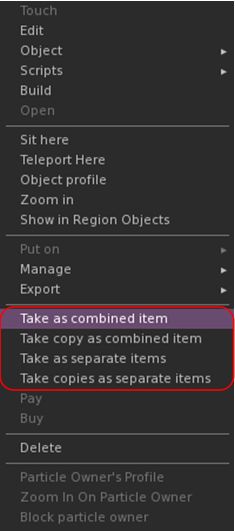
Kokua 7.1.10 includes the Lab’s updates to picking-up objects in-world using the right-click context menu:
- When selecting an individual item, the right-click context menu will display the expected Take and Take Copy options.
- When selecting multiple items, the right-click context menu will display the following new options:
- Take As Combined Item: return all the selected objects to inventory as a single, coalesced object.
- Take Copy As Combined Item: return copies all the selected objects to inventory as a single, coalesced object, leaving the originals in-world as individual objects.
- Take As Separate Items: return all the selected objects to inventory, but list them as individual items, not as coalesced.
- Take Copies As Separate Items: return copies all the selected objects to inventory, but list them as individual items, not as coalesced, leaving the originals in-world.
Note that all of the above Take options will be available in accordance the SL’s permissions system (as with Take / Take Copy).
Avatar Rendering Updates
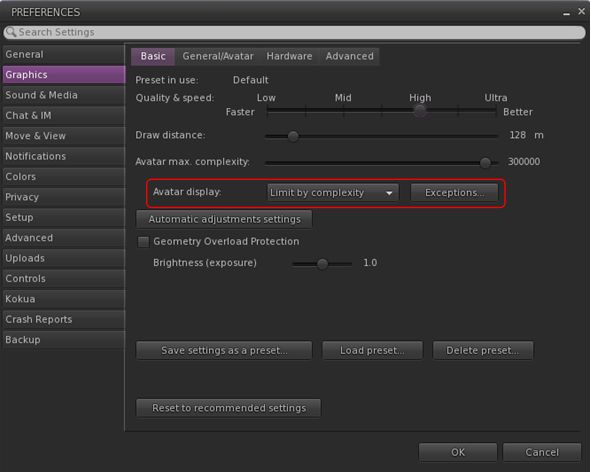
- Limit by complexity – any avatar with a complexity greater then your Avatar Maximum Complexity” setting will be rendered as a Jellydoll.
- Always show friends – your friends will never be rendered as Jellydolls, no matter what their complexity
- Only show friends – all avatars except your friends will be rendered as Jellydolls.
Within Kokua, this options are found under Preferences → Graphics, with the Exceptions drop-down also repositioned in the panel.
General Updates / Improvements
- Add Images to Inventory Items in Bulk: select up to 50 inventory items → Right click selection → Image.
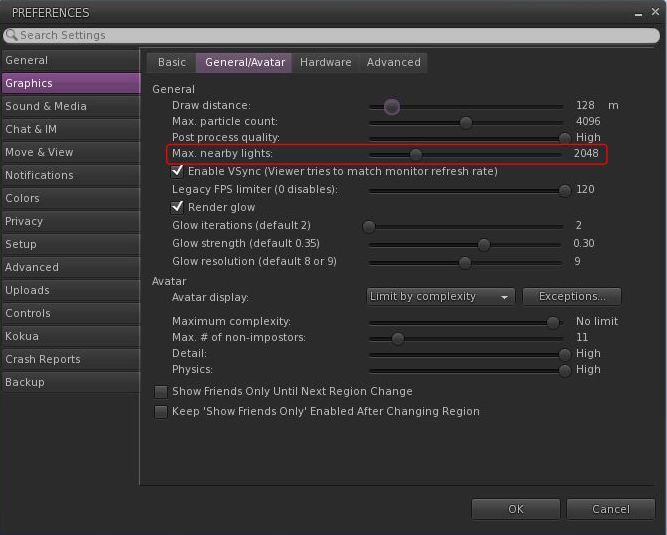
- Option to control the amount of lights: Preferences → Graphics → General/Avatar → Max Nearby Lights slider.
- Requested in Canny – Support control over rendering of Local Lights.
- glTF model preview: use a prim to preview the appearance of a glTF scene / model:
- Edit the prim. then Top menu bar → Develop → GLTF → Open.
- To enable the Develop menu, either go to Advanced → Show Develop Menu or press Ctrl-Alt-Q or go to Preferences → Advanced → check Show Developer Menu
- Note that this feature is still in the early stages of development and that glTF models will only appear locally in your own viewer, they will not be rendered for others to see in their viewers.
- Better MOAP URL handling in order for users to not only be able to CTRL-C or Cmd-C copy but also to see decoded URL payloads for easy inspection. In the nearby media list, you can also right click a media/data link and Copy URL/Copy Data.
- Mirrors disabled by default for all graphics quality levels to improve performance.
Selected Kokua Updates
Preferences
- With the introduction of the new avatar complexity settings by the Lab:
- Kokua’s options Show Friend Only Until Region Change and Keep ‘Show Friend Only Enabled Avatar Changing Region have been relocated:
- From: Preferences → Graphics → Basic
- To: Preferences → Graphics → General/Avatar.
- Kokua’s Always Render Friends checkbox is removed from Preferences → Graphics → Basic.
- Kokua’s options Show Friend Only Until Region Change and Keep ‘Show Friend Only Enabled Avatar Changing Region have been relocated:
Improve Graphics Speed
- The Improve Graphics Speed → Auto-Adjust Settings panel is now correctly sized to fit the displayed information (no overflow).
- The Enable VSync options have been inverted so the explanation and note are at the top (Improve Graphics Speed → Auto-Adjust Settings → Enable VSync.
Linux Updates
- Kokua 7.1.10 requires a newer Linux system than previous releases; GLIBC 2.35 is required, meaning Ubuntu 22 or better and Debian 12 or better.
- This version of Kokua may run on older Linux variants (e.g. Ubuntu 20), however CEF will not run, so web pages within the viewer will not be available.
- There are some known bugs in the Linux version which we considered minor enough to proceed with the release.
- 360 snapshot doesn’t work
- Need wine installed for Vivox voice
- GLIBC 2.30 systems could still run the viewer, but with a broken internal browser.
This Linux version of Kokua runs much more smoothly due to LL fixing a number of the causes of frame stall which were most noticeable on Linux.
Kokua Team Request
Kokua is provided through time and efforts of a two-person project team. Understandably, the majority of work two people can perform on the viewer is largely focused on tracking and integrating with official viewer releases from Linden Lab. This means that there is limited time for bug fixing and for implementing additional features and requests. The team also has a limited capacity for maintaining the Linux flavour of the viewer.
Because of this, the Kokua team is seeking additional help. In particular they would like to hear from:
- People interested in working on bug fixes and enhancements for Kokua, thus reducing the said backlog.
- A Linux specialist to help with maintaining the Linux version of Kokua.
Those interested in volunteering their time should drop an e-mail to chorazinallen AT gmail.com. When doing so, please note that:


 Inara Pey: Living in a Modemworld