A return to Clef des Champs in Second Life

Clef des Champs, September 2024 – click any image for full size

Update, April 2025: Chef de Champs has closed. SLurls have therefore been removed from this article.

Flicking through my notes in the week, I came across La Clef des Champs, by Rose Siabonne, a place I’ve visited a number of times, and which I’d actually convinced myself it was somewhere I’d revisited fairly recently. I was therefore utterly surprised when my notes revealed that “fairly recently” actually meant “nigh on five years ago”!

How time flies when it comes to Second Life 🙂 . Ergo, I suggested to W that we bounce our way over and have a look to see what might have changed. So off we went.

Clef des Champs, September 2024

I first visited the setting back in May 2018, when it occupied a Homestead region. However, within a month of that post the setting had relocated to a quarter parcel on a Full private region, prompting me to drop in once again. By December 2019, and after a short absence whilst Rose focused on a homestead design she called Hors du Temps (May 2019), La Clef des champs returned later that year, this time covering an entire Full region and prompting my further visit.

Now simply called Clef des Champs, the setting remains on a Full private region, with the majority of the landscaping within this iteration by BeautifulDisaster Requiem, although touches by Rose ensure all the spirit and feel of the past iterations of the setting are very much still in evidence. However, one change from my previous visit is that the setting now appears to include a number of residential rentals; these appear to be confined primarily to the east and southern sides of the region, and so don’t interfere with public explorations, whilst as long as people keep their eyes open, the risk of invading privacy is equally remote.

Clef des Champs, September 2024

The landing point now sits in the south-west corner of the region, on the edge of a little hamlet which is very mindful of parts of France (and includes a boules court!). Primarily designed by Rose, this offers a little café in which to pass the time, and one or two little touches those familiar with earlier iterations of Clef des Champs might recognise (and which help with a sense of continuity between iterations).

From here, a walk northwards winds its way over grasslands and (via boardwalks) across the local wetlands before turning eastwards. These wetlands are fed by falls dropping from the region’s central highlands and offer a home to local waterfowl whilst a houseboat permanently moored close the the foot of the falls (“permanently”, given the boardwalks now appear to block its exit to open water) and several places to sit located around the edge of the waters all provide excellent vantage points from which to observe the waterfowl  – or simply has a cuddle.

Clef des Champs, September 2024

Having passed the wetland, the eastward path skirts the feet of the central rocky plateau, passing over a little stream to carry on around the landscape, presenting paths over to the rental properties to the south and east in the process. Screened by trees and shrubs from the rest of the setting, the latter are easily avoided by keeping to the flower-covered banks of the larger stream reaching outwards from the plateau’s falls.

A fallen tree trunk here provides a convenient bridge to cross the waters of the steam and reach the steps and trail leading up into the rugged hill. At the top. multiple places to pass the time might be found – including within the hilltop folly –  and a rope bridge might lead you to a hot tub sitting on the south cliffs as they form a curtain between the inner lands of the region and the public beach.

Clef des Champs, September 2024

When circumnavigating the main upland plateau, do keep your eyes peeled for the romantic cavern hidden within the rocks at its base. Do also keep an eye out for the teleport pads dotted around (not that they are hard to miss!). As well as offering shortcuts to areas on the ground level of the region, they also provide access to the Autumn and Winter sky platforms, each of which offers its own little retreat.

Between the plateau and the screen of rocky cliffs to the south, the landscape is cut through by the meandering, if fast-flowing, stream as it makes its way back towards the west to eventually exit into the waters beside the little hamlet. As it does so, it passes through a verdant land of tall trees, flowers, grasses and woodland where trails equally meander, and at least one camp site awaits discovery.

Clef des Champs, September 2024

Throughout all of this, the landscaping is highly amenable to photography and lends itself nicely to a range of EEP settings – I’ve used my own for the pictures here – and the soundscape adds depth to the setting. There are also multiple places to sit and pass the time; some of which are mentioned above, but more of which await discovery.

There was some redecorating (seasonal changes) going on during the second half of my re-visit, so its is possible some details may change between this article going out and you reading it – but if so – then that’s another reason for visiting, no? 🙂 .

Clef des Champs, September 2024

Looker Lumet at NovaOwl in Second Life

NovaOwl Sky Gallery, September 2024: Looker Lumet – Sea Views

Open through until late October 2024 at the sky gallery space at NovaOwl Social Corner and Gallery, is an exhibition of photographic art by Looker Lumet. Entitled Sea Views, it in part features – unsurprisingly, given the title – images of coastal settings, seascapes and bays; however, to assume such images are the sole focus of the exhibition would be a mistake; rather, Sea Views offers a glimpse of Looker’s broader photographic and artistic talents, making it a thoroughly engaging portfolio of works in which to immerse oneself.

I’ve covered exhibitions featuring Looker’s work in the past, but these have tended to be shared exhibitions, rather than solo offerings; and while I’ve always admired what I’ve seen in his work, Sea Views is the first time I’ve actually been able to visit an exhibition that offers such a complete and engaging selection of his work.

NovaOwl Sky Gallery, September 2024: Looker Lumet – Sea Views
Looker Lumet is a Belgian photographer who found the pleasure in sl of taking pictures, back in 2007, which was an extension of his hobby in real life. It is also from 2007 that he has learned to work with Photoshop, and is still evolving by learning the skills of post processing every day. Thanks to the evolution in second life, where the avatars were better looking, the landscapes were more detailed, the pictures became more and more realistic. Throughout the years in second life, Looker Lumet has been first an artist of the Avatrait Gallery, before he was giving the opportunity to manage the gallery for three years. His works has been displayed in several galleries since then.

Looker Lumet biography

The lower level of the gallery space focus on Looker’s landscape and seascape photography. In all 10 pieces are presented, and whether the locations within them are instantly recognisable or not as popular public locations past and present within Second Life doesn’t matter; each is striking in its own way, thanks to a combination of Looker’s ability to compose and / or frame a shot and / or for his skills in post-processing.

NovaOwl Sky Gallery, September 2024: Looker Lumet – Sea Views

Eight of the ten clearly feature  coastal and sea views, be they sandy shores, coastal fens (Autumn Trace, if I’m not mistaken), or sailing vessels at anchor in a bay or with sails unfettered and in full career as they head to sea; and each is alive with a sense of Nature’s beauty and expanse. The remaining two pictures do not feature the sea directly, but both strongly suggest it, with Cloud Edge being captured from such an angle that even though the region itself presents a location high up upon a mountain range, the way clouds roll up against the peak directly before the camera within the image, strongly give the impression of sea-spray foaming up over rocks as waves roll against an island’s flanks following the ebb and flow of the tide.

The upper level of the gallery space offers a selection of eight pieces representing another aspect of Looker’s work: that of a portraiture artist. Seven of the pieces are rendered at black-and-white pieces, with one a self-portrait carrying with it subtle hints of chiaroscuro (in which it is joined by the two pieces immediately to its left as you look at it), whilst all capture their subjects both uniquely in terms of pose and angle, and expressively. The remaining image, offered in colour, stands as a broader portrait of a couple, offering a superbly framed and composed single-frame story ready to be told to the eyes and ears of anyone viewing it.

NovaOwl Sky Gallery, September 2024: Looker Lumet – Sea Views

Recommended.

SLurl Details

2024 week #38: SL CCUG summary: more on performance updates

[REN], August 2024 – blog post
The following notes were taken from my audio recording and chat log transcript of the Content Creation User Group (CCUG) meeting held on Thursday,  September 5th, 2024.

Tis meeting was also livesteamed on You Tube by the Lab. The video is embedded at the end of this summary, my thanks to the Lab for providing it.

Table of Contents

Meeting Purpose

  • The CCUG meeting is for discussion of work related to content creation in Second Life, including current and upcoming LL projects, and encompasses requests or comments from the community, together with related viewer development work. This meeting is held on alternate Thursdays at Hippotropolis.
  • Meeting dates and times are recorded in the SL Public Calendar, and they re conducted in a mix of Voice and text chat.
  • The notes herein are a summary of topics discussed and are not intended to be a full transcript of the meeting.

Official Viewers Update

[Video: 0:57-3:05]

  • Release viewer: version 7.1.10.10800445603, formerly the DeltaFPS RC (multiple performance fixes, etc), dated September 11th, promoted September 17th.
  • Release Candidates(s):
    • None at present.

Near-Term Viewer Release Roadmap

As a reminder, linden Lab is focused to bringing viewer performance back up to levels equal or close to “pre-PBR” performance,. This involves both further adjustments in the wake of the PBR releases and also fixing issues not directly related to PBR, which were coincidentally introduced with Graphics Featurette viewer release. This work is currently focused on, but not limited to, the following viewer updates from LL:

  • Atlasaurus, promoted to release status on August 16th, 2024.
  • DeltaFPS, promoted to release status (and thus superseding Atlasaurus) on September 17th, 2024.
  • ExtraFS, a new viewer that will be issued as a release candidate viewer in the near future.

Once ExtraFPS reaches at least RC status, work will commence on resuming the normal follow of maintenance update viewers, etc., as per the more usual flow of viewer updates.

  • The first maintenance RC to be issued will likely include contributions to help with Linux support in the viewer.
  • It will also likely also include a round of further “post-PBR” performance / aesthetic improvements.

WebRTC Status

[Video 3:10-5:30]

Summary

  • A new project intended to move Second Life away from reliance on the Vivox voice service and plug-in, and to using the WebRTC communications protocol (RTC=”real-time communication”). Roxie Linden is leading this work.
  • Key benefits:
    • WebRTC supports a wide range of real-time communications tools in common use (e.g. Google Meet), supporting audio, video and data communications, and is thus something of a “standard” approach.
    • Offers a good range of features: automatic echo cancellation, better noise cancellation and automatic gain control, much improved audio sampling rates for improved audio quality.
    • Opens the door to features and capabilities to voice services which could not be implemented whilst using Vivox.

Status

  • WebRTC is now fully supported in the official viewer.
  • Back-end deployment – WebRTC support is available on the following regions Pop Rock RC, comprising: WebRTC Voice 1, WebRTC Voice 2, WebRTC Voice 3 and WebRTC Voice 4.
  • Not that during the transitional period of moving from Vivox to WebRTC, there is no bridging between WebRTC peer-to-peer  / ad-hoc and Vivox.
  • There will be an updated Echo Island specifically for WebRTC, which will be be available soon.

Graphics Team Work

Performance / Aesthetics Improvements

[Video: 7:40-14:39]

  • DeltaFPS has a major change to the texture streaming system utilising the GPU:
    • Until now, the approach has been to drop the texture resolution down to a very low resolution (often causing a texture to blur on-screen) and then use the CPU to bring it back up to the appropriate resolution for display.
    • With DeltaFPS and going forward, the GPU is used to generate a copy of the texture at the appropriate resolution for display, and this is then used in rendering, with the higher-resolution version then discarded.
    • The overall results of this is a) there should be a lot less visible blurring of textures as they are loaded; b) the CPU load should be reduced; c) texture loading should be a lot smoother and faster.
  • The upcoming ExtraFPS viewer includes texture rendering improvements for rigged attachments:
    • Currently the viewer  does not have an clear idea as to the size of a rigged attachment, other than it being possibly as big as the avatar, so all attachments essentially get the same texture resolution no matter how small there actually are, which can impact performance.
    • With ExtraFPS the texture resolutions for attachments will be more correctly calculated by their size, reducing the texture rendering overheads (e.g. rather than the texture for buttons on a jacket being loaded at its full 2K resolution, a much lower resolution sample for the texture is used unless the camera is zoomed right in on a single button, when higher resolution are used until zoomed out again).
    • This should mean that general viewer performance in crowds of avatars is improved, as the viewer isn’t trying to load high-resolution textures across every attachment in its view.
    • Note: this change is purely with regards to attachment textures, it does not change attachment LODs.
  • Anti-Aliasing:
    • ExtraFPS will support Subpixel Morphological Anti-Aliasing (SMAA).
    • In addition, as as per the previous CCUG meeting, Rye Cogtail from the Alchemy team is planning (or already has) submitted contribution to improve the FXAA code for inclusion in the ExtraFPS viewer.
    • Those requiring more insight into anti-aliasing and the various types of AA, including FXAA and SMAA, can find out more in What Is Anti-Aliasing? TAA, FXAA, DLAA And More Explained, via Digitaltrends.
  • Tone mapping:
    • The viewer update after ExtraFPS should include the Khronos Neutral tone mapper (another code contribution by Rye Cogtail), which should improve overall ambient lighting in SL.
    • To help with this, the viewer will include additional user controls. During the previous CCUG meeting, these were described as a combo box and a slider within the Advanced Graphics settings, together with a new new control – Tone Mapping Strength – to alter the linear alpha colour.
  • Linear alpha blending:
    • Again, as per the previous CCUG meeting, in order for PBR lighting to render anywhere close to correctly, alpha blending had to be switched from SRGB to linear colour space. This can cause some older content using Blinn-Phong, to look either more opaque or more transparent than in did pre-PBR.
    • A fix for this giving people the ability to adjust the alpha/gamma on per texture entry for the object (including no mod items) is in development, and will likely surface in the viewer after ExtraFPS.

Linden Water

[Video: 11:52-12:40]

  • Linden Water reflections have been reduced in quality with PBR. Geenz linden is experimenting with using elements of the mirror reflection code to try an improve them, but was not at the meeting to provide and update.
  • This work is also not a current priority, as Geenz is focused on the performance improvements work.
  • Adjusting screen space reflections (SSR) to correct the issue is not an option as “SSR has it own bunch of problems”.

PBR Terrain Work

[Video:39:34-41:44]

  • Texture transforms (as a subset of the KHR texture transform) for applying scale, offset and rotation to any one of the four PBR terrain materials, are in development for the viewer, and are currently behind a feature flag and is awaiting further work on the server-side, which is currently in a very preliminary state.
  • The server support is available on Aditi (the Beta grid), those wishing to test it should contact Cosmic Linden.
  • In addition, an LSL API for manipulating PBR terrain materials has been requested, but this is not something that is currently being worked upon.

In Brief

  • [Video: 14:48-17:18] Will GLTF mesh uploads address the issues of random linkset ordering (i.e. currently, when uploading a multi-object .DAE file, it is turned into a linkset with random ordering, so the root object can never be know until post-upload)?
    • Yes. What should happen is whatever the hierarchy is used within Blender (or similar glTF-compliant mesh modelling tool us used) should be reflected in SL after upload.
    • The basic interoperability between Blender and SL can be found here in the Blender documentation, although note that LL are not going to support extensions like Clearcoat, Sheen and Anisotropy with the initial release.
  • [Video: 18:25-30:15] In-world build tools:
    • As a part of the upcoming glTF scene import support, the in-world build tools will be given the ability to edit such scenes (subject to permissions). These will likely take the form of a Scene Explorer and Scene Management tools.
    • LL has had internal discussions on a “simplified editor for decorating houses, etc.”, and feedback has been requested as to what kind of improvements to the existing in-viewer toolset / additional tools people would like to see.
    • This sparked a brief conversation on possible improvements to the build tools / options, together with a discussion on the growing complexity of wearable layers (due to creators effectively “splitting off” face !skins” into layers, which can cause issues with the ordering of layers, and the ability to “lock” the ordering of specific items in a layer class  – e.g. the “face tattoo” should always be “below” any “make-up” tatt0o, etc.) .
    • Please refer to the video for more.
  • [Video: 30:35-36:20] A general discussion on getting started on avatar rigging and animation + suggested resources (e.g. AvaStar, AvaStar discord channel, Bento Buddy; making the avatar UV files, etc., more accessible via secondlife.com rather than being buried in the SL Wiki) – again please refer to the video.
  • [Video: 36:25-38:32 and 57:39-end] Generative AI and SL content creation:
    • Some basic internal experimentation has been carried out with meshy.ai. It is described as “compelling” in terms of content creation, but “definitively cost prohibitive to host such a thing”.
    • As such LL are brainstorming how they might interact with such a tool from SL, should they opt to go that particular route.
    • In addition, other AI tools are being speculatively looked at as well.
    • Please refer to the video for more.
  • [Video: 45:59-49:50] a request for additional LSL functions llGetSTPos and / or llGetUVPos get a world positioning from a texture coordinate. The short answer was no, and for a combination of reasons, but might be something for the upcoming viewer-side Luau scripting. Please refer to the video.
  • [Video 50:36-57:29] General discussion on the feedback portal, feature requests, duplication of requests etc.

Next Meeting

Footnotes

† The header images included in these summaries are not intended to represent anything discussed at the meetings; they are simply here to avoid a repeated image of a gathering of people every week. They are taken from my list of region visits, with a link to the post for those interested.

Diving into Second Norway’s Havfolk Fjord in Second Life

Havfolk Fjord, Second Norway, September 2024

As is fairly obvious from this blog, I enjoy exploring Second Life and writing about the places I discover either directly as I bounce around or via the Destination Guide, or am led to through the kindness of others dropping me a  landmark or SLurl and / or a suggestion. There are certain criteria I tend to apply to places I visit when considering them as a potential blog post; some of these criteria are pretty obvious (do I like what I see? Is this a place with a broad-ranging appeal?, etc.); others perhaps less so.

While there are some exceptions, I live within the estate and feel comfortably , I rarely review residential region or those that are largely residential focused – not unless they offer a good extent of public spaces thing to do and / or reasonably clear delineation between public and residential spaces. There’s a simple reason for this: I don’t want to be responsible for upsetting people’s privacy in regions that are largely residential by suggesting people go a-wandering in them and end up trespassing to the annoyance of those living there.

Havfolk Fjord, Second Norway, September 2024

But, as noted, there are at times exceptions to thus broad rule of thumb. This is one of them – but as a long-time resident of Second Norway (4+ years now) and knowing Vanity and some of her staff, I’m comfortable in writing about it. Specifically, it relates to Second Norway’s new Havfolk Fjord, a two region area of the estate that has been redeveloped to provide underwater rentals and open spaces for those within Second Life’s Merfolk community to explore and in which to set-up home if they desire.

The Norwegian word for “mermaid” is havfrue. For “mermen” or “mer people,” the term is havmann (for males) and havfolk (which refers to merfolk or mer people in general).
Havfrue = Mermaid (literally “sea woman”); Havmann = Merman (literally “sea man”); Havfolk = Merfolk or Mer people (literally “sea people”)
Welcome to our Havfolk Lands at Second Norway! The Mer Community helped form the Blake Sea way back in the day. We are very pleased to introduce our own Mer Lands at Second Norway and hope all of our residents will enjoy this added dimension to the Role Play here.

– From the Second Norway announcement about the opening of Havfolk Fjord

With a small island serving as the Landing Point at its southern end, Havfolk Fjord presents ten rental parcels (at the time of writing) of various sizes across the sea bed and within an environment decorated by Second Norway resident (and operator of the Knapper village MyStory community within Second Norway) BenjaminButtonss on behalf of the Second Norway management team.

Havfolk Fjord, Second Norway, September 2024

Linked by “paths” along the sea floor where ancient ruins  and sunken ships might be found and fish food obtained (yes there are little fishes scattered around , giving you the opportunity of finding Nemo and given feeding him), the rental parcels range in size from 3744 sq m / 484 LI through to 11040 sq m / 1431 LI, making them suitable for most pockets among merfolk (and maybe underwater explorers?), whilst the sea floor within the region offers a certain, if limited, given the need to conserved Land Capacity for residential use), “landscaped” seafloor ready for exploration via submarine or by scuba diving as well as offering merfolk the chance to rent space for a home. Meanwhile, the open waters on the surface offer space for boating and sailing.

The Landing Point island offers – literally, given the pier at one end of the beach – a jumping off point for explorations. However, on visiting, I couldn’t help but feel it might benefit from a little rez zone so visitors could conjure up a little boat or underwater craft to take to the water for a spot of sailing or exploring. But that said, the idea behind the updated regions of Havfolk Fjord is interesting, and I do look forward to seeing what develops on the seas bed there!

Havfolk Fjord, Second Norway, September 2024

In the meantime, if you are within the merfolk community and looking for a suitable home, feel free to jump over the the Havfolk island and dive in for a look-see; details of all rents can be found within the information boards located within each of the available parcels.

SLurl Details

Rolvsoya is rated Moderate

Blip’s Black and White World in Second Life

IMAGOLand Galleries: Blip Mumfuzz – Black and White

Currently open within the Suburbs sky gallery space at Mareea Farrasco’s IMAGOLand, is an exhibition of photography by Blip Mumfuzz. Entitled Black and White, it is perhaps a slight departures from Blip’s past exhibitions in that – as the name implies – Blip eschews her usual lean towards a richness of colour palette and explorations of tone and colour within her landscapes and images, as seen with the likes of Exaggerations (reviewed in 2022), or for capturing the mood and tone of entire regions, as seen within Images of Skrunda (also reviewed in 2022) in favour of a dive into the world of black-and-white photography / image processing.

And it is another tour-de-force demonstration of both images capture and processing; the section of images found within the two hangers  of the gallery space (and outside on the tarmac!) are simply eye-popping in their depth and content.

IMAGOLand Galleries: Blip Mumfuzz – Black and White

I’ve long admired Blip’s art because of her many abilities and approaches. She has, for an example, an eye for creating images that hover between offering a complete scene whilst simultaneously encouraging the eye to focus down with macro-like intensity onto individual elements – a pot apparently tossed aside here, a towel draped over a bath there, and to on – imbuing the completed image with a layer of prompts which may prompt the imagination to create a story.

For example: who hung the cap on the handle of a garden fork? Was it the gardener taking time out to mop his or her brow, or a youngster who has decided they don’t want the encumbrance of the hat whilst playing?  Or is it simply, like the sheets hanging on the line behind it, just set out to dry in the day’s sunlight?  And what of the corner of an old building (or barn?) where a door stands open, the darkness inside beckoning? What might we find on stepping through? At the same time her compositional skill can produce images that blur the line between the digital and the physical to the point the eye can be tricked into thinking it is looking at a scene from the latter rather than the former.

IMAGOLand Galleries: Blip Mumfuzz – Black and White

In other words, Blip has an innate ability to draw us into her images, to not so much see them, but experience and explore them; and this is more than evidenced within Black and White. Admittedly, not all of the images presented are necessarily new creations; there was at least one I recognise for certain from Blip’s Images of Skrunda and one I seem to recall from Urban and Industrial Images (2021, and reviewed here), although I’m not 100% certain on the latter.

But the fact that these images may well reply of post-processing to achieve their monochromatic finish doesn’t matter. Black and white photography / processing is in many respects a lot harder than working with colour; it is an unforgiving mistress prone to highlighting errors and imperfections – and this is true when converting colour images to black-and-white; yes, often the software will do the basics for you, but to get the genuine look and tone of a black-and-white image, with its clarity of line, light, shadow and so on, takes time and practice. And as these piece show, Blip has an artist’s skill in bringing this factors to the fore such that the pieces in this collect stand more as monochrome “originals” that anything that started life in the world of colour-.

IMAGOLand Galleries: Blip Mumfuzz – Black and White

In being completely honest, I could have perhaps done without the nose and wing of a 747 being shoved through the the roofs of the hanger galleries – by a quick right-click derender soon eliminated that such that it did not intrude on my enjoyment and appreciation of this collection – and as such, I again strong commend it as being well worth viewing.

SLurl Details

Firestorm 7.1.10: WebRTC and performance tweaks

On Tuesday, September 17th (SLT), Firestorm released version 7.1.10.75913 of their viewer.
This release is primarily focused on a merge with the Linden Lab Atlasaurus release code base, which combines initial performance bug fixes to help correct some of the issues seen with recent viewer releases with the WebRTC code in preparation for the switch away from using Vivox Voice with Second Life.

In addition to the above, there are some cherry-picked updates from the Lab’s upstream code (DeltaFPS), and also updates from the Firestorm Team.

Note that the following is not a complete review of the 7.1.10 release and all the changes made therein; it focuses on the more visible and user-facing updates. Those requiring a list of all changes and updates to Firestorm 7.1.10 should refer to the Firestorm 7.1.10 release changelog, which also provides all proper credits for the work.

Table of Contents

Note: as this review was going to post, Linden Lab promoted the DeltaFPS viewer to de facto release.

General Notes

Installation

  • Only download Firestorm from the Firestorm website. Do not utilise and other third-party site purporting to offer the Firestorm viewer, and remember Firestorm will never ask for log-in credentials in order to download a release version of their viewer.
  • There is no need to perform a clean install with this release if you do not wish to.
  • Do, however, make sure you back-up all your settings safely so you can restore them after installing 7.1.10.

Linden Lab Updates

Atlasaurus/WebRTC Viewer

  • Viewer version number 7.1.9.10515727195 – release notes in full.
  • Date of promotion to release status: 26th August, 2024.

WebRTC

WebRTC communications protocol (RTC=”real-time communication”) is the new Voice communications protocol for Second Life, replacing Vivox Voice.

Why Make The Change?

Voice in Second Life has been supplied through an arrangement with Vivox. This has required Linden Lab to utilise a viewer plug-in tool – SLvoice.exe – to manage voice services within the viewer., which in turn has made LL both reliant on Vivox for bug fixes for the plug-in, and subject to changes in support for operating systems imposed by Vivox such as the latter ending native support for Linux some years ago).

WebRTC by contrast is the predominant telephony protocol used by web-based applications, such as Google Meet, and is integrated into most common browsers. It has almost all the features common to Vivox in supplying a voice service – spatial in-world voice; peer-to-peer sessions; Group voice (including moderation) and multi-user Voice conferencing – although the are some limitations (see below).

Benefits and Improvements

WebRTC Offers a range of benefits over Vivox, including, but not limited to:

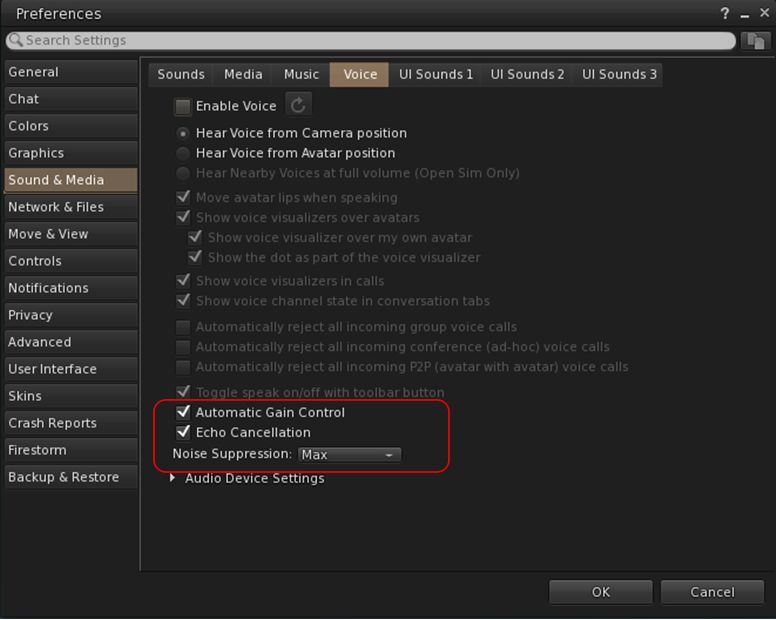
  • 48khz audio bandwidth providing cleaner sound.
  • User control over:
    • Audio noise reduction – high reduction for noisy environments, no reduction for clean audio sources (performers, etc.)
    • Automatic gain control – less need to individually tune other user’s audio levels.
  • Audio/video device selection.
  • Improved: spatialization,  audio echo cancellation and audio sampling rates for improved audio quality.
Options for managing WebRTC Voice quality can be found under Preferences → Sound & Media → Voice

Most significantly, WebRTC removes all reliance on a third-party plug-in for the viewer. Instead, it is supplied as a  a library and wrapper within the viewer. This means:

  • Linden Lab has greater ability to address Voice related issues directly, without having to await fixes from a supplier.
  •  Potentially opens the door to adding features and capabilities to SL Voice in the future, including some which have been long-requested.
Limitations
  • WebRTC does not support the existing Voice Morphing capability in Second Life.
    • This is because voice morphs are tied to the Vivox service, and cannot be utilised with WebRTC.
    • Those who do use the current Voice Morphing capability are directed to this SL Wiki article on Voice Morphing, which provides a list of solutions which can be used with WebRTC.
  • Conferences and group voice calls are limited to 50 participants.
Security

The Second Life implementation of WebRTC addresses security issues such as potential eavesdropping, exposing users’ IP addresses, etc., by routing communication through proxy servers managed directly by LL .

Project Status
  • At the time of writing this update, back end support is available on the WebRTC “Pop Rocks” simulator channel: WebRTC Voice 1WebRTC Voice 2WebRTC Voice 3 and WebRTC Voice 4.
  • Deployment to RC channel should  commence on Wednesday, October 2nd, when the code will be deployed to the BlueSteel RC channel.
  • During this deployment period both WebRTC Voice and Vivox Voice will be supported.
  •  LL will turn off the Vivox support on the simulators some time after WebRTC has been fully deployed and there is sufficient support for the service across all viewers.
Additional Information

Usability Enhancements

Object Take
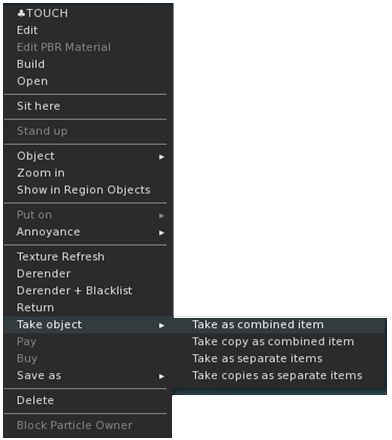
LL’s new object Take options, as displayed through the Firestorm right-click context menu

When picking-up in-world objects you can now chose to:

  • Take As Combined Item: return all the selected objects to inventory as a single, coalesced object.
  • Take Copy As Combined Item: return copies all the selected objects to inventory as a single, coalesced object, leaving the originals in-world as individual objects.
  • Take As Separate Items: return all the selected objects to inventory, but list them as individual items, not as coalesced.
  • Take Copies As Separate Items: return copies all the selected objects to inventory, but list them as individual items, not as coalesced, leaving the originals in-world.

Note that for Firestorm 7.1.10, these options are ONLY available as a sub-menu set in the right-click context menu; they have not as yet been added to the Pie menu (see: FIRE-34438).

Avatar Rendering Updates

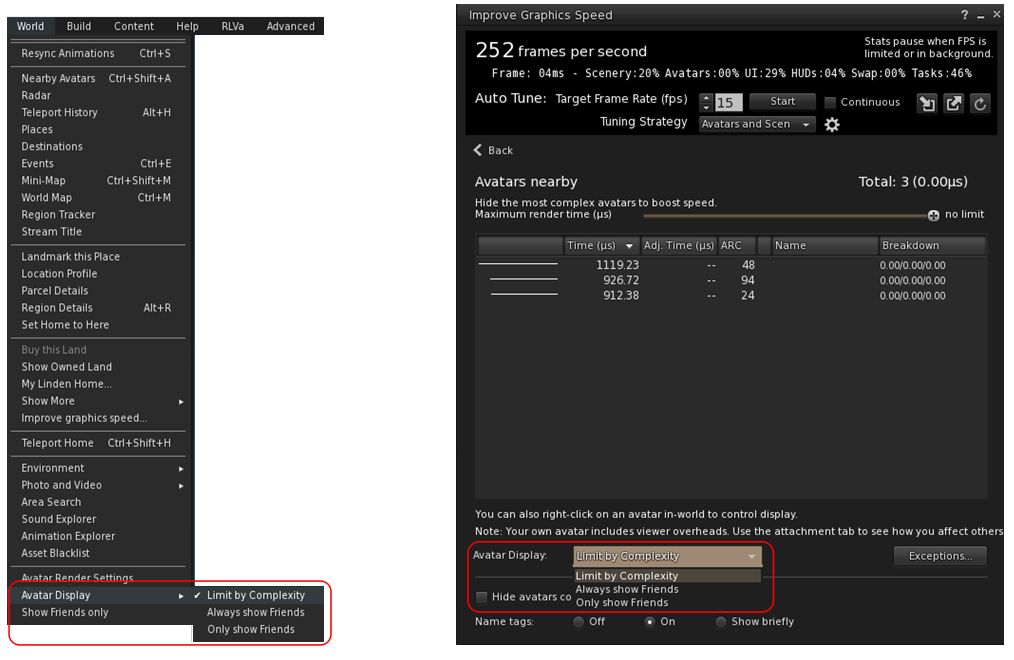
Linden Lab added new options to enable the prioritisation of rendering avatars using the following criteria:
  • Limit by complexity – any avatar with a complexity greater then your Avatar Maximum Complexity” setting will be rendered as a Jellydoll.
  • Always show friends – your friends will never be rendered as Jellydolls, no matter what their complexity
  • Only show friends – all avatars except your friends will be rendered as Jellydolls.

Within Firestorm, these options can be found as follows:

  • In  the  top menu → World → Avatar Display.
  • In the Performance Floater → Avatars Nearby.
Linden Lab’s avatar rendering options, as located within Firestorm 7.1.10
  • Notes:
    • In addition to these updates, Firestorm 7.1.10 retains the Firestorm option World → Show Friends Only. When enabled, the viewer will only renders your friends.
    • The now redundant Always Display Friends In Full Detail checkbox has been removed from the Performance Floater → Avatars Nearby.

Avatar-Related Improvements

  • Avatar height now correctly displays  in edit appearance window (see: FIRE-34192).
  • Worn clothing layers now all correctly report as such in inventory (see: FIRE-34343).
  • Fix for integer underflow causing issues with wearables.
  • Fix for avatar attachments & surroundings not rezzing after teleport when teleport screens are disabled (see: FIRE-33981).
  • Setting for AvatarRotateThresholdSlow and AvatarRotateThresholdFast added back into Firestorm following their removal as part of a viewer code clean-up by LL (see: FIRE-34196 and LL Bug #1963).

General Updates / Improvements

  • Add Images to Inventory Items in Bulk: select up to 50 inventory items → Right click selection → Image.
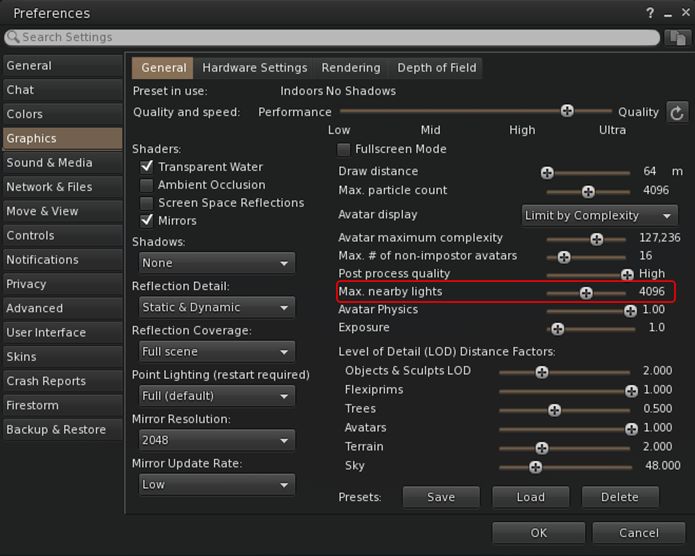
  • Option to control the amount of lights: Preferences → Graphics → General → Max Nearby Lights slider.
Control nearby lighting through the nearby lighting slider
  • GLTF model preview: use a prim to preview the appearance of a glTF scene / model:
    • Edit the prim. then Top menu bar → Developer → GLTF → Open.
      • To enable the Developer menu, either go to Advanced → Show Developer Menu or press Ctrl-Alt-Q or go to Preferences → Advanced → check  Show Developer Menu
    • Note that this feature is still in the early stages of development and that glTF models will only appear locally in your own viewer, they will not be rendered for others to see in their viewers.
  • Better MOAP URL handling in order for users to not only be able to CTRL-C or Cmd-C copy but also to see decoded URL payloads for easy inspection. In the nearby media list, you can also right click a media/data link and Copy URL/Copy Data.

Performance Improvements Summary

  • Mirrors disabled by default for all graphics quality levels to improve performance.
    • You can choose to enable mirrors manually in Preferences → Graphics → General → Mirrors.
  • Improved general performance with PBR – Issue 1769.
  • Fixed performance regression since Graphics Featurettes viewer – Issue 1831.
  • Fixed viewer failing to detect more than 4Gb of video memory on Windows – Issue 1583.
  • Improved texture memory calculation – Issue 799.
  • Various performance improvements for Mac:
    • Improved PBR viewer performance on Apple Silicon – Issue 1527.
    • Fixed setting a map beacon causing extreme lag on Mac – Issue 999.
    • Fixed severe stall and stutter in PBR viewers on Mac when editing objects – Issue 1203.
  • For the full list of fixes and improvements from Atlasaurus, please refer to the Atlasaurus release notes, linked to above.

Upstream Fixes from LL

  • Added error handling for intel crashes from the GLTF Scene shader – this fixes the login crashes on systems with older Intel HD graphics (see Issue 1856).
  • Fixed visual corruption caused by divide by zero in lighting functions – this fixes black & white areas in certain locations (see Issue 1852).
  • Fixed the voice call button being greyed out when you logged in to a voice disabled parcel (see this Canny bug).

Significant Firestorm Updates

Camera Roll

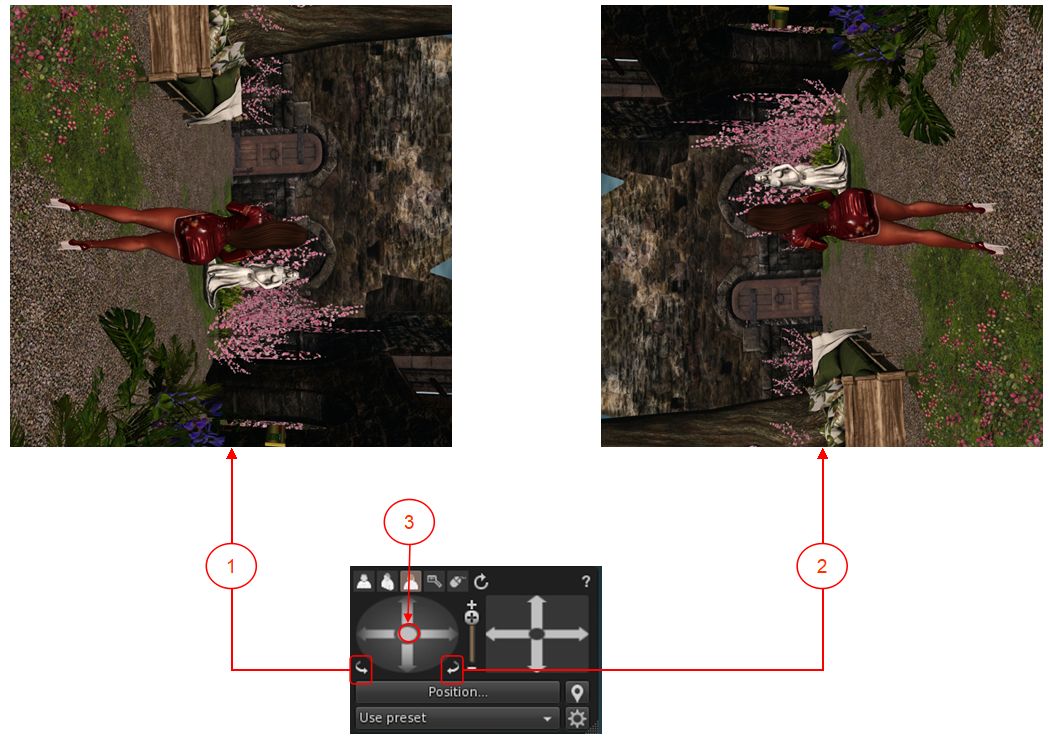
Ever wanted to physically roll the camera with ease when taking pictures? With Firestorm 7.1.10 you can, using an update based on an Alchemy viewer feature.  Both the large and the small camera control floaters have new camera roll buttons (see image below):

The new camera roll buttons and the button for re-centring the view
  1. The left button will roll the camera view clockwise on your screen through 360º.
  2. The right button will roll the camera view counter-clockwise on your screen through 360º.
  3. Clicking the button at the centre of the rotation controls will revert the viewer to “normal”.

General Improvements

  • Check folder limit safeguard:
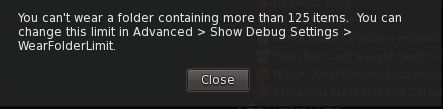
    • If you select the Wear Items option in the Inventory folder context menu, and the total number of items in the folder(s) exceeds the maximum limit for wearable items / attachments, a warning pop-up is displayed.
    • This prevents multiple items withing a folder (and sub-folders) being worn / removed / worn in excess of the limit when the Wear Items option is clicked.
A new safeguard warning is displayed when clicking on the Warn Items Inventory menu option for a folder containing items that exceed the maximum number of wearable items / attachments
  • Raised the 512×512 limitation for uploading snapshots to inventory to 2048×2048.
  • Multiple bug fixes for memory issues, RAM detection, texture management, UI bugs, stability and improvement fixes, crash fixes and more – please refer to the Firestorm 7.1.10 changelog for specifics.

OpenSim Updates

  • Fix for inventory fetching issues on OpenSim (see FIRE-34403).
  • Fix for occasional crashes on large inventories or slow grid asset servers (see  FIRE-34403).
    • Previously, an assertion failure would occur if mComplete.size() was zero. This has been downgraded to a warning message and early return, improving stability especially for large inventories or slow grid asset servers.
    • This entire code path is only accessed by OpenSim pending their implementation of AISV3, when it will be removed.

Feedback

As with the PBR release, I have no feedback to offer with this release, as I’ve not had time time to bounce around with it to any great degree.

Note that the performance improvements from the Lab’s Atlasaurus viewer constitute a first round of fixes; more will be coming with the upcoming DeltaFPS viewer (promoted to release status, Tuesday, September 17th) and the ExtraFPS viewer (still to be issued by LL at the time of writing).