
“PBR” and “glTF™” are terms which have referenced a lot in forum discussions, Lab Gab sessions, etc., but for many Second Life users it might not be entirely clear as to what it all means. I’ve therefore written this article to offer a layman’s overview of what is happening and what people can expect. I’ve intentionally tried to avoid making this a “one stop tour of everything PBR”, and to keep it as a relatively simple and (hopefully) informative introduction, with a resource list people can use to find out more.
The Terms

The Khronos® Group is a consortium of 170+ organisations focused on developing, publishing and maintaining open, royalty-free standards for a range of computing applications including 3D graphics, to enable software applications and middleware to effectively harness authoring and accelerated playback of dynamic media across a wide variety of platforms and devices. Some of these standards – such as COLLADA and OpenGL – are already used within Second Life (as the current file format for the import of mesh objects and the graphics API in the viewer respectively), and another Khronos® API – Vulkan – is also being considered as a replacement API for OpenGL in the viewer.
Find out more about the Khronos® Group via Wikipedia.

Developed by the Khronos® Group, the graphics library Transmission Format, or glTF™ specification, is now regarded as the leading standard for sharing 3D and related assets (models, scenes, animations, etc,) authored in multiple tools across multiple platforms and devices in a optimised manner, minimising things like the processing overheads required to render those assets. It also enables content produced in accordance with it to be more easily shared across platforms and services by content creators.
To achieve this, the specification covers many aspects of 3D modelling and rendering, leveraging recognised rendering methodologies to manage the appearance of 3D models and assets, such as physically based rendering (PBR).
Find out more about the glTF™ specification via Wikipedia.
Physically Based Rendering (PBR) is a method of shading and rendering that provides a more accurate representation of how light interacts with material properties, with the aim of making both the environments and objects in a 3D environment appear more life-like in terms of the ambient lighting, haze, light diffusion, how surfaces respond and reflect the lighting within a scene – and in their general appearance.
Find out more about PBR via Wikipedia.
Putting the Terms into Context with Second Life
To put this all into some form of context in how it relates to the PBR Materials project within Second Life: Linden Lab has committed to gradually transitioning Second Life so it more and more adheres to the glTF™ specification.
Note: glTF™ is a core specification. Associated with it are additional features and schema referred to as extensions. Until such extensions are formally adopted into the core glTF™ specification, they are outside the scope of consideration for adoption by Second Life.
Hang On! Second Life Already Has Materials!
A materials system was first introduced into Second Life in 2012/13 (coincidentally the time when the first implementation of PBR-like rendering was being attempted within video games). However, that system of materials handling was based on the Blinn-Phong reflection model, which has roots reaching back as far as the 1970s (Phong), although it was more directly defined to leverage OpenGL and Direct3D. The key point with Blinn-Phong is that it is based on a mix of ad-hoc assumptions and approximations of lighting and reflection, rather than anything modelled in the physical world.
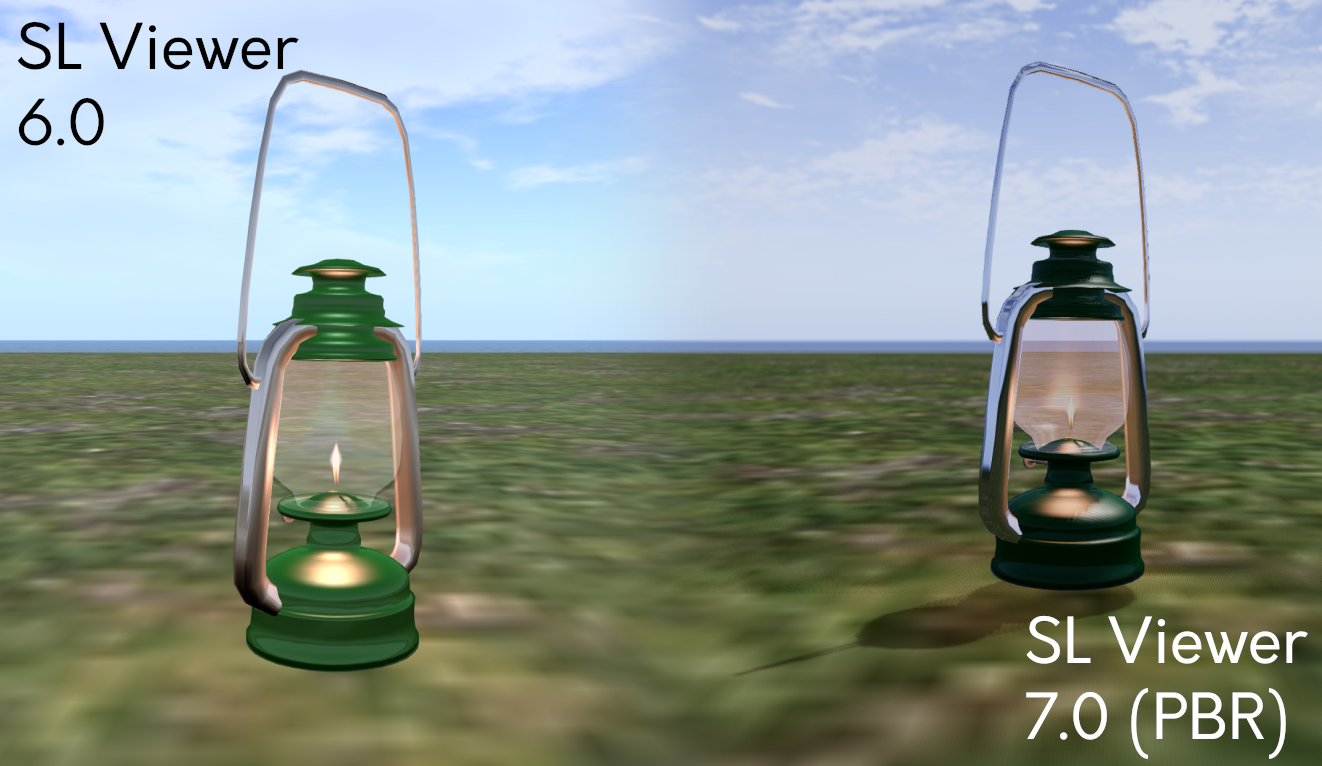
As noted above, PBR is based far more on how physical world light interacts with surfaces and objects, etc., in order to provide a greater sense of depth and realism to rendered scenes. As such, PBR Materials might be said to be more integrated with the overall environment / scene, properly leveraging lighting, rather than being a capability added “on top” of the scene to provide an approximation of surface shine and reflectivity.
To help achieve this more realistic look, the Second Life PBR Materials system supports up to four texture maps: the base colour (which includes the alpha); normal map; metallic / roughness map and emissive map, each with independent scaling. Further, PBR Materials come as a bundle of textures and primitive parameters, such as face tint and specular colour which travel as a single unit and are applied all at once.
Note: I appreciate the above is a rather simple explanation, but as state at the top of this piece, I do not want this article to be overly technical. Others have already provided resources which explain the system in this regard far more capably than I ever could, so I’ll simply leave you to use the resources listed at the end of this article – such as the official PBR Materials Overview in the SL Wiki – to find out more.
Co-Existence
However, this should not be taken to mean the current materials system is now entirely obsolete and no longer useable. It remains possible to use “classic / legacy” materials (texture (diffuse), normal and specular) if required; steps have been taken to ensure that as far as possible, these will render reasonably well via the PBR shaders – but there will be some discernible differences that pop up.
How big / noticeable these differences might be is down to how the “classic / legacy” materials have /are been / being used (e.g. have they ever been exposed to local lighting with SL?). Therefore, users should anticipate objects using the older materials system potentially looking “different” when viewed on a PBR-enabled viewer, but outside of some edge-cases, not excessively so.
Bringing PBR to Second Life means updating the basic calculations of how light is represented and interacts with the world of Second Life. The goal is to integrate these changes while minimally changing how everything that presently exists in Second Life that was designed prior to the introduction of PBR. While the preservation of creative intent and the aesthetic appeal of items users have enjoyed for over two decades of Second Life is always a priority, Second Life is an ever-evolving platform, and to continue to do so, some changes are inevitable.
– PBR Materials Overview in the SL Wiki
Some of the Visible Changes Users Can Expect

Note: PBR Materials require the use of a PBR-Materials enabled viewer. It may take time for the code to be implemented on all third-party viewers.
The introduction of PBR Materials has required a large-scale overhaul of the viewer’s rendering pipeline (and numerous back-end updates which fall outside the scope of this article). Some of the more visible changes users can expect to see include:
- More realistic and immersive reflections (related: see Reflection Probes, below).
- More natural ambient lighting within scenes, including a new Midday sky preset).
- The use of high-dynamic range (HDR) rendering and tone-mapping, which should result in colours in Second Life generally appearing more saturated, with less detail being lost in shadows and highlights.
- Updates to the viewer’s Graphics Preferences, comprising:
- The removal of:
- Hardware settings – Texture Memory slider, Fog distance Ratio slider and Gamma slider.
- Shaders – Bump Mapping and Shiny, Local Lights, Terrain Detail slider, Avatar Cloth, Water Reflections drop-down, Atmospheric Shaders and Advanced Lighting Model.
- The repositioning of:
- The Sky detail slider.
- The Shadows drop-down options.
- Ambient Occlusion (renamed: Screen Space Ambient Occlusion).
- The introduction of:
- Enable / disable Screen Space Reflections.
- Drop-downs to set Reflection Detail and Reflection Coverage.
- Exposure slider.
- Updates to the viewer’s Build Edit floater:
- Ability to switch between “classic / legacy” materials (still referred to as “Textures”) and PBR Materials (referred to as “PBR Metallic Roughness”).
- Options to copy attributes (colour tint, transparency, glow, materials) between editable objects / object faces.
- The removal of:
Of the above, the removal of the Advanced Lighting Model checkbox might be viewed with alarm, given its (not always correctly) linked to viewer performance. However, given the amount of work already completed in viewer rendering performance under the Graphics Improvements project, the loss of this option and the ability to disable atmospheric shaders should have a minimal impact for most users.
That said, for those who are on particularly low-end hardware and have relied on these options to help boost the viewer’s performance on their hardware, please refer to this section of the PBR Materials documentation for guidance on adjusting settings within PBR-enabled viewers.
Capabilities for Content Creators / Modifiers
Note that this is not an exhaustive list, but a simple-to-grasp summary.
- Ability to use tools with PBR workflows without sacrificing visual quality on import.
- A new Build → Upload option for uploading Materials to Second Life.
- Generate new Materials assets which can be sold to other users in-world / via the Marketplace and otherwise exchangeable in accordance with their defined permissions, just like any other texture in Second Life.
- Drag and drop Materials asset from inventory and onto an object face.
- Perform limited editing on PBR Materials (again in accordance with their specified permissions).
As I am in no way qualified as a content creator, I will leave it to Boston Blaisdale to present an introductory course on creating, uploading, applying and editing PBR Materials, courtesy of the Second Life University.
Reflection Probes
As noted in the above video, a key component within the PBR Materials capability is the idea of a new Second Life volume type called a reflection probe.
- “Automatic” reflection probes are located within regions and cannot be moved or edited; they are intended to provide a “default” or “ambient” reflection solution.
- Reflection probes can also be created manually, when they are intended to be used in interior spaces such as rooms, homes, etc., or where a specific style / use of reflections is required. They are used to calculate and present reflections based on proximity to them, the local lighting, etc., and will override the default (/ambient) solution (e.g. so an object will not reflect things like the sky outside of a building).
- Manually-created reflection probes are defined using a new set of parameters found within the Features tab of the Build / Edit floater.
- However, Reflection Probes can be resource-intensive, and so should be used sparingly and efficiently, and should not:
- Be used to try to create (planar) mirrors in Second Life – there is a follow-on “Mirrors” project which will enable real-time mirrors in SL within define parameters.
- Be attached to small creations such as furniture or décor – these should use the reflection prob(s) within the space in which they reside.
- Be worn on an avatar or attached to a physics-enabled object (e.g. a vehicle). By design, and given that reflection probes are intended to be part of a scene, doing so will render the probe inoperative.
Known and Possible Issues
There are some issues and bugs within the PBR code, with two of the most significant perhaps being:
- A “slim minority” of users with very, very large inventories and Friends lists may find some objects in a scene do not render when logging-in. Currently, the steps for correcting this are to a) re-log, and if that fails to resolve the problem, b) clear cache.
- Some users on Macbooks and / or Apple Silicon systems may experience poor performance on the PBR viewer.
- When seen on a non-PBR enabled viewer, objects and avatars may have a blue tinge reflecting off of them. This is a result of the viewer not having the required shaders within the rendering pipe to manage the ambient lighting.
These, and remaining bugs within the system will be dealt with in upcoming maintenance updates to the viewer. Those finding issues with PBR Materials are asked to test on the official viewer, and if necessary raise a bug report.
Looking to the Future
The release of PBR Materials is not the end of the glTF™ project, but rather the first deployment of glTF™-based capabilities. In the coming months the Lab hopes to be able to deliver:
-
- Real-time mirrors: providing the means to have mirrors within scenes reflect their immediate surroundings.
- These will leverage a “hero” reflection probe concept (512×512 resolution), with one such probe per scene being active for any given avatar, based on the avatar / camera distance from the mirror.
- Work on this is already in progress, and a project viewer for the capability is expected to be available in the very near future.
- PBR terrain: providing the means to apply glTF™ materials to terrain as a viewer-side effect to improve the appearance of the SL terrain.
- Real-time mirrors: providing the means to have mirrors within scenes reflect their immediate surroundings.

glTF™ Scene Import
It is hoped that alongside of the above mirrors / terrain work, and allowing for maintenance releases to the PBR Materials deployment, work will soon commence on developing the capability for Second Life to support glTF™ mesh and scene import.
- There is no time frame as to when this will be available for testing or when it might be deployed.
- The first steps will likely be the development of a prototype import mechanism.
- Once the prototype is available, the Lab will then likely proceed as with the PBR Materials project, invite content creators to engage in the project, provide input / feedback, and then develop the capability on an iterative cycle utilising that input / feedback.
Resources and Further Links
- PBR Materials Overview in the SL Wiki.
- PBR Materials Are Here – Linden Lab’s pre-deployment blog post (November 1st, 2023).
- PBR Materials (release) viewer download
- Second Life University episode – PBR with Runitai and Kyle – Discussion and explanation of PBR and the overall plans and hopes for this project.
- PBR Terrain – SL Wiki
- New LSL functions and parameters for PBR Materials:
- glTF Overrides (llSetPrimitiveParams)
- SKY_REFLECTION_PROBE_AMBIANCE (llSetEnvironment)
- How to create a Metallic-Roughness! YouTube video by Medhue Simoni.
- Austin Tate’s list of PBR resources for Second Life – Independently compiled resources from Austin Tate (aka AI Austin).
Footnotes
- Khronos® and the Khronos® Group logo and glTF™ and the glTF™ logo are registered trademarks of the Khronos® Group Inc.

 Inara Pey: Living in a Modemworld