Kitely move to offer new marketplace

Kitely-logoKitely, the on-demand virtual world provide has issued more details on their upcoming new marketplace, including an “early bird” promotional offer.

Announcing the company’s plans for the new marketplace on Sunday 20th January, Ilan Tochner, Kitely’s CEO had the following to say:

We are currently developing an advanced content marketplace. Since most OpenSim users are familiar with the Second Life marketplace, we asked our users what they like and don’t like about it. Using these insights we intend to deliver a great user experience that addresses the main usability issues with existing online marketplaces. At first the market will be used only for buying and selling inside the Kitely grid, but eventually it will be used for selling to multiple grids from a single online shop.

In order to attract good content creators we are now offering various benefits for merchants that bring their content to our market before it opens to the public.

The Kitely Marketplace will combine features familiar to those used to using the SL Marketplace or markets such as the (now defunct) Apez and Metaverse Exchange: items can be browsed on-line, then purchased (using Kitely Credits (KCs) or US dollars), prior to being delivered directly to the purchaser’s in-world inventory.

Additionally, the Kitely Marketplace will function more like e-commerce sites such as Amazon, where items can be searched for using attributes, rather than a rigid category hierarchy, making the search process and drill-down easier and more flexible for both merchants and consumers. Kitely will also allow for multiple versions of a product to be listed as a single item, thus simplifying the lists, viewing and reviewing of products. For example, rather than having 5 individual listings for an outfit which is available in 5 different colours, a merchant will be able to create a single listing for the outfit, which includes the 5 different colours, allowing consumers to buy any of the five from the one listing. Kitely call this capability “variations”, and it was a major attraction within the old Metaverse Exchange marketplace. Reviews and ratings for any variation of a product will be recorded in the one listing.

Merchants will be charged a one-off fee of 100 KCs for listing an original item on the marketplace, and a one-off fee of 25 KCs for each variation on that item also listed. There are no ongoing fees associated with listed items or their variations once listed. So for example, in the case of an outfit with 5 colours as mentioned above, the merchant will be charged 100 KC when creating the initial listing for the outfit (which will obviously include one colour variation) and then a one-off fee of 25 KC for listing each of the remaining 4 colours. Further charges will only apply if the merchant uploads additional variations (additional colours) to the item.

Commenting on this approach, Ilan Tochner stated, “The listing fees are designed to prevent low quality content from being added to the marketplace and were supported by our mentors group so that high quality content can be more easily found. This can increase sales for high quality items that are currently hard to find in marketplaces, such as the SL Marketplace, that include many low quality items that aren’t likely to be bought. Those low quality items make it harder to find desirable items which in turn means that good content providers see less money coming in. One way merchants can view listing fees is as a type of low-cost advertising that helps increase the visibility of their wares by eliminating a lot of the noise that prevents finding it.”

Kitely will charge a 10% transaction fee on content sales. Purchases made using US Dollars are paid directly into the merchant’s PayPal account (without going through Kitely), therefore PayPal’s fees will also apply.

Please use the page numbers below to continue reading

SL project news: week 4 (1): server, permissions, terrain and teleporting

Server Deployments Week 4

There was no Main Channel deployment on Tuesday 22nd January due to the issues encountered in week 3, which saw the interest list code on BlueSteel and LeTigre rolled back due to stability issues, and the maint-server release on Magnum having problems of its own (including regions not showing up in search, etc.).

There will be RC deployments on Wednesday 23rd January, as follows:

  • BlueSteel and LeTigre should receive the region crossing improvement project.  This project makes sim performance smoother when objects and avatars cross between regions.  This is the same project which was on BlueSteel and LeTigre in week 2; the only change is a fix for a crasher – release notes (BlueSteel)
  • Magnum should receive the interest list improvement project.  This update should reduce the bandwidth usage of viewers due to object updates, and should improve simulator performance, especially in sims with many connected avatars.  This is the same project which was on BlueSteel and LeTigre briefly in week 3; the only change is a fix for two crash modes – release notes
3rd time lucky? Interest List updates due for deployment to Magnum on Wednesday 23rd January

According to Simon Linden, speaking at the Simulator User Group on Tuesday 22nd January, the issue(s) relating to Magnum regions / parcels failing to show up in search also has a fix, which is apparently included in code due to be deployed to those regions, although there is no comment on this in the release notes themselves at the time of writing.

SL Viewer

Work continues on the viewer development side of things with further updates an merges and new versions appearing almost every other day, but little is currently filtering through to the beta viewer code branch at present.

Similarly, the CHUI developement viewer is going through a rapid series of updates, reaching 3.4.4.269264 on Tuesday 22nd January, although updates from the last series of development releases have yet to reach the CHUI project viewer.

Work has been promised to update the Sunshine (avatar baking) viewer code, whether this has been done or not is unclear as there was no Content Creation meeting on Monday 21st January due to Martin Luther King’s birthday; however, the current release of the project viewer remains 3.4.4.268071 at the time of writing.

Merges are also still awaiting on the Mesh project viewer in order to bring that back into line with more recent viewer-dev code updates.

Continue reading “SL project news: week 4 (1): server, permissions, terrain and teleporting”

A Nordic adventure resumed

Finlandia
Finlandia

Last year, I wrote about my explorations on land and water around the community of Second Norway – a place I still visit as it has the added attraction of being able to fly in / out of the new airport there.

More recently, I decided – mainly thanks to popping into Ziki Questi’s blog, to continue my Nordic adventures by “hopping over the border”, so to speak, into Finlandia. This is Daniela Finchy’s marvellous build, which offers visitors a slice of rural Finland to explore and enjoy.

Finlandia
Finlandia

This is another of those “natural” regions which tends to draw me in, and there are many aspects to it which do leave one feeling one has merely “hopped over the border” from Second Norway, rather than having teleported a good way across the grid.. Here are fir trees, rugged slopes, cobbled paths and roads and the familiar slanted fencing which I’ve been told is common in the Nordic countries and which is certainly found throughout Second Norway.

Finlandia offers the explorer various things to see and do – you can visit the farm, take a canoe out on the water, share the warmth of an open fire with reindeer or warm you hands in front of a roaring log fire in the lodge – or around a cup of moonshine, fresh from a still by the water. If you want to ease away the stresses of the day, there is a wood-burning sauna, or for those with a loved one, the lodge offers a dance floor and comfortable sofas for a cuddle or a chat.

Finlandia
Finlandia

Getting around the place is easy – the paths are all cobbled, signposts point the way here and there, and for those who prefer to use their pedal extremities in other ways, bicycles can be used to ride around the region.

Finlandia is rich in opportunities for the SL photographer as well. The default windlight settings work well, but the region really lends itself to experimentation and ideally suited to settings which give a more ambient look and feel, although I experimented with a range of options and settings as I walked around and through the region.

Finlandia
Finlandia

All-in-all this is one of those regions well worth a visit, whether you’re a romantic, a photographer, and explorer, or any / all of the above, and worthy of taking the time to wander through and experience. So why not go and enjoy a little piece of Finnish nature? Just don’t forget Daniela’s tip jar to help with the maintenance of the region, which sits just inside the windmill which forms the teleport landing-point!

Related Links

“It was raining in the city…”

It was raining in the City — a hard rain — almost hard enough to wash the slime from the streets. But it never does. When the rain stops, the boulevard dries and the snakes once again slink from their holes. That’s when my door opens and the helpless, the desperate, walk through with a heart full of hurt and a pocket full of nothing.*

"It was raining in the City -- a hard rain ..." - The Silent Peacock Hotel, starting-point for a grid-wide investigation of Room 326
“It was raining in the City — a hard rain …” – The Silent Peacock Hotel, starting-point for a grid-wide investigation of Room 326

My name is Bullit. Traci Bullit. I’m a private dick without the di – well, you get the picture. My bosom buddy is Mr Redemption, because he’s helped me out of some tight scrapes and spends time in a holster under my right arm.

The rain was still falling when my door opened, only it wasn’t the helpless or the desperate who walked through. It was the Governor’s special assistant. He had instructions for me to get down to the Silent Peacock Hotel where the local gumshoes were tripping over themselves trying to sort out a spate of disappearances. I don’t usually do requests, but Governor Linden is a good egg, and I figured there’d be no harm in doing her a favour. Besides, girls should always stick together...

"The lobby was like the name of the place: silent" - Room 326
“The lobby was like the name of the place: silent” – Room 326

So might begin the mystery of Room 326, the latest grid-wide hunt from MadPea Games. I was actually hesitant to blog this piece, as I visited Hoshi Island last week and tried my hand at following some of the clues (I don’t as a rule “do” hunts), prior to abandoning things due to other pressures – and then Honour McMillan brilliantly covered the setting (I swear, one day I’m going to have to superglue her shoes to the floor to stop her getting to all the fun places ahead of me…. 😉 ).

MadPea routinely produce grid-wide hunts as a part of their broader résumé of games, and all are both imaginative and cleverly themed. Room 326 runs through until the end of the month and involves players becoming sleuths attempting to unlock the mysterious disappearance of 15 people who stayed in the titular room at the Silent Peacock Hotel. The mystery can only be resolved by following a trail of point-and-click clues across the grid.

Room 326
“The room wasn’t that bad, other than the smell of cheap cologne and cigarettes – a sure sign the local gumshoes had been over the place. That, and the file they’d managed to leave behind…”  Room 326

The game is HUD-based (costing L$50 from the vendors in front of the hotel entrance). Your first task on purchasing it is to activate it, which requires finding Room 326 and the information inside.

Once you have found the required information, your HUD will activate and reveal the 15 missing people, clicking on a photo will provide you with information on a person and – importantly – the location of the clue associated with them. Clues take the form of envelopes which must be found and clicked on. Unlike other hunts, the envelopes don’t themselves give out prizes. Instead, players must collect all 15 envelopes; only then will they be given instructions on how to proceed to the final gameplay area where, as they say in the time-honoured tradition, “All will be revealed…”

Room 326 runs through until January 31st. Even if you’re not into hunts, it’s an entertaining distraction.

Related Links

*Quote from “The Big Goodbye”, scripted by Tracy Torme

Singularity 1.7.3: more than just a vignette

singularityIt’s been a while since the last Singularity update, and the team have been hard at work updating the viewer and making in-depth changes to a range of functionality as well as providing new features and options.

Version 1.7.3.3624 was released on Sunday January 20th, 2013, which saw the viewer gain, among other things:

  • Merchant Outbox support
  • Large group management support
  • HTTP communications updates in line with recent v3 viewers.

Download and Install

The Windows download remains roughly the same size at previous releases, a touch under 23.9Mb. The release notes don’t explicitly mention the need for a clean install, but given I’m looking at the viewer for review purposes, I did my usual and removed the previous version (1.7.2) and all support files prior to installing. The installation process was, as ever, smooth and error-free.

HTTP Updates

Large Groups fulls supported under HTTP in Singularity, in line with recent LL-driven changes
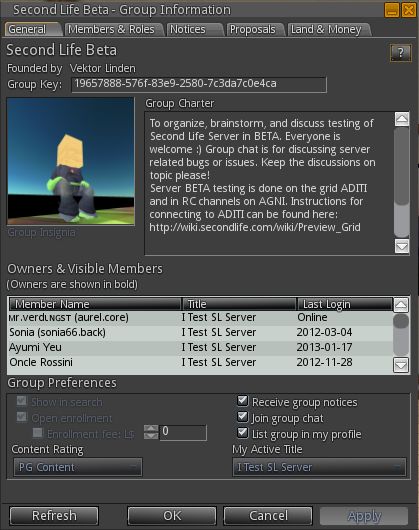
Large Groups fully supported under HTTP in Singularity, in line with recent LL-driven changes (the SL Beta group has over 21K members)

Much work has been carried out on HTTP communications within Singularity in order to bring it into line with ongoing HTTP-based projects underway within the Lab.

Perhaps the most obvious evidence of this work is that this update incorporates Baker Linden’s Group Service code changes to support the management of large groups – which will now load successfully in Singularity and avoid the 10K members cap imposed on the UDP code for handling groups.

Additional work has been carried out on support of HTTP communications which is designed to both improve stability when using HTTP within the viewer and to pave the way for full support of further enhancement of LL’s HTTP services, including the upcoming new server-side avatar baking service.

Merchant Outbox

Version 1.7.3 of Singularity brings with it Merchant Outbox support (World -> Merchant Outbox). As with V3-style viewers, the outbox forms a separate floater, allowing folders to be dragged and dropped from Inventory with the same ease as v3-style viewers.

Right-clicking on objects in the Merchant Outbox provides the usual options of renaming / deleting them, together with an additional option to send them to your Marketplace store (allowing individual items / folders to be sent, rather than the entire contents of the Outbox see comments at the end of this article).

Snapshot Floater

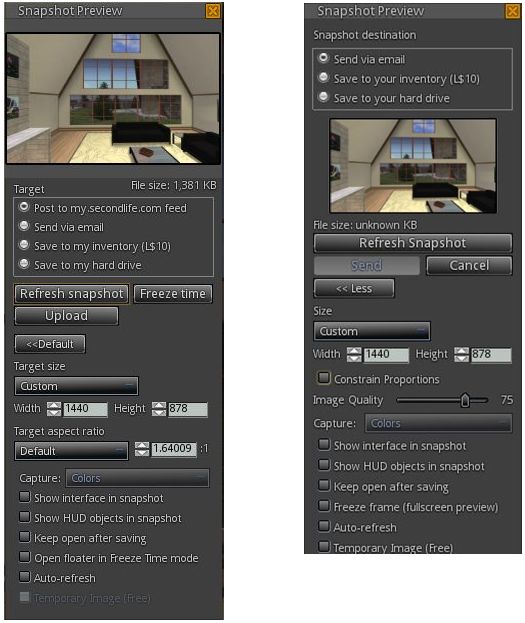
The snapshot floater has been completely overhauled with this release, which now includes an option to upload images to your profile feed at my.secondlife.com.

The new (l) and old (r) Singularity snapshot floaters (click to enlarge)

The new floater is larger when opened-out, but offers a better snapshot preview, and is also somewhat context-sensitive with options; the temporary upload option is disabled, for example, when sending a snapshot anywhere other than to inventory. Aspect ratios have also been improved upon within the new floater as well, providing further flexibility when creating images.

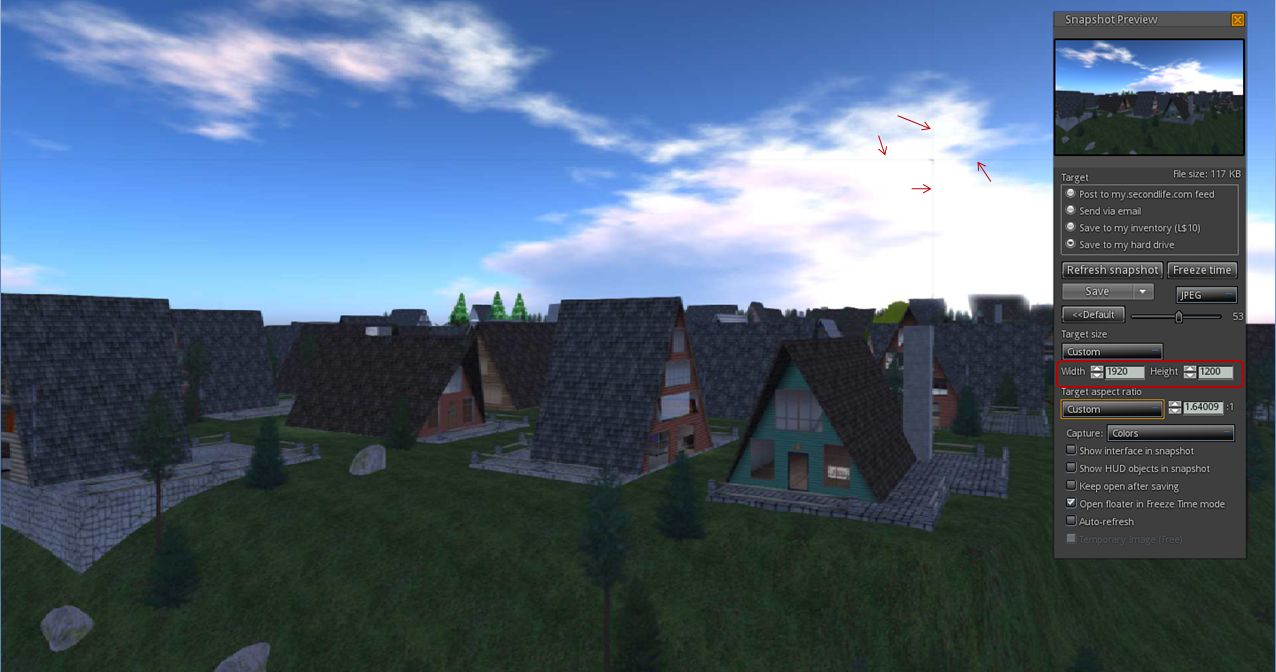
Unfortunately, this release of Singularity does not appear to include the snapshot tiling fix (MAINT-628). I’m not sure if that is because of issues with the code fix or an oversight. However, increasing the images size to anything over my screen resolution when running in deferred mode immediately produced tiling lines – and actually did so on-screen.

Snapshot tiling issue still present: My screen resolution is 1440 x 900. Increasing the image resolution beyond this (in this case 1920x1200) when in deferred mode displays the familiar tiling lines.
Snapshot tiling issue still present: My screen resolution is 1440 x 900. Increasing the image resolution beyond this (in this case 1920×1200) when in deferred mode displays the familiar tiling lines (slick to enlarge)


Continue reading “Singularity 1.7.3: more than just a vignette”

Viewer release summary 2013: week 3

This summary is published every Monday and is a list of SL viewer / client releases (official and TPV) made during the previous week. When reading it, please note:

  • It is based on my Viewer Round-up Page, a list of  all Second Life viewers and clients that are in popular use (and of which I am aware) and which are recognised as adhering to the TPV Policy
  • By its nature, this summary will always be in arrears
  • The Viewer Round-up Page is updated as soon as I’m aware of any releases / changes to viewers & clients, and should be referred to for more up-to-date information as the week progresses
  • The Viewer Round-up Page also includes comprehensive links to download pages, blog notes, release notes, etc., as well as links to any / all reviews of specific viewers / clients made within this blog.  

Updates for the week ending: 20 January, 2013

  • SL Viewer updates:
      • Release version rolled to 3.4.4.268864 on January 15th – release notes
      • Development rolled to 3.4.6.269073 on January 15th, then to 3.4.6.269108 on January 17th and 3.4.6.269229 on January 20th
      • CHUI project viewer rolled to 3.4.4.268981 on Janunary 15, while the development version  rolled 3.4.4.268994 on January 14th, then 3.4.4.269171 on January 17th and 3.4.4.269254 on January 20th
  • Dolphin rolled to 3.4.10.27205 on January 15th – core updates: viewer no longer freezed briefly on opening Places floater for the first time after logging-in; prims rotate correctly even when not looking at them (Henri Beauchamp), updated to latest viewer-dev codebase; release notes
  • Niran’s Viewer updated to version 2.0.7 on January 17th – core updates: rendering updates – release notes
  • Cool VL updates – three versions for the time being, all updated on January 19th:
    • Stable version rolled to 1.26.6.6
    • Legacy version Legacy (v2.6 renderer) rolled to 1.26.4.49
    • Experimental version rolled to 1.26.7.6
    • Release notes
  • Singularity released 1.7.3.3624 on January 20th – core updates: major updates to HTTP communications (Aleric); rendering updates (Shyoti / Siana), including motion blur and vignette; Image pipeline update and tuning (Siana); updates snapshot system (Aleric);  Merchant Outbox implemented (Inusaito and Aleric); Large group management support (Inusaito); Inventory cut’n’paste support for folders (Inusaito); UI setting changes; fixes – release notes
  • Phoenix officially reached end-of-line for SL on December 31st – read more here

Related Links