I’ll admit I’m not the greatest fan of attachable pets / companions in Second Life (I know, “Booooo!” 🙂 ). OK, so I do have a Zooby cat that can be attached and carried, but he’s designed more for free wandering and actually spends all of his time lying in his kitty basket at home. So when a Culprit Mousie (by Eku Zhong and Yure4u Sosa) arrived on our doorstep, I was not entirely sure what I’d make of it; however, having tried it out on-and-off over the last few days, I admit I can see some of the appeal.
One of the things that has recently revolutionised this kind of companion is, of course, Animesh. Thanks to the ability to make use of the avatar skeleton it is possible to produce companion attachments like this that have a considerable amount of dexterity and “natural” animations – and this is certainly the case of the Culprit Mousie.
I get the impression, someone might be mimicking me…
As the name implies, this is mouse companion who has the anthropomorphic ability to walk on his hind legs and use his forelegs and paws for gestures. He stands around 1/2 a metre tall when worn, and sits by default just to the right of your avatar.
The package is supplied with Mousie, a gesture HUD and instructions. Both Mousie and the HUD are supplied Copy, No Modify / No Transfer. There is an order to wearing the HUD and Mousie – the former *must* be added first, then the latter.
Once worn, Mousie can be repositioned via right-click Edit, so if he is too close for your avatar’s stand animations so you look to be standing through him at times, you can shuffle him around within reason. Once in place, Mousie will self-animate, rocking on his heels, wriggling his tail, gesturing with his forepaws, etc., – and, if you’re standing still for a long period of time, will fold his forelegs and drum his “fingers” as if bored / impatient.
In this, Mousie’s “hand” movements are rather exquisite. His “fingers’ will curl and extend, he’ll delicately scratch himself, wipe his snout and even – or so it seems -occasionally and cheekily – raise a middle “finger” when his arms are upraised! As well as his forelegs / paws, Mousie will also occasionally flick his tail and twitch his ears. When you walk, he’ll waddle along beside you, looking like a speed walker with his forelegs swinging back and forth and little hind legs working overtime which – and I can’t believe I’m writing this – had me wanting to stop every so often and let him catch his breath!
The HUD provides access to the 3-function menu. This provides access to three buttons:
Gestures: as the name implies, provides access to Mousie’s range of gestures, each triggered via a button. These offer a range of options – dances, air guitar, blowing kisses – a total of 18 gestures in all.
New name: opens a dialogue box in which you can give your Mousie a personal name.
Channel: allows you to change the communications channel between your HUD and your Mousie – this is recommended to avoid conflicts with other Mousie users you might encounter.
The gestures themselves are – like Mousie himself – cheeky in places. They also include local sounds, so might be a source of irritation for others in the way that many gestures can – but there is no doubting their giggle factor, either.
Complexity-wise, Mousie adds around 5,300 to an avatar under the current ARC system, suggesting Eku and Yure4u have worked to optimise it. If you want to rez a copy of Mousie in-world, you can – he’ll have a cost of 29 LI (and a physics impact of 0.4 and server cost of 1.8); however, he will only play his default animations if rezzed like this, and will not be responsive to the HUD.
I’m still not won over to using a wearable companion for myself, but I admit that Mousie is different and fun enough in bursts that he might make the odd appearance now and again 🙂 . For those who do like companion / pets like this, he is somewhat different to the more usual dog and cat style of companion and – as noted – comes with a certain giggle factor. Plus, at L$350, he certainly isn’t going to break the bank, and he can (at the time of writing) be obtained via the Culprit store in-world (at the time of writing it had yet to be added to the Culprit Marketplace store).
The Bandit 50/3 is the latest sailing release by Analyse Dean under her Bandit brand of sailing and power boats. At 99 LI when moored, it is no lightweight – but then, it is packed with features and capabilities, including the latest third generation BOSS dynamic sailing engine, offering one of the most outstanding sailing experiences in Second Life.
Everything about the boat is aimed at giving you a fun and realistic experience, and while being a cruise friendly boat that is accessible for beginners, the Bandit 50/3 is set-up to bring you pure adrenaline when pushed to the limits in high winds with full manual control.
– Analyse Dean, describing the work put into the Bandit 50/3
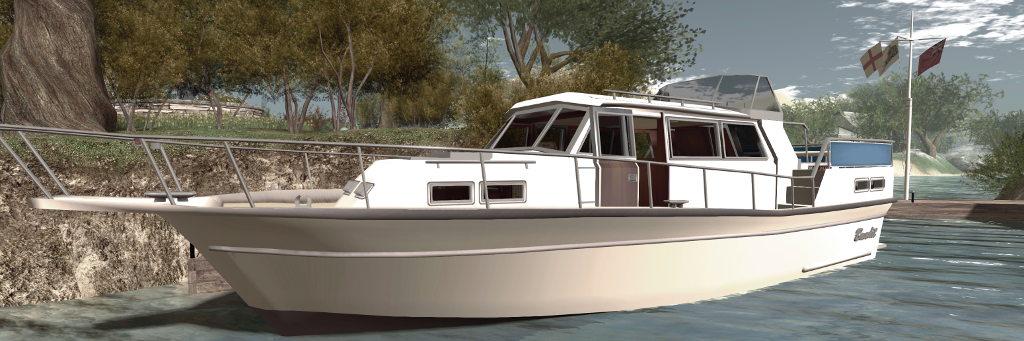
Bandit 50/3: sailing past Isla Pey
The 50/3 is slightly smaller that the Bandits 55 and 60, but in terms of options, it easily matches and exceeds the pair of them, and builds on the 460AK motor cruiser (which I reviewed in Two Bandits at sea in Second Life) in terms of “hidden” additions. However, the main thing that is liable to make this Bandit a hit is the sailing characteristics.
The 50/3 was set-up with some realism in mind. Where previous boats had some “rubber bumpers” in the code to prevent stuff from happening when people exceed limits. The 50/3 doesn’t have that; go out of range with the spinnaker, broach, sail close to the wind with the genoa, knockdown [When a sailing boat is suddenly pushed onto its side, either by an abrupt wind gust or rouge wave], mess up a tack and it will cost you some time to recover. Heel excessively, and the rudder will loose grip. It is set-up for racing in high winds really, and it will keep the adrenaline flowing when you sail it at the edge.
– Analyse Dean, describing sailing the Bandit 50/3
Bandit 50/3
The package includes the Bandit 50/3, a dock (compatible with the dock supplied with the 406AK) a sailing HUD, and three optional packages: flags, textures, and racing. A comprehensive note card manual is also supplied, providing full coverage of the boat’s features and a set of comprehensive notes on sailing it.
Coming in at just under 15 metres overall length, the Bandit 50/3 is laid out with a stern cockpit with plenty of room for the helmsperson and passengers. Multiple steering poses are provided, depending on the sailing siltation / whether of not the boat is under engine power. A bimini can be raised via chat, as can a more protective tent for bad weather. Note that the dodger is a permanent fixture, but can be hidden by selective editing and making it transparent (although the baked textures on top of the cabin means some re-texturing might be required if you’d prefer to mostly run without the dodger being visible.
Two sleeping berths are provided, one under the cockpit, the other in the bows. Between the two is a comfortable salon with functional galley. There are a lot of poses packed into the cabins – and a lot of clickies, as one would expect from a Bandit: light switched work, the doors to the sleeping berths close / open, the table leaves can be raised / lowered, blinds drawn – and more.
Bandit 50/3: moored at my Linden Houseboat and using the Bandit piers for mooring
I’ve not owned other Bandit boats and am unfamiliar with handling them outside of sailing the demos, so I cannot offer direct comparison between the 50/3 and any of the other boats in the range, but I will say that in the 24 hours I’ve had it, 50/3, I’ve found it to be both a fun and a genuine challenge when sailing.
As the manual notes, the 50/3 includes four sail options: the main, a jib, a genoa and a spinnaker. Which of the latter three you use is down to the prevailing wind conditions (which you can set). Setting the sails can be shared with others sailing with you, if desired (just pass them a copy of of the supplied HUD).
The 50/3 is BOSS 3, just like the Bandit IF. It has multiple animated actions and really comes into its own when you sail with a crew member.
– Analyse Dean, describing sailing the 50/3 with crew
Bandit 50/3: “unfettered and in full career!”
Solo sailing, I have a say that the 50/3 is a handful – at least for the relatively novice, like myself -but also a heck of a lot of fun. When properly trimmed and with a good wind, the boat moves at a fair lick of speed, and the camera system allows you to appreciate this fully. With a crew handling the sails, things really do come into their own and sailing the boat becomes a shared experience that adds a dimension to being on the water.
For those into racing, the race pack includes a HUD-based “iPad” (although it can also be worn by your avatar), is designed to provide a more realistic consistent sailing experience. Also included is a copyable scripted buoy. This can be set out (where you have rezzing rights) along a race course to again provide a consistent wind effect when racing. In taking the boat out on both Blake Sea and around Bellisseria, we made multiple region crossings without issues.
We are also starting a little sailing club for it, off shore, long distance, point to point. Keep an eye out for Blake Off-Shore Rally for Cruisers (BORC) as well, it will be super fun!
– Analyse Dean
Bandit 50/3: in the galley
When moored or anchored, the boat offers a range of single and couples animations, both on the top of and within the cabin. These, and the helm positions, mean that the Bandit 50/3 offers a good selection of poses and animations.
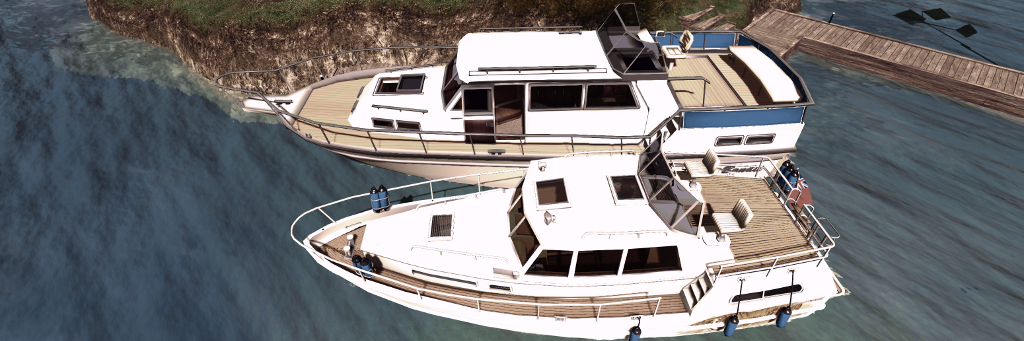
With the Bandit 460AK, analyse introduced a new docking system for her boats, and this is continued with the Bandit 50/3. Rez the pier and when the Bandit 50/3 is close enough, issue the text command “dock”, and the 50/3 will neatly move alongside, deploying its fenders and mooring and electrical power lines appear. What’s more, the pier is fully compatible with the connecting dock supplied with the Bandit 460AK, allowing both to be used together.
The Bandit 50/3 (foreground) with the Bandit 55 and and Bandit 60, The Mesh Shop
As noted at the top of this article, there is a lot to be found in this boat, not all of which is covered here. At L$3,750 it offers a huge amount of value for money. At the time of writing, it is only available in-world at The Mesh Shop, but expect to see it on the Bandit Marketplace store soon; as Analyse noted to me, “It will be there in a week or so. I always wait to see if any bugs surface.”
At the start of April 2019 I reviewed the Water Horse Animesh horse – a horse that, unlike Bento horses, is not limited to having to be worn in order to be ridden – as it has its own skeleton, completely independent of an avatar, an Animesh horse can also be rezzed in-world, where it can wander, or ridden in the style of a vehicle, making it perfect for use both when riding, or as region décor.
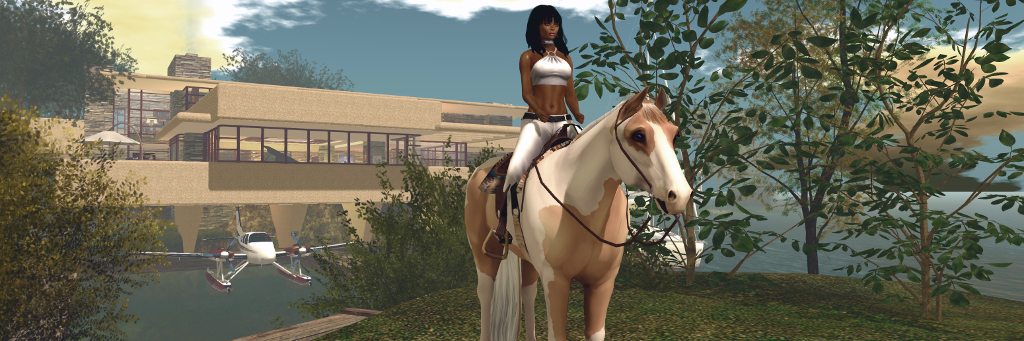
However, the Water Horse model isn’t the only Animesh horse. Teegle, for example, are currently developing their own horse, which is currently in public beta – and in the interests of comparing the two, I recently picked one up and took it for a test drive. Err, ride.
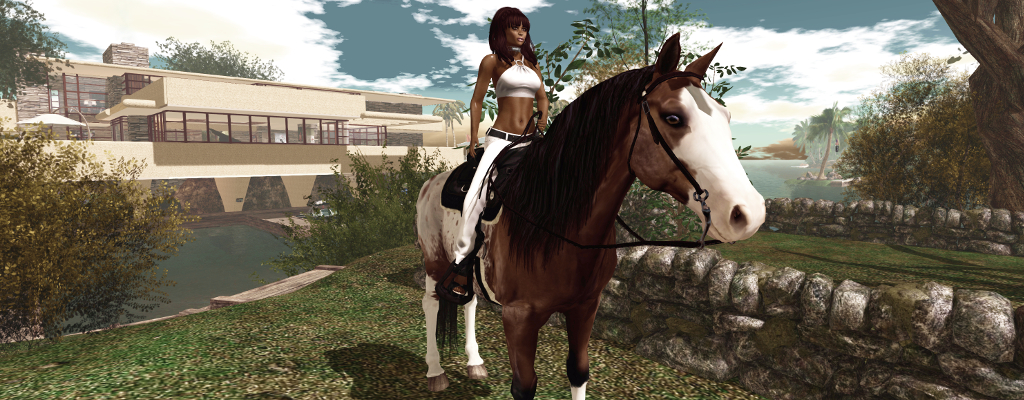
Currently, the Teegle horse comes in two styles: a paint and a Hanoverian. The former might be seen as more suited to an American style of riding, and the later leaning towards more European riding, but the fact is that as both horses are supplied sans tack, you’re free to decide which you’d like, and then choose your preferred style of tack, or even swap riding tack depending on your mood.
The horse is supplied at two price points, which at the time of writing were: L$1,500 for the No Copy version, and L$6,000 for the copy version (allowing you to rez as many as you like). Again, note that these prices are purely for the horse, no riding tack is included; you can however ride them bareback. Tack will cost an additional L$750 from Teegle, although there are other suppliers. Other points worthy of note with the horses at both price points are functionally identical, and:
You can set them to be ridden by yourself or, when rezzed in-world, by others.
When rezzed in-world each horse can carry a rider and up to two passengers.
The basic LI for a Teegle horse is 28LI. With riding tackle attached, this rises to 35 LI.
The no Copy version come with a guarantee of automatic replacement if lost as a result of a bad region crossing, or broken as a result of incorrect editing. Replacements are delivered via the horse management HUD.
Horses can be individually renamed.
Retexturing is possible, but requires the purchase of texture packs at L$450, which include skin, mane and eye colour options.
The wander option when horse is rezzed in-world, does not require Pathfinding to be enabled within a region.
The HUDs
Two HUDs – both of which are still under development at the time of writing – are supplied with each Teegle Animesh horse.
A Management HUD, which:
Allows the horse’s gender to be set.
Includes a button that provides a chat link to a dedicated web page listing all Teegle pets you may have purchased. The last grind location the animal was recorded as being at, together with the date and time, is listed, allowing you to relocate a “lost” horse. A redeliver option is also provided here as well.
A riding HUD, which provides:
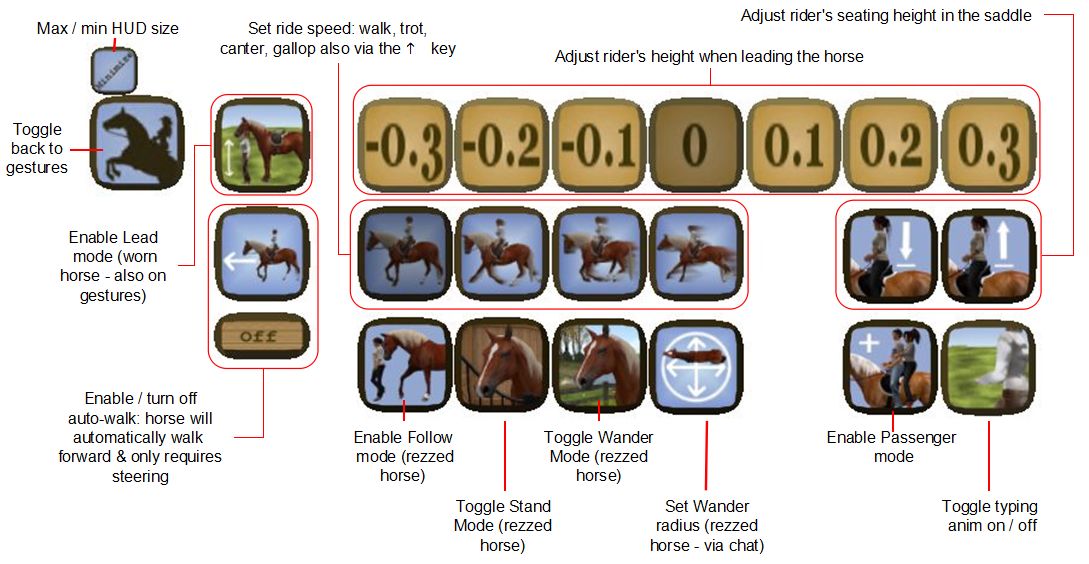
4 different click-selectable riding speeds: walk, trot, canter, gallop. Riders can also move between these by tapping the UP arrow key (or W if WASD is set for avatar motion and the horse is being worn).
4 horse animations: spook, (horse jumps sideways nervously and looks around); buck, rear, and reward (rider leans forward and pats the horse).
An autowalk function: set the horse walking in a straight line. The rider can look around, take snapshots, etc., or simply steer.
Follow (rezzed horse only): the horse will automatically follow the named avatar.
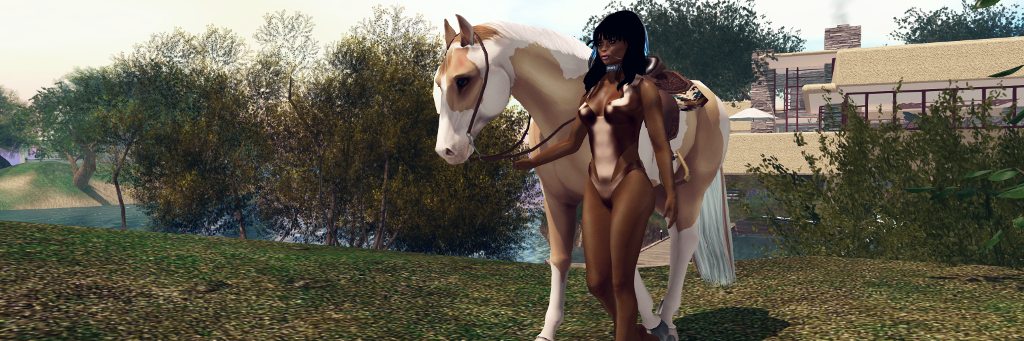
Lead (rezzed horse only): lead the horse via the halter when walking.
The Teegle riding HUD. Note the Lead / Follow options are only available when the horse is rezzed in-world
Riding the Horse
Before riding the horse, make sure any AO you have (scripted or client) is turned off to avoid any conflicts. Then either:
Add it to your avatar from inventory as a worn attachment.
Mouseover the horse in-world, right-click and select Ride.
The first option will add the horse to you, with you in the saddle (if attached to the horse); the second will place you in the saddle (if attached) of a rezzed horse. Note that if worn, you’ll need to the manually attach the riding HUD; if the horse is mounted while rezzed in-world, you’ll be asked if you’d like to accept the HUD, which then attaches automatically (note this is a slightly different HUD to the one in your inventory, as it includes the Lead and Follow options for the rezzed horse).
Movement is via the usual WASD / Arrow keys, with W / Up for forward motion, with double-taps advancing through the four speed options. Tapping the Down keys while moving forward will step back down through the riding speeds. When riding the horse from rezzed, the Down arrow will play a nice backwards walking animation.
Camera-wise, riding the horse from rezzed fixes the camera in a good position above and behind the horse, regardless of any camera offsets you may have set (not something seen with the Water Horse Animesh horse). Riding the horse from worn may leave the camera awkwardly positioned if you use custom camera offsets, the mousewheel and CTRL-Mousewheel generally fix this.
You can lead a Teegle Animesh horse to water…
Passenger Riding
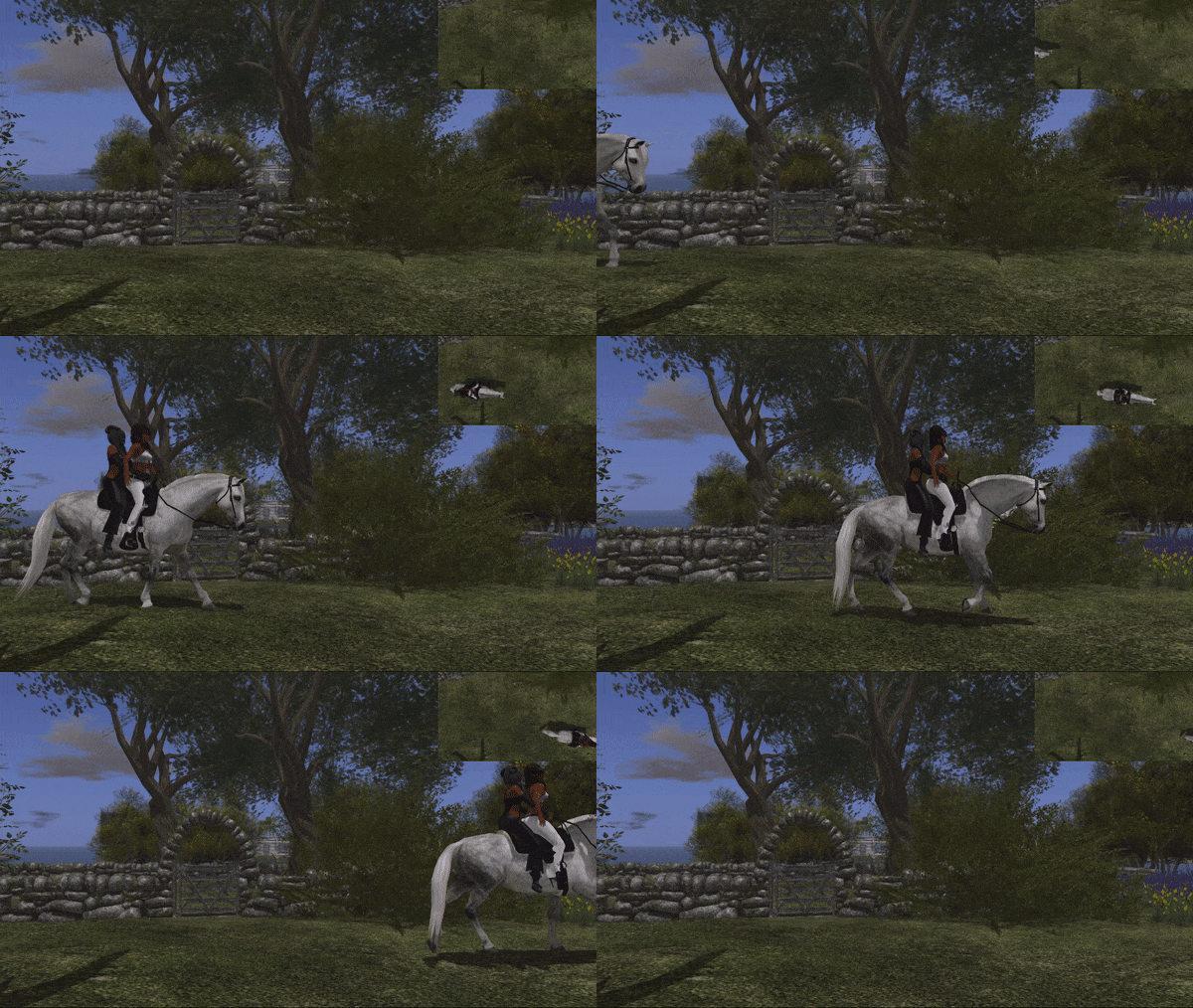
Passengers can ride with you simply by clicking the horse. The rider can then select who “drives” the horse via a left-click to display the menu, and then the Driver option (rider 1= the avatar in the saddle; rider 2 = the passenger directly behind the rider; rider 3 = rearmost passenger). Who has the reins is indicated via local chat. The same menu option is used to take back control.
Riding Permissions
Who can directly ride a Teegle Animesh horse when rezzed in-world is also set via the menu: left-click the horse, then Settings > Driver Perm. At the time of writing, the options were limited to Private (owner only) and Public (anyone), but I understand more granular options will be added.
Other Capabilities / Options
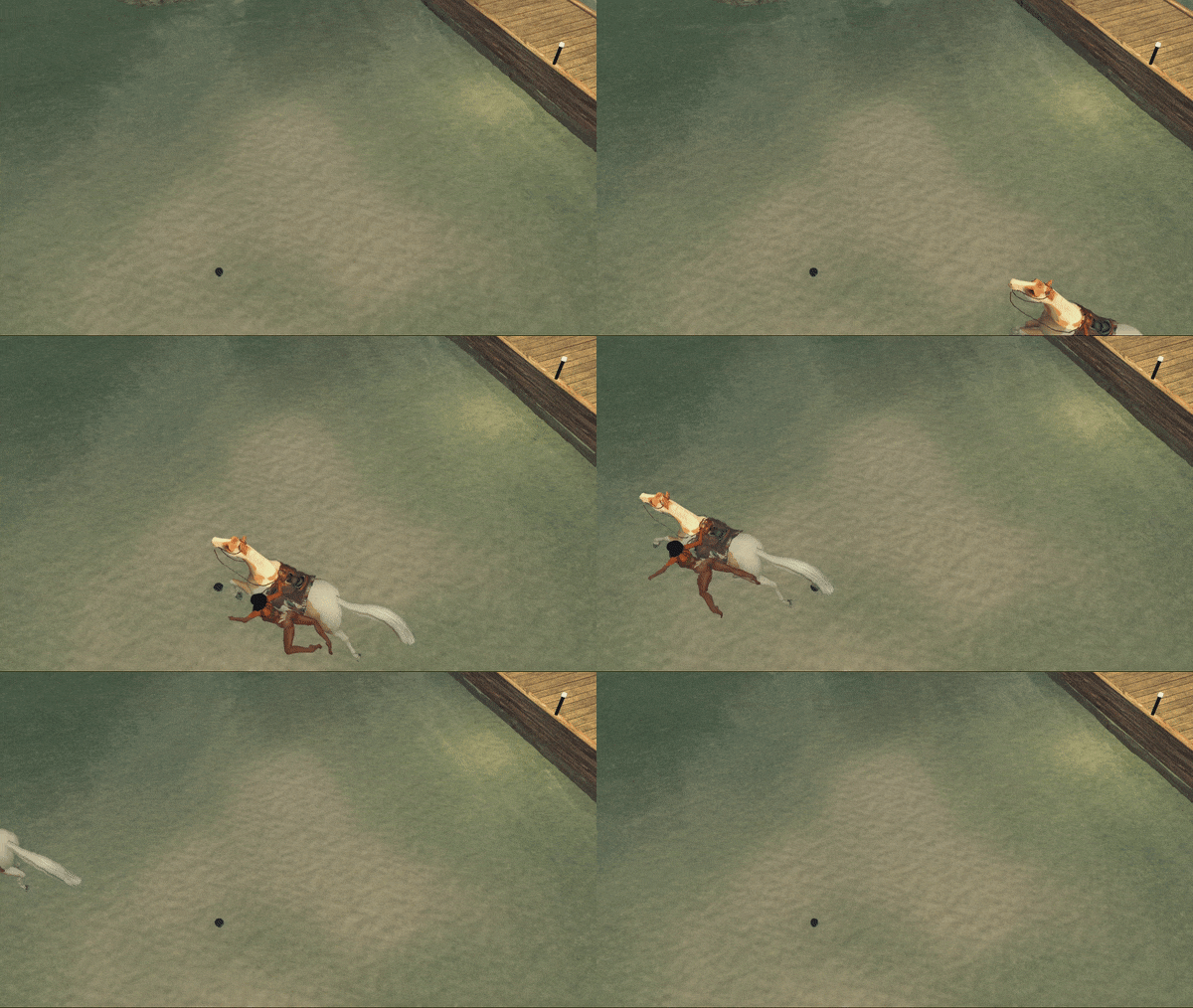
… and you can have it swim!
As the Teegle Animesh horse is still in development, it is hard to say what else might be included. However, some of the current additional capabilities include:
Linden Water swim option: the left-click menu offers a Settings option to have the horse swim in deep enough Linden water, complete with a companion swimming animation for the rider (but not passengers).
Flying option: you can set the horse to fly or disable flying (so no accidents when trying to jump an obstacle).
Motion function: set the horse to physical (default), so it will respond to objects around it (useful for racing, when wandering in paddock, etc), or non-physical (useful for things like dressage).
Set wander distance via chat.
Rename function: Teegle horses can all be given their own name.
Adding Tack and Other Options
Riding tack by Teegle is easy to attach to the horse:
Rez both horse and tack in world.
With neither selected, right-click on the tack and selected edit.
Press and hold the SHIFT key and then left-click on the horse to additionally select it.
Click the Link button in the edit floater (arrowed, below).
The tack will correctly orient itself and attach to the horse, as seen in the inset image, below.
Adding options such as riding tack – use the Link option in the Edit menu (arrowed)
To remove an attached item (e.g the saddle or entire riding tack):
Rez your horse in-world.
Left-click the horse for the menu.
Click Unlink to display the Unlink menu.
Use the numbered buttons to unlink the required items.
Move your horse away from the unlinked objects and then delete them.
Removing items – use the Unlink option in the horse’s menu
On Friday, April 5th, the ~*Water Horse*~ team released their new Animesh rideable horse – something many in their group, myself included, had been eagerly awaiting.
Those who follow my Content Creation User Group updates will know that Animesh allows the avatar skeleton to be applied to any suitable rigged mesh object, allowing the object to be animated. This opens up a whole range of opportunities for content creators and animators to provide things like independently moveable pets / creatures, and animated scenery features.
Comparison between ~*WH*~ Bento and Animesh horses
For the ~*WH*~ Animesh horse, it means the ~*WH*~ team have been able to produce a horse that:
Can be ridden by attaching it to an avatar directly from inventory, akin to the manner of a Bento attachment. However, as it uses its own skeleton, it will not clash with any other Bento attachments the avatar might be wearing.
Can be rezzed in-world, where it has a range of capabilities (subject to certain land constraints), including the ability for it to be mounted and ridden.
These points make the ~*WH*~ Animesh horse a very flexible new product; one that will continue to be offered alongside the ~*WH*~ Bento horses, but with notable differences, as indicated by the graphic on the right, provided by Tyrian Slade, the ~*WH*~ brand owner.
At the launch, two breeds of the new horse were made available:
A warmblood with English riding tack and a 38 Land Impact when rezzed in-world
A quarter horse with American riding tack and a land impact of 37.
Given that all Animesh creations have a basic LI of 15, both of these horses are really impressive in their relatively low LI. As a worn attachment they also have a reasonable complexity value, adding roughly 12,000 ARC to an avatar in the case of the quarter horse. Both also have extreme compact script memory usage (231 KB).
The horses are also supplied at two price points:
L$4,499 for the “personal version”, which can only be ridden (controlled) by the purchaser (~*WH*~ group members can purchase this for L$4,050).
L$12,999 for a “public / friends” version, that can be ridden (controlled) by anyone when it is rezzed in-world.
In both variants, the overall features are the same (so both variants can carry “passengers” for example), and all of the horses are supplied Copy / Modify. This latter point means that you can have multiple horses on your land for use as décor, if required, and you can add accessories (increasing their LI) or remove items (the riding tack can be removed, for example, if a horse is rezzed purely as décor), and they can be re-textured.
The package for each comprises: four versions of the horse itself (with stirrups, without stirrups, jousting version, version for large avatars); separate wearable stirrups; a riding HUD; a texturing HUD; a visual guide to the HUD buttons; a texture creator kit and some (minimal) documentation (detailed documentation is available on the web).
The Riding HUD
The HUD is a core part of the system, comprising two sets of buttons:
A set of gesture buttons for animating the horse when riding. Note that the button to lead the horse via its halter only applies if the horse is directly worn from inventory.
A set of buttons accessed via the gear button, combining a number of options for making adjustments to the rider, and for setting different capabilities for the horse when it is rezzed in-world (see below).
~*Water Horse*~ HUD options
Riding the Horse
Before riding the horse, make sure any AO you have (scripted or client) is turned off to avoid any conflicts. Then either:
Add it to your avatar from inventory as a worn attachment.
Mouseover the horse in-world, and left-click.
Both options will play an animation as your avatar mounts the horse. If the horse has previously been rezzed and set to wandering, the riding tack will render on it prior to the mounting animation being played. In both cases (worn or rezzed) there will be a brief pause as the riding animations are loaded.
Mounting and riding the Animesh horse (when worn or rezzed)
Movement is via the usual WASD / Arrow keys, with W / Up for forward motion. Speed can be increased from walk through trot and canter to gallop with further taps on W / Up; releasing the key will bring the horse to a halt. Tapping S or Down will slow the horse or cause it to walk backwards. Your vertical position in the saddle can be adjusted via the HUD or via Hover Height. To dismount a worn horse, right-click on it and select Detach. To dismount a rezzed horse, click on the viewer Stand button.
Passenger Riding
Passenger riding only works with the horse rezzed in-world.
Mount the horse as rider and open the HUD to the second set of options.
Click the Passenger mode button (shown right).
Select who you wish to have ride with you via the displayed dialogue box.
The nominated person can then mouseover the horse and left-click sit.
Passenger riding with the ~*WH*~ Animesh horse
Camera Position
Many SL users now set their own camera presets (see: SL Camera Offsets in this blog). Due to the way camera control has been implemented in the horses, this can result on some odd camera positions for the rider (which attaching the horse) or for a passenger. Should this happen, try positioning your camera behind you and, once mounted / seated, use CTRL-mouse wheel / the mousewheel to set your camera to a comfortable position above and behind the horse for viewing.
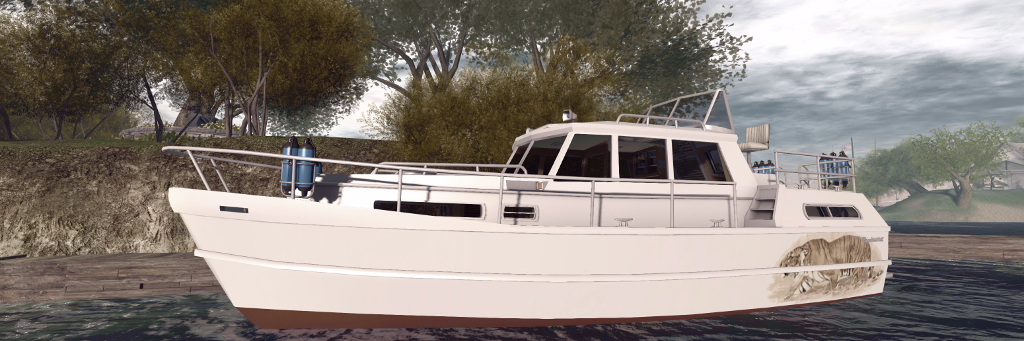
Over the last several years I’ve collected numerous boats in Second Life, but one thing that has been missing from collection is a cabin cruiser. After looking around, and given budget is a little limited at the moment, I decided to pick up a Bandit 580.
Now, to be sure, this is not the most recent design in the Bandit range by Analyse Dean, but there was something about the lines I liked, together with its rich range of animations. It also, given the budget limit noted above, fitted my purse rather nicely, given I wasn’t entirely sure how often it would be used. However, I was in for a very pleasant surprise; unbeknownst to me, Analyse had noted the purchase, and no sooner had I arrived home and started unpacking the 580, she tapped me on the (IM) shoulder and dropped the more recent Bandit 460AK (the AK a reference to the included streaming radio) into my lap. So now I have not one, but two cabin cruisers to play with – thank you, Analyse!
The Bandit 580
As noted, the 580 is the older model, roughly 16 metres in length and about 5.8 metres across the beam. It has a large central cabin with a double berth forward, and dining cabin to the stern, which raises the helm station and stern deck. A second helm position can be found in the main cabin and both this and the stern helm station have working gauges and are suitable for Mouselook piloting. Two versions are supplied, the 580GT noting it has a built-in GridTalkie grid-wide marine 2-way radio system.
At roughly 12.1 metres in length and 4.6 metres at the beam, the Bandit 460AK is noticeably smaller than the 580, but it packs in a lot more. As with the 580, it has a primary midships cabin, with a stern sleeping area and forward dining area / sleeping cabin with a “functioning” toilet / shower cubicle. Piloting the boat can be performed from both inside the main cabin (standing position) plus a seated stern helm area with co-pilots seat alongside, separated by the single hatch to access the cabin.
The Bandit 460 with my own custom hull finish
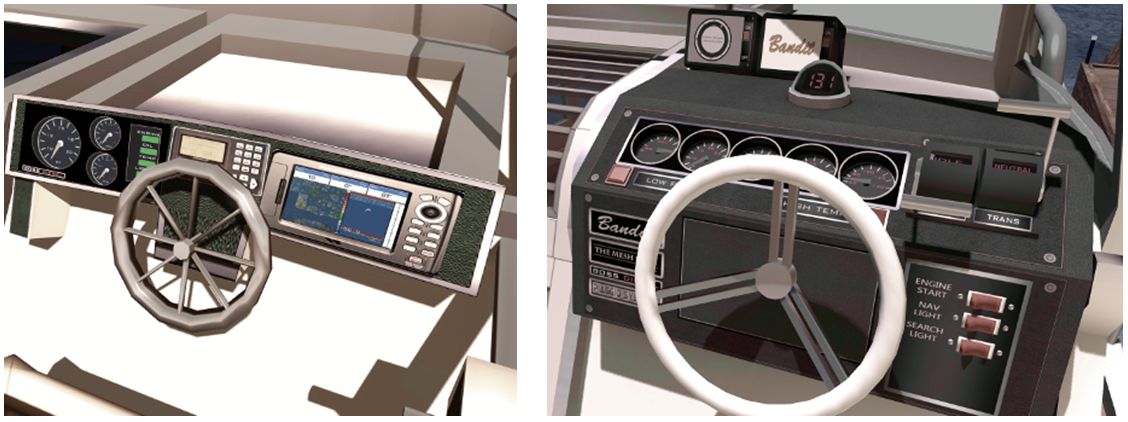
A visual comparison between the two quickly reveals the improvements Analyse has made to her modelling; the steering wheels on the 580 are noticeably more “clunky” looking than those on the 460AK, for example, while the control switches on the latter all work via touch, as do the cabin light switches, hatches and a number of windows – the instruction manual highlights all touchables. Overall, the detailing on the 460AK is a step above the 580, but there are also similarities between the two. Many of the animations found in the 580 are also present in the 460AK: both share the same, or have similar, swimming, dancing, and deck working animations, for example (although overall, the 460AK has more animations). Local chat commands are similar for the two as well, although again, the 460AK’s are more extensive.
But when it comes to handling, these are very different boats. A twin-screwed vessel (the engines can be accessed via floor panels in the main cabin), the 580 has a higher top speed than the 460AK, and includes a racing mode. Trim can be automatically set via the engine script, or manually adjusted (Page Up and Page Down keys). The engine sounds are suitably diesel-like for a vessel of this size, and while turning feels very flat, overall handling and manoeuvring is acceptable.
The Bandit 580 (l) dashboard features working gauges, but is showing its age a little – note the steering wheel. The 460 dashboard (r) offers more refined working gauges and steering wheel, together with a working compass and master switches for Mouselook driving
By contrast, the 460AK has more realistic handling, the boat naturally rolling outwards as it turns, and the helm being affected by inertia when travelling a speed (the faster you’re going to more pressure is required on the left or right cursor keys to maintain the turn). Like the 580, it is well suited to Mouselook piloting, and the superior helm controls make this a joy. My one small disappointment is the engine noise itself, which is – to my ears – is a little underwhelming.
Another difference between the two boats is in their LI and physics costs. The 580 weighs-in at 32 LI and a physics cost of 24.2. The 460AK, however is a heavy 55 LI and 40.5 physics. Both of these tend to make themselves felt at region crossings, making the 460AK something of a handful, although like the 580 it recovers well enough.
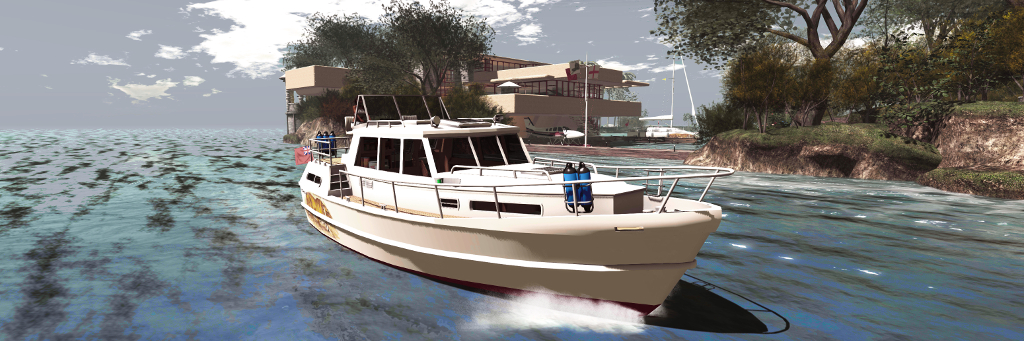
Taking the Bandit 460AK around Isla Pey
The additional LI / physics costs with the 460AK is a result of the range of options included: deck furniture for the rear deck – chairs, table, drinks-; forward deck loungers that sit over the main cabin, radio (working) forward cabin switchable bed / table, cushions and curtains for the cabins and a stern deck railing canvas. The upper deck also has a 3-option Bimini (at least the top canvas needs to be deployed to see the in-world text HUD displayed over the boat), and the rear cabin has a built-in television.
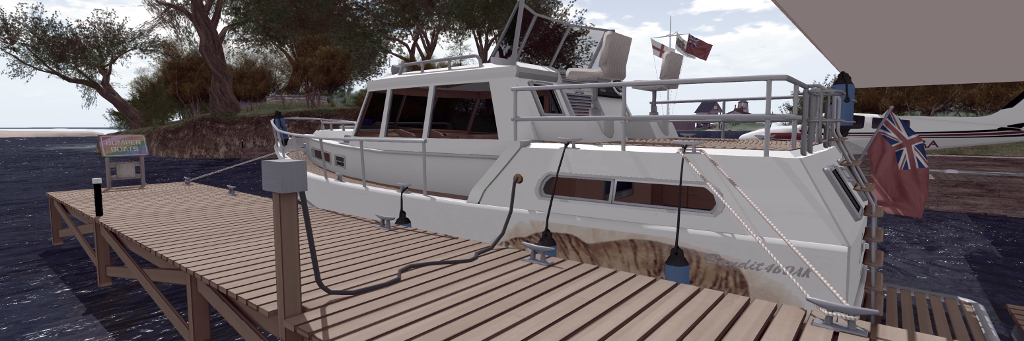
Further accessories are supplied in a separate box, the smartest of which is the 460AK wooden dock. Place this out in a suitable position and bring the 460AK in close with engine running, preferably with the fantail at the stern facing towards the small extension side from the dock, and then type “moor” in local chat. The 460AK will slide neat into to place, fenders deployed, before mooring lines appear, together with a shoreline power connector, before the boat’s engine shuts down.
The 460AK alongside with mooring and power lines deployed
When leaving the dock, starting the engine will automatically hide the mooring lines – then just click the fenders to return them to their stowage bins on the boats’ railings, and you’re ready to advance the throttle and ease away from the dock. The dock itself is provided in handed versions – but the second is unscripted. Other accessories include a fishing rod, dock poles, a second radio for the boat and a lounge chair.
Custom painting of either boat is possible, with texture PNG files supplied. These are adequate for the task, with each boat having at least one additional hull finish. For those not up to painting, there are also several paint schemes from various merchants to be found on the Marketplace – just search Bandit 580 or Bandit 460. I opted to use one of the supplied Bandit 580 pre-sets, as it has a nice musical theme, but took work I’d previously produced for my Loonetta 31 and applied it to the 460AK to offer something of a matching theme.
Both the Bandit 580 (l) and the Bandit 460 (r) are set-up to be rezzed from our vehicle rezzer, although the 460AK tends to remain rezzed by default.
As noted, both boats have optional in-world hover text information displays, while the 580 also includes two screen HUDs, one for the skipper and one for crew. The former provides options to start the boat, activate the lights and sound the horn. It also includes a CTRL button, which takes control of the driving the boat back from any crew member currently driving it. Crew can drive the boat if the skipper (owner) expressly allows it, and use the crew HUD Control button to take command.
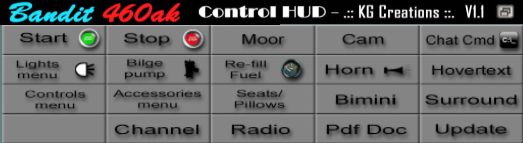
The 460AK doesn’t have a screen HUD of its own, relying on chat commands – which can get a little tedious (e.g. typing “bimini” multiple times to step through the Bimini options and remove it). However, .:: KG Creations ::. have produced a L$170 460AK Control HUD, that reproduces the majority of the boat’s commands either directly (button click) or via button-click and displayed menu. By default, when attached to your screen, this will appear at the top of the viewer window (and can be repositioned, obviously), making switching from the HUD to a displayed menu dialogue straightforward.
Analyse is justifiably proud of the Bandit 460AK, and while it takes a little getting used to handling-wise, it’s a feature-packed vessel that justifies the L$3,000 price tag. While older in build quality and lacking all the options found in the 460AK, the Bandit 580 offers a good cruising experience at a modest L$1,250.
But before buying either, I do recommend seeing them in-world at the Bandit / Mesh Shop store at Dutch Harbor, where demo versions are available to take out and get a feel for their respective handling – note that the demos are limited to 10 minutes rez time, but that should be more than adequate. In addition, the 460AK can be obtained via the Bandit Marketplace store.
The Culprit Sonata Baby Grand in two of its finishes
In September 2018, I wrote about the Culprit Sonata Bento Piano created by Eku Zhong and Yure4u Sosa (see The Culprit Sonata Bento piano in Second Life). At that time, I noted that Eko and Yure4u were working on a baby grand edition, and on March 13th, 2019 they graciously sent me a copy.
As I noted in that piece, as a pianist, I have a leaning towards the grand (concert or baby), as I appreciate the more rounded richness of its note. As having one in the physical world is impractical (although I do have a Yamaha N1), I enjoy having them in-world, and have been looking forward to the opportunity to try this particular baby grand and seeing how the Bento animations work with such an instrument.
The Culprit Sonata Baby Grand
Unlike the upright variant, the Culprit Baby Grand is supplied in one size, and follows the accepted shape of a grand, with a sweeping case built around a horizontal plate and pin block / action. In this, the Culprit Baby Ground might appear little different to other grand pianos in SL. However, it is fair to say that it is the play mechanism in this piano that is one of the aspects that sets it apart from others, even without the Bento play capability.
Where others might in part reproduce the mechanism – some strings, the plate and sound board – or offer a texture of a grand’s “innards”, the Culprit Baby Grand goes much further. A peek under the raised lid reveals the cast iron plate with soundboard below – and a beautiful pin block and hammer set, with strings neatly positioned, presenting one of the best facsimiles of a grand I’ve yet witnessed.
Play-wise the Culprit Baby Grand is similar in nature to the Sonata upright: sit at the piano and you’ll be placed in an “idle” pose – and moving your arms as if conducting – or perhaps warming-up in readiness to play. While mentioning this pose, note that as playing the piano can result in your avatar’s eyes rolling up into the head and flicking back to this option – available from the Muted option (see below) before standing will avoid this. Sitting will also display the piano’s menu, which has the following options:
Texture: allows the piano body and the stool’s cushion to be textured to suit your preferences.
Muted: presents a total of 12 different playing styles without any associated music – so you can set a style in keeping with the music you’re listening to out world, or on your parcel stream.
Songs: offers 54 solo pieces to play, all public domain, representing a good cross-reference of music.
Duets: offers 11 duet pieces of public domain music to be enjoyed with a friend of partner playing with you.
The Culprit Sonata Baby Grand – mechanism detail
The menu also includes options to adjust the seated position on the stool, and to swap positions when playing duets, all of which makes for a pretty comprehensive set-up.
Selecting a piece of music from the Songs or Duets menus will display sheet music on the piano and move your avatar into a matching playing animation. It is here where the Bento element comes in. If you have Bento hands and watch yourself play (note that non-Bento users can still play the piano, it will just be minus the finger movements). The animations appear to be those used in the Culprit Sonata Upright, so just like that piano, they are fluid and natural, if with a slightly dramatic flair in a couple of styles – although even the fact this is a grand, they are perhaps more in keeping with playing classical pieces than might be the case with the upright version.
Bento hand movements are available in the three playing options built-in to the Culprit Sonata Baby Grand. Note the thumb-led glissando (filmed on the Sonata)
For those who like their in-world pianos to autoplay without being physically seated at it, the Culprit Baby Grand is perhaps not an ideal choice, simply because it does require and avatar to be seated (you can set rights to control who can). But then, this is a piano that is all about the Bento playing actions. On a personal note, I found the Culprit Baby Grand a little larger than I was expecting; the width of the piano means the reaching the extremes of the keyboard is a stretch for an avatar proportioned close to a physical world build, like mine. However, this is a minor point when compared to the “interior” modelling of the piano, its music selection and playing animations mean, all of which make it an ideal addition to any home – and it is now the preferred piano at Isla Pey, replacing the slightly smaller Lisp Persimmon grand.
With a total LI of 11, the Culprit Baby Grand will début at the Boardwalk shopping event from March 15th, 2019, at a price of L$995. It will be generally available, including via the Culprit store, from April 15th.