Lab announces Oculus Rift DK2 project viewer available

On Wednesday May 21st, Linden Lab publicly released the Oculus Rift project viewer, offering initial support for the Oculus Rift DK1.

Things have moved on since, most notably with the release of the Oculus DK2, versions of which the Lab received in July 2014, and have been using to update the project viewer to provide DK2 support.

Oculus Rift: Lab launches project viewer with DK2 support

On Monday October 13th, the Lab announced that the updated version of the viewer is now available.

The blog post announcing the update reads:

A few months ago, we released a Project Viewer that made it possible to use the first generation Oculus Rift development kit (DK1) anywhere in Second Life.

Since then, Oculus Rift has released a second generation development kit, DK2. The new hardware offers an even more immersive experience when used with Second Life – there’s less likelihood of feeling motion sick thanks to the motion-tracking features, and less of the “screen-door effect” on the visuals, thanks to higher resolution and brighter display.

We’ve integrated the DK2 with Second Life, and today are releasing a new Project Viewer so that virtual reality enthusiasts with the DK2 can use it anywhere in Second Life, just as DK1 users can.

Unfortunately, though, there are still some bugs impacting the experience, which we won’t be able to fix until we receive the next SDK from Oculus Rift. Because Second Life uses OpenGL in its browser, we cannot support direct mode in the Rift until Oculus releases a version of the SDK that supports that.

In addition, juddering is an issue (as it is with most DK2 demos).This can be significantly improved on Windows by turning off Aero, which allows the Rift to use its full refresh rate rather than being limited to the refresh rate of the primary monitor. This refresh rate is a major factor in the judder and turning off Aero can significantly improve your experience.

We’ll continue to fix bugs and improve the experience as quickly as we can once we get the next SDK, but in the meantime, we wanted to get this Project Viewer out into testers’ hands. If you have an Oculus Rift development kit, you can download the new Project Viewer here.

The update includes an expanded HMD configuration panel, which can be accessed via Preferences > Move and View > click on the Head Mounted Displays button.
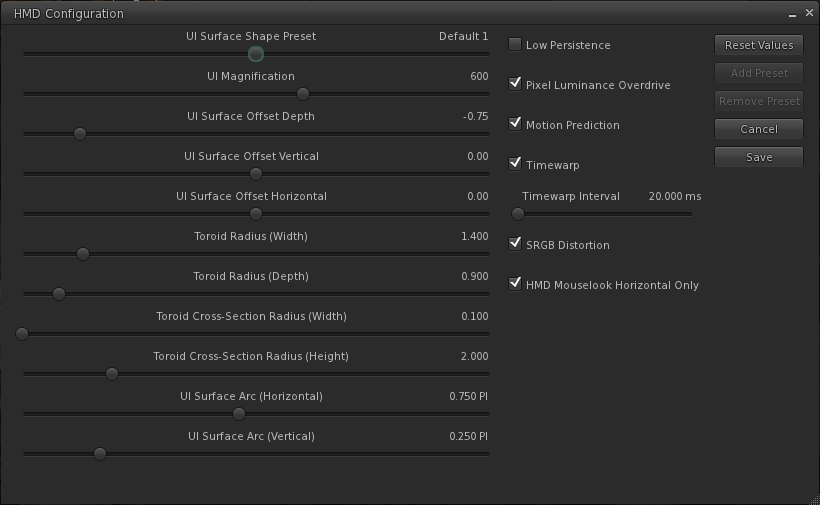
The expnaded HMD configuration panel
The expanded HMD configuration panel

As with the original project viewer, this configuration panel can also be accessed via a dedicated toolbar button.

The release notes for the viewer include some additional hints and tips:

  1. In Windows 7 turn OFF Aero (go to Windows Basic setting in the “Personalize” right-click menu on the desktop).
  2. In the Windows display settings, adjust the refresh rate on the DK2 to 60hz rather than 75hz.
  3. Make sure your Oculus config runtime and firmware are up to date.
  4. Make sure the power cable is plugged in to the Rift.
  5. If using an NVIDIA card, update to the latest drivers, which have some Oculus/VR specific optimizations.
  6. Turning on Triple buffering in the NVIDIA control panel may help in some cases. Results may vary.
  7. To increase framerate try reducing the Second Life Viewer draw distance and/or disable Shadows and the Ambient Occlusion.
  8. On the HMD setting panel in preferences try experimenting with turning low persistence mode on and off. We’ve found that is some cases it can exacerbate ghosting and jitter.
  9. If you’re in Mac OS X, it is recommended that you exit HMD when uploading files, such as images or models. There is currently an issue that can get your viewer stuck in a bad state if you attempt to upload files while HMD Mode is enabled.

Key Controls

  • Enter HMD mode – CTRL + SHIFT + D
  • Align to look – Q
  • Center Mouse Pointer – Z
  • Action key – X
  • Camera Mode – M (Press multiple times to cycle through 3rd Person, HMD Mouse look, and 1st Person modes)

The blog post from the Lab also includes the video released at the time the original Oculus Rift project viewer was launched.

Related Links

CtrlAltStudio adds basic UI elements for the DK2

CAS-logoStrachan Ofarrel, known in the physical world as Dave Rowe, continues to enhance the alpha version of his CtrlAltStudio viewer for the Oculus Rift DK2 headset and windows.

Dave has been working steadily on adding DK2 capabilities to CtrlAltStudio for a while now, and this marks the third update to the DK2 Alpha version – officially called 1.2.2.41206 Alpha 3.

The Alpha 1 release, made on August 19th, added preliminary support for the DK2, then Alpha 2, released on August 25th, added positional head tracking. The Alpha 3 release adds initial viewer UI support, as Dave explains in his blog post announcing the release:

This alpha release of the CtrlAltStudio Viewer adds basic UI to the Rift DK2 display. This includes dialogs, avatar toasts, and floating text (i.e., the same UI as displayed with the DK1 in the 1.2.1 Release).

Other changes this release:

  • Added fade-to-black around the barrel distorted image edges.
  • Stopped showing the health & safety warning the second and subsequent times into Riftlook view.
  • Fixed barrel distorted images being displayed lower on the screen than they should be.
  • Fixed “landing” in the air when flying in Riftlook with an Xbox 360 Controller.

The blog post also contains a reminder that the Alpha version(s) is / are still preliminary, with Dave noting, “it does not work with direct mode and Advanced Lighting Model needs to be turned on. It is built using the 0.4.1 Rift SDK and should work OK with the 0.4.2 Rift SDK.”

Usage is the same as the previous alpha releases. With the DK2 configured in extended mode: use the Windows key + RIGHT CURSOR to move your viewer window onto the Rift’s display, then CTRL+ALT+3 to make the window full screen and switch into Rift view.

As with the previous ALpha releases with DK2 support, this version will install into its own directory, allowing it to be used alongside the release version (although it will obviously over-write Alpha 1 or ALpha 2, if installed).

Further information on the release can be found in the release notes.

Related Links

CtrlAltStudio now with DK2 positional head-tracking

CAS-logoOn August 25th, and continuing his work in providing preliminary support for the Oculus DK2 in his CrtlAltStudio viewer, Dave Rowe announced the release of version 1.2.2.41190 Alpha 2 for Windows.

This is essentially the same release as the 1.2.2.41183 release for the DK2 made on August 19th, but sees positional head tracking support added to the viewer.

Commenting on the release, Dave stated:

This alpha release of the CtrlAltStudio Viewer adds positional head tracking support to take advantage of the DK2’s camera. You can look around, over, and under objects by moving your head. This adds significantly to the sense of immersion.

Usage is the same as the previous alpha. With the DK2 configured in extended mode: use the Windows key + RIGHT CURSOR to move your viewer window onto the Rift’s display, then CTRL+ALT+3 makes the window full screen and switches into Rift view.

CtrlAltStudio 1.2.2.41190 supports Rift DK2 positional head tracking (image: Le Journal du Gamer, July 5th, 2014)

The release also sees two other additions to the viewer:

  • A CTRL+Spacebar command that zeroes Rift sensor orientation and tracking position.
  • A user warnings if Rift HMD or camera not found at start-up.

There is still no support for basic shaders or the UI in Riftlook in the viewer, nor is there any Rift direct mode support. However, these are on Dave’s “to do” list for the future.

As with the previously alpha release with DK2 support, this version will install into its own directory, allowing it to be used alongside the release version.

 Related Links

CtrlAltStudio offers preliminary Oculus DK2 support

CAS-logoDave Rowe, who develops the CtrlAltStudio viewer has announced he has some preliminary support for the Oculus Rift DK2 available in an alpha version of his viewer.

The viewer version – 1.2.2.41183 Alpha, dated August 19th, should also support existing DK1 headsets, but it doesn’t yet support head tracking for DK2 hardware.

Announcing the availability of the viewer in a blog post, Dave said:

I know some people are very anxious to try their DK2s in Second Life / OpenSim so I’ve released this alpha with some very preliminary DK2 support.

It works with the DK2 configured in extended mode: use the Windows key + right-arrow to move your viewer window onto the Rift’s display, then Ctrl+Alt+3 makes the window full screen and switches into Rift view.

Have I mentioned that this release is very preliminary? It does not work with direct mode yet as the current Rift SDK 0.4.1 Beta does not work in direct mode with OpenGL. Also, in this alpha, head orientation is tracked but not yet head position. Plus there’s no display of any UI. And Advanced Lighting Model must be turned on. For more details on usage, see the Release Notes.

I haven’t tested this alpha with a DK1 yet but it should in theory work. Note though that the mirrored windows mode used in previous viewer releases for the DK1 is and will not be supported by the new Oculus software.

Austin Tate has provided an overview of his experience with the viewer and the DK2, for those who would like more first-hand information.

Related Links


SL projects update 33/3: TPV Dev meeting: HTTP, avatar height offset

The following notes are taken from the TPV developer meeting of Friday August 15th. A video of the meeting, provided by Chakat Northspring is included below. This report represents an overview of items discussed at the meeting which are liable to have the broadest interest among users. Timestamps are given against items and paragraphs for ease of referencing what was said within the video for those who wish to listen to the entire conversation on a given subject.

Note that subjects are not necessarily presented chronologically when compared to the video, but has been grouped under common headings.

My thanks, as always, to North for her recording of the meeting and linking to this blog post.

SL Viewers

[00:30] There have been few visible changes with the RC and project viewers this week. The library refresh viewer and the experimental log-in viewer remain unchanged, and while the Experience Keys project viewer has been updated, this has yet to appear in the Alternate viewers wiki page.

Oculus DK2 and Project Viewer Updates

Oculus Rift: the Lab now has the DK2, so work will be resuming on the project viewer

[00:50] The lab has received around half-a-dozen of the Oculus Rift DK2 headsets, and so it is anticipated that further work will be progressing with the project viewer, and updates will be emerging over time. As noted in week 32, there are some substantial differences between the DK1 headset and the DK2, which currently make the project viewer largely incompatible with the newer headset.

Texture Statistics Logging

[19:15] With the roll-out of the 3.7.7 the Lab unfortunately broke the texutre stats reporting debug option LogTextureDownloadsToSimulator. As this is off by default (set to False) it has not been noticed by most users. However, the recommendation is that users do not set this option to True, as it will cause the viewer to immediately crash on start-up, at the next attempt to run it. This issue is common to all viewers using all code releases subsequent to 3.7.7 as well.

Viewer Build Process

[40:24] The Lab is shortly going to commence the process of upgrading the tool chain they use in the viewer build process (e.g. switch to Visual Studio 2013 for Windows and Xcode 5 for Mac) and switching over to the new version of autobuild. This work may also eventually help pave the ay for 64-bit builds of the official viewer. However, this is not currently the focus of the changes, as no decision has made as yet within the Lab on producing 64-bit builds of the viewer; the current aim of these changes is to improve the overall viewer build process.

[47:23] There are two points of note here. The first is that the new autobuild process includes changes which self-compilers must adhere to if they are using it, and details are available on a wiki page. The second is that it is probable that Windows viewers built using Visual Studio 2013 will not run on Windows XP. The Lab has already dropped Windows XP support, which is as much as it will currently say in terms of future viewers built using the new tool chain running on XP.

Group Chat

[02:00] The work on group chat has temporarily halted due to those working on it either being on vacation or working on other projects. Given this, and with a degree of ironic timing, there have been increasing reports of group chat issues over the last several days, including one chat server apparently becoming completely non-responsive.

It’s not clear to the Lab as to what may be causing the problems, but they have been noted. In the meantime, informal advice is that if your group chat is consistently failing, to contact support, provide them with the information on your group (name, etc.), and the issues you’re having, and request the chat server is restarted.

Continue reading “SL projects update 33/3: TPV Dev meeting: HTTP, avatar height offset”

Loki: using the Xbox Controller with the Oculus Rift

Earlier in May I reported on Dave Rowe’s work integrating the Xbox 360 controller with his CtrlAltStudio viewer, allowing it to be used with the Oculus Rift or Stereoscopic 3D viewing options in that viewer, as well as with the normal display mode.

On Saturday May 24th, Loki Eliot tweeted that he’d been working on a similar approach, using the Xbox 360 controller and a dictation feature of OSX Mavericks to provide greater control over his avatar when using the Oculus Rift.

loki-tweet

Since tweeting, Loki has produced a blog post on his work, including links to the software he’s used and tutorials to help get things sorted out. his original video was posted to Telly, which WordPress.com doesn’t like, embedding-wise. However, Draxtor has, with Loki’s permission, reposted it to You tube, and so it’s that version I’ve embedded here.

Loki is the first to admit this approach doesn’t solve all of the Oculus related issues when using Second Life – he has a few wry observations as to where things will “suck” (his expression – not mine!). He also gives some musings on how technology might further assist things in the future.

Loki's work on integrating the Xbox 360 controller for use with SL and the Oculus Rift (image via Loki Eliot)
Loki’s work on integrating the Xbox 360 controller for use with SL and the Oculus Rift (image via Loki Eliot)

The use of HMDs brings with it a lot of challenges – some of which, the Lab freely admits in releasing its Oculus Rift project viewer, it has yet to really tackle. Seeing experiments like this is therefore interesting, as they demonstrate potential alternative (and not necessarily hyper-expensive) means of providing control over basic aspects of using SL with a headset which are not reliant on the keyboard and mouse and, in this case at least, also not dependent upon in-world voice (which many people don’t like to use for a wide variety of reasons). I wonder if approaches like this and Dave Rowe’s work with CtrlAltStudio might raise an eyebrow or two of interest at the Lab …?

Related Links