Project Bento User Group update 32 with audio

Project Bento – extending the SL avatar skeleton

The following notes and audio were taken from the weekly Bento User Group meeting, held on Thursday, October 27th at 13:00 SLT at the the Hippotropolis Campfire Circle. and chaired by Vir Linden. For details on the meeting agenda, please refer to the Bento User Group wiki page.

Note that this update is not intended to offer a full transcript of the meeting, nor does it present the discussion points in chronological order. Rather, it represents the core points of discussion, grouped together by subject matter were relevant / possible, whilst maintaining the overall context of the meeting.

General Project Status

Work continues on Bento bug fixes. As a result of the Bento code being available in a pre-release version of Firestorm, the number of reported issues with legacy content have increased (see BUG-40672). There are two issue in particular the Lab have been looking at:

  • The previously reported issues of some mesh content having latent “bad” joint positions which were previously overlooked by the viewer, but which are now taken into account under Bento, leading to avatar deformation (see my update #30 for more on this)
  • An issue related to the eye joints now being scaled by the eye size slider, which can result in existing mesh eyes appearing to bug out of avatar’s heads when viewed in the Bento viewer. The easiest way to fix this is to reset the eye slider to the default 50 value.

Eye sizing issue: as Bento allows mesh eyes to be affected by the eye size slider, they can suddenly appear to resize when seen on the that viewer (r), compared to how they appear on a non-Bento viewer (l)

Outside of these problems – which are still being looked at (see below), there is at least one bug (initially noted with Haste Coy products and also reported on BUG-40672), which should have a fix in the next Bento RC update, and a crash issue which also should be fixed in the next update.

If anyone is encountering issues with existing content when using the Bento viewer, they should report their problems via the JIRA (BUG-40672) so the Lab can look at things.
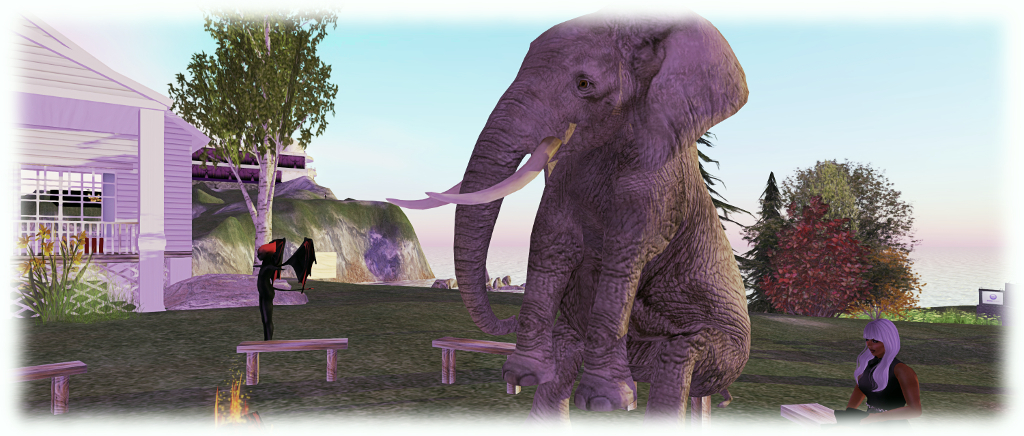
Benches: because even an elephant needs the occasional sit down. Medhue Simoni's stunning Bento mesh elephant
Benches: because even an elephant needs the occasional sit down. Medhue Simoni’s stunning Bento elephant avatar

Legacy Content Deformation Issue

There has still been no decision on how to handle the “werewolf deformation” issue, which now extends to about three creators, and may extend beyond werewolf models. There have been suggestions on forking rendering behaviour by something like upload date, so that if an item was uploaded prior to date X, then it is handled as “non-Bento”; if uploaded after date X, it is handled with Bento in mind.

A problem here is setting an arbitrary date may not actually solve anything. Bento has been around for over a year, with content creators working on it for the last several months at least, during which time other creators have been creating / updating and uploading non-Bento content. So, determining which is which by date likely won’t work.

That said, if there is a large amount of legacy content impacted by the viewer change, it still might be preferable to set a date and have Bento content creators re-upload their work to be on the “right side” of that date, rather than trying to get legacy content creators to re-upload. This is because some creators may not already be around and / or some may have used mesh creation kits which don’t have the necessary .DAE file for them to modify.

A further complication here is that any impact of the viewer behaviour change may simply be negated by creators of older avatar models updating to Bento models, to which their customers subsequently update.

Other Items

No Modify Shapes

The eye issue mentioned above once again raised concerns around users employing shapes that do not have modify permissions. Such shapes prevent the use of the appearance sliders, so even apparently “easy fix” issues, such as adjusting the eye size slider, may not be applicable.

This particular issue sparked a lengthy conversation about using the (currently non-obvious in the official viewer) XML shape exporter coupled with additional code to more easily export a shape’s XML file, which could then be re-imported with a check box to ensure the default 50 setting for things like the eye size sliders.

One problem here, as Vir pointed out is that users who are unaware of unfamiliar with using the shape sliders likely aren’t going to be enamoured with the idea of exporting an appearance XML file, creating a shape and then importing the appearance XML data against that shape, even though some TPVs have, with the Lab’s approval, sought to make this easier.

There is also the problem that creators may object to users being given the ability to export / import shape data, as it effectively bypasses the permissions system, allowing anyone to take shape data and use it as they please. However, given there is already a TPV methodology available, to assist with shape data import which has been given the nod by the Lab,  Vir will take the matter back to the office for further discussion.

The more direct solution might be for creators to indicate that Bento avatar meshes require the use of a modifiable shape (either supplied with the mesh or which the user can create and edit).

The Skeleton

Vir highlighted the fact that while different terms are used, there are technically three types of joints in the avatar skeleton: bones, the “standard joints” for rigging to; collision volumes, as used by things like fitted mesh; and attachment points,  which have most of the properties of joints, hence why some creators started rigging and animating to them, even though this was never an intended use.

Next Meeting

The next Bento meeting will likely be Thursday, November 10th, 2016, as November 3rd clashes with the Lab’s monthly internal meeting.

Additional Links

Project Bento User Group update 31 with audio

Bento: extending the avatar skeleton

The following notes and audio were taken from the weekly Bento User Group meeting, held on Thursday, October 20th at 13:00 SLT at the the Hippotropolis Campfire Circle. and chaired by Vir Linden. For details on the meeting agenda, please refer to the Bento User Group wiki page.

Note that this update is not intended to offer a full transcript of the meeting, nor does it present the discussion points in chronological order. Rather, it represents the core points of discussion, grouped together by subject matter were relevant / possible, whilst maintaining the overall context of the meeting.

Bento Viewer Status

The 4th iteration of the Bento RC viewer appeared on Thursday, October 20th, ahead of the meeting. Version 5.0.0.320815 is primarily an update to keep the viewer on a par with the release viewer code (VLC Media plug-in for Windows), although it does include a rendering bug fix.

The fix including in the new RC version is for some existing Haste Coy assets, which were  reported on BUG-40672 (the deformed werewolf issue noted in my previous Bento update).

There has been no decision on what to do about the werewolf deformation issue itself (the result of a change in viewer behaviour – see my previous update, linked to above). It’s not clear how widespread this issue is – at the moment it appears to be somewhat limited. The problem here is whether the viewer behaviour is maintained for Bento or rolled back to how it was, it will mean some content will have to be re-worked and re-uploaded. Thus, a deciding factor for the Lab in determining what to do will be discovering exactly how much existing content is actually impacted.

The focus is now on bug fixing with the viewer. There is no date being considered for promoting Bento to release status; as previously indications, this will depend on bugs and fixes, the viewer’s crash rate, and the relative priority it has when compared with other viewers in the release channel (there being only one at the time from writing).

Reported Issues

Scale Locking Bug

A bug was reported just prior to the previous Bento meeting about an issue with the new scale locking capability. This allows creators to disable shape sliders from having any influence over joint positions when uploading their models. However, it had been reported as working intermittently,  Vir has developed a fix for this issue, but it will not be available until the next RC update for the viewer.

Skin Weight Viewer Crash

BUG-40725 reports that checking the Skin Weights option when previewing joint positions will crash the viewer (Bento RC 5.0.0.320160). This has yet to be investigated.  This is actually one of two places where skin weights can be checked, the other being in the upload option, so the preview doesn’t have to be used. However, the Lab will be looking into the issue.

Feet Resizing

There was some confusion as to whether feet on models could be resized or not using the sliders. It appears that they can, providing the model is rigged to the L_FOOT and R_FOOT collision volumes for the feet.

MayaStar

Cathy Foil reports that MayaStar has been updated completely to Bento. Those using it should rez their update Checker to get the latest version. Report are that it handles sliders really well. This represents the culmination of several long months of work for Cathy in updating her product to be fully Bento compliant – congratulations to her!

Additional Links

Project Bento User Group update 30 with audio

Bento: extending the avatar skeleton

The following notes and audio were taken from the weekly Bento User Group meeting, held on Thursday, October 13th at 13:00 SLT at the the Hippotropolis Campfire Circle. and chaired by Vir Linden. For details on the meeting agenda, please refer to the Bento User Group wiki page.

Note that this update is not intended to offer a full transcript of the meeting, nor does it present the discussion points in chronological order. Rather, it represents the core points of discussion, grouped together by subject matter were relevant / possible, whilst maintaining the overall context of the meeting.

RC Viewer

The Bento viewer is now on its third version as a release candidate (version 5.0.0.320160 at the time of writing). It is performing well crash-wise in comparison with the current release viewer, so the hope is – bugs allowing – it might not be too long before the viewer moves up to release status.

The first of the bugs mentioned by Vir in the audio is that the scale locking capability recently added to disable shape sliders from having any influence over joint positions has been reported as working intermittently at times. Vir is still looking into this.

The second is a report instance of pre-Bento content being deformed when viewed on the Bento viewer – see BUG-40672.

The problem appears when a sub-mesh contains bad joint position overrides for various joints that the model is rigged to. Prior to Bento, these joint position overrides were not applied, because the Lab was enforcing a 20-joint minimum: if a sub-mesh was rigged to fewer than 20 joints, then it was not treated as rigged, and the joint positions were ignored.

The BUG-40672 issue as seen in the Bento viewer, and apparently the result of "bad" joint overrides defined in the pre-Bento model, and changes made to how overrides are handled in the Bento viewer
The BUG-40672 issue as seen in the Bento viewer, and apparently the result of “bad” joint overrides defined in the pre-Bento model, and changes made to how overrides are handled in the Bento viewer

For Bento, this restriction has been relaxed to make it easier to produce meshes only affecting part of the avatar (wings affecting wing joints positions, head that affects only head join positions, etc.), making it possible to “mix and match” different meshes. Unfortunately, it also means that any model with “bad” (but previously “invisible”) joint positions defined may now appear deformed.

Reverting the viewer to its previous behaviour is not seen as optimal, because of the potential to break some Bento models and make the extended skeleton less useful (no more mix and match of meshes). Similarly, it is currently unclear as to how much content might be affected if the updated behaviour is retained, so the Lab is still considering what to do.

Makers of pre-Bento mesh avatars are asked to check BUG-40672 and then test their avatars using the current Bento viewer to see if similar issues manifest themselves. The most direct way to “fix” things is for affected content being re-uploaded with the bad joint positions removed, or by adding an animation to fix the joint positions after the fact (assuming said animation doesn’t conflict with others the model is using). Of course, if the model does not require joint positions at all then the option could also simply be unchecked at upload time.

Animating Hands

A complex discussion has been unfolding on the discussion forum concerning animating hands (from around page 122 onwards), and which also encompassed a part of the user group meeting (in text). It’s a convoluted subject involving several elements, of which perhaps the most important thing is understanding how best to animate hands.

To try to address this, Cathy Foil has produced a comprehensive video on hand animations, which anyone developing mesh hands for Bento may find informative and helpful, and so is embedded below.

Cathy also provided some hints and tips during the meeting.

Feet

There has also been forum discussion on feet. Bento doesn’t add and further joints to feet, and there are no plans to change the rig specifically to a support for animating feet. However, as Vir pointed out, there are more joints than the system avatar does not use – mToe and possibly mFoot – which might offer a degree of flexibility for mesh creators. If these are used, a point to keep in mind is that they are not used in the avatar height calculations, so some unexpected results my occur.

Other Items

Bounding Box Clipping / LODs

A non-Bento issue which can be frequently seen at Bento meetings due to the number of meshes being worn is that of bounding box clipping – part of the avatar appears to vanish as a camera is pulled back.

This generally occurs when the viewer is operating at the limit of its imposter avatars setting, and a conflict occurs trying to both display the avatar mesh (which the viewer will try to render at a united LOD (level of detail) whilst also trying to switch to displaying an avatar as an imposter. It can be overcome by setting the imposter slider to No Limit in Preference > Graphics.

While fixing this issue is not part of Bento, it raised the subject of why LODs aren’t used rather than the imposter setting. Vir explained that one reason is this idea that the viewer will try to render avatars and their attachments at a high LOD, rather than stepping down through LOD models, as is the case with in-world mesh objects. Another isse us that many creators tend to only use high LOD models, and incentivising people to use the LOD system correctly isn’t easy, although there are tools (e.g. Decimator in Blender) which help in the creation of LODs for models.

As the whole issue of rendering and associated costs and calculations is now being looked at by the Lab, changes might be forthcoming to help with matters – time will tell on that.

Additional Links

Project Bento User Group update 28 with audio

Bento: extending the avatar skeleton

The following notes and audio were taken from the weekly Bento User Group meeting, held on Thursday, September 29th at 13:00 SLT at the the Hippotropolis Campfire Circle. and chaired by Vir Linden. For details on the meeting agenda, please refer to the Bento User Group wiki page.

Note that this update is not intended to offer a full transcript of the meeting, nor does it present the discussion points in chronological order. Rather, it represents the core points of discussion, grouped together by subject matter were relevant / possible, whilst maintaining the overall context of the meeting.

RC Viewer and Scale Locking

The next release of the Bento RC viewer should be appearing soon. When it does, it will have a couple of updates:

Slider Scale Locking

At the last meeting, Vir requested feedback on the proposed ability to effectively make joints in a mesh “slider proof” by overriding the scale as well as position in uploaded mesh models, as seen in the proof of concept viewer put out at the start of September.

The option has now received positive feedback, and will included in the next RC update. It will comprise a check box which, if checked will lock joints against scale changes, and thus the sliders affecting the joint will no longer influence it. Leaving the box unchecked for the joint will allow scale changes.

Performance optimisations

There has been one noticeable “hot spot” of viewer performance degradation as a result of all the new Bento joints. This has been sufficient for the Lab to make some changes which should help improve FPS for users when in a region with a lot of rigged mesh.

Going to Release

The question on when Bento will reach a release status tends to come up at every meeting, and the answer remains the same. Bento’s promotion to release status is dependent on a number of factors, including:

  • The viewer’s crash rate compared with the current release viewer and other RC viewer in the release channel
  • Whether exposure to a wider audience of users uncovers non-bento bugs or regressions which require additional fixing
  • Relative priorities between Bento and other projects.

However, there have been few Bento-specific bugs raised against the RC viewer, and while it still requires time as an RC as changes are still being made, Vir’s hope is that it will be weeks rather than months until the viewer is promoted to release status (bugs and other priorities allowing, as noted.

Joint Position Locking

A joint’s position can be locked from slider influence by setting a custom position for it. However, the slider’s influence isn’t completely disabled, as a change to scale can still have influence. For example, if the scale of a parent join is changed, it can influence where a child joint appears, even if the child has a custom position set (hence one reason for the scale locking. However, there has been a suggestion that joint position locking may not be working smoothly, so Vir is interested in hearing about situations where this might be the case.

The question was asked in joints could be locked from within Second Life – that is, after upload. the short answer to this is no, as it would require a significant amount of reworking which falls well outside of the scope for Bento.

My company of wolves: wearing the "Morgan" avatar, my Alt attends the Bento meeting, under the protection of two Bento wolves (designed by Medhue Simoni) - that's Whirly on the left, and Medhue on the right)
My company of wolves: wearing the “Morgan” avatar, my Alt attends the Bento meeting, under the protection of two Bento wolves (designed by Medhue Simoni) – that’s Whirly on the left, and Medhue on the right) – see the addendum below for more info on the wolves.

Animation Priorities And Formats

As all SL animators know, the platform supports two animation types: .BVH and .ANIM. The differences between them, in essence, is that .BVH is a format which pre-dates Second Life. During the upload process, an attempt is made to process the .BVH file to make it more efficient. The .ANIM format is more of an internal format for Second Life, and bypasses all the processing common to .BVH files; all the settings are already baked in, including the priority.

Generally speaking, the priority in which animations play is based on their priority; those animations with a high priority than other will take precedence in playback. If to animations with the same priority are called, it can be indeterminate as to which may play first. There have been some proposals to make this more deterministic, but it is a non-Bento effort, if it is being actively pursued.

However, if using the .ANIM format in Blender, it is possible to set the animation priority on a per joint basis, prior to exporting for upload to Second Life – although it is not clear if the Second Life .ANIM format supports a per-joint field for prioritising animations. Also, all of the options available in the .BVH uploader for Second Life are available for .ANIM files from within Blender / Avastar, and can be set from there prior to export.

Maya also has a native .ANIM format, but it is important to note that this is not the same format as the Second Life .ANIM file, and it is not  compatible with Second Life.

Other Items

Mixing and Matching Bento Parts

One of the aims with Bento is to allow users to mix and match Bento parts. So, for example, if you have a Bento elephant, you might in theory be able to get a set of Bento wings and add them to become a flying elephant. To achieve this, a Bento mesh no longer has to define positions for all the joints in the skeleton – only those it actually uses need to be defined.

However, this still means customers must be aware of the joints being used by different mesh models to avoid potential conflicts. Again, if the elephant mentioned above uses the wing bones to animate its ears, that’s going to conflict with the use of wings using the same bones  – and yes, I’m avoiding Dumbo and his ear-flapping flying for the purposes of this example! 🙂 ).

One way to avoid this might be for creator to document the joints they’re using in their mesh models when selling them (e.g. in the Marketplace listings, on their vendor boards, etc). But quite how this might work in practice remains to be seen – and will largely rely on the community to consider matters.

MayaStar Update

Cathy Foil has reached a point of getting all the sliders working with the all of the bones, although some are not yet working properly. She hopes that MayaStar will be updating a in the next couple of weeks. She also reminded people that Aura Linden is, in her own time and unpaid, writing an exporter for MayaStar for .ANIM files. This will be provided as an open-source project.

Bento Follow-up?

After the main meeting had finished, Cathy Foil indicated that she and Matrice had discussed a possible follow-up for Bento with Vir, which he was positive about. This would be to add a further appearance slider which would allow an avatar to be correctly / proportionally scaled larger or smaller.

This would apparently be a relatively simple addition, although work would also have to be put into correctly scaling walks, runs and flying to avoid things like Mach 5 tinies roaring across a region because the scale of their steps remains unchanged (the upper and lower limits of avatar size would also need to be defined). Given the potential benefits of such a slider – more efficient land use as avatars could be more easily scaled down to make use of smaller spaces, etc. -, it could also be a useful task for one of the few remaining slider slots which are available.

The discussion included the idea of using animations or even a file (/script) to define avatar scale, with Cathy indicating that animation scaling was ruled out early in the project on the grounds of cost, and that Vir was unsure of a way to easily allow file-based avatar scaling.

Next Meeting

Due to the Lab’s monthly internal meeting, which conflicts with the Bento meeting, the next Bento User Group meeting will be on Thursday, October 13th.

Addendum

Those interested in the Bento mega-wolves by Medhue can now obtain them through the Marketplace, and read about them on Medhue’s blog. You will require a Bento-enabled viewer to render them correctly. With thanks to Whirly for the pointer.

Additional Links

Project Bento User Group update 26 with audio + hints’n’tips

Bento: extending the avatar skeleton

The following notes and audio were taken from the weekly Bento User Group meeting, held on Thursday, September 15th at 13:00 SLT at the the Hippotropolis Campfire Circle. and chaired by Vir Linden. For details on the meeting agenda, please refer to the Bento User Group wiki page.

Note that this update is not intended to offer a full transcript of the meeting, nor does it present the discussion points in chronological order. Rather, it represents the core points of discussion, grouped together by subject matter were relevant / possible, whilst maintaining the overall context of the meeting.

RC Viewer Release

As indicated in an official blog post, and in this blog, the Bento viewer is now at release candidate status with the release of version 5.0.0.319688 – which can be obtained through the Alternate Viewers wiki page. This means that TPVs can now officially adopt the Bento code and release it in their own viewers. Cool VL Viewer already has Bento merged into its experimental branch, for example, and Firestorm has the code merged ready for their next scheduled release.

There are a number of small updates in the RC version of the viewer, chiefly typos in the sliders which were preventing them from having symmetrical effects. These affected the lip thickness slider, the square head slider, and the body thickness slider, together with a slight tail bone issue.

The RC Viewer and “Distorted Avatars”

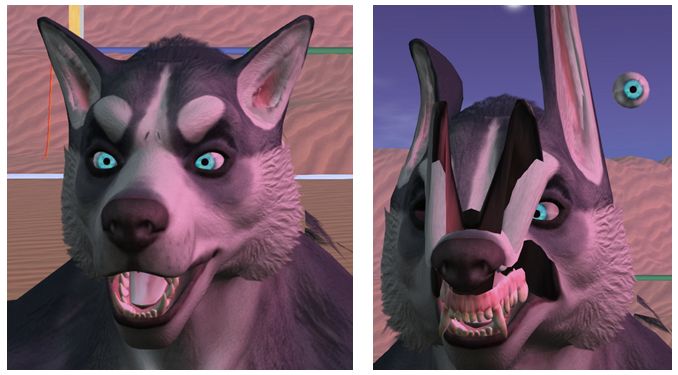
If you opt to experiment with the Bento RC viewer and Beno demons etc., keep in mind that any Bento-enabled items to you wear will only appear as intended when viewed from another Bento capable viewer. Anyone using a non-Bento viewer see you is at best going to see things incorrectly positioned on your avatar, and at worse, see whatever you are wearing utterly deformed.

Bento creations will only appear correctly when viewed in a Bento-enabled viewer, as shown in these two pairs of images. On the left: a Bento head seen in a Bento viewer, then in a non-Bento viewer; On the right, a Bento avatar seen respectively in a Bento and a non-Bento viewer (click for full size)
Bento creations will only appear correctly when viewed in a Bento-enabled viewer, as shown in these two pairs of images. On the left: a Bento head seen in a Bento viewer (note; the jewellery is out-of-position on the first image as I didn’t bother repositioning it to fit the head for the photo) and then on a non-Bento viewer – note the head is now located in the small of my back (arrowed). On the right, a Bento avatar seen respectively in a Bento and a non-Bento viewer (click for full size)

Obviously, as the Bento code is more widely adopted and reaches release status, these issues will decline – but for now, if you’re using the Bento RC viewer (or other viewer with Bento support), do keep this in mind when venturing out in public.

In extreme cases, older viewer versions may crash if a Bento avatar / Bento content is encountered; but these cases should be rare. The Lab added code to the viewer some time ago to specifically prevent Bento updates from crashing the viewer, so as long as a viewer has these updates – as should be the case with all currently maintained viewers – it should not crash.

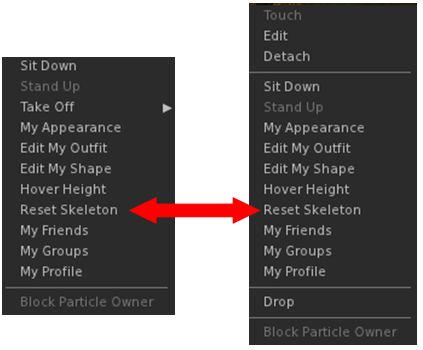
Reset Skeleton

reset-skele
The Reset Sketon option is available from the right-click context menus for both avatar name tags (l) and avatars (r)

There are occasions (when changing between avatars, for example) when those who are on a Bento viewer may see themselves or another Bento avatar distorted. This is due to variances in how appearance updates are received / handled (and even with non-Bento avatar models has in the past required a re-log to fix).

To overcome this in the Bento viewer, there is a Reset Skeleton option, which can be used on either yourself or other deformed avatars in your view. This can be found in the avatar name tag context menu, or the avatar context menu, either of which can be access by right-clicking on the name tag or avatar respectively.

Vir notes the solution is not ideal, but the only other way to fix such issues would be extensive re-working of the viewer code – and at least this approach avoids the need for a re-log to correct matters.

Time Frames for Release

Questions were asked on when the viewer might go to release. this is actually dependent on a number of factors, including:

  • The viewer’s crash rate compared with the current release viewer and other RC viewer in the release channel
  • Whether exposure to a wider audience of users uncovers non-bento bugs or regressions which require additional fixing
  • Relative priorities between Bento and other projects.

Avatar Vertical Position (height above ground) Calculation

This has been a running topic for some time. In short, a n avatar’s vertical position relative to the ground is determined by a complex calculation which involves using a number of joints running up through the body from the left foot to the skull. The idea is to present a consistent view of an avatar standing on the ground, rather than in the ground or over the ground. However, if any of the joints used in the calculation are changing position unintentionally when the calculation is made, it can result in the avatar seeming to bounce up-and-down (see here for more).

To help overcome these kinds of issues, Vir has now documented the body height calculation bones, and the details can be found here: Avatar body size

Joint Position and Volume Bones

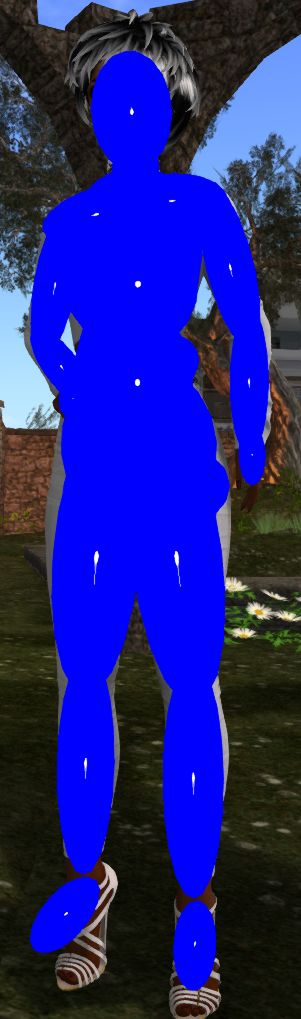
collision-bones
Visualising volume bones

It’s been noted that zooming in on a Bento avatar or attempting to click on a part of the avatar can be difficult. This is generally because the collision bones are not set-up correctly. The positions of the volume bones can be seen using Advanced Menu > Avatar > Show Collision Skeleton.

This will overlay the avatar with a series of oval shapes (official viewer – other viewers may render the collision skeleton slightly differently) which show the position of the volume bones. The closer these match the shape an avatar (something which may not always be possible, depending on the avatar type / size), the easier it will be to zoom in on the avatar and / or click on it.

Tapple Gao’s avatar testing and visualisation kit of meshes and animations can also be used to show the collision skeleton.

Setting volume bone positions can either be done within the mesh model or via animation, although there was some confusion whether collision volumes now get included in joint offsets.

Continue reading “Project Bento User Group update 26 with audio + hints’n’tips”

Bento project reaches RC status in Second Life

Bento: extending the avatar skeleton

OK, I admit I wasn’t expect this until next week, but on Wednesday, September 14th, the Lab  announced that Project Bento is now officially available as a release candidate viewer – version 5.0.0.319688 – which can be obtained through the Alternate Viewers wiki page.

And just in case anyone has missed all the Project Bento news, the best way is to catch-up through the official video. In short, Bento adds a wealth of new bones to the basic avatar skeleton (30+ to heads / faces and to hands alone!), making a wealth of new avatars (humans and non-human) and mesh wearables possible.

The reason I wasn’t expecting the viewer to get promoted just year is that the Lab also has a proof-of-concept viewer being tested, so I assumed any push to RC would come after a decision had been made on incorporating those changes (if they are to be adopted). So, not for the first time, I’m been wrong 🙂 .

The move to release candidate status doesn’t mean the project is at an end. There is still further work to be done as remaining bugs are fixed, etc  (so updates such as the slider locking in the proof-of-concept might yet arrive in the viewer). What it does do is three things:

  • Makes the viewer available to a wider audience through the Lab’s RC distribution mechanism, thus allowing any unforeseen issues in merging the Bento code into the current release viewer code (and which may be outside of direct Bento testing) to be identified and fixed
  • Potentially makes the viewer more widely available to content creators who may not have so far tried the viewer
  • Means that TPVs can now officially start incorporating the Bento code into their viewers (in fact, Cool VL Viewer has had Bento in its Experimental branch from some time, and Firestorm have also been working to merge the Bento code as well – but this shouldn’t be taken to mean there will be a new release of the latter in  the near future).

In keeping with the status of the Bento code, the Lab do ask people – particularly avatar content creators – to give the viewer a go,  and to file a JIRA against any issues found.

As noted above, Bento offers a range of opportunities for mesh wearable and avatar creators – you can see a couple of video exploring the AK and Catwa preview Bento mesh heads in my SL project update. Also, back in August, Vista Animations produced a video illustrating the potential of finger animations:

Then, of course, there is a huge range of non-human avatars: centaurs, “rideables”, winged creatures – all of which can be achieved a lot more efficiently through Bento than has previously been the case.

Teager's Bento Raptor using Bento bones
Teager’s Bento Raptor using Bento bones

So – get ready for the Bento Revolution!

Additional Links