Logos representative only and should not be seen as an endorsement / preference / recommendation
Updates for the week ending Sunday, March 11th
This summary is generally published on every Monday, and is a list of SL viewer / client releases (official and TPV) made during the previous week. When reading it, please note:
It is based on my Current Viewer Releases Page, a list of all Second Life viewers and clients that are in popular use (and of which I am aware), and which are recognised as adhering to the TPV Policy. This page includes comprehensive links to download pages, blog notes, release notes, etc., as well as links to any / all reviews of specific viewers / clients made within this blog.
By its nature, this summary presented here will always be in arrears, please refer to the Current Viewer Release Page for more up-to-date information.
Official LL Viewers
Current Release version 5.1.2.512803, dated February 23rd, promoted March 1st – formerly the Nalewka Maintenance RC – No Change.
Black Dragon updated to version 3.0.3, and then to 3.0.4 (bug fixes), both on on March 6th (release notes).
Kokua for 64-Windows updated to versions 5.1.3.42936 (RLV) and 5.1.3.42935 (non-RLV) on March 10th (via Sourceforge)
V1-style
Cool VL Viewer updated as follows: the Stable branch to version 1.26.20.46 and the Experimental version to 1.26.21.11, both on March 10th (release notes).
Update, March10th: Two new versions of Kokua are available for 64-bit Windows (RLV – version 5.1.3.42936 – and non-RLV – version 5.1.3.42935). These build on recent updates to Kokua using the Lab’s 5.1.3 code base, and feature internal code refactors. They can be downloaded from Kokua’s Sourceforge repository.
In October 2017, Nicky Perian announced he would be stepping back from a direct, hands-on leadership role in maintaining Kokua to enjoy a well-deserved retirement. He put out a call for members of the Kokua community to step forward and help maintain Kokua, although he has maintained a role working on the Mac and Linux versions of the viewer.
On Friday, March 9th, Chorazin Allen – perhaps best known as the creator of Chorazin Creations, a range of RLV-enabled cages and cells for the BDSM community, and the Chain of Command range of scripted plug-ins for the Real Restraints range of products by Marine Kelley- issued a Kokua group notice indicating he would be joining the team, taking directly responsibility for:
The Windows builds of Kokua
RLV updates
Release management and general administration.
In a separate group notice, Chorazin also notes:
You can check on the latest Win64 versions of Kokua by visiting Sourceforge here:
You may also set up notifications from Sourceforge when new versions are added.
RLV users should update to 42932 to get a fix for the garbage collector failing to remove restrictions from vanished objects.
Chorazin notes that – understandably – it will take a little time for the re-organisation within the Kokua team to be completed, and Kokua users are asked to keep an eye on group notices – which will become more frequent as a new version is readied for release – and on the Sourceforge repositories for updates to forthcoming versions.
In the meantime, news that Kokua is to be moving forward will likely be welcomed by the Kokua community, and kudos to Chorazin for taking up the request to help manage the viewer and carry it forward. I’ll continue to cover updates as they are released.
Logos representative only and should not be seen as an endorsement / preference / recommendation
Updates for the week ending Sunday, March 4th
This summary is generally published on every Monday, and is a list of SL viewer / client releases (official and TPV) made during the previous week. When reading it, please note:
It is based on my Current Viewer Releases Page, a list of all Second Life viewers and clients that are in popular use (and of which I am aware), and which are recognised as adhering to the TPV Policy. This page includes comprehensive links to download pages, blog notes, release notes, etc., as well as links to any / all reviews of specific viewers / clients made within this blog.
By its nature, this summary presented here will always be in arrears, please refer to the Current Viewer Release Page for more up-to-date information.
Official LL Viewers
Current Release version 5.1.2.512803, dated February 23rd, promoted March 1st – formerly the Nalewka Maintenance RC – NEW
Cool VL viewer updated as follows: the Stable branch to version 1.26.20.45 and the Experimental version to 1.26.21.11, both on March 3rd (release notes).
Logos representative only and should not be seen as an endorsement / preference / recommendation
Updates for the week ending Sunday, February 25th
This summary is generally published on every Monday, and is a list of SL viewer / client releases (official and TPV) made during the previous week. When reading it, please note:
It is based on my Current Viewer Releases Page, a list of all Second Life viewers and clients that are in popular use (and of which I am aware), and which are recognised as adhering to the TPV Policy. This page includes comprehensive links to download pages, blog notes, release notes, etc., as well as links to any / all reviews of specific viewers / clients made within this blog.
By its nature, this summary presented here will always be in arrears, please refer to the Current Viewer Release Page for more up-to-date information.
Official LL Viewers
Current Release version 5.1.1.512121, dated January 26th, promoted February 7th formerly the Voice Maintenance RC – No Change.
Update: The 360 snapshot viewer was updated to version 5.1.6.515934 on June 6th.
On Thursday, February 22nd, Linden Lab issued a further update to the 360-degree snapshot project viewer. While version 5.1.2.512774 brings with it some updates and changes, it still fair to say this is more an interim update than the set of improvements and capabilities some of us had been hoping for.
As with the previous update, released in June 2017 – see my Hands-on II review here – this viewer:
Uses the Alex Ivy viewer code base (only the release code, this time, obviously), and so is available for Windows (32-/64-bit) and Mac OSX; there is no Linux version at present.
Handles the “stitching” of a captured set of images into a single equirectangular 360-degree image ready for upload to suitable suites supporting 360-degree images.
However, what’s new with this viewer is that it:
Moves the 360-degree photo option from the snapshot floater to its own floater.
Sets the 360-mage resolution to 4096×2048 (no more “small”, “medium” or “large”).
Includes the required meta data for images to auto-display in Flickr’s 360-degree viewing mode, so you no longer have to manually set the equirectangular tag
So, how does it stack-up?
On the positive side, the new capture UI does a credible job of easing the capture process and in offering preview of the 360-degree image. Hopefully there will be some further options added to it in the future – such as image size.
On the negative side the current 4096×2048 resolution could still do with improvement – Alexa Linden informed me that this work is in-hand – as it can exhibit a very definite fuzziness.
Taking the Shot
Position your camera at the centre point of your 360 shot.
While it is not specified, I would suggest camera in a circle to encourage the scene to load before capture.
Use Menu > World > Environment Editor > Sky Presets > Edit Presets to set your desired Windlight and use the Clouds tab to freeze cloud movement. Avoid the use of Depth of Field.
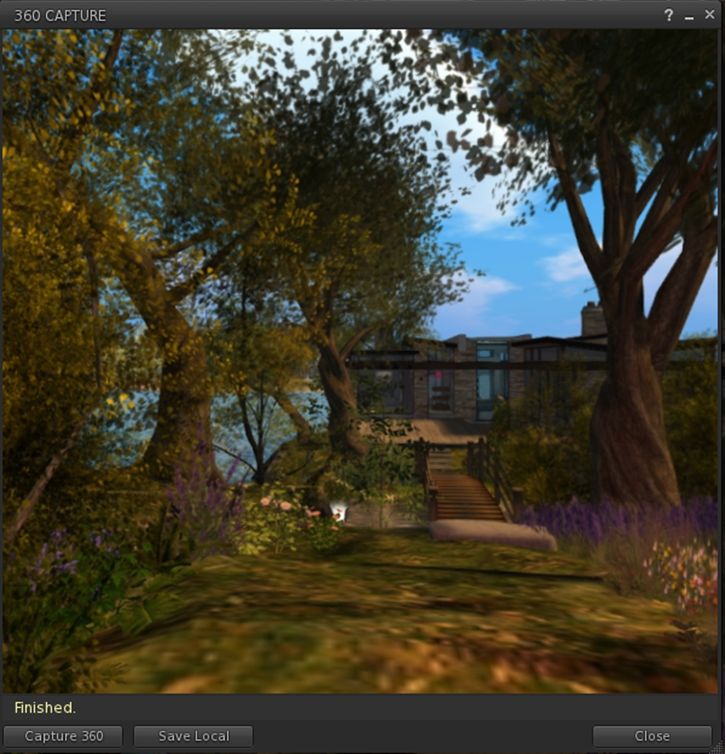
Press CTRL-SHIFT-C to display the 360-image capture floater.
The new 360 snapshot floater – default mode
Click Capture 360 to commence the capture process.
The floater will display some basic messages as the images are being captured and process, and the Lab have indicated these may be improved, depending upon feedback.
Once image processing is complete, the floater will expanding to show an auto-rotating previewing of the captured image. As with any 360-degree image, you can press and hold the left mouse button while over the image and scroll around it.
The 360-degree image preview
Note that there is currently an issue with the preview on Mac systems which can leave it black. If this happens, click Save Local and then Cancel. This should force the preview to displayed correctly.
If you’re unhappy with the preview, you can re-start the process by clicking Capture 360 again, or you can save the image using the Save Local button. This will save the image in equirectangular format to a location of your choice on your computer, from where yo can upload it to photo sites supporting 360-degree equirectangular images.
As noted above, images captured in this version of the viewer should automatically display in 360-degree viewing mode in Flickr without the need to meta tag them manually. They also should display in the WordPress “VR” shortcode, placed within square braces (“[“, “]”) and in the format:
vr url=path-to-photo.jpg view=360
This should yield a result like this:
Feedback
A welcome update to a project viewer that was a little long-in-the-tooth: obviously, as well as the 360 snapshot changes, this version also brings the viewer up to par with all of the most recent viewer releases.
I was a little disappointed that there’s no support for uploads to Second Life Place Pages with this iteration of the viewer – something that had been indicated as being on the horizon in some recent user group meetings; apparently, and like the overall image resolution, it requires further work. As the 360 image captures now has its own floater, I’d also personally like to see it gain a dedicated toolbar button as well. CTRL-SHIFT-C isn’t a taxing short cut to remember, but buttons can make for convenience.
That said, the thing to remember here is that this is still only a project viewer – it still has a good way to go before being ready for prime-time use, which is something the Lab fully acknowledges. So, while it is worth taking it for a drive and having a play, expect to see further improvements and added functionality appearing in – hopefully not-too-distant – future updates.
Logos representative only and should not be seen as an endorsement / preference / recommendation
Updates for the week ending Sunday, February 18th
This summary is generally published on every Monday, and is a list of SL viewer / client releases (official and TPV) made during the previous week. When reading it, please note:
It is based on my Current Viewer Releases Page, a list of all Second Life viewers and clients that are in popular use (and of which I am aware), and which are recognised as adhering to the TPV Policy. This page includes comprehensive links to download pages, blog notes, release notes, etc., as well as links to any / all reviews of specific viewers / clients made within this blog.
By its nature, this summary presented here will always be in arrears, please refer to the Current Viewer Release Page for more up-to-date information.
Official LL Viewers
Current Release version 5.1.1.512121, dated January 26th, promoted February 7th formerly the Voice Maintenance RC – No Change.



 Inara Pey: Living in a Modemworld