Black Dragon and UKanDo: final updates for 2013

As a part of the holiday period, and as mentioned in various SL projects reports of min over the last few weeks, Linden Lab operate a code freeze / no change window in which no major updates to either the viewer or the simulator code are made, other than those required to fix significant issues impacting Second Life. This code freeze, which this year comes into effect on Monday December 16th and extends through until the start of 2014, encompasses all thing server, and the SL viewer release channel (the release viewers and RCs). The aim is to give LL’s support personnel and contractors a chance to enjoy the holiday period as well.

However, as well as encompassing the server and LL’s viewer, the Lab also request that TPVs refrain from making major releases during the same period, again to help lessen the load on LL’s viewer support team, who take a lot of TPV-related calls when users encounter problems.

This means that the window for TPVs to get significant updates out is closing fast, and both Black Dragon and UKanDo have both had what is likely to be their last updates this side of the new year (although in Black Dragon’s case, it appears the reason is because Niran is having fun relaxing with a new computer game!).  Both updates are small, tidy packages, and as such, both are overviewed here.

Black Dragon 2.3.9.2

Released on Wednesday, December 4th, hard on the heels of version 2.3.9 and 2.3.9.1, both of which appeared on December 3rd, Black Dragon 2.3.9.2 is described as “Maintenance #4”, and is the latest in a line of maintenance releases of the viewer which build on existing functionality and UI changes, rather than adding anything significantly new to the viewer.

That said, version 2.3.9.2 does offer what is something of a new feature: “realistic Mouselook”. Traditionally, when in Mouselook, the camera is positioned / locked towards the centre of the avatar frame (around chest level). With this release, Niran has moved the camera position so it is effectively in the avatar’s head.

This may sound a trivial, but it does make something of a difference when operating in Mouselook, as movement in Mosuelook as a lot more responsive to avatar animations. While it is somewhat dependent upon the animations you are using, it can mean, for example, that when running, your mouselook view with “bounce” in time with your avatar’s running strides.

To help demonstrate the difference, Niran has produced a video showing what happens when in Mouselook with Black Dragon 2.3.9.2; you might want to compare it to your own experience using Mouselook in a viewer without the updates.

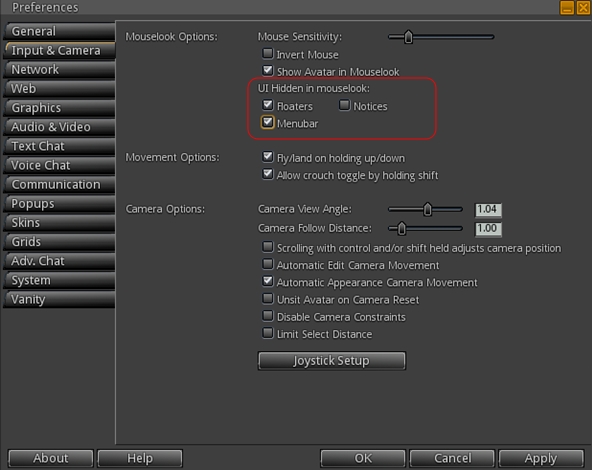
The option can be toggled off / on via Preferences > Camera > Mouselook Options. Additionally, Niran recommends that when using it, Mouselook Smoothing (same section of Preferences) is enabled.

A further Mouselook fix with Black Dragon 2.3.9.2 comes by way of Adeon Writer, which corrects the issue of hand attachments (weapons, etc., behaving oddly and appearing to move away from the avatar when entering Mouselook or when crouching in Mouselook.

The remaining updates for the release as recorded in the release notes comprise:

  • Addition of all windlight presets found in other versions of Niran’s viewer (other than his own “realistic” settings)
  • Updates to a number of floaters, include People, which has been a little reduced in size and the addition of the Send button to the Notices floater
  • Updates to the loading screens and a fix to the version history link on the log-in screen.

UKanDo 3.6.11

UKanDo 3.6.11.27919, released on Sunday, December 8th, is officially noted on the UKanDo website as the last release for 2013.

Total number of users in a group displayed for those groups you have joined
Total number of users in a group displayed for those groups you have joined (see below left)

This release offers another small package of tidy changes, several again gathered from other TPV offerings, and it’s good to see that credits for imported features are starting to appear in the release notes as well.  The latter list the updates within the release as comprising:

Merged:

  • Updates from RLV

Tweaks:

  • Addition of Penny Patton’s windlight settings
  • Re-write/clean-up of the Status Bar code
  • Possible speed improvements
  • UKD_Logo icon updates.

Fixes:

  • Black background in the address bar combo list’s scroll bar fixed
  • An old bad merge for the avatar context menu in chat which didn’t show at the time
  • Net Stats graph now shows correct Kb and wdiget now clickable

Features Added:

  • Show the total member count on the Group panel’s General tab if you’re a member of that group
  • Edit option added to the Area Search floater’s context menu
  • Username login drop-down combo box for multiple accounts
  • Frames-Per-Second displayed on StatusBar (from NiranV Dean). Modified and clickable (Hidden by default)
  • Additional Status Bar show / hide options for  FPS, Net Stats, Avatar Offset Slider and Draw Distance Slider.
status bar options
Additional show / hide options for elements in the status bar (sliders, buttons, info displays)

Feedback

Both of these releases offer neat packages of updates to their respective viewers, both of which continue to be developed and enhanced in small, relevant steps and which also keep track with most of the recent code base updates from Linden Lab.

Performance-wise, both viewer showed more-or-less consistent performance levels on my primary PC as shown with earlier releases, and I had no difficulty in running both viewers with the major graphics bells and whistles enabled (ALM on, Ambient Occlusion Enabled, shadows set to Sun/Moon + Projectors, etc.), at home and in wandering.

Viewer release summaries 2013: week 48

This summary is published every Monday and is a list of SL viewer / client releases (official and TPV) made during the previous week. When reading it, please note:

  • It is based on my Viewer Round-up Page, a list of  all Second Life viewers and clients that are in popular use (and of which I am aware) and which are recognised as adhering to the TPV Policy
  • By its nature, this summary will always be in arrears
  • The Viewer Round-up Page is updated as soon as I’m aware of any releases / changes to viewers & clients, and should be referred to for more up-to-date information
  • The Viewer Round-up Page also includes comprehensive links to download pages, blog notes, release notes, etc., as well as links to any / all reviews of specific viewers / clients made within this blog.

Updates for the week ending: December 1st, 2013

Official LL Viewers

  • Current Release version: no update.
  • Release channel cohorts (See my notes on manually installing RC viewer versions if you wish to install any release candidate(s) yourself):
    • No updates.
  • Project viewers:
    • No updates.

LL Viewer Resources

Third-party Viewers

V1-style

  • Cool VL updated on November 30th to:
    • Stable version: 1.26.10.2
    • Experimental version: 1.26.11.2
    • Legacy version: 1.26.8.39
    • Release notes (all) core updates: Legacy version: removal of SL mesh deformer supporter & addition of some support for Fitted Mesh; addition of “GetMesh2” capabilities support; FMOD Ex updated to v4.44.27; assorted fixes and optimisations; Stable version: as for Legacy plus rednering fixes imported from viewer-bear; Experimental: full support for Fitted Mesh; region caching fix; import of viewer-interesting fix for crashing when TPing across region boundaries; assorted fixes.

Additional TPV Resources

Related Links

Lance provides further news on Dolphin

dolphin-logoIt’s been several months since the release of the last Dolphin viewer update (March 2013). This means the viewer is lagging behind many of the 2013 updates from the Lab, including things like Server-side Appearance, materials, etc.

Lance Corrimal, the man behind Dolphin is not unaware that this is the situation. His real life this year has been such that it has required almost all of his attention (including starting a new job which sees him travelling and away from home a lot of the time), all of which has limited the time he can devote to the viewer, as much as he’d like to be able to do so.

In July and August he gave a couple of short updates on his situation, which I also passed on through these pages, and on November 22nd, he posted a further update on the Dolphin website, which reads in part:

I am not exactly happy about what I have to announce here, but this is how it is going to be:

The next Dolphin Viewer is not going to be around any time soon.

I have looked at the mess that my current state of the sources would produce, and I have (finally but far too late) come to this decision:

I will start from scratch.

Right now, taking the current Dolphin Viewer source and just “shoe-horning” in everything new from the official sources produces a terrible mess that does not compile cleanly, let alone works. Besides, the last Dolphin Viewer has a quite large number of features that don’t work any more, due to changes that the Lab has made in the meantime, temp uploads being one of them.

So, I’ll basically have to reinvent everything. That will of course take some time. I’m guessing “several months” right now, not the least due to the fact that with my new job that I have been doing since April, I’m travelling a lot, so I’m not even home all that much. I’ll see how much I can do on my company laptop.

I will go back to my usual “release early, release often” policy, as soon as I have something that is properly branded as Dolphin Viewer and has more to offer than just the name.  I will plan to release at least a public beta as soon as I have something.

This would suggest that an updated Dolphin viewer is unlikely to emerge before the end of the year, and that we may be a few months into 2014 before one does. However, the upside of this is that Lance is not abandoning the viewer, which has enjoyed a loyal following. Patience remains the order of the day as he tries to balance the demands of real life and Second Life on his time.

One additional consequence of everything going-on for Lance right now is that he plans to  eventually stop building / providing openSUSE rpm packages for some of the other third-party viewers; as he notes himself, he just can’t seem to pack more than 24 hours into a day.

Further news / updates from Lance will be reported as they become available.

Viewer release summaries 2013: week 47

This summary is published every Monday and is a list of SL viewer / client releases (official and TPV) made during the previous week. When reading it, please note:

  • It is based on my Current Viewer Releases page, a list of  all Second Life viewers and clients that are in popular use which are recognised as adhering to the TPV Policy (and of which I am aware), including
  • By its nature, this summary will always be a week in arrears
  • The Current Viewer Releases page is updated as soon as I’m aware of any releases / changes to viewers & clients, and should be referred to for more up-to-date information
  • The Current Viewer Releases page also includes comprehensive links to download pages, blog notes, release notes, etc., as well as links to any / all reviews of specific viewers / clients made within this blog.

Updates for the week ending: November 24th, 2013

Official LL Viewers

  • Current Release version updated on November 21st to version 3.6.11.283787 (dated November 15th) – formerly the GPU table updates RC (download page, release notes)
  • Release channel cohorts (See my notes on manually installing RC viewer versions if you wish to install any release candidate(s) yourself):
    • No updates
  • Project viewers:
    • Fitted Mesh viewer 3.6.11.283899 released on November 20th – This viewer adds new “collision bones” to the standard avatar skeleton. Properly rigging mesh objects to those bones will cause the garment to adapt to changes in the avatar shape made using the avatar editor sliders and avatar physics (download and release notes)

LL Viewer Resources

Third-party Viewers

V3-style

  • Black Dragon updated on November 18th to version 2.3.8 (Maintenance #3) – core updates: UI updates; RLVa update; rendering fixes (release notes)
  • CtrlAltStudio Experimental version updated on November 18th to version 1.1.0.34376 – core updates: variable-speed walk / fly; Kinect gesture support for avatar movement (release notes)
  • Kokua updated on November 18th to version 3.6.10.30662  – core updates: parity with SL 3.6.9 / 3.6.10 code base; significant rewrite to area search with context menu active; link to grid support groups (if available in settings file) added to Help > About Kokua  (release notes)

V1-style

  • Cool VL Experimental version updated November 23rd to version 1.26.11.0 and again on November 25th to version 1.26.11.1 – core updates: 1.26.11.0 implemented “project interesting” updates; 1.26.11.1 fixed 2 bugs within the 1.26.11.0 release that prevented cache files to be written to the disk (losing the benefit of caching on return to visited regions) and which prevented object flags (touch, pay, modify, etc) to be propagated from the cache to the rezzed objects on cache updates (making it impossible to touch, pay, edit, etc random objects in the avatar’s field of view) – release notes

Text Clients

  • Group Tools updated on November 23rd to version 2.2.24.0.

Additional TPV Resources

Related Links

CtrlAltStudio gains Kinect support and is adapted for use by a university

CAS-logoDave Rowe contacted me earlier in the week to let me know that he’s updated his CtrlAltStudio viewer with both a variable walk speed and support for Kinect for Windows.

Commenting on the updates, which can be found in CtrlAltStudio release Alpha 5 1.1.0.34376 (Windows only), Dave explains:

In the time-honoured tradition of making things do that which they weren’t quite designed for, I’ve added a variable walking speed to the CtrlAltStudio Viewer, Alpha 5 1.1.0.34376. I’ve also added “spot standing” Kinect control of avatar movement for people to try out. These two items can be used with all display modes: normal, stereoscopic 3D, and Oculus Rift.

The variable walk speed came about as a result of some issues when walking / flying in-world when using the Rift, and Dave was pointed in the direction of a possible solution after reading a Firestorm JIRA raised by Adeon Writer requesting that the ability to more easily toggle between “full” and “quarter” speed movement when walking, running or crouching than solely by pressing and holding the spacebar.

Dave notes that his solution, which employs a slider in the Movement sub-tab of Preferences > Move and View, may not be ideal at present, and only affects avatar walking speeds.  He also notes it may not work properly on OpenSim Grids or with the SpaceNavigator (at least at present in the case of the latter).

The new variable walk speed slider and the Kinect options in CtrlAltStudio Alpha 5

In all the slider has five presets, from “slow” (left) to “normal” (right). When using the viewer, I found that with the mid-point “half speed” and the preset between it and “normal”, my avatar (on an uncrowded region) moved forward reasonably well and was relatively responsive when turning as I walked. Walking backwards was also OK, although if you enable the option to turn your avatar around when walking “backwards”, you may find your avatar’s movement becomes jerky and it constantly tries to turn and put its back to you; something which becomes more pronounced at the lower settings.

I found the “slow” setting to be somewhat akin to being caught in a heavy lag situation, but without any accompanying rubber-banding or sudden speed-ups with walking; my avatar moved very slowly and was subject to intermittent pauses and froze on a couple of occasions, requiring me to adjust the slider more to the right.

While this may not sound promising, do remember that this is only the first cut at the work on Dave’s part.

Kinect Gesture Support

As well as the variable walking speed, Dave has also added gesture support for the viewer, which can be used via the Microsoft Kinect system.  The supported gestures allow you to set your avatar walking, stop it, turn it around and fly up and down or stop gesture-driven control. He’s produced a set of easy-to-understand drawings of the gestures for each, and notes that you can also stop gesture-driven motion by walking out of the Kinect’s sensor range, and also fly down by crouching.

Kinect gestures (image courtesy of Dave Rowe)

In discussing the use of the variable walk slider and the Kinect options, Dave notes:

The variable walk speed improves the usability of Kinect “spot standing” control, usable in Windows builds on PCs with Kinect for Windows sensors installed. You set a “home” position of zero movement, then once you move out of a dead zone around that position your avatar starts moving in the direction you’ve moved in. Avatar movement starts off slow and increases speed as you move further out, with the maximum being that of the walk speed you’ve configured. Except that for forwards movement you start running after the maximum walk speed.

Even if you don’t have either active stereoscopic glasses or an Oculus Rift headset, but you do have a Kinect system (with Runtime or Software Development Kit installed on your PC), you can still use the Alpha 5 version of CtrlAltStudio to try both the variable speed walk and the gesture controls out – just leave both the Stereoscopic and Oculus options disabled. Note you do not have to have Kinect in order to try-out the variable speed walking.

A further change with this release is the inclusion of a Prediction Delta slider with the Oculus Rift options.  Again, as Dave notes in his blog:

Sensor prediction helps reduce latency and you can configure how far into the future your orientation is predicted. With your Rift on, adjust the Prediction Delta value until moving your head feels most comfortable.

predict
the new Prediction Delta slider in the Oculus Rift section of the Display Output sub-tab for helping to reduce latency and configuring how far into the future your orientation is predicted for a more natural head movement when using the Rift.

You can find out about these , and the other updates within the Alpha 5 version of CtrlAltStudio via the release notes.

CtrlAltStudio Adopted and Adapted by St. Andrew’s University

Dave’s work on CtrlAltStudio has not gone unnoticed. None other than St. Andrews University in Scotland have adopted and adapted it as a part of their own work to create a new viewer they’ve called ACE.

Faculty members and students at the university have been using virtual environments for historical reconstructions as a part of their Open Virtual Worlds project for some time now, running their own dedicated OpenSim grid (which is hypergrid enabled, or people can access by creating a log-in account).

Project members have now taken Dave’s work with CtrlAltStudio viewer and combined it with their own Kinect bindings created as a part of their Chimera project in order to produce their own ACE (Armadillo Control Extensions) viewer. This can be used to explore and experience their in-world reconstructions using Oculus Rift and without the need for any physical device to assist them.

The ACE viewer also requires the installation of the Kinect Runtime or SDK to be installed on the host computer in order to work, but once these and the viewer are installed, it can be used to connect to any grid (OpenSim or SL).

A blog post on the ACE viewer is available on the Open Virtual Worlds blog, as is a video demonstrating it in use.

Related Links

CtrlAltStudio

Open Virtual Worlds Project

Kinect Runtime & SDK (required for Kinect use)

Viewer release summaries 2013: week 46

This summary is published every Monday and is a list of SL viewer / client releases (official and TPV) made during the previous week. When reading it, please note:

  • It is based on my Viewer Round-up Page, a list of  all Second Life viewers and clients that are in popular use (and of which I am aware) and which are recognised as adhering to the TPV Policy
  • By its nature, this summary will always be in arrears
  • The Viewer Round-up Page is updated as soon as I’m aware of any releases / changes to viewers & clients, and should be referred to for more up-to-date information
  • The Viewer Round-up Page also includes comprehensive links to download pages, blog notes, release notes, etc., as well as links to any / all reviews of specific viewers / clients made within this blog.

Updates for the week ending: November 17th, 2013

Official LL Viewers

  • Current Release version updated on November 12th to version 3.6.10.283403 (dated November 6th) – formerly the Maintenance RC viewer comprising finer access control for estate/parcel owners; CHUI: toggle expanding conversations by clicking on icon; GPU table update + more (download page, release notes)
  • Release channel cohorts (See my notes on manually installing RC viewer versions if you wish to install any release candidate(s) yourself):
    • GPU Table Update RC updated on November 16th to version 3.6.11.283787 – GPU table updates only, no functional changes (download and release notes)
    • “Project Interesting” RC 3.6.11.283895 released on November 14th  – more viewer-side control of which objects are loaded in memory at any given time; more aggressive scene caching; faster scene load when visiting a region never previously visited; expanded performance metrics (download and release notes)
  • Project viewers:
    • None at present

LL Viewer Resources

Third-party Viewers

V3-style

  • UKanDo updated on November 14th to version 3.6.10.27888 – core updates: LL 3.6.10 code base; SLShare (Facebook) integration, updates to area search, toolbar button icon updates, Advanced Build Options floater, + more (release notes)

V1-style

  • Cool VL updated on November 6th to:
    • Stable version: 1.26.10.1
    • Experimental version: 1.26.8.38
    • Release notes (both) core updates: FMOD Ex updated to v4.44.26; added Advanced menu option to save both default and current settings globally and per-account; Improved shared media handling; Backport of minor speed optimisation to alpha rendering from Singularity; numerous updates and improvements & pruning of dead code
  • Singularity updated on November 14th to version 1.8.4.5433 and then on November 16th to version 1.8.4.5434 after an issue with the camera controls was discovered in 1.8.4.5433 – core updates: materials and updated particle rendering support (ribbon, glow), Google Breakpad for crash reporting; assorted menu updates; inclusion of context menus; + more; Windows 64-bit release (release notes)

Text Clients

  • Group Tool updated on November 7th to version 2.2.23.0.

Additional TPV Resources

Related Links