Black Dragon: Build floater updates

Blackdragon logoBlack Dragon 2.4.2.6 was released on Saturday, May 30th 2015, followed by a rapid-fire bug fix update with the release of 2.4.2.7 on Monday, June 1st.

Both updates  focus on the Build tools floater and its associated tabs, which Niran has completely overhauled and realigned in an attempt to make it a lot less cluttered-looking and easier to read, as well as adding a degree of consistency of presentation between the tabs in the floater and the types of tool options (spinners and sliders) seen in the Build floater when compared to other tool floaters in the viewer.

My personal opinion on the changes is that is that he’s largely succeeded. There is a linear tidiness to the tabs in his revised Build floater that works naturally for those used to scanning left-to-right, and top down. everything is pretty much orderly placed, and the flow through the various tabs is logical and easy to follow.
Build-1
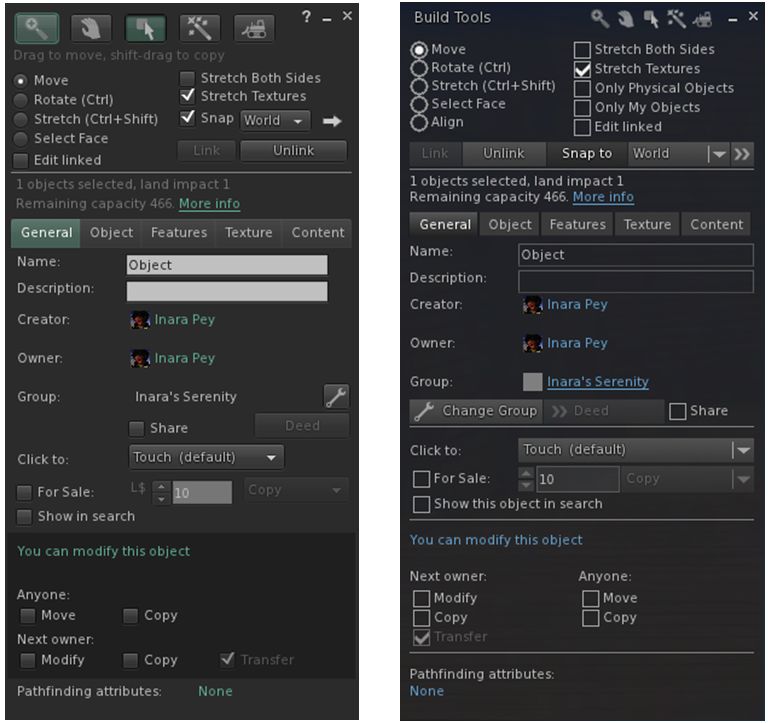
The official viewer’s Build floater Object tab (l) and Niran’s revised layout in black Dragon (r) – click any image for full size

Buttons with the Black Dragon floater are more obvious / clearer – radio buttons, for example are better defined when selected, what might be slightly confusing buttons (such as the spanner for changing the group attributes) are now clearly labelled, and buttons for pop-out options like the Grid Options are also more in keeping with the style used elsewhere in the viewer.
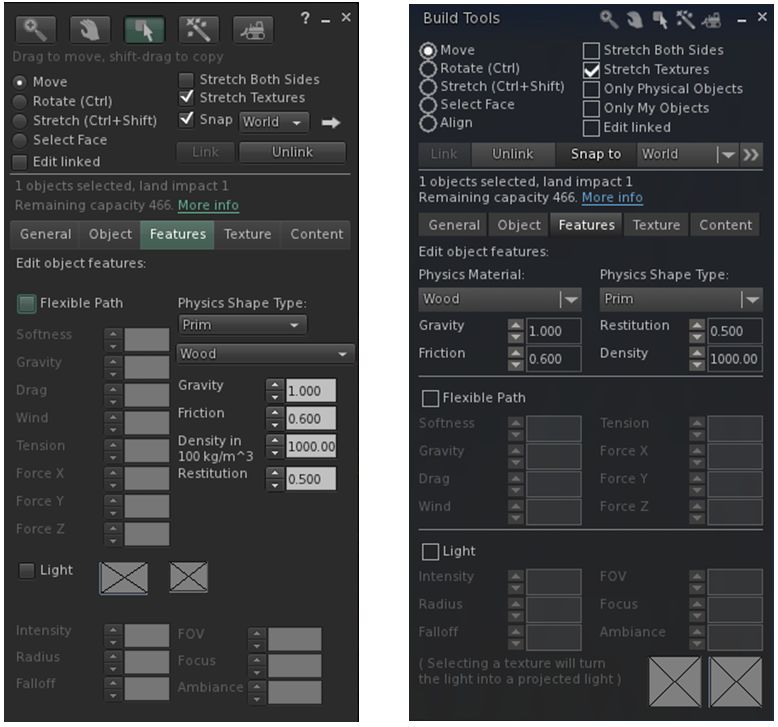
The official viewer's Build floater Features tab (l) and Niran's revised layout in black Dragon (r)
The official viewer’s Build floater Features tab (l) and Niran’s revised layout in black Dragon (r)

Some of the changes are a lot more noticeable in this regard than others – as with the General and Features tabs – both of which are compared to their official viewer equivalents in the images above – and the Texture tab. The changes to the Content and Object tabs are more subtle in nature – but given they were relatively straightforward to understand, then this is in keeping with making balanced changes.
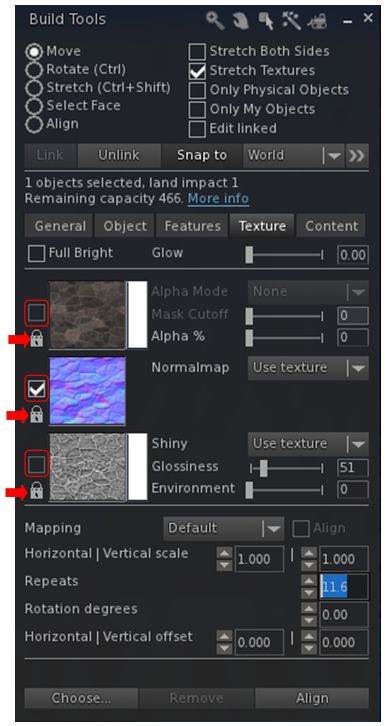
The Texture tab now has clearer map selection check boxes (outlined) and individual lock options for applying rotations, offsets, etc., via the spinners (arrowed)

In terms of the Texture tab, Niran has also revised the map selection indicator from a radio button to a check box – again adding consistency to the use of check boxes in the floater – and has also added an individual lock option to each of the three map types.

The check boxes actually do make it easier to see which of the three maps (diffuse, normal or specular) has been selected, while the three individual locks now allow greater flexibility in how changes to repeats, offsets and rotations are applied.

For example, if you want to have them applied across all three maps, regardless of which one you have selected, just click on the icons to lock them – any change make to the offsets, etc., on one map will automatically be applied to all three, regardless of which one you are working on.  If you want to change the offsets to each map independently of the others, simply unlock them (the default) – any changes made the offset, etc., spinners will only apply to the selected map. And you can also obviously have one set of rotations applied to two out of the three maps and level the third to be independently set.

The Textures tab also now makes use of sliders as well as spinners for applying  Glow, Transparency (Alpha %), Glossiness and Environment  to faces / objects, making it easy to apply quick changes before fine-tuning them with the spinners. It was actually two of these sliders that prompted the 2.4.2.7 release. While testing the 2.4.2.6 release for this review, I noted the Glow and Alpha % sliders were not working as expected. A quick IM to Niran, and he dived in and fixed the issue. The updates to these two sliders mark the only changes between 2.4.2.6 and 2.4.2.7.

Snapshot Floater Preview Update

The other significant update in the 2.4.2.6/7 release lies with the Unified Snapshot floater. In the 2.4.2.5 updates (which I reviewed here), Niran introduced a separate, resizeable preview panel as an alternative to the preview pane built-in to the floater. He’s now further revised the snapshot floater so that the built-in preview pane displays a high-resolution preview image, as with the alternative preview panel.
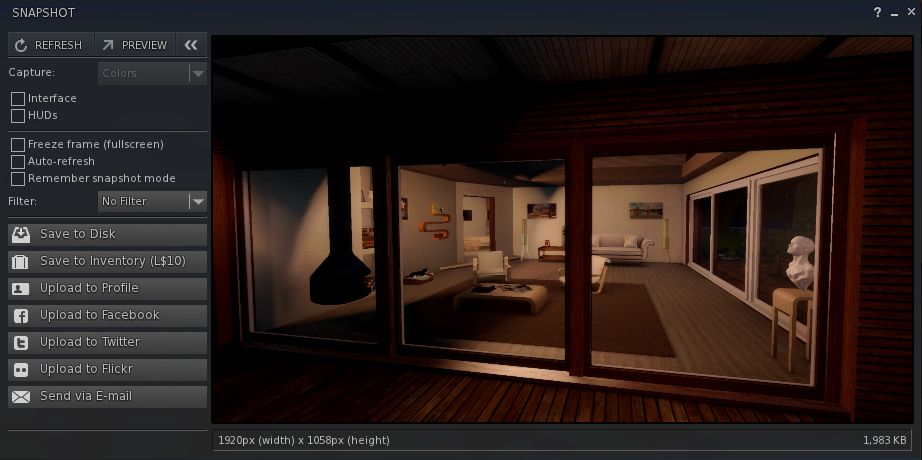
The resizeable preview panel for the snapshot floater now displays high-resolution preview images
The preview pane for the snapshot floater now displays high-resolution preview images

The new preview panel offers a much improved image, and further enhances an option a lot of people would like to see adopted by other viewers in some way.

Feedback

Overall, the core Build tools updates in these releases  – to me – do much to enhance the Build floater. As noted, some of the changes are a little more subtle than others, but overall they all work to present a far tidier set of tabs within the floater, and offer a more-or-less consistent set of control options in terms of the use of spinners, sliders, etc. One might have a small niggle with the colour swatch panels for the diffuse and specular maps perhaps not being obvious, but it’s really hard to see how else they could be presented without losing the order and layout Niran has achieved within the Texture tab.

Towards the top of this post, I pointed to these releases marking the beginning of the end of Niran’s active development of the Black Dragon viewer He’s aiming to slow things down from release 2.4.5). Since releasing the 2.4.2.7 update he has explained some of his reasons for this.

The important point to note here are the word “active” – hence my emphasis above. He’s not given up on everything within the viewer; he’s allowing himself space to refocus on other things than need attention (like that irritating thing we call “real life”) and to refresh himself. He’ll still be poking and tweaking things in the viewer in the future; it just won’t be his primary focus. And after the amount of time and effort he has poured into his viewers, frankly, he should be respected for his decision, and offered kudos for all he has offered the community.

In the meantime, I’ll continue to look forward to seeing what future updates to Black Dragon bring.
Additional Links

Black Dragon 2.4.2.5: snapshot floater and cinematic camera

Blackdragon logoOn Saturday, May 23rd, NiranV Dean released version 2.4.2.5 of his Black Dragon viewer, which brings with it three core updates:

  • Revisions to the Unified Snapshot floater
  • An experimental cinematic camera
  • A “lock” feature to synchronise map changes (diffuse, normal and specular) across all three channels simultaneously.

Unified Snapshot Floater Updates

The snapshot floater updates include:

  • An option to save the snapshot upload type
  • Automatic file format changes when switching to profile/inventory upload and back
  • Fixes for auto-refresh
  • Improved world freeze – the entire world is now frozen, and allows proper camming around.

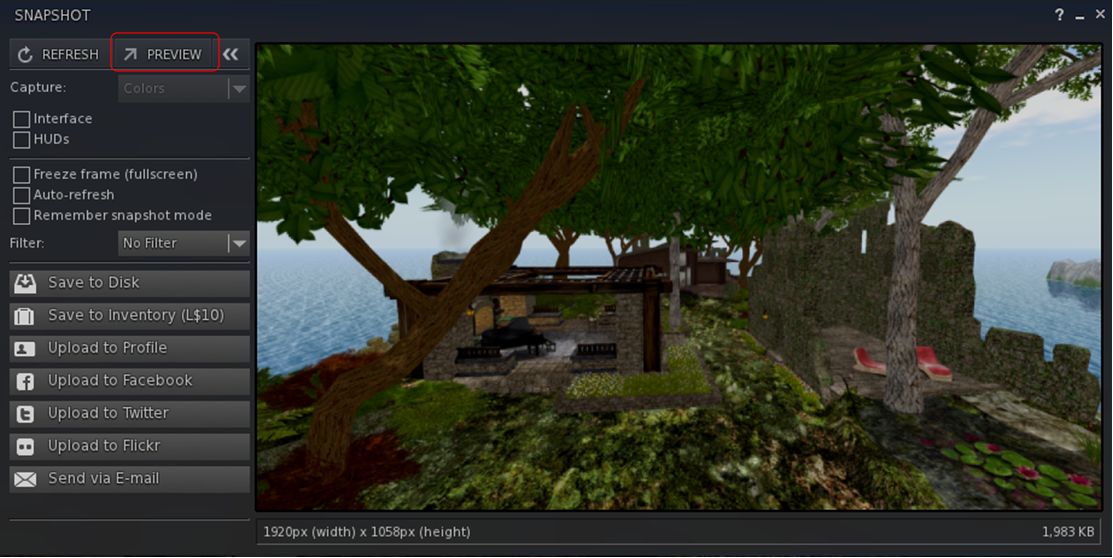
However, what is likely to find favour with a lot of users (assuming it is adopted by other viewers, including LL’s)  is the ability to now preview snapshots in a separate, resizeable texture panel.

The alternative snapshot preview panel can be accessed via the Preview button in the Unified Snapshot Floater

This is enabled by a new Preview button in the snapshot floater, as shown above. However, do note that this does not “tear off” the existing preview pane, but actually opens a separate panel, linked to the floater – the original preview pane will remain open as well, until such time as it is closed using the << button at the top of the snapshot floater. Also, as it is a separate panel, the resizeable preview panel must also be closed separately to the snapshot floater.

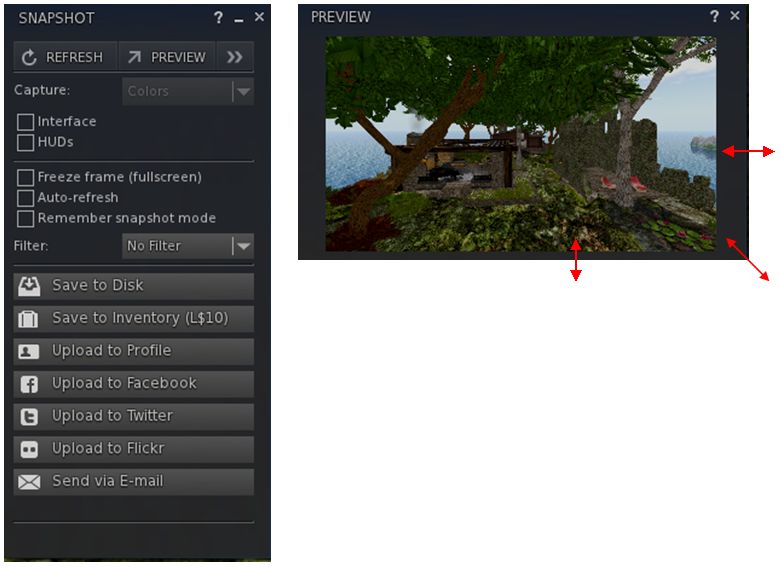
Once opened, the alternate preview panel can be resized by dragging from the sides, the top or bottom edge or from the corners to more readily suit your requirements. note also that in doing so, the image will retain the correct aspect ratio.

The additional preview panel can be resized via dragging from the top / bottom / sides / corners

I did encounter a slight problem with the updated snapshot floater – not with the new preview panel, but in the fact that the floater appears to be locked into saving images to disk in PNG format without my having changed any install defaults. On selecting either JPEG or BMP, the floater defaulted back to PNG.

Cinematic Camera

The Cinematic Camera is an experimental option, enabled through a debug setting, UseCinematicCamera. The camera will track head movements as you move – and is most effective if you’re using one of the Black Dragon over-the-shoulder third-person views. You’ll need to ensure your avatar’s head movement is free to follow the mouse as well.

If I’m honest, I didn’t have too much success playing with it – but that could easily be down to me doin’ it wrong. However, Niran has provided a video which may help to demonstrate things:

Texture Sync Lock

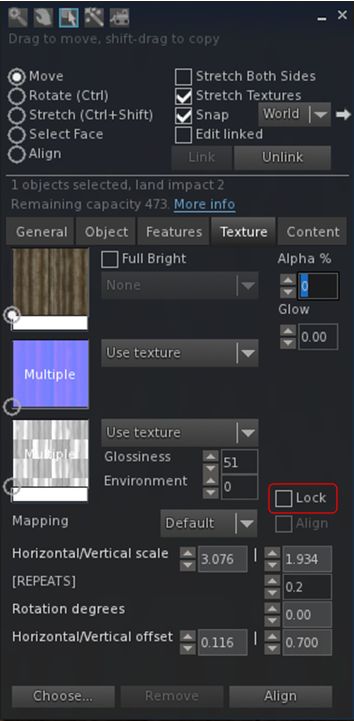
build-1The “Lock” option on the Texture tab of the Build floater operates in a similar manner to the Synchronise option found in the official viewer. When set, it ensures that changes made to the spinners for repeats, offsets and rotation on a texture are applied across all three materials maps.

This allows the viewer to use a single set of spinners for adjusting offsets, etc., against a set of maps applied to a surface / object and ensures they are applied across all three maps correctly.

Niran also provides some advice when using the Lock capability:

Note that this might cause the spinners and/or faces to revert sometimes, this is NORMAL behaviour, it’s due to lag which was already present long before this change (sadly). Usually happens if you use the spinners via mouse repeatedly, to prevent it most of the time you should type in your desired values directly and press enter ONCE then wait a bit.

Feedback

An interesting set of updates, and the ability to use a resizeable preview panel for snapshots could fine some popular support given some people have found the default preview panel size in the Unified Snapshot floater to be overwhelming. As such, it’ll be interesting to see how the Lab and other TPVs option to implement this particular change or not (I understand Niran will be contributing the updates to LL, if he has not already done so, as he did with the original Unified Snapshot floater code).

Note also that as well as the features outlined above, this release includes a number of fixes, updates and changes – please refer to the release notes for details of these.

Additional Links

2015 viewer release summaries: week 21

Updates for the week ending: Sunday, May 24th, 2015

This summary is published every Monday, and is a list of SL viewer / client releases (official and TPV) made during the previous week. When reading it, please note:

  • It is based on my Current Viewer Releases Page, a list of all Second Life viewers and clients that are in popular use (and of which I am aware), and which are recognised as adhering to the TPV Policy. This page includes comprehensive links to download pages, blog notes, release notes, etc., as well as links to any / all reviews of specific viewers / clients made within this blog
  • By its nature, this summary presented here will always be in arrears, please refer to the Current Viewer Release Page for more up-to-date information.

Official LL Viewers

LL Viewer Resources

Third-party Viewers

V3-style

  • Black Dragon updated to version 2.4.2.5 on May 23rd – core updates: updates unified snapshot floater; experimental cinematic camera (release notes)
  • Restrained Love updated to version 2.9.10 on May 19th, and then to version 2.9.11 on May 25th – core updates: bug fixes (release notes: 2.9.10 and 2.9.11)

V1-style

  •  No updates.

Mobile / Other Clients

  • No updates.

Additional TPV Resources

Related Links

UKanDo goes VMM with a beta update

logoThe UKanDo viewer, maintained by Connor Monaron updated to version 3.7.28.34230 on May 11th.

As the version number suggests, this brings the viewer to parity with the Lab’s 3.7.28 code base, and specifically with the Viewer-Managed Marketplace (VMM) functionality.

For those who may not recognise VMM, and keeping things relatively brief, the aim of the project is to enable merchants to manage the creation and management of Marketplace product listing through the viewer, bypassing the need to use the Merchant Outbox (and have copies of items stored on the Marketplace inventory servers) or using Magic Boxes.

It does this by adding a new Marketplace Listing panel to to viewer, which will eventually replace the Merchant Outbox entirely, and by adding additional back-end and web functionality which allows merchants to carry out a number of tasks associated with their Marketplace listings from within the viewer, and by enabling products to be delivered to customers directly from the Lab’s asset servers, rather than having to store them as separate inventory on the Marketplace servers.

Rather than go into a detailed explanation of all the functionality here, if you haven’t come across VMM before, please read my notes from the initial testing in 2014.

The Merchant Listing Panel for VMM, as see in the UKanDo beta, with some of my migrated items
The Merchant Listing panel for VMM, as see in the UKanDo beta, with some of my migrated items

The key point here is that, at the time of writing, VMM is still very much undergoing beta testing, and the viewer-side code has yet to reach a release candidate status in the official viewer, so the 3.7.28 release of UKanDo is slightly ahead of the curve – the Lab prefer that TPVs don’t release code which the Lab themselves have not issues in release candidate form.

To this end, Connor has clearly indicated this 3.7.28 release is a beta version of UKanDo, and the earlier 3.7.27 update remains available as the full release.

It’s also worth pointing out that initially, the current VMM beta was by invitation, so if you want to try the functionality either using the UKanDo beta or the Lab’s own project viewer, you’ll have to apply to join the beta via the link towards the bottom of your Merchant Home Page on the Marketplace.

All that said, I’ve been driving the VMM version of UKanDo over the last couple of days, using it to gradually convert my own modest store on the Marketplace from Direct Delivery to VMM (as shown in the image above right, taken as I got started), and have found absolutely no issues with it – not that I was actually expecting any.  Everything works smoothly, and updates made via UKanDo are accurately reflected when checked in the official VMM project viewer.

For Merchants who prefer using UKanDo over the official viewer, and who would like to try-out VMM as the Lab moves it gradually towards full deployment (which could occur in June 2015), the 3.7.28 presents an opportunity to do so.

Note that as a VMM beta release, the 3.7.28 update does not contain any other functional or other updates compared to the UKanDo 3.7.27 release.

VMM allows merchants to carry out some Marketplace listing related tasks from within the viewer (subject to how they have web browsing set-up) - here I'm editing a listing associated with an item in my Merchant Listing Panel
VMM allows merchants to carry out some Marketplace listing related tasks from within the viewer (subject to how they have web browsing set-up) – here I’m editing a listing associated with an item in my Merchant Listing panel – click for full size, if required

 Related Links

2015 viewer release summaries: week 20

Updates for the week ending: Sunday, May 17th, 2015

This summary is published every Monday, and is a list of SL viewer / client releases (official and TPV) made during the previous week. When reading it, please note:

  • It is based on my Current Viewer Releases Page, a list of all Second Life viewers and clients that are in popular use (and of which I am aware), and which are recognised as adhering to the TPV Policy. This page includes comprehensive links to download pages, blog notes, release notes, etc., as well as links to any / all reviews of specific viewers / clients made within this blog
  • By its nature, this summary presented here will always be in arrears, please refer to the Current Viewer Release Page for more up-to-date information.

Official LL Viewers

LL Viewer Resources

Third-party Viewers

V3-style

  • UKanDo updated on Windows to version 3.7.28.34230 Beta on May 11th – core updates: Viewer-Managed Marketplace – release notes

V1-style

  • Cool VL Viewer Stable branch updated to version 1.26.12.43, and the Experimental branch to version 1.26.13.12 both on May 16th (release notes)

Mobile / Other Clients

  • No updates.

Additional TPV Resources

Related Links

2015 viewer release summaries: week 19

Updates for the week ending: Sunday, May 10th, 2015

This summary is published every Monday, and is a list of SL viewer / client releases (official and TPV) made during the previous week. When reading it, please note:

  • It is based on my Current Viewer Releases Page, a list of all Second Life viewers and clients that are in popular use (and of which I am aware), and which are recognised as adhering to the TPV Policy. This page includes comprehensive links to download pages, blog notes, release notes, etc., as well as links to any / all reviews of specific viewers / clients made within this blog
  • By its nature, this summary presented here will always be in arrears, please refer to the Current Viewer Release Page for more up-to-date information.

Official LL Viewers

LL Viewer Resources

Third-party Viewers

V3-style

  • UKanDo updated on Windows to version 3.7.28.28106 on May 8th – core updates: viewer built to the new viewer tool chain (Linux build unchanged) – release notes

V1-style

  • Cool VL Viewer Stable branch updated to version 1.26.12.42, and the Experimental branch to version 1.26.13.11 both on May 9th (release notes)

Mobile / Other Clients

  • No updates.

Additional TPV Resources

Related Links