Lab issues notifications project viewer

secondlifeOn  Wednesday, July 8th, the Lab issued their notifications project viewer, which sees an overhaul of the way in which notifications – system, group, transaction, etc., are presented through the viewer.

The viewer has been in the works for a while, and is the direct request of a feature request put to the Lab by Aki Shichiroji back in 2012 (see BUG-8000), and which has more recently been working its way through the Lab’s work list to appear in project form on July 8th.

The release of the project viewer, version 3.8.1.303211, was accompanied by an official blog post on the subject, which reads in part:

The Notifications Project Viewer is an improvement for sorting your notifications. This new feature is based on your feedback: a notifications floater with four tabs sorting your incoming notifications into System, Transactions, Invitations, and Groups and allowing better interaction with them as well.  Those who deal with high volumes of money transactions, group notices, group invites, or inventory transfers now have a better way to review their messages and identify which notices need immediate attention.

The images below show the floater and its four tabs:

The new Notifications floater - see below for explanatory notes
The new Notifications floater – see below for explanatory notes

Multiple notifications within a tab are initially shown compressed (above left). Clicking on the down pointing arrow button for a specific notification (highlighted in red, above left) will expand that particular notification within the floater (above right), with scroll bars allowing you to scroll down through an individual notification or through the notifications within that tab.  Clicking the up point arrow button (highlighted in blue, above right) will compress an expanded notification.

As with the current notification system within the release viewer, individual notifications can be deleted from any tab by clicking the X button. There are also additional buttons within the panel for collapsing all expended notifications or deleting all notifications within the currently displayed tab (i.e. clicking Delete All with the System notifications tab will delete all notifications in that tab but not all of your notifications in general).

A further improvement to the way notifications are displayed is that a time stamp for when a notification was sent / received is now clearly visible, both in the collapsed and expanded views for all notifications. The presence of any attachment is also indicated by the use of a paper clip symbol.

Given this is a project viewer, the Lab is requesting feedback and bug reports via the Second Life JIRA.

A couple of issues have been filed already. One of these – BUG-9625 – points out that the notification floater currently fails to include any means of accepting a group invitation; the only way of accepting an invitation in the project viewer at present, is to click on the button displayed in the initial pop-up (which will still be displayed as usual).  Expect this to be created in due course as the project viewer is updated.

Also, do keep in mind this is a project viewer, and currently not intended for prime time use.
Related Links

2015 viewer release summaries: week 27

Updates for the week ending: Sunday, July 5th, 2015

This summary is published every Monday, and is a list of SL viewer / client releases (official and TPV) made during the previous week. When reading it, please note:

  • It is based on my Current Viewer Releases Page, a list of all Second Life viewers and clients that are in popular use (and of which I am aware), and which are recognised as adhering to the TPV Policy. This page includes comprehensive links to download pages, blog notes, release notes, etc., as well as links to any / all reviews of specific viewers / clients made within this blog
  • By its nature, this summary presented here will always be in arrears, please refer to the Current Viewer Release Page for more up-to-date information.

Official LL Viewers

  • Current Release version: 3.8.0.302622, June 30 – formerly the Experience RC viewer providing support for viewing and managing Experiences and for contributing content for Experiences download page, release notes
  • Release channel cohorts (See my notes on manually installing RC viewer versions if you wish to install any release candidate(s) yourself):
    • Attachment fixes RC viewer (Project Big Bird) updated to version 3.8.1.303130 on July 2nd – core updates: a number of fixes for various attachment issues (download and release notes)
  • Project viewers:
    • No updates.

LL Viewer Resources

Third-party Viewers

V3-style

V1-style

  • Cool VL Viewer Stable branch updated to version 1.26.12.49, and the Experimental branch to version 1.26.13.18, both on July 4th (release notes).

Mobile / Other Clients

  • No updates.

Additional TPV Resources

Related Links


UKanDo and Black Dragon get Experience Tools

Both UKanDo and Black Dragon have recently incorporated the Lab’s Experience tools, following their were promotion to release status in the official viewer on June 30th, 2015.

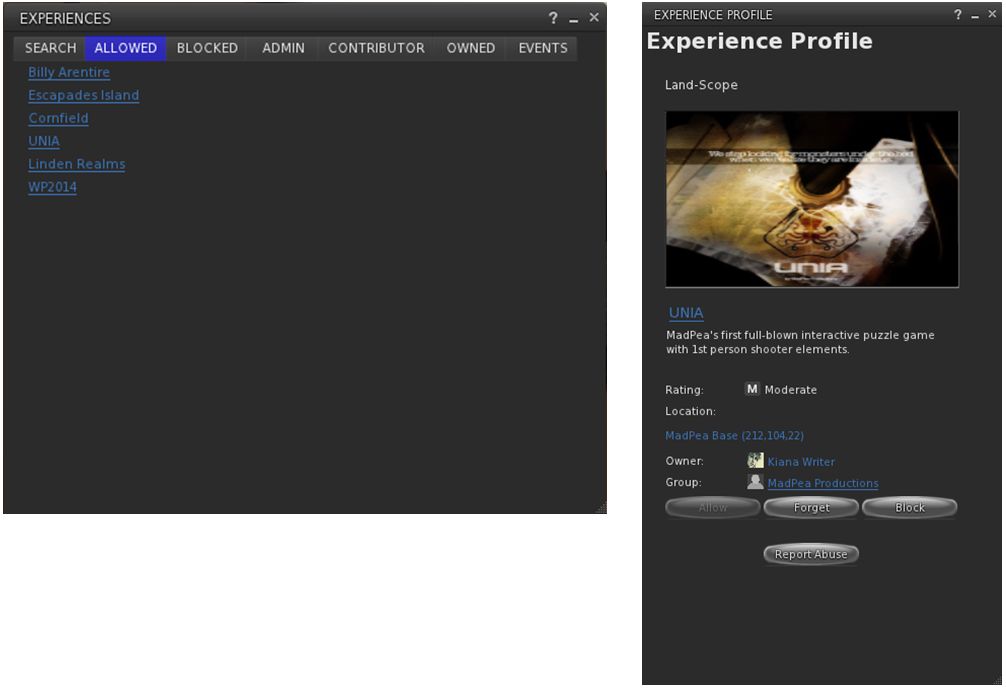
UKanDo arrived with Experience Tools on Thursday, July 2nd, with the release of version 3.8.0.28122. As with the official viewer, this adds the Experiences floater access to the ME menu, and also has the Region / Estate and About Land panel also updated with their respective Experiences tabs.

The Experiences floater and an Experience Profile as they appear in UKanDo with the default skin. The viewer also includes the Region / Estate and the About Land Experience Tools updates as well

In addition, as a part of this release, UKanDo updates to RLV 2.9.12, with the NaCl / Marine Kelley avatar shadow rendering updates for rigged mesh – see my article of RLV 2.9.12, available here.

UKanDo 3.8.0 also includes Marine Kelley's RLV 2.9.12 update, with the avatar shadow rendering debug setting to help with rendering performance when running with shadows enabled and surrounded by avatars using mesh bodies & other rigged mesh attachments
UKanDo 3.8.0 also includes Marine Kelley’s RLV 2.9.12 update, with the avatar shadow rendering debug setting to help with rendering performance when running with shadows enabled and surrounded by avatars using mesh bodies & other rigged mesh attachments

Black Dragon release 2.4.3.5 sees the Experiences floater added to Dragon > Edit menu. As with UKanDo, it also adds the Experiences tabs to the Region / Estate and About Land Floaters.

This release, which arrived on July 4th after a couple of hiccups with versions 2.4.3.3 and 2.4.3.4, also includes Niran’s July 3rd update, which focused on a complete RLVa update, as per the release notes for that version.

I’ve not had an opportunity to extensively drive either of these viewers; my time is a little squeezed at the moment, and I’m struggling to clear a backlog of work and bits. So, consider this more a heads-up than any attempt at a review.

Related Links

Dolphin viewer bows out of Second Life, Adams style

dolphin-logoSometimes it takes us humans quite some time to admit something to ourselves that we don’t want to admit, but eventually there’s no more putting it off.

It is with a heavy heart that I have to announce the end. It’s over. No more new Dolphin Viewer.

Thus opens a blog post dated June 22nd, from Lance Corrimal, which I am ashamed to admit I missed when it appeared.   It serves as an introduction to Lance officially announcing the end of all Dolphin viewer development / maintenance work at his end of things.

He goes on:

With my current RL job and all the travelling that I’m doing there are more exciting things to do with the little time I have to spend on SL and other hobbies, than maintaining a third-party viewer… especially when most of the “maintenance” involves fixing stuff that shouldn’t have been broken in the first place.

I have been porting a few of the things that used to be in Dolphin Viewer 3 to Firestorm in the last few weeks …  I invite the FS team to grab anything from there that they like.

TheDolphin Machinima Toolbox was one of the last additions to Dolphin to be release (in beta form), and held a lot of promise
The Dolphin Machinima Toolbox was one of the last additions to Dolphin to be release (in beta form), and held a lot of promise

This is sad news; over the years Lance had built the Dolphin viewer into an excellent offering (it was my second viewer of choice of a good while). But time has conspired against him, even though he did attempt to get the viewer back on track (and in doing so started implementing some nice additions, such as the Machinima Toolbox, seen on the right).

But the viewer is very much a living, evolving things, and playing catch-up, even with the best will in the world, can become increasingly hard (and probably more than a little demotivating when the “to do” list constantly remains longer than the “done” list). This being the case, we can hardly blame Lance for wanting to spend what free time he has to devote to SL in enjoying things in-world that he finds fun and relaxing; I know if I were in his shoes, I’d have given up a long time ago.

Lance closes his blog post with a paraphrase of a Douglas Adams quote, saying, “Goodbye, and thanks for all the fish!”

I’ll add a small response of my own, “thanks, Lance, for all of your work over the years. May the wind be always be at your back!”

With thanks for the pointer to Nalates Urriah

Restrained Love 2.9.12: rendering rigged mesh and shadows

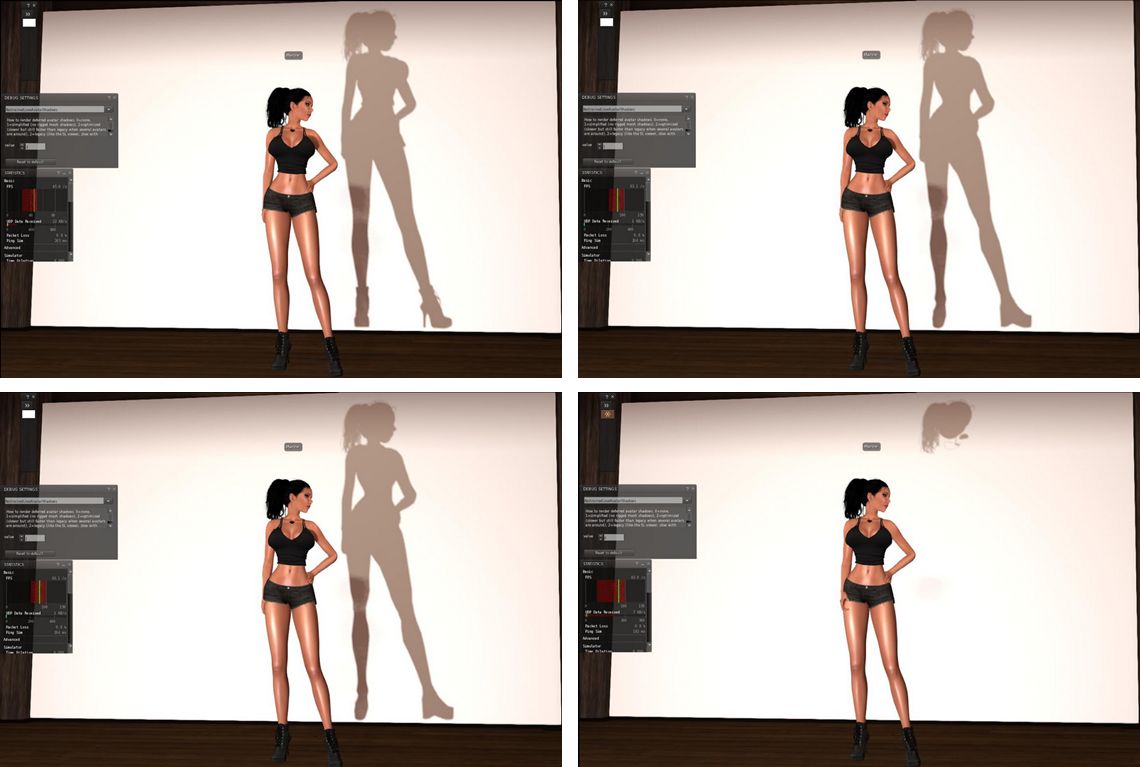
Avatar shadows as see using the debug, top left; rigged mesh avatar body seen in default avatar shadow rendering (debug setting 3); Top right: as seen with the debug set to 2 (Chalice Yao's adjustments; bottom left: as seen with the debug set to 1, showing the system avatar shadow, rather than the rigged mesh body shadow; bottom right: the setting reduced to 0, only unrigged attachment shadows are rendered (images via Marine Kelley)
Avatar shadows as see using the debug, top left; rigged mesh avatar body seen in default avatar shadow rendering (debug setting 3); Top right: as seen with the debug set to 2 (Chalice Yao’s adjustments; bottom left: as seen with the debug set to 1, showing the system avatar shadow, rather than the rigged mesh body shadow; bottom right: the setting reduced to 0, only unrigged attachment shadows are rendered – see below for details (images via Marine Kelley)

The latest version of RLV appeared on Friday, June 26th. Version 2.9.12 brings with it an attempt by Marine Kelley to lighten the load placed on your GPU when rendering complex rigged meshes (such as avatar bodies) when running with shadows enabled in the viewer.

In her notes accompanying the release, Marine states:

I have become a mesh body user not long ago, and like every mesh body user, I quickly found out that having dynamic shadows activated while wearing a complex mesh body (Maitreya which is my choice, but also Eve, Belleza, Slink, Abar, TMP…) totally kills the FPS (Frames Per Second, the measure of rendering speed). Like, it divides them by half. It was so bad that I had to turn the shadows off, and I’m sure I’m not the only one.

I knew it was due to the avatar shadows, simply by looking at the Fast Timers in-world (press Ctrl-Shift-9 to show them). A little digging in it and you see “Avatar Shadows” in plain letters as the FPS hog. In fact, this was due specifically to complex rigged mesh rendering, the FPS slowdown wasn’t due to unrigged attachments or anything like that. And since mesh bodies are among the most complex rigged mesh around, they kind of made that issue more obvious. And over time, more and more people switch to mesh bodies, so something had to be done.

Regular readers here know that something is being done at the Lab’s end of things, with the forthcoming introduction of Avatar Complexity. This has the advantage that it takes into account other elements within avatars that can push up rendering complexity and thus reduce performance, such as over-use of very high resolution textures, etc. This disadvantage is that people will have to get used to having Jelly Baby avatars around themselves, which may not be to everyone’s liking.

As noted, Marine’s aim is to allow those people who have previously been able to run the viewer with shadows enabled, but who are finding it impossible to do so when in locations with a number of complex avatars present due to the performance hit they’re taking, to be able to do so again by reducing the hit taken by their system.

As she acknowledges in her release notes, the original idea actually came from Chalice Yao, who has been poking at things with her NaCl viewer. With RLV 2.9.12, Marine adds what she believes to be further refinements to Chalice’s work, which in turn may feed back in to NaCl.

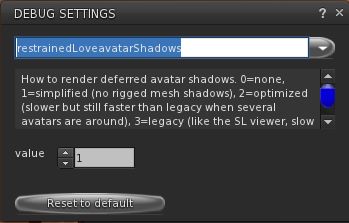
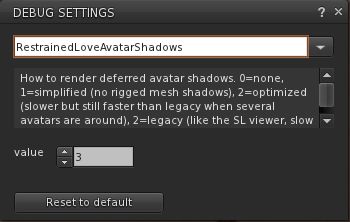
The RestrainedLoveAvatarShadows debug setting in RLV 2.9.12

Essentially, Marine has added a debug setting to RLV, RestrainedLoveAvatarShadows, accessed via the Debug settings floater (under the Advanced menu).

The debug offers four settings (3 down to 0) which offer different levels of rendering avatar shadows, thus:

  • 3- the default (what Marine calls “legacy”) rendering of avatar shadows commonly seen in viewers: an exact rendering of avatar shadows with rigged and unrigged attachments, and which recognises alpha masks
  • 2- Chalice Yao’s initial adjustments to avatar shadow rendering. Said to simplify the shadow rendering to offer noticeable performance improvements when running in locations with a number of complex avatars
  • 1 – render simplified avatar shadows. The first of Marine’s additions to Chalice’s code, this ignores any alpha masking of the system avatar shape, causing its shadow to be rendered, along with the shadows of unrigged attachments. All shadows associated with rigged attachments (e.g. mesh bodies, etc.), are ignored
  • 0 – don’t render avatar shadows. This will leave avatars with no shadow at all, with the exception of unrigged attachments, therefore offering the biggest potential boost in performance.

Marine offers a series of images demonstrating the resultant shadows, as shown at the top of this article, together with the FPS boosts she sees. The latter may be too small to read in the image collection produced here, so I recommend reading Marine’s blog post for full details.

As I don’t have anything other than a demo fitted mesh avatar body, and also have a fairly high-spec system which includes a GTx 970 with 4GB of memory which handles most situations pretty well, I’ve not been able to practically test how all of this plays out.

However, given this solution is aimed at reducing performance hits when shadows are enabled in the viewer, it’s perhaps not going to suit everyone. If your system already struggles with handling shadow rendering regardless of the complexity of any avatars around you, for example, you may not gain much from using the debug settings. But if you are an TLV user who finds Marine’s situation as quoted towards the top of this article to be familiar, this update a go could well help you. Either way, the one way to find out is to download RLV 2.9.12 and give it a go.

Additional Links

2015 viewer release summaries: week 26

Updates for the week ending: Sunday, June 28th, 2015

This summary is published every Monday, and is a list of SL viewer / client releases (official and TPV) made during the previous week. When reading it, please note:

  • It is based on my Current Viewer Releases Page, a list of all Second Life viewers and clients that are in popular use (and of which I am aware), and which are recognised as adhering to the TPV Policy. This page includes comprehensive links to download pages, blog notes, release notes, etc., as well as links to any / all reviews of specific viewers / clients made within this blog
  • By its nature, this summary presented here will always be in arrears, please refer to the Current Viewer Release Page for more up-to-date information.

Official LL Viewers

LL Viewer Resources

Third-party Viewers

V3-style

  • Restrained Love Viewer updated to version 2.9.12 on June 26th – core updates: shadow rendering options for fitted mesh bodies (release notes)

V1-style

  • Cool VL Viewer Stable branch updated to version 1.26.12.48, and the Experimental branch to version 1.26.13.17, both on June 27th (release notes).

Mobile / Other Clients

  • No updates.

Additional TPV Resources

Related Links