2016 viewer release summaries: week 21

Updates for the week ending Sunday, May 29th

This summary is published every Monday, and is a list of SL viewer / client releases (official and TPV) made during the previous week. When reading it, please note:

  • It is based on my Current Viewer Releases Page, a list of all Second Life viewers and clients that are in popular use (and of which I am aware), and which are recognised as adhering to the TPV Policy. This page includes comprehensive links to download pages, blog notes, release notes, etc., as well as links to any / all reviews of specific viewers / clients made within this blog
  • By its nature, this summary presented here will always be in arrears, please refer to the Current Viewer Release Page for more up-to-date information.

Official LL Viewers

  • Current Release version: 4.0.5.315117 (dated May 11), May 18th – no change: formerly the Quick Graphics RC viewer download page, release notes
  • Release channel cohorts (See my notes on manually installing RC viewer versions if you wish to install any release candidate(s) yourself):
    • Maintenance RC viewer, version 4.0.6.315551 release on May 23 – a modest but useful set of 24 fixes and updates to the viewer (download and release notes)
    • Inventory Message RC viewer updated to version 4.0.6.315555 on May 23 – removal of deprecated and unused UDP inventory messaging mechanisms from the viewer (download and release notes)
  • Project viewers:
    • Project Bento (avatar skeleton extensions) updated to version 5.0.0.315657 on May 26 – this build includes the “reset Skeleton” option and additional slider updates  (download and release notes).

LL Viewer Resources

Third-party Viewers

V4-style

  • No updates.

V1-style

  • Cool VL viewer Stable branch updated to version 1.26.18.7 and the Experimental branch updated to version 1.26.19.9, both on May 28th (release notes).

Mobile / Other Clients

  • No updates.

Additional TPV Resources

Related Links

2016 viewer release summaries: week 20

Updates for the week ending Sunday, May 22nd

This summary is published every Monday, and is a list of SL viewer / client releases (official and TPV) made during the previous week. When reading it, please note:

  • It is based on my Current Viewer Releases Page, a list of all Second Life viewers and clients that are in popular use (and of which I am aware), and which are recognised as adhering to the TPV Policy. This page includes comprehensive links to download pages, blog notes, release notes, etc., as well as links to any / all reviews of specific viewers / clients made within this blog
  • By its nature, this summary presented here will always be in arrears, please refer to the Current Viewer Release Page for more up-to-date information.

Official LL Viewers

  • Current Release version: 4.0.5.315117 (dated May 11), May 18th – formerly the Quick Graphics RC viewer download page, release notes
  • Release channel cohorts (See my notes on manually installing RC viewer versions if you wish to install any release candidate(s) yourself):
    • Inventory Message RC viewer, version 4.0.5.315019, released on May 16th – removal of deprecated and unused UDP inventory messaging mechanisms from the viewer (download and release notes)
  • Project viewers:
    • No updates.

LL Viewer Resources

Third-party Viewers

V4-style

V1-style

  • Cool VL viewer Stable branch updated to version 1.26.18.6 and the Experimental branch updated to version 1.26.19.8, both on May 21st (release notes).

Mobile / Other Clients

  • No updates.

Additional TPV Resources

Related Links

Avatar Complexity and Graphics Presets in Second Life

Avatar Complexity provides users with the adbility to
Avatar Complexity is a means to help people who may suffer from performance issues in crowd areas

On Wednesday, May 18th, Linden Lab promoted the long-awaited Quick Graphics viewer to de facto release status. This viewer includes two important new features:

  • The updated Avatar Complexity settings
  • The ability to create, save and load different groups of graphics settings quickly and easily.

Avatar Complexity

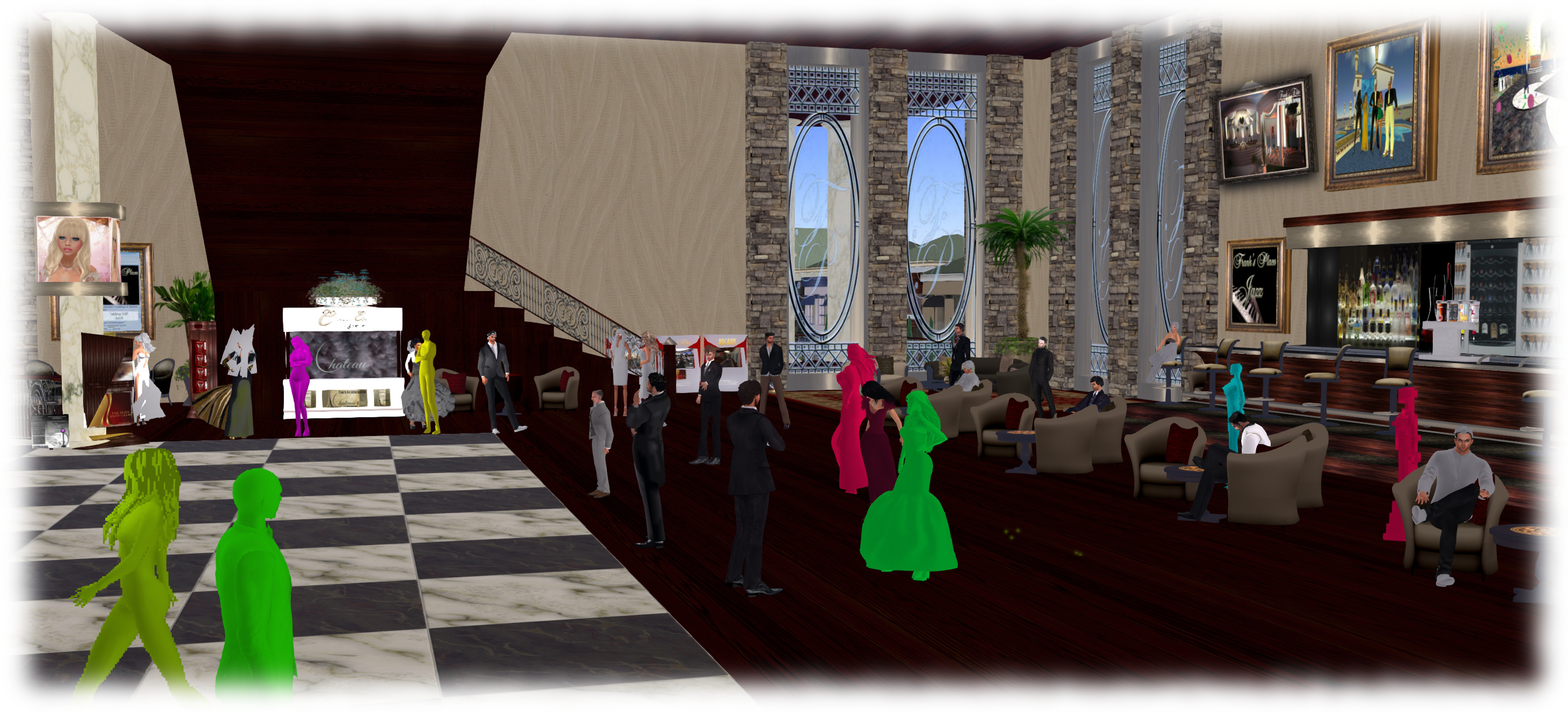
As avatars can often be the single biggest impact on the viewer in terms of rendering, particularly in crowded places, so  Avatar Complexity adds a new slider to the viewer which can be used to set a level above which avatars requiring a lot of processing will appear as a solid colour – the casual term to refer to them being “Jelly Dolls” – greatly reducing the load placed on a system compared to having to render them in detail, so improving performance.

The idea is that you can adjust the setting according to circumstance, so that when in a crowded area with lots of avatars, you can dial down the Avatar Complexity setting, found in Preferences > Graphics (and in the Advanced Settings floater), with the result that more of the avatars around you are rendered as solid colours, reducing the load on your graphics card and system, thus improving performance. Then, in quieter areas, the setting can be dialled back up, allowing more avatars to fully render in your view.

Note: this only applies to other avatars in your world view: your own avatar will always fully render in your view.

The Avatar Maximum Complexity slider sets a threshold on avatar rendering by your viewer. Any avatars in your view exceeding this value will be rendered as a
The Avatar Maximum Complexity slider sets a threshold on avatar rendering by your viewer. Any avatars in your view exceeding this value will be rendered as a “Jelly Doll”, sans attachments

If you have a good system with a high-end graphics car, you can set the value on the slider quite high and thus ensure all avatars render fully for you wherever you are.

Note: You can sett the Avatar Maximum Complexity to “No Limit”. However, this is not entirely recommended. some irritants in Second Life still use worn graphics crashers to overload GPUs and crash the viewer. If you set Avatar Maximum complexity to “No Limit”, then such tools, should you ever encounter an irritant using one, will still be effective; so it’s better to set a reasonable high value, leaving your viewer with a cut-off point which should defeat their efforts in crashing you.

There are a few other points to note with Avatar Complexity:

  • You can opt to always render or to not render avatars around you, regardless of your Avatar Maximum Complexity setting by right-clicking on them and selecting your desired action from the context menu
    You can opt to always render or to not render avatars around you, regardless of your Avatar Maximum Complexity setting by right-clicking on them and selecting your desired action from the context menu

    To help you understand how complex you own avatar is, every time you change your appearance, each time you change the appearance of your avatar, a small notice with your new complexity value will appear in the upper right of your display for a few seconds

  • The complexity value of your avatar is transmitted to each simulator as you travel around Second Life. In return, you’ll get a brief notice in the upper right of your screen telling you approximately how many of those around you are (or are not) rendering you because of your complexity
  • If you have a friend or friend you wish to see fully rendered no matter how low you dial Avatar Maximum Complexity (while out at a club, for example, where it may be beneficial to set a lower complexity threshold), you can right-click on those individuals and select “Render Fully” from the context menu
  • Similarly, and if you prefer, you can selectivity render avatars in your view as grey imposters, by right-clicking on them and selecting “Do Not Render” from the context menu.

Note: Both “Render Fully” and “Do Not Render” will only apply during your current log-in session; the options are not persistent between re-logs.

To help people understand Avatar Complexity, the Lab has produced the following:

  • A blog post to accompany the promotion of the Quick Graphics viewer to release status
  • An Avatar Complexity Knowledge Base article
  • A video tuTORial, which I’ve embedded below.

https://www.youtube.com/watch?v=PxWrqd0o3dc

Continue reading “Avatar Complexity and Graphics Presets in Second Life”

2016 viewer release summaries: week 19

Updates for the week ending Sunday, May 15th

This summary is published every Monday, and is a list of SL viewer / client releases (official and TPV) made during the previous week. When reading it, please note:

  • It is based on my Current Viewer Releases Page, a list of all Second Life viewers and clients that are in popular use (and of which I am aware), and which are recognised as adhering to the TPV Policy. This page includes comprehensive links to download pages, blog notes, release notes, etc., as well as links to any / all reviews of specific viewers / clients made within this blog
  • By its nature, this summary presented here will always be in arrears, please refer to the Current Viewer Release Page for more up-to-date information.

Official LL Viewers

  • Current Release version: 4.0.4.314579 (dated April 28) – no change (download, release notes)
  • Release channel cohorts (See my notes on manually installing RC viewer versions if you wish to install any release candidate(s) yourself):
    • Quick Graphics RC viewer updated to version 4.0.5.315117 on May 11th – comprises the graphics pre-sets capability and the new Avatar Complexity settings (download and release notes).
  • Project viewers:
    • No updates.

LL Viewer Resources

Third-party Viewers

V4-style

  • No updates.

V1-style

  • Cool VL viewer Stable branch updated to version 1.26.18.5 and the Experimental branch updated to version 1.26.19.7, both on May 14th (release notes).

Mobile / Other Clients

  • No updates.

Additional TPV Resources

Related Links

2016 viewer release summaries: week 18

Updates for the week ending Sunday, May 8th

This summary is published every Monday, and is a list of SL viewer / client releases (official and TPV) made during the previous week. When reading it, please note:

  • It is based on my Current Viewer Releases Page, a list of all Second Life viewers and clients that are in popular use (and of which I am aware), and which are recognised as adhering to the TPV Policy. This page includes comprehensive links to download pages, blog notes, release notes, etc., as well as links to any / all reviews of specific viewers / clients made within this blog
  • By its nature, this summary presented here will always be in arrears, please refer to the Current Viewer Release Page for more up-to-date information.

Official LL Viewers

  • Current Release version: 4.0.4.314579 (dated April 28) – formerly the Maintenance RC viewer download, release notes
  • Release channel cohorts (See my notes on manually installing RC viewer versions if you wish to install any release candidate(s) yourself):
    • No updates.
  • Project viewers:
    • Project Bento (avatar skeleton extensions) updated to version 5.0.0.314884 on May 5th – several updates related to joint offsets and meshes and slider changes  (download and release notes)

LL Viewer Resources

Third-party Viewers

V4-style

  • No updates.

V1-style

  • Cool VL viewer Stable branch updated to version 1.26.18.4 and the Experimental branch updated to version 1.26.19.6, both on May 7th (release notes).

Mobile / Other Clients

  • No updates.

Additional TPV Resources

Related Links

2016 viewer release summaries: week 17

Updates for the week ending Sunday, May 1st

This summary is published every Monday, and is a list of SL viewer / client releases (official and TPV) made during the previous week. When reading it, please note:

  • It is based on my Current Viewer Releases Page, a list of all Second Life viewers and clients that are in popular use (and of which I am aware), and which are recognised as adhering to the TPV Policy. This page includes comprehensive links to download pages, blog notes, release notes, etc., as well as links to any / all reviews of specific viewers / clients made within this blog
  • By its nature, this summary presented here will always be in arrears, please refer to the Current Viewer Release Page for more up-to-date information.

Official LL Viewers

  • Current Release version: 4.0.3.312816 (dated March 23) – no change
  • Release channel cohorts (See my notes on manually installing RC viewer versions if you wish to install any release candidate(s) yourself):
    • Maintenance RC viewer updated to version 4.0.4.314579 on April 28th – multiple fixes and improvements (download and release notes)
    • Quick Graphics RC viewer updated to version 4.0.4.314426 on April 26th – contains Avatar Complexity and Graphics Quicksets (download and release notes)
  • Project viewers:
    • No Updates.

LL Viewer Resources

Third-party Viewers

V4-style

V1-style

Mobile / Other Clients

  • No updates.

Additional TPV Resources

Related Links