This summary is published every Monday, and is a list of SL viewer / client releases (official and TPV) made during the previous week. When reading it, please note:
It is based on my Current Viewer Releases Page, a list of all Second Life viewers and clients that are in popular use (and of which I am aware), and which are recognised as adhering to the TPV Policy. This page includes comprehensive links to download pages, blog notes, release notes, etc., as well as links to any / all reviews of specific viewers / clients made within this blog
By its nature, this summary presented here will always be in arrears, please refer to the Current Viewer Release Page for more up-to-date information.
Official LL Viewers
Current Release version: 4.0.5.315117 (dated May 11), May 18th – no change: formerly the Quick Graphics RC viewer download page, release notes
Cool VL viewer Stable branch updated to version 1.26.18.11 and the Experimental branch updated to version 1.26.19.13, both on June 25th (release notes)
This summary is published every Monday, and is a list of SL viewer / client releases (official and TPV) made during the previous week. When reading it, please note:
It is based on my Current Viewer Releases Page, a list of all Second Life viewers and clients that are in popular use (and of which I am aware), and which are recognised as adhering to the TPV Policy. This page includes comprehensive links to download pages, blog notes, release notes, etc., as well as links to any / all reviews of specific viewers / clients made within this blog
By its nature, this summary presented here will always be in arrears, please refer to the Current Viewer Release Page for more up-to-date information.
Official LL Viewers
Current Release version: 4.0.5.315117 (dated May 11), May 18th – no change: formerly the Quick Graphics RC viewer download page, release notes
Maintenance RC viewer updated to version 4.0.6.316614 on June 16th – fixes and updates (download and release notes)
Project viewers:
Project VLC Media Plugin Viewer updated to version 4.0.6.316258, on June 15th – replaces the QuickTime media plugin for the Windows version of the viewer with one based on LibVLC (download and release notes)
Cool VL viewer Stable branch updated to version 1.26.18.10 and the Experimental branch updated to version 1.26.19.12, both on June 18th (release notes)
Singularity Windows (32/64-bit) and Linux 64-bit updated to version 1.8.7.6861 on Thursday, June 16 (release notes)
Thursday, June 16th saw the first full release of Singularity in almost two years, with version 1.8.7.6861being offered for download.
As the release notes explain, the delay in updates for the viewer have been due to a number of reasons – not the least of which was the sad passing of Latif Khalifa (to whom this release is dedicated), and also the departure of one of the viewers core developers for pastures new. There have also be various infrastructure and hardware issues which have frustrated attempts at update.
The new release is currently for Windows 32-bit and 64-bit, and Linux 64-bit only, The team hopes to get the Mac version back on track as well, and are currently seeking a Mac developer to help with this.
Given the length of time since the last full release, there have obviously been a lot of changes, including getting back towards parity with many of the Lab’s own updates, as well as singularity’s own bug fixes and the adoption of elements from Alchemy.
As usual, I don’t propose giving an in-depth review of all the changes to the viewer here, but will attempt to highlight some of the more significant.
Lab-derived Changes
Tool Chain Update
Perhaps the most significant change with this release is under-the-hood. Singularity is now built using the latest tools and libraries recommended by Linden Lab. For Windows, this means that with the 1.8.7 release, the viewer no longer supports Windows XP. It also means that when the Mac version of the viewer is updated, Singularity will no longer support anything earlier than OSX 10.7 going forward.
TLS 1.2 Support
Singularity 1.8.7 is TLS 1.2 complaint, meaning you can use the built-in web browser to make LindeX transactions or SL marketplace purchases if you so wish.
Hover Height
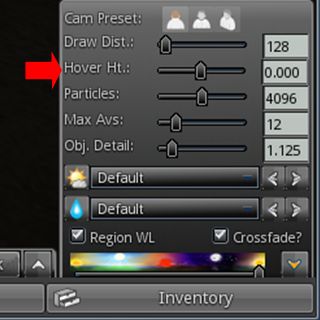
The Hover height slider is available via the Quick Prefs panel
The Lab’s Hover Height functionality has been added to the Singularity Quick Pref panel (click the UP arrow button, lower right-hand corner of the viewer window). As per the official Hover Height it works to a range of +/- 2 metres.
Independent of Hover Height, but a little similar in nature and so worth mentioning here is a new /hover command, which is described as “supporting values of -50 through 50”, however, during testing on Aditi, I found that the maximum height by which I was moved was around 5 metres, regardless of anything set above that. I therefore assume the release notes should read “supporting values of -5.0 through 5.0” – although admittedly I’ve not referred this back to the Singularity developers for confirmation.
Other Lab-Driven Updates
Latest inventory protocol (AISv3) support has been merged in to maintain future SL inventory handling compatibility
QtWebkit browser has been replaced with a Chromium variant
The SLVoice plug-in (Vivox) has been updated to parity with the SL viewer
Server-Side Baking (avatar appearance has been updated
Avatar rendering information is now reported to the simulator (although the local complexity limit slider has not been implemented in Preferences > Graphics) so this is not a full Avatar Complexity implementation).
Preferences Updates
Input and Camera
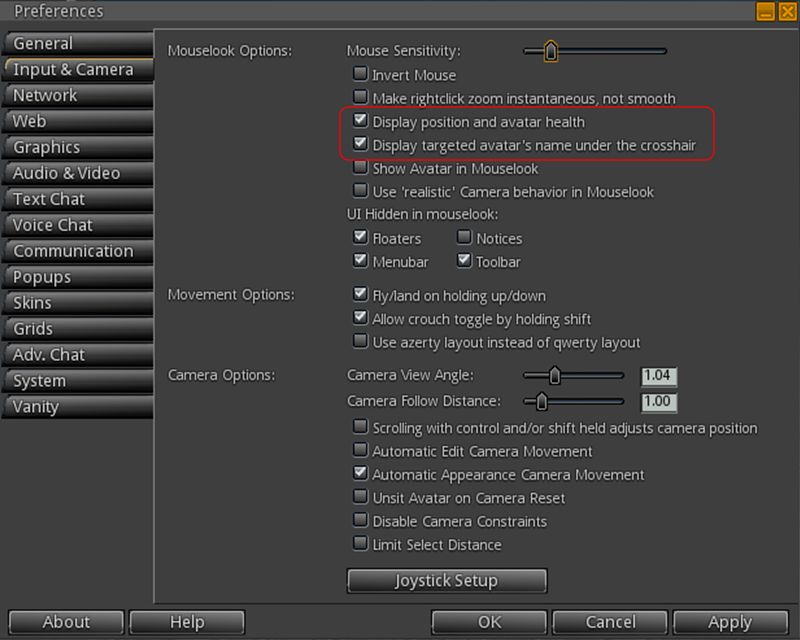
For combat enthusiasts, Preferences > Input and Camera includes two new options:
Display targeted avatar’s name under the crosshair
Display position and avatar health (your own avatar, in damage-enabled regions)
The new Mouselook options in Preferences > Input & Camera
Communication Chat Preferences Updates
Preferences > Communications: you can now select which conference calls to accept / block (Accept all, accept Friends Only, Block all)
Preferences > Adv. Chat > Chat UI allows you to select displaying user names, display name, display name with user names or user names with display names from a drop-down list
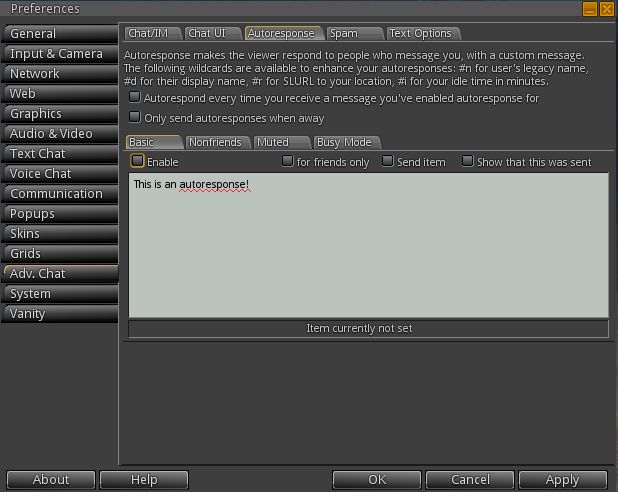
Preferences > Adv. Chat > Autoresponse now splits auto response options into separate sub-tabs. Also, autoresponse options can now be selected via the World menu > Status sub-menu
Revised auto response options layout
Adv Chat > Spam includes a new option to block LM offers.
This summary is published every Monday, and is a list of SL viewer / client releases (official and TPV) made during the previous week. When reading it, please note:
It is based on my Current Viewer Releases Page, a list of all Second Life viewers and clients that are in popular use (and of which I am aware), and which are recognised as adhering to the TPV Policy. This page includes comprehensive links to download pages, blog notes, release notes, etc., as well as links to any / all reviews of specific viewers / clients made within this blog
By its nature, this summary presented here will always be in arrears, please refer to the Current Viewer Release Page for more up-to-date information.
Official LL Viewers
Current Release version: 4.0.5.315117 (dated May 11), May 18th – no change: formerly the Quick Graphics RC viewer download page, release notes
Maintenance RC viewer updated to version 4.0.6.316312 on June 10 – fixes and updates and a much better set of release notes (download and release notes)
Project viewers:
Project Bento viewer updated to version 5.0.0.316366 on June 10th – bug fixes (download and release notes)
Project Visual Outfits Browser viewer, version 4.0.6.316123, released on June 6th – a means to visually preview your outfits through the Appearance panel (download and release notes)
Cool VL viewer Stable branch updated to version 1.26.18.9 and the Experimental branch updated to version 1.26.19.11, both on June 11th (release notes).
This summary is published every Monday, and is a list of SL viewer / client releases (official and TPV) made during the previous week. When reading it, please note:
It is based on my Current Viewer Releases Page, a list of all Second Life viewers and clients that are in popular use (and of which I am aware), and which are recognised as adhering to the TPV Policy. This page includes comprehensive links to download pages, blog notes, release notes, etc., as well as links to any / all reviews of specific viewers / clients made within this blog
By its nature, this summary presented here will always be in arrears, please refer to the Current Viewer Release Page for more up-to-date information.
Official LL Viewers
Current Release version: 4.0.5.315117 (dated May 11), May 18th – no change: formerly the Quick Graphics RC viewer download page, release notes
Maintenance RC viewer updated to version 4.0.6.315924 release on June 2 – fixes and updates and a much better set of release notes (download and release notes)
Project viewers:
Project VLC Media Plugin Viewer version 4.0.6.316087, released on June 3rd – replaces the QuickTime media plugin for the Windows version of the viewer with one based on LibVLC (download and release notes)
Lumiya is an Android client for Second Life which is really quite remarkable. I’ve followed its development through these pages at length since it first appeared back in 2012, all the way through to the most recent 2.6 iterations; and while things have been quiet for a while, rest assured, development work is continuing, although developer Alina Lyvette has been very caught-up with physical world matters.
But did you know you can also run Lumiya on Windows*?
I suspect the responses to this question would be a combination of “No,” and “Why would I want it to?” The former is to be expected, and the latter not unreasonable; after all if you have a computer capable of running the Second Life viewer reasonably well why would you want to try anything else?
One possible “why” might be if you have a relatively low-end laptop you use when on the move, and would like to use it on occasion to access SL, but don’t want to meet the costs involved in running Bright Canopy’s (very excellent) service (which I’ve also covered in these pages), and would prefer something bigger than the average android device screen when accessing SL.
While I’ve not played at length with things, I did come across an Android emulator called Bluestacks which runs on the PC, and used to be available for Mac*. It makes running Lumiya on Windows a breeze in four easy steps:
Download and run the Bluestacks installer
Run the Bluestacks player and sync it to your Google Android account
Run Google Play and install Lumiya (note the app does have a one-off purchase fee if you have not previously installed it)
Launch Lumiya.
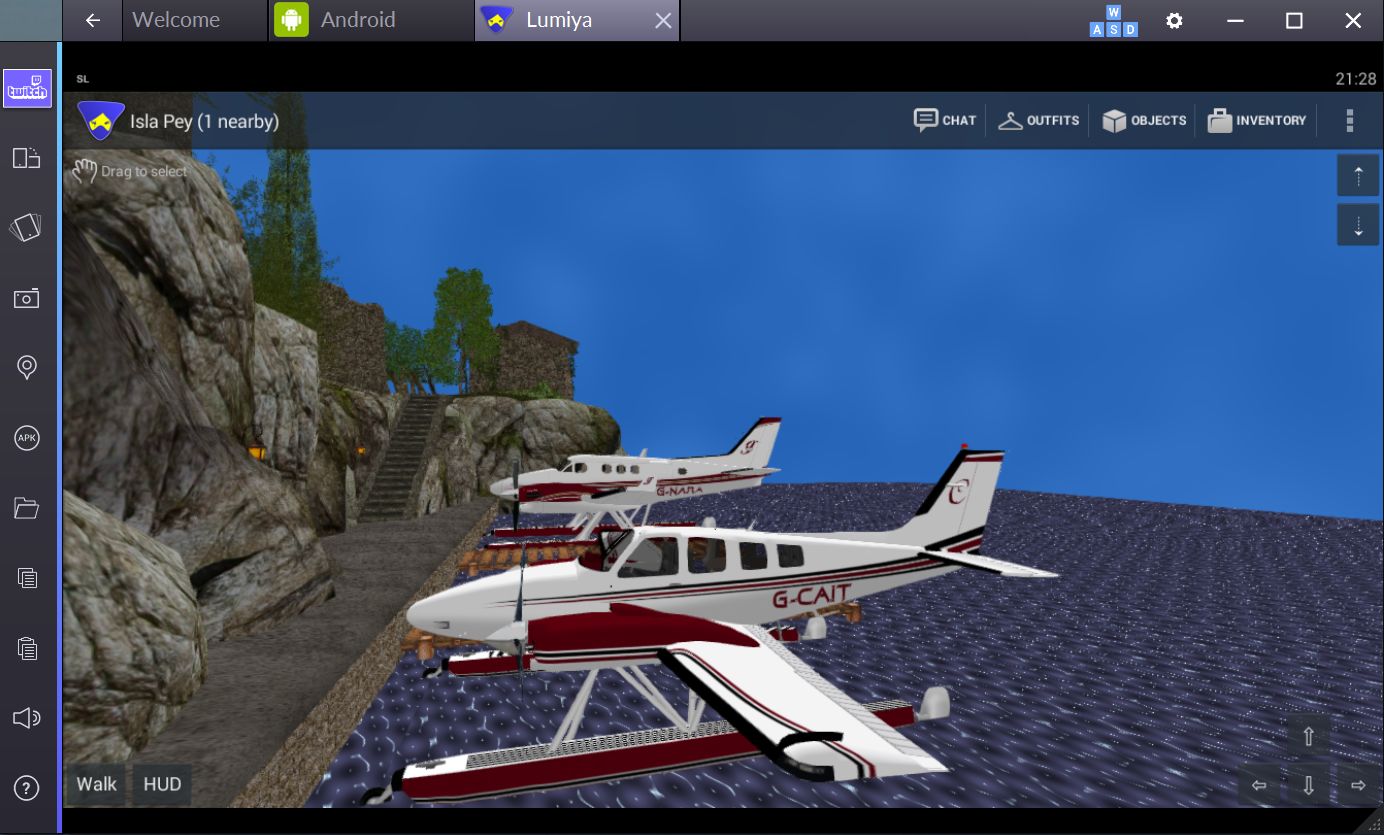
Running Lumiya via Bluestacks on a Windows notebook
There are a few things to note when running Lumiya in this way. Obviously, being built for Android, it is intended for touch screen use. While Bluestacks does a credible job of allowing mouse and pointer control and the use of keyboard controls such as the arrow keys and WASD, I tended to find that things did sometimes “stick”, prompting a return to the on-screen movement / camera focus keys (lower right corner of the screen).
Given Lumiya is running on a “standard” computer, it’s also easy to slip into the expectation that it will respond to things like ALT-camming when it obviously won’t – this is still an Android app running through an emulator, after all! Given this, it goes without saying that if you’re new to Lumiya, you have a lot to learn via the UI and options – feel free to use my reviews linked to above 🙂 .
Also keep in mind that as Lumiya is an Android app, the graphics don’t have the same fidelity as the viewer, and running it through an emulator isn’t going to magically give you that kind of fidelity. If that is what you’re looking for when on the move and don’t have a good laptop, then Bright Canopy is your best option outside of a new computer / GPU.
Lumiya may not have the same graphics fidelity as a full viewer, but if you’re looking for something that can provide you with an in-world view while on the move with a low-end laptop and for whatever reason, don’t want to use Bright Canopy, running it in through the Bluestacks emulator might be a viable option
Also, as you are running through a laptop there might be a temptation to push Lumiya’s settings to the max. I’d actually suggest some caution here; your little laptop / notebook may appear to have more umph that an Android device, but you will take a performance hit in driving things too high.
Overall, I found running Lumiya on an Asus PCee 1201N to be pretty acceptable – certainly a lot less tasking than running a full-blown viewer. I wouldn’t want to do it all the time, but as an alternative and occasional means of access, it’s more than acceptable. The UI, intended for touch screens, works well with mouse and pointer, and while there were occasional niggles (sometimes I had to swap back to using the on-screen movement keys via mouse, for example), my biggest issue came down to trying to use conventional SL keyboard shortcuts simply because I was sitting in front of a keyboard!
Whether this kind of approach would appeal or not is down to the individual – but as noted above, if you are looking for the occasional access to SL from a low-end laptop / notebook whilst on the go and either don’t want to fiddle with the small screen of and android device or would prefer not to use Bright Canopy, then this might be an option for you.
Addendum, June 3rd: While Bluestacks was promoted as a “free” emulator, some 36 hours after installing it, I received a notification requiring a subscription payment of either US 2.00 per month or to install sponsoring games in order to keep using it to access Android apps.
*Note: Bluestacks used to offer an emulator for Mac systems as well. It’s no longer available through their own website, but can be obtained from this review on the TechApple website. However, as I’m not a Mac user, I have no idea how up-to-date it is compared with the latest Windows version of the emulator or whether it is a viable option.
Lumiya on Bluestacks was tested using an Asus PCee 1201N with 2 Gb RAM, Intel Atom 330 processor and Nvidia Ion 2 GPU using shared memory.



 Inara Pey: Living in a Modemworld