2025 week #47: SL CCUG and Open Source (TPVD) meetings summary

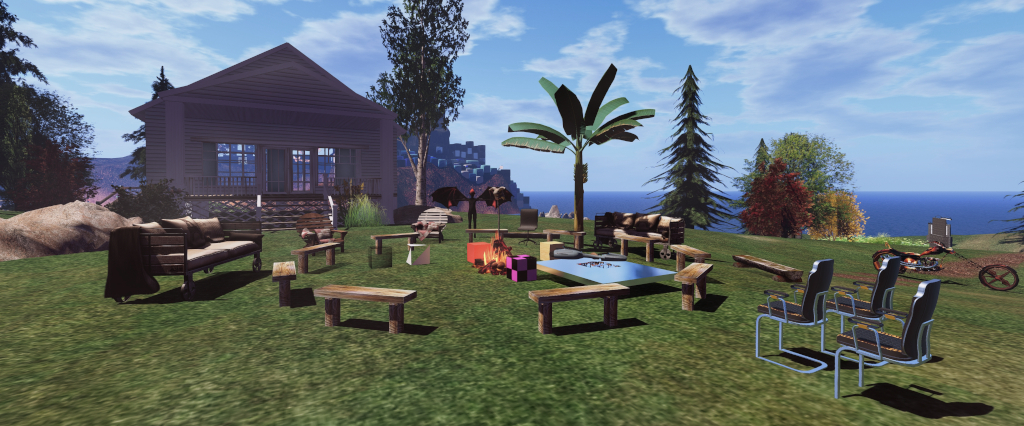
Hippotropolis Campsite: venue for CCUG meetings
The following notes were taken from:

  • My chat log of the Content Creation User Group (CCUG) meeting of Thursday, November 20th, 2025 and my chat log of that meeting
  • Pantera’s video (embedded at the end of this article) and my chat log of the Open-Source Developer meeting held on Friday, November 21st, 2025.
Table of Contents

Please note that this is not a full transcript of either meeting but a summary of key topics.

Meeting Purpose

  • The CCUG meeting is for discussion of work related to content creation in Second Life, including current and upcoming LL projects, and encompasses requests or comments from the community, together with related viewer development work.
    • This meeting is generally held on alternate Thursdays at Hippotropolis and is held in a mix of Voice and text chat.
  • The OSUG meeting is a combining of the former Third Party Viewer Developer meeting and the Open Source Development meetings. It is open discussion of Second Life development, including but not limited to open source contributions, third-party viewer development and policy, and current open source programs.
    • This meeting is generally held twice a month on a Friday, at 13:00 SLT at the Hippotropolis Theatre and is generally text chat only.
  • Dates and times of meetings are recorded in the SL Public Calendar.

Official Viewer Status

General Viewer Updates

  • 2025.08 is to be the last viewer release for 2025. This is likely to be promoted to de facto release status after the US Thanksgiving holiday.
  • At the time of writing, 2025.08:
    • The crash rate is improving.
    • This viewer includes the VHACD convex decomposition library.
    • Mesh content creators are encouraged to try the current beta of the the viewer to make sure physics hulls are working in-world, etc., given that many settings with the library are different to those used by Havok, the longer-term plan being to eliminate Havok sub-libraries from the viewer.
  • The next viewer version will by 2026.01 – details of which will be made available once its likely contents have been initially settled on by the Lab.
    • However, it looks like 2026.01 will include the new code for faster log-in loading of inventory for those with very large inventories, and a dedicated Linux build of the viewer.
    • During the OSUG meeting, Geenz Linden indicated that another project he hopes to start moving forward with in 2026 is the Current Outfit Folder (COF) updates contributed by Kitty Burnett (Catznip), and the current plan is to get this into 2026.01.

You Tube Embedding Issue

  • As a reminder:
    • You Tube recently updated elements of their video embedding code such that non i-frame youtube.com/embed/NNNNN style links will not work within Second Life (whilst youtube.com/watch/NNNNN style links will still function correctly – although this latter format does expose all the You Tube on-screen video controls, etc).
    • This is an issue liable to impact a variety of in-world television and similar systems utilising You Tube.
    • It is very much a You Tube issue, so there is no guarantee they would remain valid / useful for any length of time.
  • For further detail please refer to the official blog post: YouTube Embeds in Second Life: What Happened and How to Keep Your Media Working.
  • Those finding further information on issues arising from this You Tube change should report them via the SL Feedback Portal.

SLua Update

  • Back-end support for SLua is now available in Beta on Agni, the main grid.
  • The SLua beta viewer, available from the official Alternate Viewers page, must be used for writing SLua code, but no specialised viewer to view SLua scripts running in-world.
  • The latest SLua viewer includes the websocket to Visual Studio.

SLua Resources

CCUG Discussion – In Brief

  • glTF animation upload support: this is “on the radar” for development, but is not currently an active project, and needs to be added to the current viewer roadmap.
    • A request to review animation priorities was also requested, and it was suggested this might be something that could possibly be looked at within the current animation support framework.
    • A general discussion on animations and priorities continued through the early part of the meeting, but no-one from the Lab with sufficient up-to-date knowledge of the animation system to provide meaningful input to the discussion.
    • This discussion included the following animation feature requests: user-definable animation priorities and allow starting an animation with a specific priority, together with this proposal for animation network reworking from user Coyote Enthusiast.
  • A request was made for an independent alpha channel (i.e. not linked to Diffuse/Colour channel) and available to both both Blinn-Phong and PBR that could help reduce the number of unique textures required for things like terrain, and without having to atlas huge sheets of layered details. The short answer was that this is unlikely until there is (at the very least) an opportunity to revisit texture streaming at the very least, with Geenz noting:
We’re already on some razor thin memory margins on some of our potato machines – so if we did that we’d need to find a way to make some stuff more scalable in our texture streaming tech. This isn’t a no – we need that for other things. But it’s not a 30/60/90 days thing I’m sorry to say.

Bakes on Mesh (BoM) Layering

  • Better layer ordering has been put to the UI/UX team with not promises as to when it might be worked upon, although there are “other projects” the Lab is planning which would also benefit from this.
  • A feature request for allowing sets / containers for/of BOM layers has been submitted, and is defined by Geenz as “interesting” and “TBD”.
  • The above led to a discussion on BoM improvements (e.g. PBR materials support; blend modes of different layers; etc).
    • In response to this, Geenz noted he would like to get PBR specular support, if only as a migration path from Blinn-Phong (and with the noted, “if you do this expect things to not quite look right if you mix these two”).
  • This discussion involved the potential complexities / straightforward aspects of PBR specular support, providing BoM support to alpha channels, before circling back to the benefits of having better texture streaming in general and prioritising the latter to different texture slots, etc.
  • This discussion touched upon BoM support for Animesh and a request for a universal alpha.

OSUG Discussion – In Brief

  • Signal Linden revealed that Friday, November 21st, 2025 was his last day at Linden Lab after 10 years with the company, rising to the position of Director of Engineering.
    • Signal has been the major driver in overhauling and improving the Lab / third-party/open-source relationship, which is to continue along the path Signal has set for it, improving and refining things where appropriate.
  • Roxie Linden noted that there has been a WebRTC voice server update. This provides HRTF (better spatialization) as well as server crash fixes. It’s still regarded as “beta”, but the WebRTC team is looking for feedback on its usability.
    • Further work on WebRTC is in progress, including spatial moderation.
    • Thought is still being given to replacing Echo Canyon (Vivox Voice testing region) with a WebRTC equivalent, with Roxie Linden indicating this is now a matter of scheduling and implementation.
    • Roxie’s preferred approach would be to have an ‘echo’ option with Preferences which, when used, does a full round trip to the server and back, allowing both device verification on the WebRTC service and network quality. If adopted, this will require both a server update and some viewer UI work.
  • A brief discussion on potentially replacing Chrome Embedded Framework (CEF) in the viewer (e.g. to something like Servo – as this matures). The response was that CEF is unlikely to be replaced in the foreseeable future, which does not mean there will not be fixes, etc., for identified issues.
  • Request for LL to provide SGV support, including for text on prims / test rendering in-world, including the following two requests:
    • SVG Canvas: A way to generate dynamics graphics on prim faces (without MoaP).
    • Add a Text Rendering Method.
    • In response, and specifically in terms of in-world text rendering, Geenz Linden suggested that something like MSDF might be more appropriate for SL, as it allows pre-rasterizing a large collection of fonts into some really tiny textures, and get some pretty sharp text rendering that scales “pretty easily”.
    • This led to a discussion on potential uses of SVG, and the advantages of SVG over MSDF, and vice-versa, and other options for in-world text rendering (and the use-cased thereof – such as notice boards, etc.).
    • Geenz requested tat if there are SVG-specific use-cases before text rendering, these be recorded in a feature request Canny.
  • A request was put forward to have TPV stats (usage per OS, crash rates and crash types) on a more frequent basis once more (they were at one time monthly, then switched to weekly before becoming more sporadic once more). This will be looked into.

Next Meetings

Artsville further relocates and continues to engage in Second Life

Artsville, November 2025

Artsville, the art and entertainment hub under the joint management of Frank Atisso and Vitoria Galli, has once more relocated for what I believe is the second time in 2025 (the first being at the start of the year, which I covered here).

Now occupying roughly one quarter of a Full private region which leverages the Land Capacity bonus, the overall design remains the work of Megan Prumier, working in collaboration with Frank and Victoria. It offers what might be said to be a setting of two halves: art and entertainment, which between them contain faint hints of the former Artsville design – most notably with the Landing Point, the symmetry of which calls to mind the prior location, together with the overall rugged elevation of the setting.

Artsville, November 2025

The two “halves”, as it were, of the setting lie to either side of a sheer-sided gorge, the waters of which flow from tall falls from its southern extent to the open waters at its northern end. It is mid-way along this gorge that the Landing Point sits, straddling the waters in the form of a pergola-covered paved walkway bordered by open seating areas.

The lands at either end of this bridge are of unequal size, with the western side of the the setting offering the smaller footprint. With the façades of city building running along its western edge, this part of Artsville might be regarded as the entertainment district and – at first glance at least – apparently comprises three main elements.

Artsville, November 2025

Directly facing the Landing Point is a large warehouse structure, given over to a music / event space, presumably for hosting music events and art exhibition open entertainment. Flanking this to the left and right when facing it are, respectively, a train station and a garden area offering seating and an old London buss now painted yellow and converted into bar space.

It is within the garden space that the “hidden secret” fourth part of this side of the setting is to be found: sitting below the sign and entrance for a London Underground station can be found a stairway leading down to a further event space laid out in the manner of a private club rich in wood finishes, low lighting and deep, comfortable armchairs, with the walls, wooden floor and low ceiling studded with lights twinkling gently light a star scape.

Artsville, November 2025

On the eastern side of the setting is the art-focused elements of Artsville, centred on another large warehouse style of building split into two indoor gallery spaces. At the time of my visit, these were hosting exhibition by two excellent Second Life photographer-artists: Cecilia Nansen and Christian Carter.

To the north side of this is a sculpture garden featuring the work of Mistero Hifeng which shares the space with a small café with an over-the-water seating area located over a small pond. Further water features to the eastern end of the sculpture garden, complete with seating. Bracketing the gallery warehouse is a further raised plateau, home to a music bar / lounge.

Artsville, November 2025: Cecilia Nansen – Light Enough to Land

The two exhibitions hosted with in the gallery space are entitled Light Enough to Land, by Cecilia, and Hands that Speak by Christian. Both are captivatingly exquisite, with Cecilia’s black-and-white images featuring a butterfly, and which Cecilia describes in part thus:

In this series of ten photographs, the little black and white butterfly becomes both a mirror and a symbol – a fragile creature suspended between strength and dissolution. Each image captures a fleeting moment where light and shadow, movement and stillness, existence and disappearance co-exist. … This little exhibition invites the viewer to linger in the in-between – where the ephemeral becomes eternal and where vulnerability reveals its quiet yet beautiful strength. 
Artsville, November 2025: Christian Carter – Hands that Speak

Meanwhile, Christian’s work, also comprising ten images – these offered in colour – also have a specific focus that of the human (in the form of the avatar’s) hand, and for which Christian offers (again, in part), the following description:

I became fascinated by the stories that we can see in people’s hands; stories of resilience, care, and connection etched into their lines, the gestures that convey comfort, strength, and vulnerability without a single word. … I hope that as you gaze at these images, you’ll be reminded of the quiet power of the human connection, the unspoken stories carried in our hands, and the profound empathy we can find in the simplest touch.
Artsville, November 2025

The new Artsville is both unique in its setting whilst carrying on its long tradition of promoting art in SL, and I highly recommend a visit – particularly to catch Cecilia and Christian’s exhibitions. My thanks to Frank for the invitation to visit, and my apologies for not being able to do so sooner.

SLurl Details

  • Artsville (Isle of Thunder, rated Moderate)

Visiting a Wild Silence in Second Life

Wild Silence, November 2025 – click any image for full size

I’m not quite ready to start exploring all the wintertime settings that are currently arriving across Second Life to match the  northern hemisphere as it welcomes its end-of-year weather. I’m sure this outlook will change over the next couple of weeks, but right now, I remain in the mood for warmer spots in which to roam, take photographs and generally blather about. There’s also the fact that given my current health situation, I’m naturally drawn to places physical and digital which offer calm and opportunities for peace and reflection.

Fortunately for me, Sorcha Tyles provides just such a place; one which has recently opened to visitors under her Dutch Pavilion land group. I’ve known Sorcha for a long time, both as a region designer as and a photographer-artist and gallery owner, and had always appreciated her work. As a result, I was quick to hop over to Wild Silence after coming across it in the Destination Guide.

Wild Silence, November 2025

Like the most recent iteration of Dutch Pavilion, which I visited in June 2025 (and after it had been relocated and downsized from the Homestead region I first visited in September 2024), Wild Silence occupies a parcel within a region – in this case a quarter(ish) of a Homestead to present a beautiful wild yet also delicate natural setting.

Really, the best way to describe this setting is to use the description found in its Destination Guide entry, a shorter version of which can also be found in the setting’s About Land description:

The Wild Silence is an untamed expanse where the pale water and whispering reeds hide a vibrant world. This sanctuary is home to countless birds and offers refuge from the noise of man. Explore the winding shores and witness a fragile beauty found only in the profound, untouched stillness.  

– Wild Silence Destination Guide description

Wild Silence, November 2025

Surrounded on three sides by curtain walls of rock which will serve to nicely separate the setting from the rest of the region as it is developed (at the time of my visit, the rest of the region – Moonlight Lullaby – was undeveloped open water), Wild Silence looks southward out over open Linden Water, the majority of the setting given over to a low-lying island of shingle, rocks, scrub grasses and gravel, dotted here and there with hardy trees and upon which an enterprising soul has established a little café inside a greenhouse  (coffee houses and tea houses are a creative signature of Sorcha’s builds and always a welcome sight).

Whilst “silence” appears in the location’s name, this is more a reflection of the lack of human occupancy (despite the presence of the café and a fishing boat), as reflected in the setting’s description; the island itself is alive with swishing ebb and flow of a gentle tide along the shoreline and the song and cry of birds and waterfowl and the occasional moo of the two cows as they help keep the grasses somewhat trimmed to size.

Wild Silence, November 2025

The majority of the birds and waterfowl within the setting are located at the far end of a tongue of water curling in to the island from the southern sea, forming a tear-drop of water with surprising depth.  Here can be found ducks, geese, gulls, heron, godwits, ibis and more, all adding their voices to the local chorus.

A second ribbon of water attempts to make its way around the land, hugging the curtains of cliffs and in one place broad enough to provide shelter to the aforementioned fishing boat. Both of these inland bodies of water are also home to a couple of rowing boats offering both singles and couples seating.

Wild Silence, November 2025

Nor are the rowing boats the only outdoor places to sit, as those following the island’s gravel path from the Landing Point around to where the greenhouse café at the south-east extent on the island. The café itself is an utter charm, warm and welcoming, presenting both indoor and outdoor seating for those wishing to spend time there.

In talking to Sorcha during my visit, I learned that she will be closing Dutch Pavilion in the near future so she can focus on Wild Silence. Given this, if you have visited the former, I’d strongly suggest you do so before at least the end of the month as it really is worth the time, and to perhaps do so in concert with a visit to Wild Silence, as they complement one another perfectly.

Wild Silence, November 2025

SLurl Details

2025 SL viewer release summaries week #46

Logos representative only and should not be seen as an endorsement / preference / recommendation

Updates from the week through to Sunday, November 16th, 2025

This summary is generally published every Monday, and is a list of SL viewer / client releases (official and TPV) made during the previous week. When reading it, please note:

  • It is based on my Current Viewer Releases Page, a list of all Second Life viewers and clients that are in popular use (and of which I am aware), and which are recognised as adhering to the TPV Policy.
  • This page includes comprehensive links to download pages, blog notes, release notes, etc., as well as links to any / all reviews of specific viewers / clients made within this blog.
  • By its nature, this summary presented here will always be in arrears, please refer to the Current Viewer Release Page for more up-to-date information.
  • Outside of the Official viewer, and as a rule, alpha / beta / nightly or release candidate viewer builds are not included; although on occasions, exceptions might be made.

Official LL Viewers

LL Viewer Resources

Third-party Viewers

V7-style

V1-style

  • Cool VL viewer Stable: 1.32.4.10, November 15 – release notes.

Mobile / Other Clients

  • No updates.

Additional TPV Resources

Related Links

A Cerulean Township in Second Life

Cerulean Township, November 2025 – click any image for full size

I first visited the Cerulean estate in Septembers 2024. A collaborative involving Emm (Emm Evergarden) of The Nature Collective fame (among other things) and Teagan Cerulean. I enjoyed my visit at the time, as noted within Coffee and a Salty C in Second Life, and actually tried to make a return visit in May 2025. However, at that time, and while the regions of the estate had been completely revised, I found things a little heavy-going viewer performance-wise, and the hoped-for article never materialised as a result.

More recently, I was again contacted by Teagan with an invitation to try a further visit with the note that both she and Emm have made some adjustments to the setting which might – together with the Lab’s tweaking of the core viewer code to encourage better performance for users – make a return visit somewhat easier. As I have always appreciated the work of Teagan, Emm and other members of the extended Cerulean family in SL, I was happy to accept the invitation and hop along to have a further look.

Cerulean Township, November 2025
The first hints of Autumn are in the air. Wander quiet trails, sip coffee by the water, or soak in the beauty of this tranquil PNW retreat. Cerulean is more than a place—it’s a feeling. Welcome home.

– Cerulean Township About Land Description

Occupying a Full private region leveraging the Lab’s Land Capacity bonus and with a Homestead adjoining it to the north, Cerulean township presents an engaging mix of public spaces and private residential rentals (the latter primarily located on the Full region, and all clearly marked as such to reduce the risk of accidental trespass by visitors).

Cerulean Township, November 2025

Whilst not enforced, the main Landing Point for the setting lies on the western side of the Full region, mid-way between a cluster of private residences lying to the north-west of the region and what might be seen as its commercial district to the south. Taking the form of a little railroad station alongside aged tracks, the Landing Point is subject to repeated audio notifications that the next scheduled train has been indefinitely delayed, and so visitors are encouraged to enjoy the local attractions.

Some of the latter are to be found by heading south from the landing point and along Old Mill Road past the aging motel to where Sonder Books and Vinyl Vines are the first of a number of local establishments to offer visitors a warm welcome, together with the Rusty Spoon diner. A walk east along Stumptown Avenue will also bring visitors to the local open-air market and, sitting alongside one of the setting’s large areas of water, the Les Beans Café which has been pleasingly carried over from my original visit to the setting (if completely redesigned!), and is still the venue for assorted local events.

Cerulean Township, November 2025

Across the bridge from the market and café lies the local glamping centre, complete with its own outdoor venue, the Bar/66. From here it is possible to take a chairlift up the eastern highlands overlooking Lost Lake and passing over tumbling falls as they cascade over the rocky cliffs. It’s also possible to follow a couple of trails up to the top of the highlands, but do note that these also pass close to some more of the setting’s private residences, so do keep an eye out for the signs warning you of such.

A trail skirts the foot of the highlands to head north towards Cerulean Lake, the largest body of water in the setting (comprising a little over half of the estate’s Homestead region. It is here that a long tongue of land extends north, passing between the main huddle of private residences to the west and a couple more to the east, between forming a low-lying and picturesque walk up to the lake’s harbour area with its waterside eateries, stores and line of (private, I think) houseboats and the land arcs around to the west, passing another campsite and the little wharf area marking the northernmost extent of the setting.

Cerulean Township, November 2025

The latter forms one of the two termini for the local ferry that plies the waters of Cerulean Lake, the other being at the southern end of the lake’s waters, not too far from the path mentioned above. The ferry is not the only means of getting out on the water either. Little motor boats are available from a couple of the decks along the wharf, whilst back at Lost Lake to the south, kayaks might be rezzed and paddled along the waterways.

For those who prefer not to take to the water for rides and don’t want to explore entirely on foot, other means of exploration await, be it on bicycle, horseback or via hot air balloon. These all add to the attractiveness of the setting in addition to its natural design and beauty.

Cerulean Township, November 2025

I will admit that I still had some issues with load times on arrival, but once I’d allowed things to fully load, the overall impact was minimal in terms of frame rates whilst wandering around (allowing for the fact I do have a reasonable GPU!), and certainly did not stop me from leaving shadows enabled whilst exploring. As such, I still consider Cerulean Township well worth visiting.

SLurl Details

Firestorm 7.2.2 release overview

On Tuesday, November 11th 2025 (SLT), Firestorm released version 7.2.2.79439 of their viewer.
The primary aim of this release is to achieve parity with the Lab’s most recent releases and to add further updates to features added to the June 2025 Firestorm 7.1.13 release.

Note that the following is not a complete review of the 7.2.2 release and all the changes made therein; it focuses on the more visible and user-facing updates. Those requiring a list of all changes and updates, including all bug fixes, etc, should refer to the Firestorm 7.2.2 release changelog, which also provides all proper credits for the work.

Table of Contents

General Notes

Installation

  • Only download Firestorm from the Firestorm website. Do not utilise and other third-party site purporting to offer the Firestorm viewer, and remember Firestorm will never ask for log-in credentials in order to download a release version of their viewer.
  • There is no need to perform a clean install with this release if you do not wish to.
  • Do, however, make sure you back-up all your settings safely so you can restore them after installing 7.1.11.

Linden Lab Updates

This release brings Firestorm to full parity with the following recent official viewer releases from Linden Lab:

Viewer 2025.04 – Chat Mentions

Version and release notes:  2025.04 – 7.1.14.15192634334 – May 2025.

  • Chat Mentions: support for chat mentions allowing  for better communication and awareness in local chat.
    • Type @ in any chat then pick a name from those listed, add your message and Say. Your text chat will be preceded by the selected avatar’s name displayed as a clickable link visible to everyone in local chat range, and which will open that person’s Profile.
    • Firestorm options:
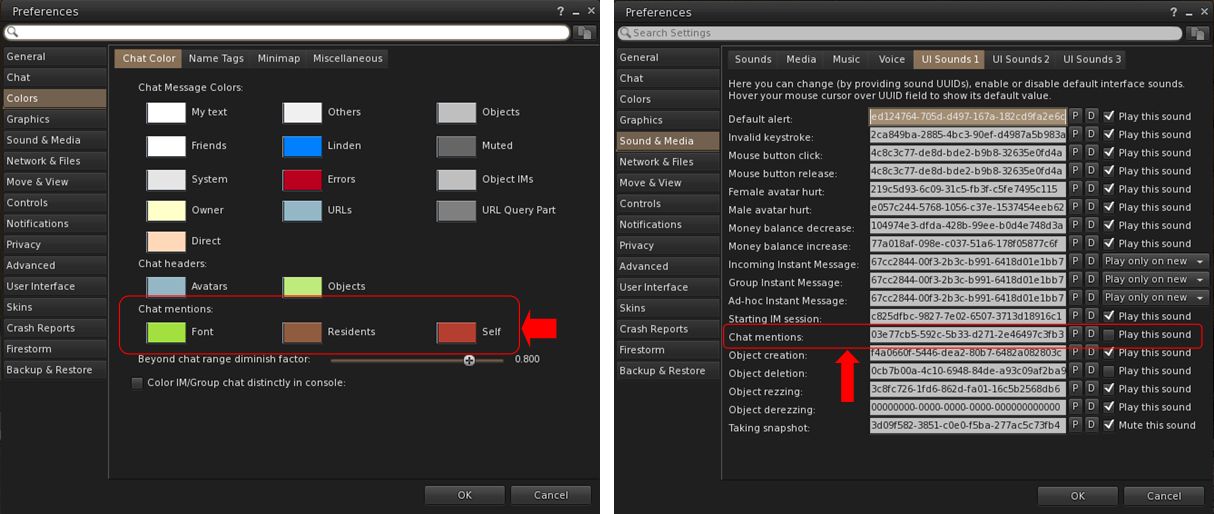
      • Set chat mention colours for Font, Residents and Self: Preferences → Colors → Chat Color → Chat Mentions.
      • Set audible tone for chat mentions using your name: Preferences → Sound & Media → UI Sounds 1 → Chat Mentions.
Chat Mention options available in Firestorm. Left: setting the colours in which chat mention links will appear; right: setting a sound to be associated with your chat mentions
  • Outfit Subfolders: the Outfit system folder now officially supports the use of subfolders.
  • Hover Height now supports new +/- 3 metre minimum/maximum values.
  • Build improvements:
    • Texture scale boundaries have been increased to match Firestorm Viewer – Canny Bug, GitHub Issue.
    • Physics Material Type now updates when selecting linked objects – Canny Bug, GitHub Issue.
    • Resolved texture “repeats per meter” value being incorrect for non-uniform sized objects – GitHub Issue.
  • Refer to the official release notes for all major updates and fixes.

Viewer 2025.04.01 – Avatar Welcome Pack

Version and release notes: 2025.04.01 – 7.1.15.15596336374 – June 2025.

  • Replacement of the old Avatar Chooser with the Avatar Welcome Pack, accessed via Menu Bar → Avatar → Avatar Welcome Pack.

Viewer 2025.05 – glTF Mesh Imports (.gltf and .glb)

Version and release notes: 2025.05 – 7.2.0.16729091892 – August 2025.

  • Support for glTF mesh imports, together with enhanced frame time metrics.
    • Allows content creators to import models in .gltf and .glb formats in a process to COLLADA uploads, with a few key differences.
    • A unified material upload for the .glb format is not yet supported (due in a future viewer update). To upload .glb models containing material, upload the model without any textures, then upload the materials separately via Upload Build → Upload → Material and then rez the model in-world and apply the materials.
  • Refer to the official release notes for all major updates and fixes .

Viewer 2025.06 – Inventory Favourites

Version and release notes: 2025.06 -7.2.1.17108480561 – August 2025.

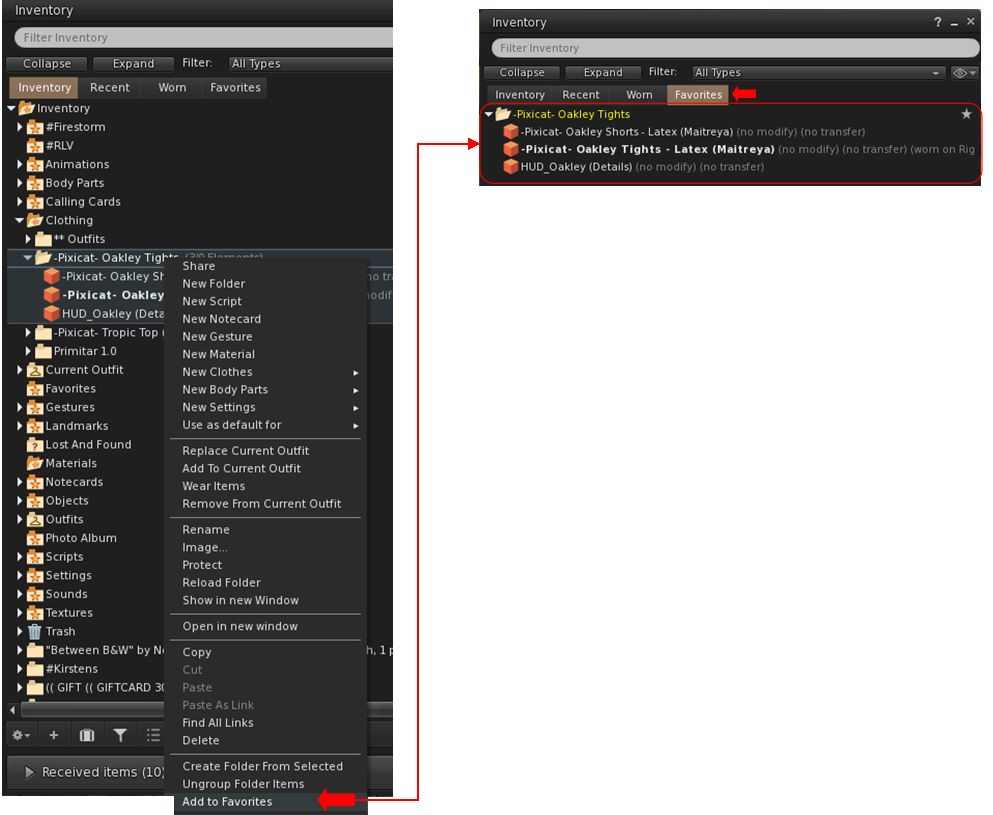
  • Adds the Favourites tab to the Inventory floater.
    • Supports the addition of individual items or folders in Inventory to the Favourites tab in the floater.
    • To add an item / folder to the Favourites tab:
      • Right click on the item or folder.
      • Select Add to Favourites in the context / Pie menu.
Inventory Favourites has been included from the official viewer, but doe not replace Firestorm’s own Favourite Wearables functionality
    • To remove an item / folder from the Favourites tab:
      • Locate the item / folder in Favourites or the original in the main Inventory tab.
      • Right-click on it and select Remove From Favourites in the context / Pie menu.
    • Note, this functionality is entirely separate to Firestorm’s Favourite Wearables feature, which remains in place in Firestorm, complete with its own toolbar button option.
  • Additional updates and improvements:
    • Assorted Avatar System fixes.
    • Camera and movement improvements.
    • Chat and Voice chat improvements.
    • UI Fixes.
    • Content Creation and Commerce improvements.
    • Environment improvements and fixes.
    • Mesh Uploader updates.
    • Refer to the official release notes for all the above updates and fixes .

Cherry-Picked Upstream Fixes from the Official Viewer

  • The Voice and WebRTC Reliability changes included in the official 2025,07 – 7.2.2.18475198968 viewer release have been added to Firestorm 7.2.2 at the request of Linden lab.
  • These changes comprise:
    • Improved device detection and recovery when unplugging/replugging microphones.
    • Fixes for several rare WebRTC crash scenarios, together with improved Voice clean-up and logging.
    • In world Voice indicator now properly reappears after tuning.
    • Fixed voice clean-up and device update crash on reinitialization.
  • All remaining updates and changes found within the 2025.07 official viewer release will be included in the next Firestorm release.

Firestorm Updates

New Features for 7.2.2

Disable Connecting to Neighbouring Regions (Navigation and Teleporting)
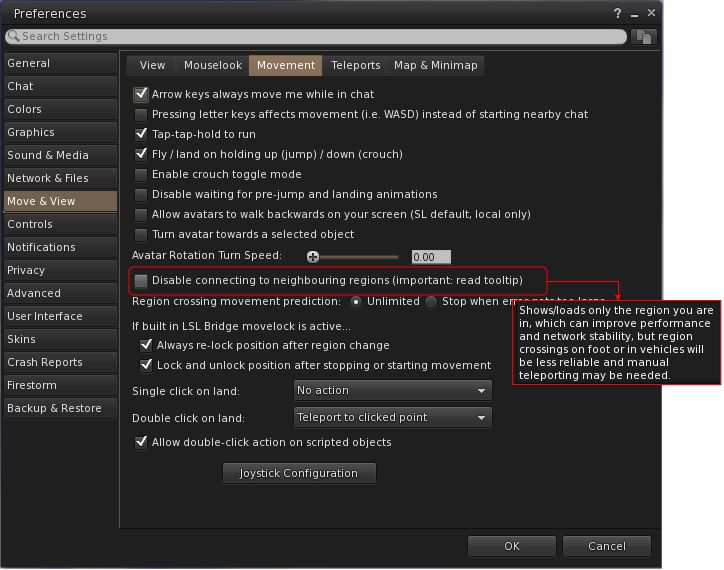
  • Preferences → Move & View → Movement → Disable connecting to neighbouring regions.
  • Request: FIRE-2325.
  • When enabled:
    • Prevents the viewer from connecting to neighbouring regions (which are ignored by the viewer), and only the current region (login/teleport destination) is connected, effectively isolating it.
    • This may improve performance for users with weaker computers or slower connections, assist multi-region event setups by lowering client overhead and reduce unintended neighbour interactions.
The new Preferences option to disabling the viewer from connecting to neighbouring regions, complete with the tooltip, which should be read to understand the implications
  • Limitations:
    • Region crossings will not function normally, as neighbouring regions are not visible or connected to the viewer.
    • Only direct teleports and logins to regions will work reliably.
    • The sense of world scale and continuity is reduced, and travellers or explorers may find it limiting.
New Imposter / Avatar Imposter Exclusions (Inventory / Avatar Appearance)
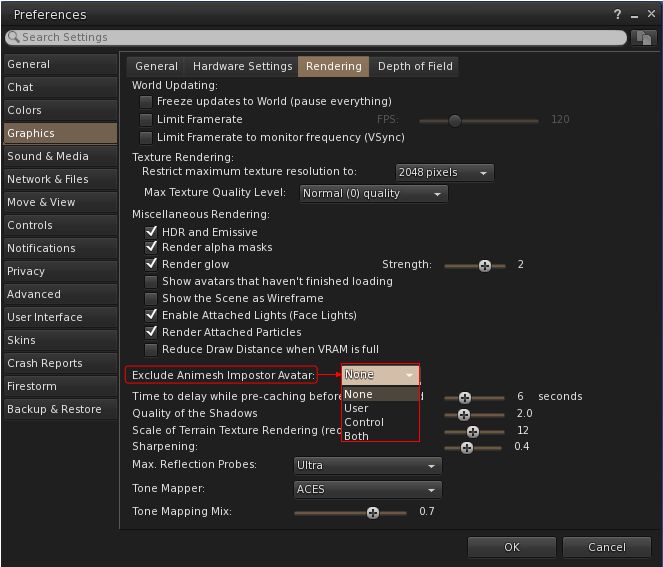
  • Preferences → Graphics → Rendering → Exclude Animesh Impostor Avatar.
  • Request: FIRE-35735.
  • When selected, allows a user to keep using the imposter system, but protect Animesh avatars from not animating or from having rendering issues (e.g. missing attachments).
The new Impostors option for protecting Animesh avatars from not animating or from having rendering issues
  • Comprises four options:
    • None: Default, don’t exclude any avatars.
    • User: Exclude only user avatars which have Animesh attached to them.
    • Control: Exclude only control avatars.
    • Both: Exclude both User Animesh avatars and control avatars.
New Snapshot Framing Guides and Settings (Photography / Snapshot Floater)
  • The snapshot frame overlay and composition guides were added to the Snapshot floater with Firestorm 7.1.13.
  • They allow the user to:
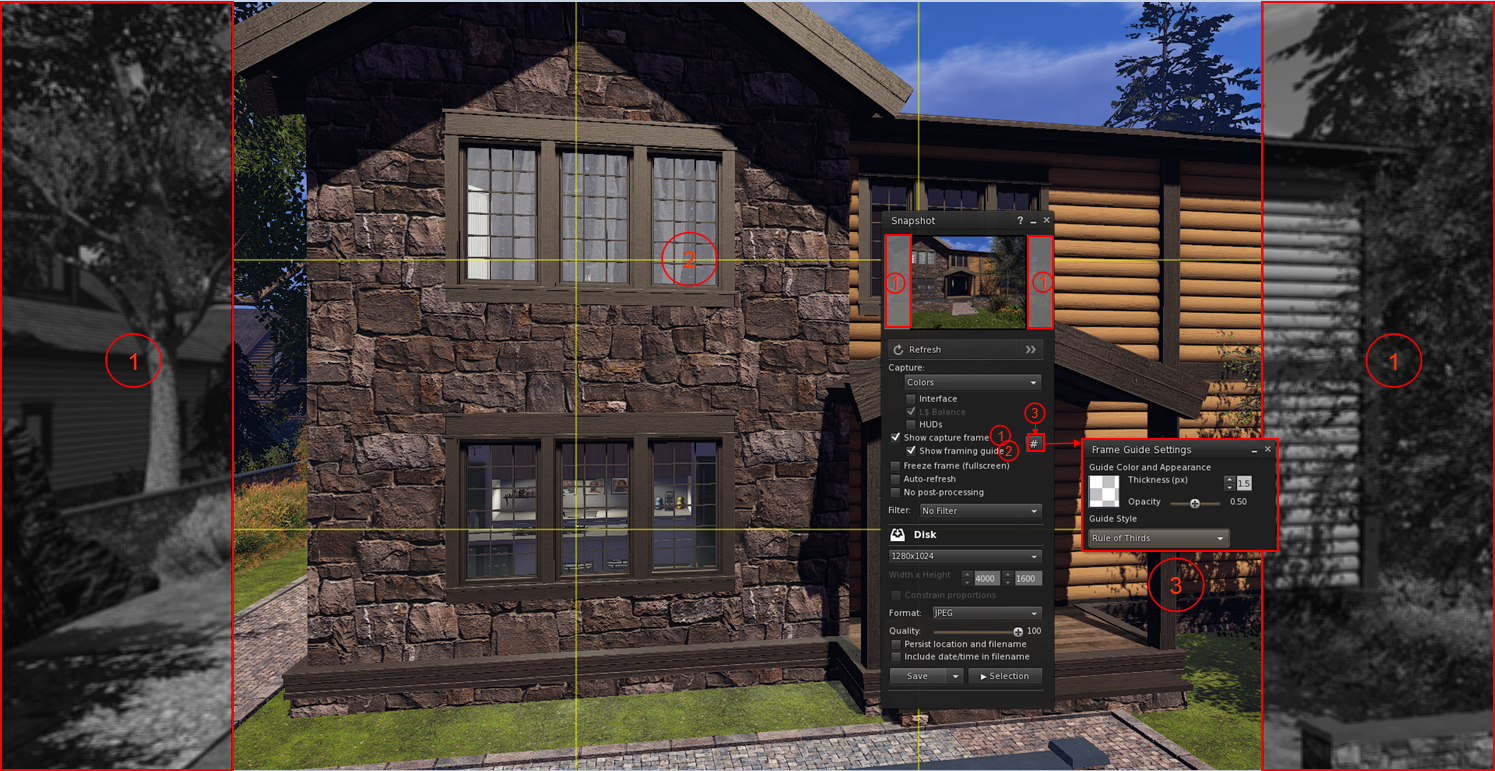
    • Overlay their in-world view with a frame mirroring the selected image size selected from the relevant image size drop-down, with the parts of the in-world view outside of the image capture size rendering in monochrome (Show Capture Frame)
    • Optionally display a composition guide overlay as a set of yellow lines within the image frame on their world-view.
    • Use a series of Debug settings to customise the snapshot frame.
  • Firestorm 7.2.2 enhances these frame overlays and guides with additional options, access via a  new # button.
  • When clicked, this button allows the user to:
    • Adjust the thickness and opacity of the frame guides displayed in-world by the viewer without having to use the Debug Settings.
    •  Select from an expanded down-down of guide styles:
      • Rule of Thirds.
      • Golden Ratio: – one of Top Left, Top Right, Bottom Left or Bottom Right .
The Snapshot floater showing the frame overlay option (1) and the yellow composition guide (2) using the Rule of Thirds, added to the floater as a part of the Firestorm 7.1.13 release. Also shown is the new Firestorm 7.2.2 # button (3) which opens the Frame Guide Settings floater, allowing the user to customise the frame guides and select from the composition guide drop-down (defined in the text above)- click for full size, if required

Firestorm Avatar and Animesh Poser

The Firestorm avatar and Animesh poser system was introduced with the release of Firestorm 7.1.13 as a re-write of the Avatar poser system developed by NiranV Dean (and found on the Black Dragon viewer). For assorted reasons, that release of Firestorm did not have any associated overview in this blog, therefore for detailed information on it, please refer to the following links:

Firestorm 7.2.2 introduces a large number of improvements and updates to the Avatar and Animesh Poser, all of which are summarised in the viewer changelog, to which those interested are referred to for details.

Other Notable Improvements / Updates

Note: for bug fixes, etc., please refer to the viewer changelog

Inventory, Appearance & Avatar
  • New option to automatically reset skeleton upon standing up, which is also automatically broadcast to surrounding avatars as well: Preferences → Firestorm → Extras → Reset avatar skeleton after standing up.
  • New Stop button on the link replacement floater (Right click inventory item → Replace Links (FIRE-29394).
  • ‘Delete from outfit’ context menu entry when right clicking on an item in an outfit, in the Appearance window, Outfits tab.
    • This is useful for when you mistakenly added some HUD or anything else you didn’t want in your outfit, and is simpler than going inside the inventory and deleting the links from the outfit folder.
    • Note that only links are deleted, not actual inventory items.
    • Accessed via: Appearance → Outfits tab → Right click item → Delete from outfit.
  • Visual warning about too many saved outfits:
    • If a user has a large number of saved outfits, this can cause the viewer to freeze for a short time when opening the Appearance panel or when searching for saved outfits on slower hardware.
    • Therefore, when the user has over 200 saved outfits, they will now see this warning notification:
      A large number of outfits were detected: [AMOUNT]. This may cause viewer hangs or disconnects. Consider reducing the number of outfits for better performance
Radar, Navigation and Teleporting
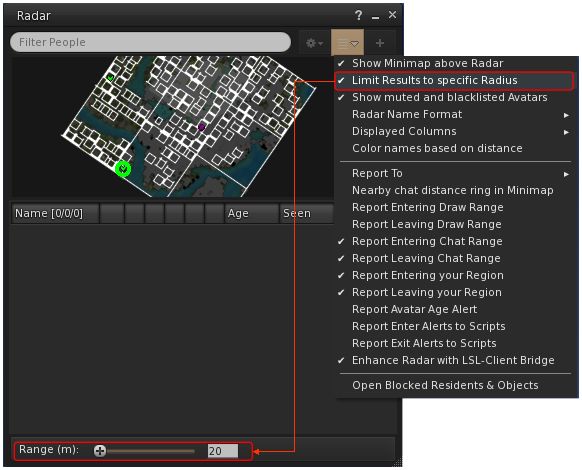
  • New Radar option to set the maximum range for results to be obtained (FIRE-35815):
    • World Menu → Radar (or Radar Toolbar button)→ Radar Options drop-down → Limit Results to specific Radius → open range panel at the foot of the floater.
    • Use the slider to set the desired radius, or manually enter the radius.
Firestorm 7.2.2 radar range option and slider / entry field
  • An option to View Chat Transcripts’ added to the Nearby People and Radar right-click context menu.
  • Option to show yellow beacons at region corners to help avoid region boundary disconnects, especially when driving or flying: Top menu → World → Show More → Beacons → Show → Region Corners (FIRE-33085).
  • The maximum zoom on the World Map has been increased to match the official viewer (FIRE-35934).
Communication + Sound and Media
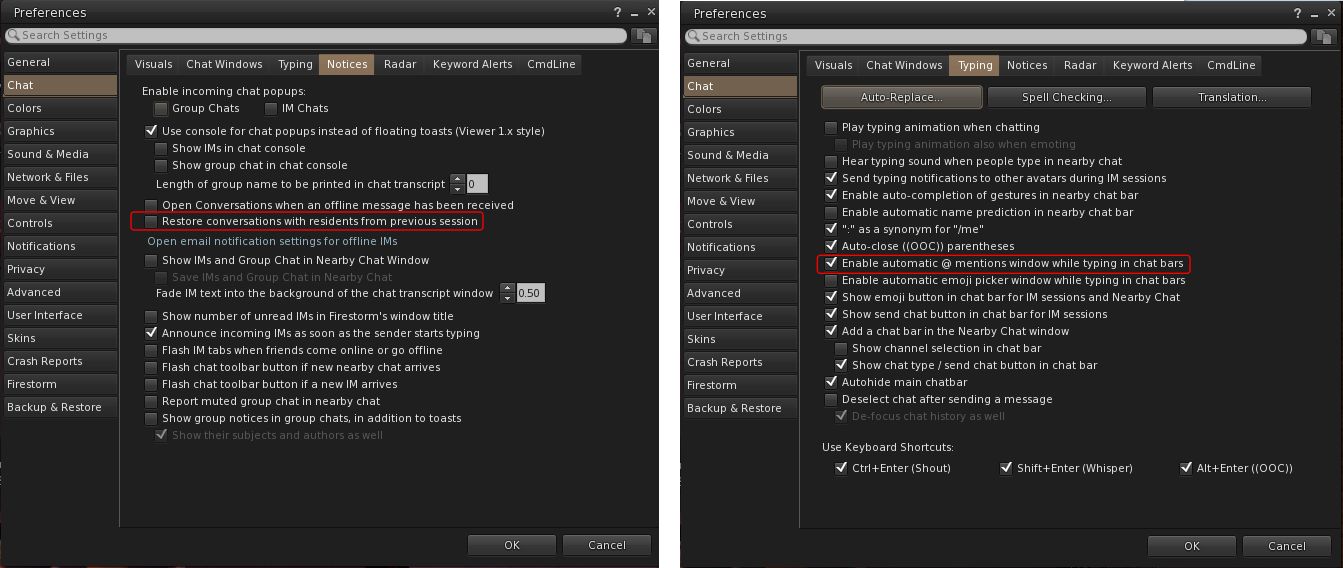
  • Functionality to save and restore open resident-to-resident IMs from the previous session (Group chat sessions are not always ready in time during start-up, making their restoration unreliable): Preferences → Chat → Notices → Restore conversations with residents from previous session.
  • Option to enable / disable auto-completion when typing @ mentions in chat: Preferences → Chat → Typing → Enable automatic @ mentions window while typing in chat bars.
New Chat Preferences to restore resident-to-resident IMs (left) and to enable / disable auto-completion when typing @ mentions (right)
  • Separate conversations opacity options, together with new checkbox to allow the conversation floater to abide by the active opacity when it is focused, so that way it can have its own inactive transparency separate to everything else – FIRE-35804.
    • Preferences → Colours → Miscellaneous → Floating Window Opacity → Conversations.
    • Preferences → Colours → Miscellaneous → Floating Window Opacity → Use Active Opacity value when the conversations window is focused.
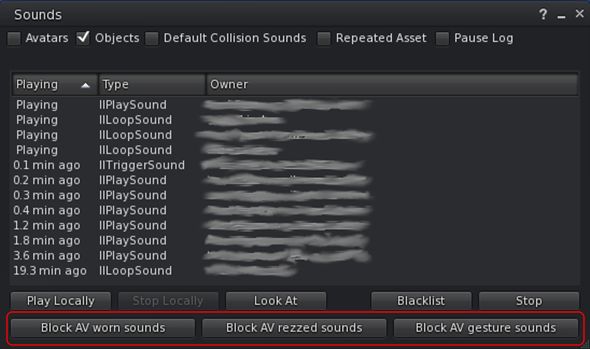
  • Sound Explorer:  new buttons in Sound Explorer to mute all attached, rezzed or gesture sounds for a specific avatar
    •  Muted sounds are re-enabled via the Asset Blacklist.
New Sound Explorer checkbox for muting specific sounds from an avatar
  • Asset Blacklist: new Flags column to the Asset Blacklist to denote if the muted sound is one of  Avatar Worn Object Sounds, Avatar Rezzed Objects Sounds or Avatar Gesture Sounds.
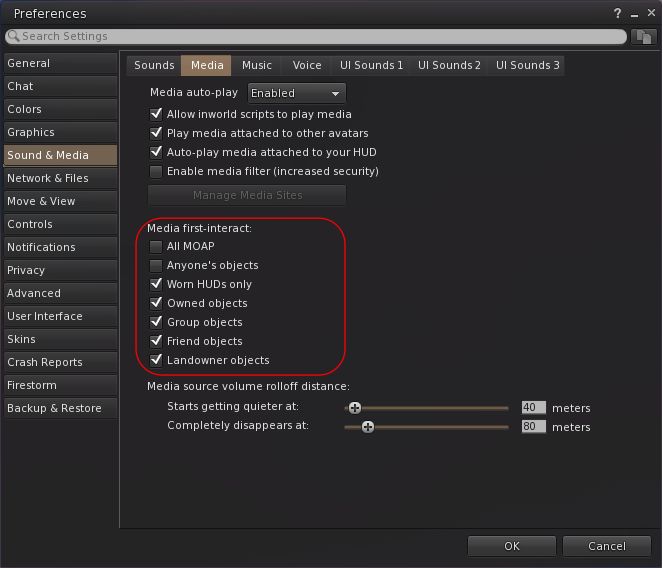
  • Media on a prim (MOAP) interaction option can now be set individually (when set, does not require a first click to focus before interaction can begin): Preferences → Sound & Media → Media → Media first-interact.
Firestorm 7.2.2 MOAP first interaction options
Miscellaneous Updates
  • Show On-Screen Console shortcut revised to ALT+SHIFT+`.
  • Area Search improvements:
    • Added functionality to save Area Search flags and options as defaults when the floater is opened: 
      Top Menu → World → Area Search → Filter Tab → Save as Default.
    • Improvements to more reliably send all objects and not just objects in front of the camera.
  • Camera:
    • Added an option to disable the reset buttons in the camera floaters (prevents the centre bullseye of the orbit and move camera controls from resetting the camera): Preferences → User Interface → Interface Windows → Disable camera controls reset buttons
    • Added a TPP preset button to the added to the right of the front, side & rear buttons on both the small and regular camera floaters – FIRE-32595.
  • Added Default buttons for Preference → Move & View → View sliders for ease of resetting to default values – FIRE-32710.
  • Height of Preferences floater increased for improved readability.
  • Graphics: Draw Distance VRAM Optimization changed to be optional:
    • Preferences → Graphics → Rendering → Reduce Draw Distance when VRAM is full or
    • Top Menu → Developer → Rendering → Reduce Draw Distance when VRAM is full.

Feedback

Sorry, no real feedback from me on 7.2.2, my personal situation has been such that I only managed to try the 79438 beta and the 78439 release less then 24 hours before the release of 79439.